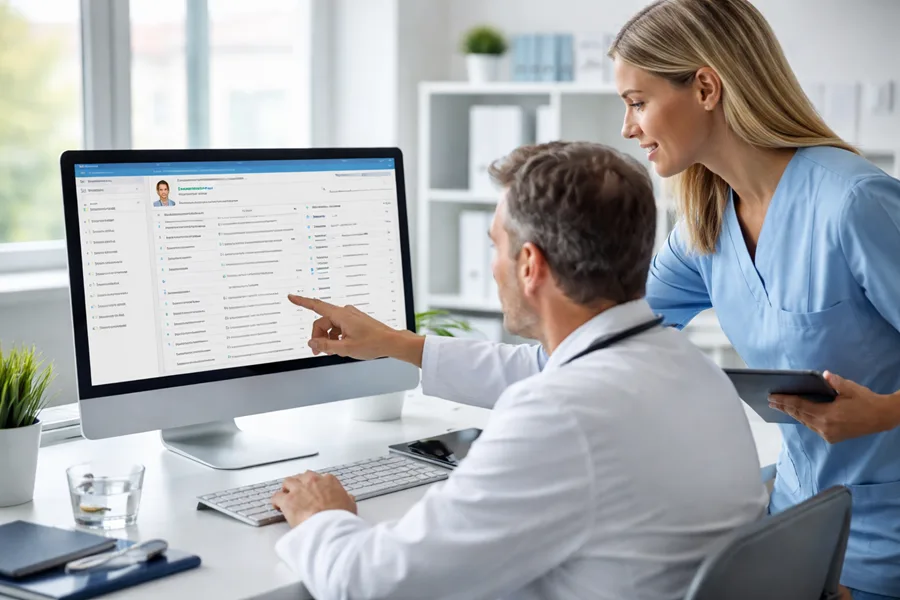
A Healthcare Document Management System acts like a diligent, never-tiring assistant—organizing every chart, form, and note into a secure, searchable hub. It replaces overflowing paper rooms with an intelligent digital filing cabinet you can access in seconds.
Why Document Management Is a Game-Changer in Healthcare
Misplaced patient charts and bulging file cabinets create daily headaches for medical staff. The manual grind of filing, searching, and routing paper records eats up valuable time, increases the odds of mistakes, and makes HIPAA compliance feel like a tightrope walk.
Going digital isn’t just about reclaiming storage space—it’s about rethinking how a practice runs from the ground up. For a closer look at this shift, exploring how healthcare documentation automation can be a game-changer is a smart move.
Core Benefits Of A Modern Document Strategy
- Centralized Access: Instantly retrieve a patient’s entire history—from lab results to billing—no matter where you are.
- Reduced Administrative Tasks: Automate filing, approval routing, and record searches, so your team focuses on patients, not paperwork.
- Improved Communication: Share up-to-date information across departments and partner facilities without delays or data silos.
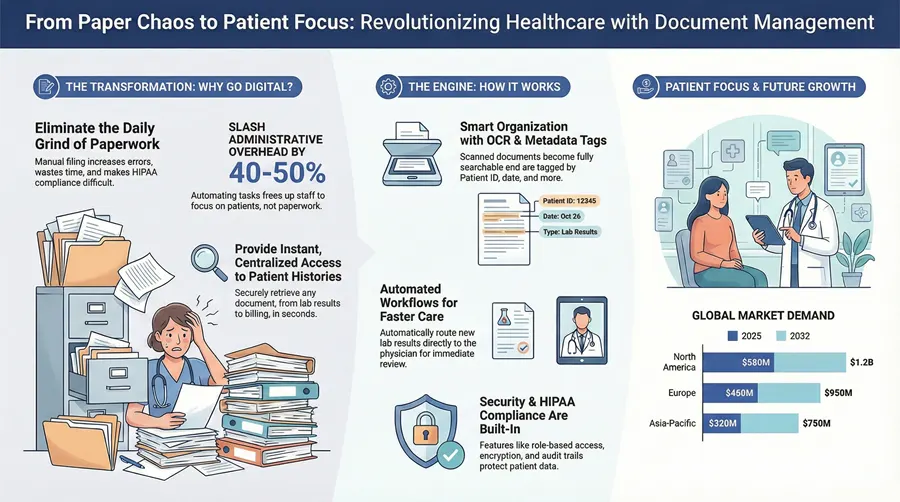
By digitizing and centralizing records, healthcare organizations can slash administrative overhead by a remarkable 40-50%, directly translating to more time and resources dedicated to patient outcomes.
In short, a thoughtfully chosen document management system forms the backbone of any modern healthcare practice striving for efficiency and compliance.
Understanding How These Systems Actually Work
Think of a healthcare document management system (DMS) as an incredibly smart digital library for your practice. It takes the chaotic mess of paper charts, scattered electronic files, and incoming faxes and transforms it all into a single, secure, and instantly searchable resource. Staff no longer have to waste precious minutes digging through filing cabinets for a patient chart or a signed consent form; with a proper DMS, that information is just a few clicks away.
The whole process kicks off with getting every piece of paper into the system. Any existing paper records, inbound faxes, or insurance EOBs are scanned. But here’s the clever part: high-quality platforms use Optical Character Recognition (OCR). This isn’t just about taking a picture of the page. OCR technology actually reads the text, making the content of every scanned document fully searchable, just like a standard Word file.
The Brains Behind the Organization
Once a document is in the system, it’s tagged with metadata—which is just a fancy term for digital labels. This is where the real magic happens. Instead of just a filename, each document gets tagged with crucial identifiers that give it context.
- Patient ID: This links the document directly to the correct patient’s record.
- Document Type: Is it a lab result, a referral letter, an insurance form, or a clinical note? The system knows.
- Date of Service: This pinpoints exactly when the care or administrative action took place.
- Attending Physician: This assigns the document to the right clinician for review.
These tags are what allow for lightning-fast, precise searches. A provider can instantly pull up every single lab result for “John Smith” from the last six months. Trying to do that with paper records would be a nightmare. For a closer look at the mechanics, our guide on how a document management system works breaks it down even further.
A critical decision you’ll face is whether to host the system on-premise (on your own servers) or in the cloud (hosted by the vendor). We’ve found that cloud-based systems usually offer more flexibility and can scale up more easily as your practice grows, saving you from major hardware investments down the road.
Automating Critical Healthcare Workflows
A good DMS does more than just store files; it actively manages the flow of information. Automated workflows are set up to route documents to the right people at the right time. For example, when a new lab result is scanned in, the system can automatically flag it and send a notification straight to the ordering physician’s digital inbox for review, approval, or an e-signature.
This visualization shows how a DMS connects the dots between centralizing records, cutting down on administrative headaches, and ultimately, delivering better patient care.
By linking these key areas, the system creates a virtuous cycle where better data access directly fuels both clinical and administrative excellence.
Connecting with Other Essential Software
A modern DMS can’t be an island. It has to talk to the other critical software in your practice, especially your Electronic Health Record (EHR) or Electronic Medical Record (EMR) system. This connection is made possible through interoperability standards like Health Level Seven (HL7) and Fast Healthcare Interoperability Resources (FHIR).
Think of these standards as a universal language that allows different software systems to share data securely and efficiently. This connectivity ensures that all supporting documents—like lab results or specialist reports—are linked directly within the patient’s clinical chart in the EHR, giving providers a complete, 360-degree view of their health history.
The explosive growth in this market really tells the story of how essential these systems have become. The industry’s increasing reliance on these solutions is clear, with projections showing significant expansion in the coming years.
Regional Market Growth Projections
| Region | 2025 Value (USD) | 2032 Projection (USD) | CAGR |
|---|---|---|---|
| North America | $580 Million | $1.2 Billion | 10.9% |
| Europe | $450 Million | $950 Million | 11.2% |
| Asia-Pacific | $320 Million | $750 Million | 12.9% |
| Rest of World | $150 Million | $350 Million | 12.8% |
As the table shows, the global market for medical document management systems is on a steep upward trajectory, expected to surpass $3.4 billion by 2032. With a compound annual growth rate pushing 12%, it’s clear that the industry-wide shift toward digital efficiency and security is not just a trend—it’s the new standard of care.
When it comes to healthcare, protecting patient privacy isn’t just a “nice-to-have”—it’s a legal and ethical cornerstone of your practice. The Health Insurance Portability and Accountability Act (HIPAA) is the law of the land for safeguarding protected health information (PHI), and any document management system you consider must have these rules baked into its very DNA.
Getting this wrong is not an option. The financial penalties for non-compliance are severe, but the damage to your reputation from a loss of patient trust can be catastrophic.
A truly compliant system acts like a digital Fort Knox for your patient data, blowing the security of old-school paper files out of the water. It’s not just about one lock on the door; it’s about multiple, overlapping layers of protection that control who can see information and, just as importantly, what they’re allowed to do with it. This level of control is what stands between you and a devastating data breach.
Building a Compliant Foundation
The bedrock of any secure system is something called role-based access control (RBAC). Think of it like a digital version of the keycards used in a hospital. A billing specialist’s keycard gets them into the finance office but won’t open the door to the operating room or a patient’s clinical chart.
An RBAC system does the same thing for your documents. It makes sure that a user can only view, edit, or share the information that’s absolutely necessary for their job. A simple but incredibly powerful concept. Your front-desk staff doesn’t need to see sensitive surgical reports, and a physician doesn’t need access to detailed billing records.
A huge part of staying compliant is knowing where your weak spots are. Running regular security evaluations isn’t optional—it’s essential. For a head start, check out our guide on how to prepare for your HIPAA risk assessment.
Another non-negotiable is end-to-end encryption. This process essentially scrambles your data into an unreadable code, both when it’s being sent over a network (in transit) and when it’s just sitting on a server (at rest). Even if someone managed to physically steal a server, the encrypted files would be complete gibberish without the specific key to unlock them. It’s one of your strongest defenses against data theft.
Creating an Indisputable Record of Activity
So, how do you actually prove you’re compliant if an auditor comes knocking? The answer is in the audit trails. These are complete, unchangeable logs that record every single action taken inside the system.
A proper audit trail will tell you everything you need to know about every document interaction:
- Who looked at the document.
- What they did (viewed, edited, printed, shared).
- When it happened, down to the exact second.
- Where they accessed it from (which computer or location).
This creates total transparency. If a question ever pops up about a patient’s chart, you can instantly pull its entire history and prove that only authorized staff handled it correctly. This isn’t just for passing audits; it’s a powerful tool for spotting unusual activity that might be the first sign of a security threat.
This intense focus on security is a huge reason the market is growing so quickly. In fact, North America is on track to hold an estimated 46.8% market share by 2025, driven largely by the push to digitize records and the strict enforcement of regulations like HIPAA. By weaving security into every part of the workflow, these systems help you earn patient trust and maintain a rock-solid compliance posture.
Connecting Your DMS with EHR and Clinical Workflows
A healthcare document management system (DMS) running on its own is like having a perfectly organized library that no one can access from their office. Its real power is only unlocked when it’s hooked directly into your Electronic Health Record (EHR) platform. That connection is what turns two separate systems into a single, unified source of truth for patient information.
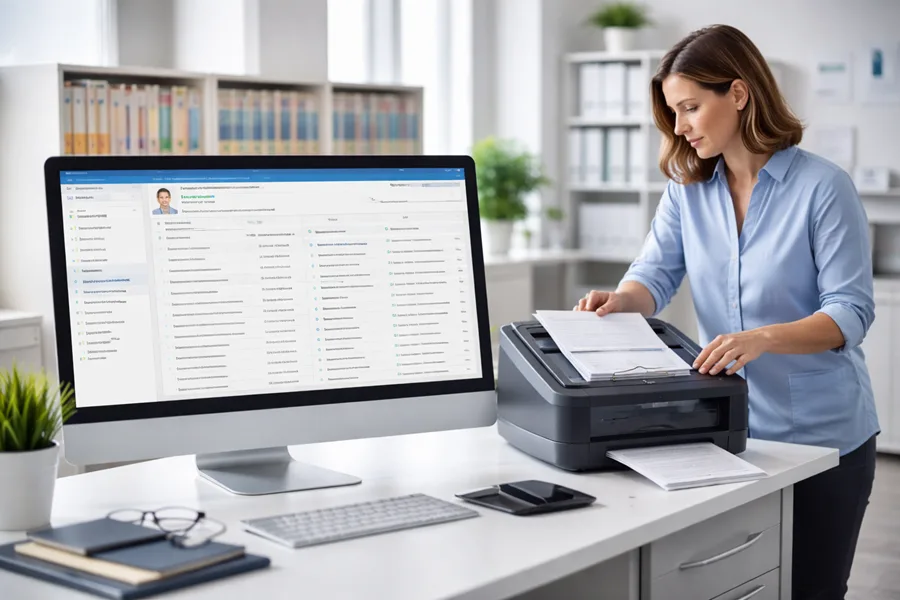
When done right, this integration gets rid of the frustrating and error-prone dance of switching between different applications. Instead, clinicians can pull up supporting documents—referral letters, signed consent forms, insurance authorizations—right from the patient’s chart in the EHR. It creates a complete picture of the patient’s story without ever forcing staff to leave their main workflow.
Enabling Seamless Data Exchange
So, how do these systems talk to each other? Modern integrations almost always happen through an Application Programming Interface (API). Think of an API as a secure, pre-built bridge that lets the DMS and EHR share information in real time. This is the magic that powers automated workflows and cuts down on soul-crushing administrative work.
Here’s a real-world example. A new lab result comes in via fax and gets scanned into the DMS. An API call can automatically:
- Read the patient’s medical record number to identify them.
- Link that new document directly to their chart inside the EHR.
- Ping the ordering physician to let them know the result is ready for review.
That simple, automated process replaces a bunch of manual steps, slashes the risk of human error, and gets critical information to doctors much faster.
The goal of integration is to make technology fade into the background. Clinicians shouldn’t have to think about which system holds which piece of data; they should just have instant access to a complete patient record, period.
Harmonizing Systems for Peak Efficiency
Getting this connection right requires some careful planning. The first step is data mapping, where you sit down and define how information in one system lines up with the other. This is how you ensure that a “Patient ID” in the DMS correctly matches the “Medical Record Number” field in the EHR. It sounds tedious, but it’s a critical step.
Another game-changer is single sign-on (SSO). With SSO, your team uses one set of credentials to get into all their essential tools, including both the DMS and the EHR. It’s not just a convenience; it’s a huge security boost because it reduces the number of passwords staff have to juggle. To really get the most out of your system, it pays to consult an EMR system integration playbook for proven strategies on connecting with existing EHRs.
Ultimately, a well-integrated DMS completely transforms clinical workflows. It turns a static digital filing cabinet into a dynamic, active part of patient care, delivering the right information to the right person at the exact moment they need it.
It’s one thing to talk about benefits in theory, but it’s another thing entirely to see how a modern document management system actually solves real-world problems. When you move past the abstract concepts, you can see how this technology tackles the specific, everyday headaches that bog down healthcare organizations of all sizes.
These stories aren’t just hypotheticals; they’re practical blueprints for what’s possible.
Take a regional health system that was quite literally drowning in paper. Their central records department was a bottleneck, serving multiple hospitals and clinics. Staff would spend hours every day physically hunting down, pulling, and then shipping patient charts between facilities. It was slow, expensive, and—worst of all—it created frustrating delays in patient care.
By bringing in a centralized document management system, they were able to digitize their entire archive. That single move had a ripple effect across the entire organization. Clinicians could now pull up any patient record instantly, right from their workstations, slashing the average time it took to get a record by an incredible 80%. This wasn’t just a win for efficiency; immediate access to information meant faster diagnoses and treatment planning, directly improving the quality of care.
Automating Workflows in Specialized Clinics
The impact isn’t limited to massive hospital networks, either. We’ve seen mid-sized specialty clinics wrestling with the sheer administrative weight of processing insurance claims. One clinic’s billing team spent the better part of their days manually matching Explanation of Benefits (EOB) forms with patient accounts—a tedious task practically designed to create errors.
They put their new healthcare document management system to work by building an automated workflow. The system used OCR technology to “read” key information from scanned EOBs, like the patient’s name, date of service, and payment amount. It then automatically matched that data to the correct patient account in their billing software.
The result? This single piece of automation freed up nearly 25 hours of administrative work every single week. The billing staff could finally pivot from mind-numbing data entry to more valuable, patient-facing work like financial counseling and chasing down complex claims issues.
Adapting to Modern Care Models
Even forward-thinking providers like telehealth startups and long-term care facilities are seeing huge gains. A fast-growing telehealth company used its document management system to completely overhaul its patient onboarding. By using digital forms and e-signatures, they allowed new patients to handle all the necessary paperwork online before their first virtual visit, which drastically sped up how quickly they could see new patients.
In a similar vein, a long-term care facility improved care coordination by giving authorized staff secure, mobile access to resident records. Nurses and aides could update charts and review care plans right from tablets while on the floor. This simple change ensured everyone was working with the most current information, all the time.
This push to digitize isn’t just a local trend; it’s a global one. The Asia-Pacific region is seeing the fastest growth in the medical document management systems market, all driven by a sharp focus on modernizing healthcare and managing rising data volumes. To get a better feel for this worldwide shift, you can explore detailed insights on the global medical document management market.
Choosing The Right Document Management Partner
Picking a vendor for your healthcare document management system feels a bit like choosing a new teammate—you want someone who not only brings skill but also understands the game of healthcare inside and out. Make the wrong call, and you’ll be juggling workflow holdups, scrambling to stay compliant, and watching your investment underperform.
A disciplined, step-by-step evaluation keeps you out of trouble. Instead of being dazzled by slick demos, you’ll dig into the nuts and bolts of features, security, and ongoing support. That way, you end up with a partner whose technology and service feel like an extension of your practice.
Building Your Vendor Evaluation Checklist
Start by listing out the must-have criteria—those nonnegotiables that affect your day-to-day. This simple framework turns a confusing vendor environment into a side-by-side comparison of the facts you care about most.
Key points to capture:
- HIPAA Compliance & Security Certifications
Demand proof of their healthcare credentials. Ask for audit reports, encryption standards, and details on role-based access controls. - Integration Capabilities
Check how your existing EHR/EMR will talk to the new system. A smooth data hand-off means no more toggling between screens or copying files by hand. - Scalability For Future Growth
Picture your practice two years from now. More providers, new locations, extra service lines—your platform should expand without slowing down your team.
Vendor Evaluation Criteria
Below is a quick reference to help you keep those critical requirements front and center when you’re talking to vendors:
| Criteria | Description |
|---|---|
| HIPAA Compliance | Verify up-to-date certifications, regular third-party audits, and robust encryption standards. |
| Integration With EHR/EMR | Look for native connectors or open APIs that prevent data silos and give clinicians a unified view. |
| Scalability & Performance | Assess whether the system maintains response times under increasing document volumes and users. |
| Total Cost Of Ownership (TCO) | Include setup fees, data migration, training, subscription charges, and ongoing support costs. |
| Vendor Support & Training | Ensure 24×7 helpdesk, dedicated account manager, and regular update/training sessions. |
Use this table as your cheat sheet during vendor conversations. It keeps you anchored on what really matters.
Calculating the Total Cost Of Ownership helps you see beyond the sticker price—think implementation, data migration, subscription fees, plus any training or support expenses.
Assessing Core System Functionality
Once the essentials check out, dive into the user experience. This is where you see if the tool fits your day-to-day workflows or feels like a square peg in a round hole.
That side-by-side dashboard reveals at a glance which vendors shine in areas like OCR accuracy, search speed, or workflow customization—all crucial for keeping your office humming.
Don’t just rely on canned demos. Ask for a live walkthrough using a sample patient record. See how quickly you can:
- Find a scanned document via keyword search
- Build an automated routing rule for lab results
- Measure the OCR’s precision on handwritten notes
For extra perspective, take a look at our guide on the best document management software. And, of course, speak with peers in similar practices—there’s no substitute for honest feedback from a colleague who’s been through the implementation trenches.
Frequently Asked Questions
When we talk with healthcare providers about document management, the same questions tend to pop up. It makes sense—you want to know exactly how this technology fits into your practice and solves the real-world problems you face every day. Let’s clear up some of the most common points of confusion.
What Is the Difference Between an EHR and a Document Management System?
This is the big one. Think of your EHR as the clinical storyteller—it’s built to handle structured data like patient diagnoses, medication lists, and lab results. It tells the what of patient care.
A document management system (DMS), on the other hand, is the practice's digital filing cabinet. It’s designed to manage all the unstructured stuff: scanned charts, signed consent forms, incoming faxes, and medical images. While your EHR holds the core clinical data, the DMS organizes all the supporting evidence. They’re two different tools that work best when they’re integrated, giving you a complete, seamless view of the entire patient story.
How Long Does a Typical Implementation Take?
That really depends on the scale of your operation. A smaller, single-location clinic might get up and running in just a few weeks. For a larger hospital system with complex workflows and a mountain of data to migrate, you're more likely looking at a 6-12 month project.
A common strategy we recommend is a phased rollout. We’ll start with one department, get them comfortable and working efficiently, and then expand from there. It’s a much smoother way to manage change and guarantees a successful transition for your entire staff.
A huge part of any implementation is the back-scanning project. This is where we digitize all your old paper archives using high-speed scanners with Optical Character Recognition (OCR). The magic of OCR is that it makes the text within those old scanned documents completely searchable in the new system.
Can We Digitize Our Old Paper Records?
Absolutely, and you really should. Digitizing your legacy paper records is the only way to create a single, unified source of truth for patient information. This process is more than just scanning—it’s about converting those dormant files locked away in storage into active, accessible digital assets.
Doing this is essential for unlocking the full power of a modern document management system and finally cutting ties with bulky filing cabinets. When your team can instantly pull up a patient's entire history, you improve care continuity and make your whole operation more efficient from day one.
Ready to modernize your workflows and secure your patient data? The experts at Kraft Business Systems design and implement healthcare document management systems tailored for Michigan providers. Learn how we can help you achieve compliance and efficiency.