Automating your invoice workflow isn’t just a technical upgrade; it’s a strategic move for any growing business. It all comes down to four key actions: mapping out your current process to spot the weak links, picking the right tools like OCR and AP platforms, connecting them with your accounting software, and, most importantly, guiding your team through the change.
Getting this right improves accuracy, speeds up payments, and frees your team from the soul-crushing grind of manual work.
Your Guide to Invoice Processing Automation

Manual invoice processing is a silent killer of productivity. It creates costly bottlenecks and drains valuable resources from small and mid-sized businesses. Every minute your team spends manually keying in data, chasing down approvals, or fixing human errors is a minute they could have spent on strategic financial analysis or building better vendor relationships.
This guide cuts straight to the solution, giving you a clear roadmap to automation.
The switch from paper-based, manual systems to an automated workflow is about more than just speed; it’s about building a more resilient and scalable financial operation. I’ve seen businesses that successfully automate see huge improvements that go way beyond just getting things done faster.
Key Benefits of an Automated System
When you automate your accounts payable process, you get tangible results that directly impact your bottom line and operational health.
Here’s what you can realistically expect:
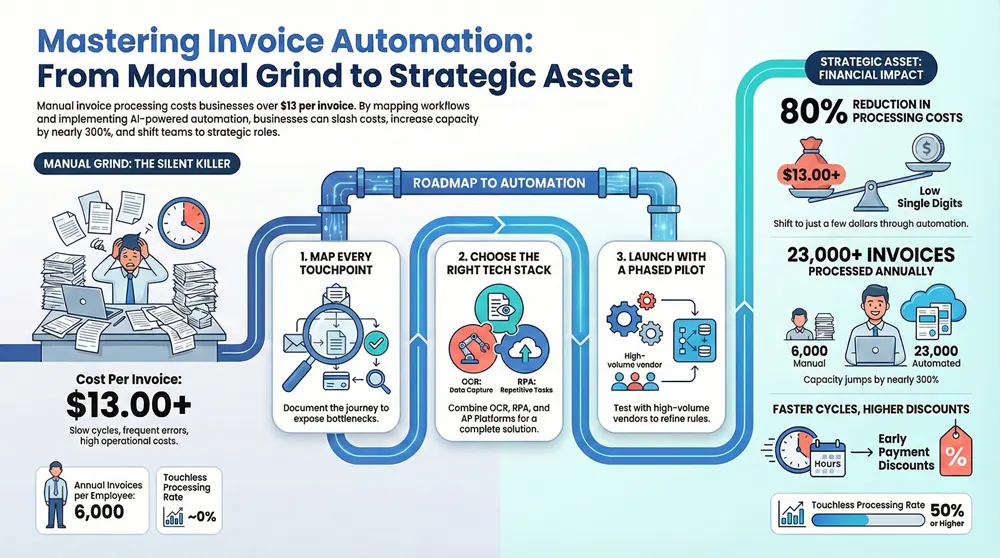
- Reduced Operational Costs: I’ve seen manual processing of a single invoice cost upwards of $13, while automated systems can slash that figure to just a few dollars. That adds up to serious savings, especially as your business grows.
- Enhanced Accuracy: Automation gets rid of the typos and data entry mistakes that are just part of being human. This means fewer payment problems, less time spent on annoying reconciliations, and more reliable financial data for making big decisions.
- Faster Processing Cycles: Approval workflows that used to drag on for days or even weeks can be wrapped up in a matter of hours. This speed lets you capture more early payment discounts, dodge late fees, and get a much better handle on your cash flow.
- Improved Visibility and Control: Digital workflows give you a real-time view of every single invoice’s status. You get complete transparency into your financial commitments, which makes it way easier to forecast expenses and manage budgets effectively.
Shifting to an automated system empowers your accounts payable team to move from being data entry clerks to strategic financial partners. They can focus on exception handling, vendor analysis, and identifying further cost-saving opportunities.
Let’s take a quick look at how the two approaches stack up.
Manual vs Automated Invoice Processing at a Glance
When you put the old way and the new way side-by-side, the advantages of automation become crystal clear. It’s a shift from a reactive, error-prone process to a proactive, data-driven operation.
The numbers don’t lie. Automation transforms accounts payable from a cost center into a strategic asset that saves money, time, and headaches.
For a deeper dive into the practical steps, including mapping workflows and comparing technologies, you can consult a comprehensive guide on how to automate invoice processing. This overview provides a solid starting point, setting the stage for the practical steps that follow.
Understanding the benefits of automating accounts payable is the first step toward building a stronger financial foundation for your Michigan-based organization.
Mapping Your Current Invoice Workflow
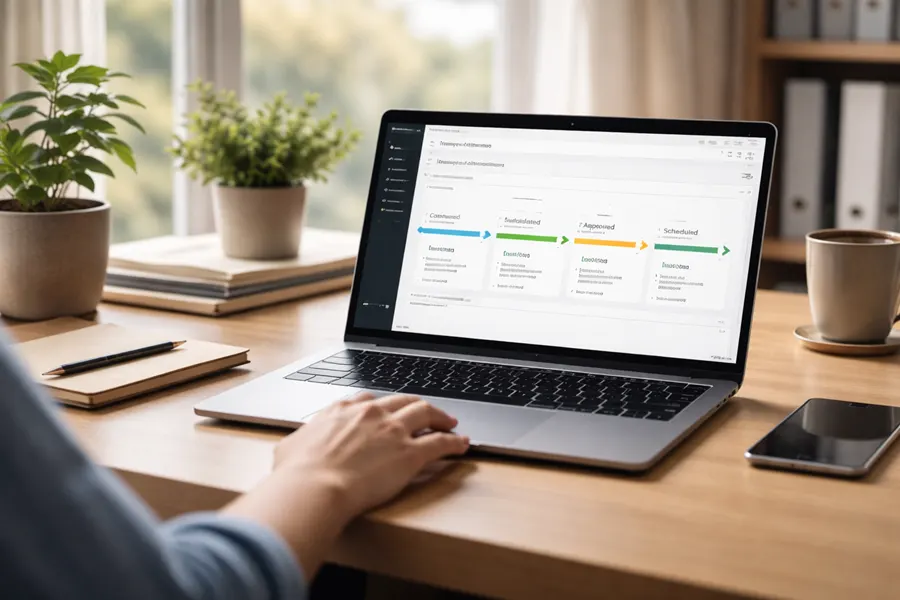
Jumping straight into automation without a clear blueprint of your current process is like trying to build a house without architectural plans. It’s a common mistake, but a costly one. Before you can build a better, faster system, you have to understand every single step, bottleneck, and manual touchpoint in your existing invoice workflow.
Honestly, this mapping phase is the most critical part of the entire project.
The goal here is to create a visual, factual map of how an invoice moves through your organization—from the moment it arrives until the payment is finally sent. This isn’t just a technical exercise; it’s about uncovering the hidden costs and time sinks that are quietly draining your resources. I’ve seen businesses shocked to discover an invoice might be handled by five or more people before it’s paid.
So, where do you start? You follow the invoice’s journey. Sit down with the people who actually do the work—your AP clerks, the department heads who approve invoices, and anyone else involved. Ask them to walk you through their exact steps, day in and day out.
Identifying Every Touchpoint
Your first task is to document every single action taken on an invoice. No detail is too small.
Think about how invoices even get into your system in the first place. Do they arrive as paper mail? As PDF attachments in an email? Through some clunky vendor portal? Each entry point is a distinct starting line for your map.
For a mid-sized Michigan manufacturing firm we worked with, this looked something like this:
- Mailroom: An admin assistant opens paper invoices and physically walks them down the hall to the AP department.
- AP Inbox: An AP clerk monitors a general email account, downloading PDF attachments one by one. Tedious, right?
- Data Entry: The clerk then manually keys data from the PDF into their accounting software. This is a prime spot for typos and errors.
- Coding: The invoice gets a GL code and is forwarded to the relevant department manager for approval.
- The Approval Chase: That manager is often busy on the factory floor and might not see the email for days, forcing the AP team to send follow-up reminders.
- Final Review: Once approved, it comes back to AP for a final check against the purchase order.
- Payment: Finally, the invoice is batched for payment, and the check is mailed out.
This kind of process visualization helps you map, choose, and integrate the right automation tools for your specific needs. It shows that a successful project requires careful planning before you even start looking at technology, ensuring the solution actually fits the problem.
Exposing the Hidden Inefficiencies
Once you have the steps documented, the next layer is to pinpoint the problems. Where are the delays? Where do mistakes happen most often? Quantifying these issues is what will build your business case for making a change.
In our manufacturing example, the bottlenecks are obvious: the physical mail delivery, the soul-crushing manual data entry, and that slow, email-based approval chain.
The real power of process mapping isn’t just documenting what you do; it’s revealing the “why” behind your delays and errors. You might discover that 70% of your AP team’s time is spent on low-value tasks like data entry and chasing approvals.
This insight is what changes the game. It transforms the conversation from a vague “we should automate” to a powerful “automating will free up X hours per week, allowing our team to focus on vendor negotiations and cash flow analysis.” It also highlights the specific areas where automation will deliver the biggest bang for your buck. By understanding these pain points, you can prioritize features when choosing a solution. You can learn more about how to automate document entry and revolutionize your workflow in our detailed guide.
Your final process map should be a clear, honest assessment of where you are today. It becomes your guide for setting realistic project goals and, down the road, measuring your success. With this blueprint in hand, you’re ready to explore the technologies that will solve the specific problems you’ve just uncovered.
Choosing the Right Automation Technology
Navigating the tech behind invoice automation can feel like you’re staring at a wall of alphabet soup—OCR, RPA, AP platforms. It doesn’t have to be that complicated. Once you’ve mapped out your current process, you can zero in on the specific tools that will actually solve your unique bottlenecks.
Think of it like this: you wouldn’t use a hammer to turn a screw. This is about picking the right tool for the job.
There’s a reason this market is exploding. Finance teams are making these investments because they see a clear, measurable path to getting their time back. Projections show the invoice automation market could swell to over $8.9 billion in the next few years, largely because many businesses see a payback period of less than 12 months. If you’re curious about the numbers, you can explore more about this market shift and why so many companies are investing in document processing automation.
Core Technologies Explained
At the heart of any good system, you’ll find a few key technologies working together. Getting a handle on what each one does will help you pick a solution that fits your needs, so you aren’t paying for features you’ll never touch.
- Optical Character Recognition (OCR): This is the foundation. OCR is the tech that scans invoice documents—whether they’re PDFs or paper scans—and turns the text into digital data your computer can actually read. The best OCR tools now use AI, which means they get smarter over time, learning to recognize different vendor layouts and improving their accuracy with every invoice.
- Robotic Process Automation (RPA): Think of RPA as a digital employee that handles repetitive, rules-based tasks. Once OCR has pulled the data, an RPA bot can take over. It can enter that data into your accounting software, perform three-way matching against purchase orders, and even route invoices for approval.
- AP Automation Platforms: For most Michigan SMBs, this is the sweet spot. These are all-in-one solutions that bundle OCR, RPA, and other critical functions like approval workflows, vendor portals, and analytics into a single, clean package.
Build Versus Buy: A Key Decision
This is a crossroads every business faces. Do you try to piece together your own system, or do you invest in a ready-made platform?
Building a custom solution from scratch gives you maximum control, but it’s a path usually reserved for huge enterprises with deep pockets and a dedicated IT army. It’s complex, expensive, and time-consuming.
For almost everyone else, buying a proven AP automation platform is the smarter, faster route. These solutions are built for quick implementation, come with pre-built connectors for common accounting systems, and are maintained and updated by the vendor. It massively lowers the barrier to entry and gets you to a positive ROI much quicker.
A pre-built platform gets you 80% of the way there on day one. It handles the core challenges of data capture and workflow management, allowing you to focus on fine-tuning the system to your specific business rules, not building it from scratch.
Essential Features Checklist
When you start looking at different platforms, it’s easy to get distracted by flashy features you’ll never use. Keep your focus on the core capabilities that will make a real difference in your team’s day-to-day work.
Here’s a no-nonsense checklist of must-haves:
- Seamless ERP/Accounting System Integration: The platform absolutely must talk directly to your existing financial software, whether it’s QuickBooks, Sage, or NetSuite. If it doesn’t, you’re just creating another data silo and more manual work.
- AI-Powered Data Validation: A good system doesn’t just pull data; it checks it. It should be smart enough to flag potential duplicate invoices, catch math errors, and verify vendor details against your master list.
- Configurable Approval Workflows: Your business has its own way of approving things. The platform needs to be flexible enough to let you easily build multi-step approval chains based on criteria like invoice amount, department, or GL code.
- Vendor Self-Service Portal: This is a game-changer. A portal where your vendors can submit their own invoices and check on payment status cuts down dramatically on the “Hey, did you get my invoice?” emails and phone calls.
Ultimately, choosing the right tech is all about matching its capabilities to the problems you pinpointed during your process mapping. For finance teams looking to go deeper on how these tools work in practice, our guide on Robotic Process Automation for finance offers more context on how these technologies get put to work.
Bringing Your Automated Invoice System to Life
Alright, you’ve mapped out your workflow and picked your tech. Now for the fun part: turning that blueprint into a real, working system that starts saving you time and money. This is where the rubber meets the road, and it’s all about careful setup, smart integration, and getting your team on board.
The goal here isn’t to just flip a switch and cross your fingers. A smart, step-by-step rollout is the key. It lets you iron out any wrinkles early, build confidence within your team, and make a smooth transition without throwing your entire finance department into chaos.
Configuring Your Core Workflows
The first hands-on task is teaching your new system the rules of the road. You’re essentially translating your process map into a set of digital instructions that tell the platform exactly how to handle invoices, capture data, and route everything for approval.
Here’s what that looks like in practice:
- Dialing in Data Capture: For your main vendors, you’ll show the system where to find key info like the invoice number, date, amount, and PO number. The good news is that modern AI-powered platforms learn fast—often, a few examples are all it takes to get them capturing data with impressive accuracy.
- Building Digital Approval Chains: This is where you can get creative with automation.
- Setting Up Exception Handling: What happens when an invoice comes in with a missing PO number or a price mismatch? Instead of letting it get lost, you’ll create a rule to automatically flag it and send it straight to a designated person in AP for a quick fix.
Integrating with Your Existing Software
Your shiny new automation platform can’t be an island. To get the real efficiency gains, it needs to talk to the software you already depend on, whether that’s QuickBooks, Sage, or NetSuite. This is where integration is absolutely critical.
A huge piece of building a solid automated system is understanding data integration. It’s what connects the dots and lets information flow freely between your systems. This two-way street ensures that once an invoice gets the green light, all the payment data is posted directly to your general ledger without anyone having to type it in again.
Think of integration as building a digital bridge between your new AP platform and your core accounting system. Without it, you’re just moving the manual data entry task from one place to another, defeating the purpose of automation.
Launching with a Phased Rollout
Going for a “big bang” launch where everyone switches over at once is a recipe for headaches. A much smarter—and safer—approach is to roll it out in phases, starting with a small, manageable pilot program. This lets you test everything in a real-world setting without high stakes.
Here’s a practical way to run your pilot:
- Pick a Pilot Group: Start with a handful of your most consistent, high-volume vendors. They’ll give you a steady stream of invoices to thoroughly test the system’s accuracy and workflow rules.
- Train the Pilot Team: Get the small group of AP staff and department approvers who will be using the new system together for some hands-on training. Their immediate feedback is gold for making final tweaks.
- Monitor and Refine: Keep a close eye on how things are running during the pilot. Track any hiccups, adjust the workflow rules as needed, and listen to what your users are saying before you start bringing more vendors and departments into the system.
Managing the Human Side of Change
Let’s be honest: the technology is the easy part. The number one reason automation projects stumble is because the team isn’t bought in. Managing the people side of this shift is every bit as important as configuring the software.
To get everyone on board, focus on clear communication and solid support. Start by explaining the “why”—how this new tool will get rid of their most tedious tasks and free them up to do more interesting work. Address their worries directly, give them great training, and make sure to celebrate the small victories as the pilot program starts to pay off. Before you know it, your biggest skeptics will become your strongest supporters.
Measuring Success and Calculating ROI
Let’s be honest: any automation project is a big deal. It takes time, money, and focus, so you absolutely have to prove it was worth the effort. To do that, you need to look past the initial setup cost and zero in on the tangible, ongoing benefits. Measuring success isn’t just about feeling more efficient; it’s about tracking hard numbers that show a clear return on your investment.
The key is establishing a baseline before you start. You need a clear “before” picture to compare against the “after.” Once your new system is up and running, you can track the improvements and turn them into a powerful business case that showcases the real financial impact of your automation efforts.
Key Performance Indicators to Track
To really get a grip on the impact of automating your invoice process, you need to keep a close eye on a handful of critical key performance indicators (KPIs). These metrics give you a clear, data-driven view of your operational improvements and financial savings.
- Cost Per Invoice: This is your most direct measure of savings. Tally up your total AP department costs (salaries, software, overhead) and divide that by the number of invoices you process. The goal here is to see a dramatic drop as manual work disappears.
- Invoice Cycle Time: How long does it take from the moment an invoice lands on your desk (or in your inbox) to when it’s fully approved for payment? Automation should shrink this window from weeks down to just a few days, which does wonders for managing cash flow.
- Touchless Processing Rate: What percentage of your invoices fly through the entire system—from data capture to final approval—without a single person having to touch them? This is a powerful indicator of your system’s efficiency and intelligence.
- Early Payment Discounts Captured: This one is my favorite. Faster cycle times mean you can finally take advantage of those “2/10, n/30” discounts your vendors offer. Tracking this shows how automation is actively making you money, not just saving it.
The ROI Calculation Demystified
Calculating your return on investment (ROI) doesn’t need to be some complex accounting exercise. A straightforward formula is all you need to quantify the value of your new system and justify the expense to your leadership team.
The basic formula is pretty simple:
(Financial Gain – Project Cost) / Project Cost = ROI
To make this work, you just need to identify your gains and your costs.
Project Costs (The Investment):
- Software subscription or license fees
- Initial implementation and setup costs
- Internal hours your team spends on training and change management
Financial Gains (The Return):
- Hard Savings: These are the benefits you can easily put a dollar sign on. We’re talking about reduced labor costs from less manual data entry and, of course, the money saved by capturing those early payment discounts.
- Soft Benefits: These are a bit trickier to quantify but are just as important. Think about stronger relationships with your vendors because you pay on time, improved morale on your AP team (no more mind-numbing data entry!), and better financial visibility for making smart business decisions.
By focusing on both hard and soft savings, you paint a complete picture. For instance, reducing the invoice cycle time not only helps capture discounts (a hard saving) but also strengthens vendor trust (a soft benefit), which can lead to better payment terms down the road.
Building Your Business Case with Data
At the end of the day, the data speaks for itself. The shift to automation almost always leads to dramatic cost reductions. Industry benchmarks show that automating invoice processing can slash per-invoice costs by more than 80% compared to sticking with fully manual methods.
For a business processing 100,000 invoices a year, that could mean shifting from an annual AP expense of over $1.3 million down to as low as $200,000. That’s a massive amount of capital freed up for growth. If you want to dive into the numbers driving this trend, you can learn more about global trends in AI invoice processing.
By consistently tracking your KPIs and calculating your ROI, you move the conversation from “we think this is working” to “we know this is saving us X dollars and Y hours.” This data-driven approach not only validates your initial decision but also helps you spot areas for future optimization, ensuring your automated system keeps delivering value long after you flip the switch.
Fine-Tuning and Scaling Your Automation
Going live with your automated invoice processing system isn’t the finish line. Far from it. Think of it as the starting gun for continuous improvement. The real magic of automation happens over time as you dig into the performance data, tweak your workflows, and scale the solution to tackle new challenges. This is when your system evolves from a simple tool into a genuine strategic asset.
Your platform’s analytics dashboard is your new command center. This is where you’ll find the hard data needed to spot opportunities for optimization. For instance, you might see that invoices from one specific vendor are constantly getting kicked out for manual review. That’s not a failure; it’s a signal. It tells you to go back and refine the OCR template for that vendor, improving its capture accuracy and nudging more of their invoices into the completely touchless pile.
From Small Tweaks to Big Expansions
Once your initial setup is stable and you’re seeing solid results, you can start looking beyond the initial scope. It’s time to explore the more advanced capabilities you’ve been hearing about. Ask yourself: could other departments benefit from this? What about procurement or receiving? They’re drowning in paperwork, too, and could likely use the same document capture and workflow engine.
Expanding your automation footprint often unlocks surprising new efficiencies you hadn’t anticipated. You can also start tapping into the more sophisticated features that really only make sense once your foundational processes are running smoothly. These can include:
- AI-Powered Fraud Detection: Imagine advanced algorithms scanning every invoice in real-time, spotting weird anomalies, flagging potential duplicate payments, and highlighting suspicious vendor activity that a human would almost certainly miss.
- Predictive Analytics for Cash Flow: You can use all that historical payment data to forecast your future cash needs with stunning accuracy. This gives you much tighter control over your working capital.
- Smarter Supplier Management: That data isn’t just for payments. Use it to analyze vendor performance, negotiate better payment terms based on actual history, and build much stronger, more collaborative relationships.
The real goal here is to build a system that doesn’t just crush today’s workload but also grows right alongside your business. Every little optimization and every new expansion builds on the last, delivering value that compounds over time.
The Holy Grail: Touchless Processing
The journey toward full automation is really measured by one key metric: your touchless processing rate. It’s shocking, but many companies are still stuck manually keying in data for over 60% of their invoices. In contrast, the best-in-class teams using modern automation are hitting touchless rates of 50% or even higher.
The productivity jump is massive. A single AP employee in a fully automated environment can process over 23,000 invoices a year. Compare that to just 6,000 in a manual, paper-shuffling role. It’s these kinds of dramatic gains in speed and accuracy that are driving companies to adopt this technology so quickly. You can find more eye-opening numbers by checking out these AP automation benchmarks and statistics on HighRadius.com.
By treating your automation platform as a living, evolving asset, you guarantee it will keep supporting your company’s growth and financial strategy long after the initial go-live party is over.
Got Questions About Invoice Automation? We’ve Got Answers.
Jumping into any new business technology stirs up plenty of questions, and figuring out how to automate invoice processing is no exception. Getting clear on a few common sticking points is often all it takes to feel confident moving forward. Here are the straightforward answers to the questions we hear most often from Michigan businesses.
I’ve seen many business owners hesitate because of the upfront expense, but that conversation changes fast once they see the potential return. The real cost you need to worry about is already hiding in the slow, error-prone manual process you’re using right now.
How Much Does Invoice Automation Typically Cost?
There’s no simple price tag here, because costs can swing pretty widely. A small shop might get by with a simple OCR tool for a low monthly fee, while a larger organization will see a more significant investment for a complete accounts payable platform. The pricing model makes a difference, too—some vendors charge by the invoice, and others offer a subscription based on how many you process.
What we see consistently is that most businesses hit a positive ROI within 6 to 18 months. The savings from less manual labor, capturing every early payment discount, and wiping out costly human errors add up faster than you’d think. The trick is to run the numbers for your own unique situation.
Don’t get fixated on the software’s sticker price. First, calculate what you’re currently spending on your manual process. Factor in staff hours spent keying in data, chasing down approvals, and fixing mistakes. That’s your real baseline for comparison.
Will This Replace Our Accounts Payable Team?
This is probably the number one concern we hear, and it’s completely understandable. But the goal here is to empower your people, not replace them. Automation is about eliminating the soul-crushing, repetitive tasks—like manually typing data from hundreds of PDFs—that lead to burnout.
This change frees up your skilled AP professionals to do much more valuable work. Instead of just processing data, they can manage vendor relationships, dig into spending patterns, and solve complex payment mysteries. Their roles shift from tactical to strategic, which is a massive win for the entire company.
How Do We Handle All the Different Invoice Formats?
Modern automation platforms are built for the real world, where it feels like every single vendor sends a completely different invoice layout. Using a mix of AI and machine learning, these systems get smarter with every invoice they see, learning new formats on the fly with little to no human help.
What about that one super-weird invoice the system can’t read with high confidence? It doesn’t just give up. Instead, it flags the document and routes it to a person for a quick double-check. This “human-in-the-loop” approach guarantees 100% accuracy while still automating the overwhelming majority of the work.
Just How Secure Is Automated Invoice Processing?
Top-tier AP automation platforms come with enterprise-grade security that is lightyears ahead of old-school paper and filing cabinets. When you digitize and centralize your workflow, you’re actually closing security gaps, not creating new ones.
You can expect to see key security features like these:
- Secure Cloud Hosting: Your financial data is locked down in highly secure data centers.
- Role-Based Access Controls: You get precise control over who can view, edit, or approve invoices. No more sensitive documents floating around the office.
- Detailed Audit Trails: Every single click, approval, or change is logged automatically, creating a transparent, unchangeable record for audits.
This kind of structure makes it incredibly difficult for things like internal fraud or accidental duplicate payments to ever slip through the cracks.
Ready to stop chasing paper and start optimizing your finances? The experts at Kraft Business Systems can design a secure, efficient invoice automation solution that fits your Michigan organization’s unique needs. Learn how we can help you save time and money by visiting us at https://kraftbusiness.com.