AI Overview:
Modern businesses are replacing traditional landlines with virtual office phone systems—cloud-based communication platforms that use VoIP (Voice over Internet Protocol) to route calls online instead of through copper wires. These systems let teams make and receive calls from any device while maintaining a professional image with tools like auto-attendants, call forwarding, voicemail-to-email, and business texting.
Why Modern Businesses Are Ditching Traditional Phone Systems
A virtual office phone system is a cloud-based communication solution that routes calls through the internet instead of traditional phone lines. It allows businesses to make and receive calls on any device – smartphones, computers, or desk phones – while maintaining a professional business presence with features like auto-attendants, call forwarding, and business texting.
Key benefits of virtual office phone systems:
- Cost savings: Save 40-60% compared to traditional business landlines
- Flexibility: Work from anywhere with calls routed to any device
- Professional image: Business caller ID, custom greetings, and virtual receptionists
- Easy setup: No complex hardware installation required
- Scalability: Add users instantly without expensive equipment upgrades
Remember when missing an important client call meant losing business? Or when setting up a new employee’s phone extension required a technician visit and days of waiting?
Those days are over.
Traditional phone systems with their bulky hardware, expensive per-line charges, and inflexible routing are becoming relics. Today’s businesses need communication tools that match how we actually work – from home offices, coffee shops, and client sites.
Virtual office phone systems solve the biggest pain points of traditional business communications. They give you enterprise-level features without enterprise-level costs or complexity. Whether you’re a solo entrepreneur wanting to sound professional or a growing company needing to connect remote teams, these cloud-based solutions adapt to your needs instead of forcing you to adapt to them.
This guide will walk you through everything you need to know to choose the right virtual phone system for your business. We’ll cover the must-have features, common pitfalls to avoid, and practical steps to make the switch without disrupting your operations.
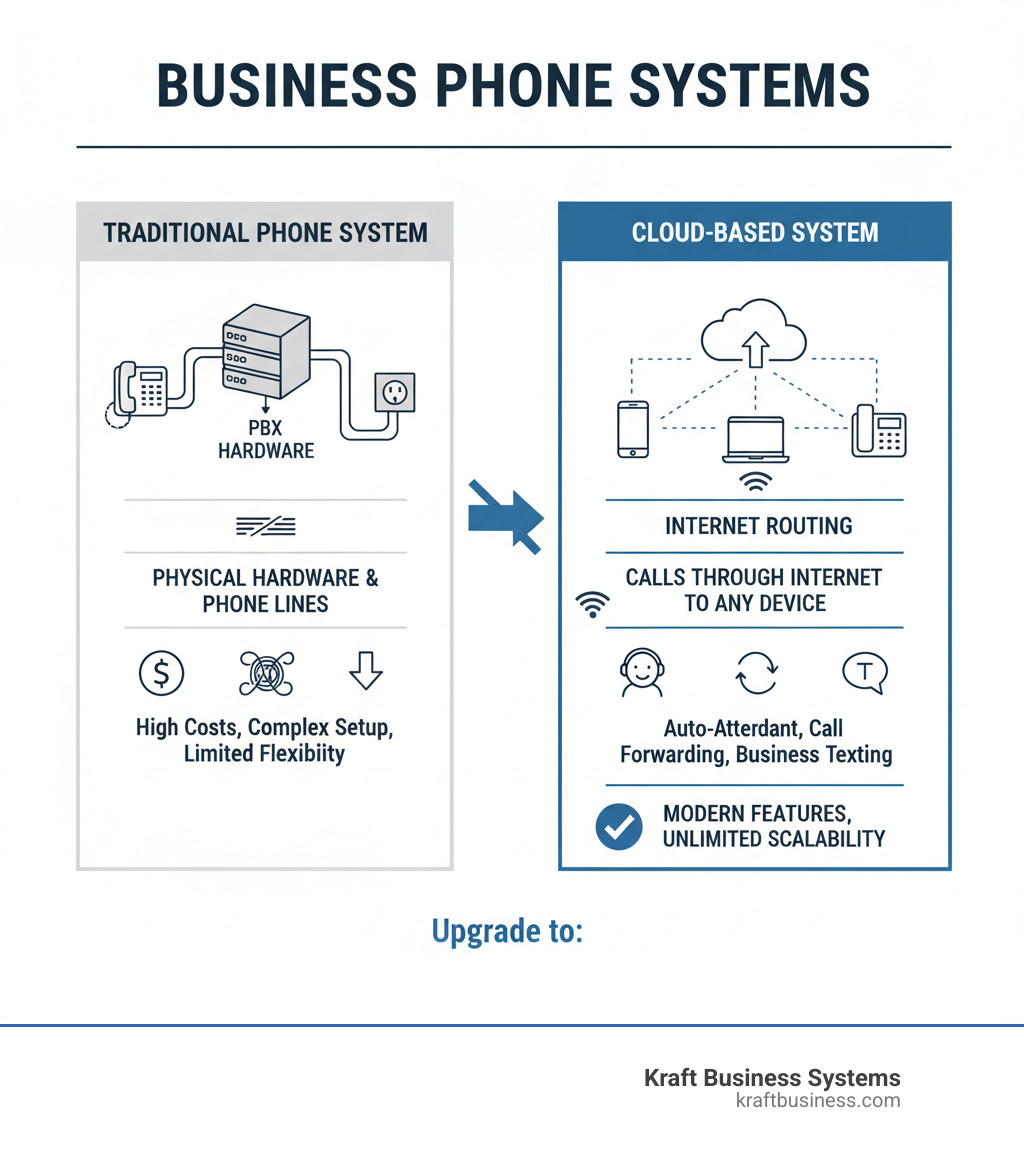
Basic virtual office phone system terms:
What is a Virtual Office Phone System and How Does It Work?
Picture this: your phone system doesn’t live in a dusty equipment room anymore. Instead, it exists in the cloud, ready to take your calls whether you’re at your desk in Grand Rapids, working from home in Traverse City, or meeting clients in Detroit. That’s the beauty of a virtual office phone system – it’s communication freedom wrapped in professional features.
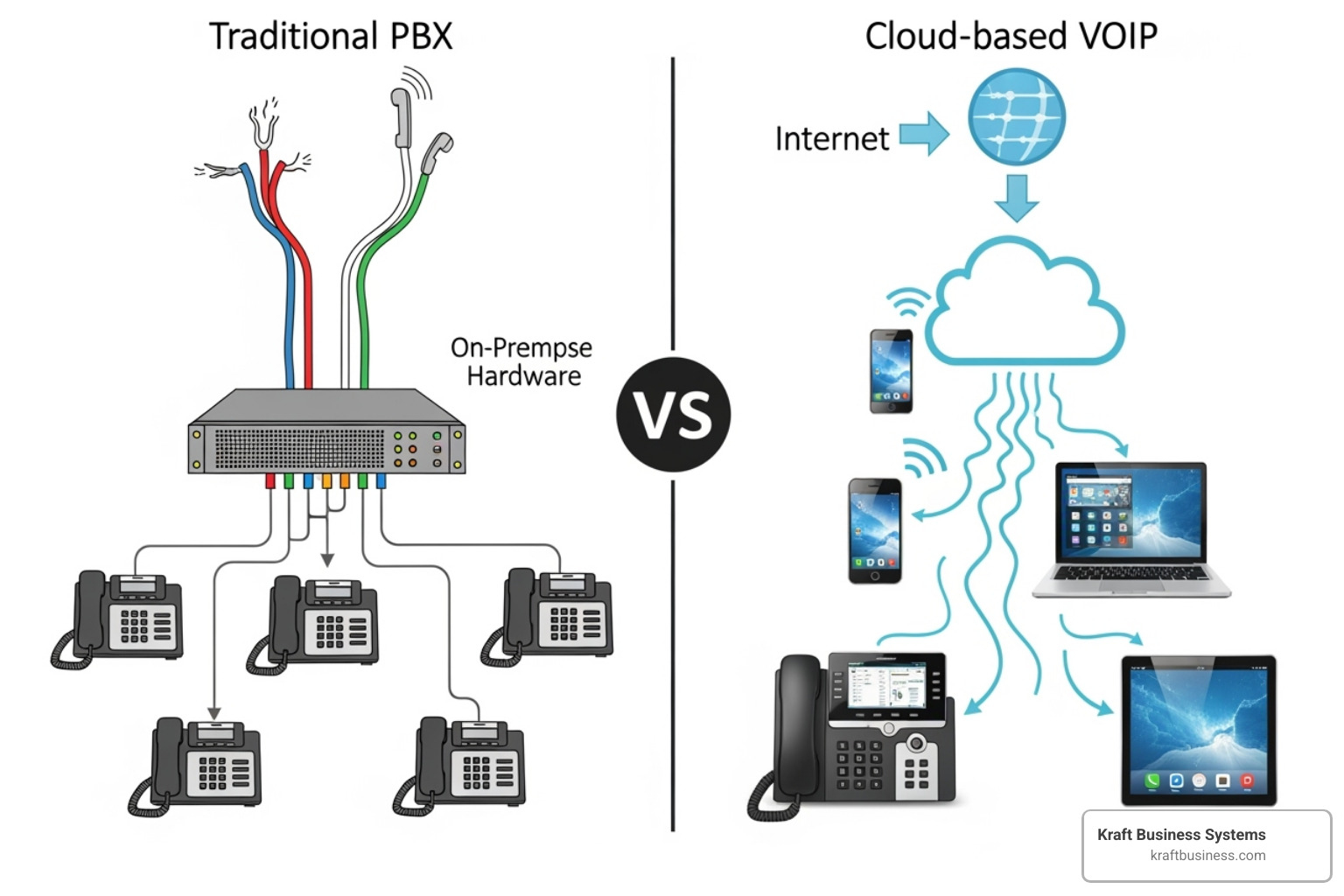
A virtual office phone system is essentially a cloud-hosted communication platform that uses Voice over Internet Protocol (VoIP) technology to handle all your business calls. Instead of relying on those old copper phone lines your grandfather used, your voice gets converted into digital data packets and zips across the internet to reach its destination.
Here’s how the magic happens: when you make a call, your voice travels through your internet connection to your provider’s secure cloud servers. These servers act like a super-smart switchboard operator, instantly routing your call to the right person – whether they’re using another cloud phone system, a traditional landline, or even a smartphone. The whole process happens in real-time, so there’s no awkward delay or robotic sound quality.
The old way versus the new way couldn’t be more different. Traditional phone systems required bulky Private Branch Exchange (PBX) hardware that took up valuable office space and demanded constant maintenance. Remember waiting days for a technician just to add a new phone line? Those days are gone. On-premise systems also meant significant upfront costs, ongoing service contracts, and the headache of managing complex equipment.
Cloud-based systems flip this model entirely. The “hardware” lives in your provider’s data centers, not your office closet. This means no more equipment to buy, maintain, or replace when it inevitably breaks down at the worst possible moment.
The cost difference is eye-opening. Traditional business landlines often charge per line with additional fees for basic features that should be standard. Virtual office phone systems typically offer subscription-based pricing that can save businesses significant business cost savings of 40% to 60% compared to legacy systems. That’s real money back in your budget for growing your business instead of just keeping the phones working.
But the real game-changer isn’t just the cost savings – it’s the flexibility and growth potential. Need to add five new employees next month? A few clicks in your online dashboard and they’re connected. Scaling down during slower seasons? Just as easy. The system adapts to your business rhythm instead of forcing you to adapt to outdated technology.
Remote work becomes seamless with cloud-based systems. Your team can work from anywhere while maintaining the same professional phone presence. Calls can ring simultaneously on office phones, smartphones, and laptops, ensuring you never miss important opportunities. Whether your employee is working from their home office or traveling for business, they stay connected to your business phone system.
Perhaps most importantly, a virtual office phone system lets even the smallest businesses project a professional image that rivals much larger companies. Automated greetings, dedicated business numbers, and sophisticated call routing make your two-person startup sound like an established enterprise. It’s about giving your customers the polished, professional experience they expect – regardless of your actual office size.
Must-Have Features for Your Business Phone System
When we consider a virtual office phone system, we’re not just looking for a way to make calls. We’re seeking a comprehensive communication hub that improves productivity, professionalism, and customer satisfaction. The right features can transform how we operate, making our business more agile and responsive. It’s about matching the system’s capabilities to our unique business needs.
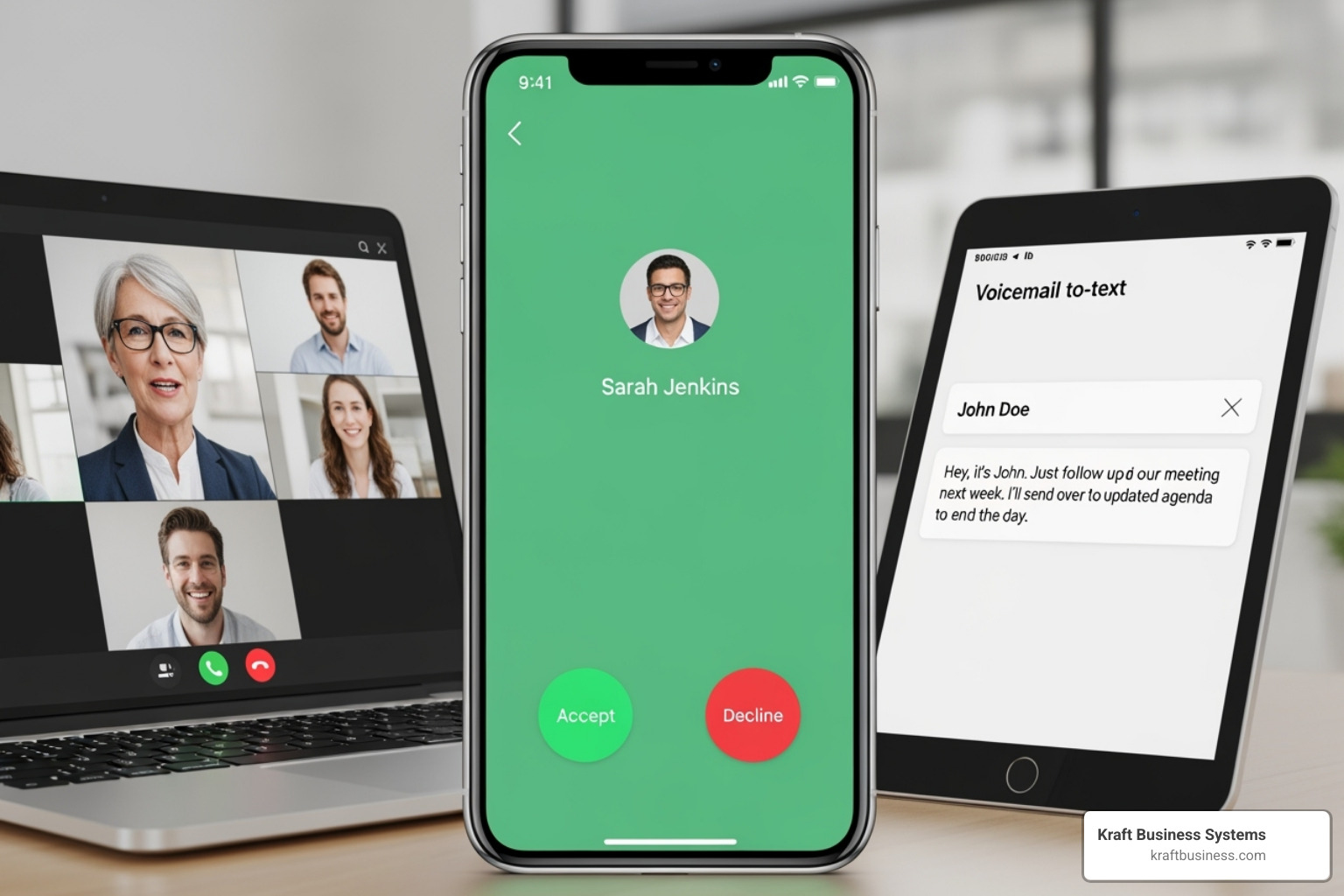
Choosing the right features is like picking the perfect tools for a job – the better the tools, the smoother the work. These systems are designed to improve both internal and external communications, ensuring our teams stay connected and our customers feel valued.
Core Communication Tools
Every business needs a solid foundation of communication tools that create a professional presence while keeping operations running smoothly. A business phone number sits at the heart of this foundation, giving us that crucial separation between personal and professional communications. It’s amazing how much more confident we feel answering calls when we know it’s business-related.
For businesses serving specific communities across Michigan – from Ann Arbor to Kalamazoo, Grand Rapids to Traverse City – having local numbers builds immediate trust with customers. There’s something comforting about seeing a familiar area code when you need help or have questions. On the flip side, toll-free numbers project a national presence that can make even a small business look established and accessible. These numbers let customers reach us without worrying about long-distance charges, though keep in mind that using toll-free numbers for SMS messaging requires a verification process due to regulatory requirements.
Some businesses take this a step further with vanity numbers – those memorable combinations like 1-800-FLOWERS that stick in customers’ minds. They’re powerful branding tools that make your business instantly recognizable.
Business texting has become absolutely essential in our mobile-first world. Customers expect to text businesses just like they text friends, and professional SMS/MMS capabilities let us meet them where they are. Many systems include auto-response features for after-hours inquiries, ensuring customers get prompt replies even when we’re not available.
Voicemail-to-email is one of those features that seems simple but changes everything. Instead of calling in to check messages, voicemails arrive as audio files in our inbox, letting us listen at our convenience. Even better is voicemail transcription, which converts those audio messages into text. This can save us potentially up to 300 hours a year by letting us quickly scan messages and prioritize callbacks without listening to every recording.
For businesses that still need fax capabilities, virtual fax integrates this into the digital system, sending faxes directly to email and eliminating the need for that old, clunky fax machine in the corner.
Advanced Call Management for a Professional Edge
This is where we start sounding like a Fortune 500 company without the Fortune 500 price tag. An auto-attendant acts as our digital gatekeeper, greeting callers with professional messages and directing them to the right department or person. Think “Press 1 for Sales, Press 2 for Support” – it filters out robocalls and spam while ensuring our team only receives relevant inquiries. While not as satisfying as slamming down a receiver on telemarketers, it’s way more effective!
Custom greetings let us set the perfect tone for our business. We can provide important information like holiday hours, promote special offers, or simply ensure every caller hears a consistent, professional brand message. Call routing takes this further by intelligently directing calls based on time of day, caller ID, or even specific skill sets, reducing customer wait times and frustration.
Ring groups are perfect for sales or support teams, distributing incoming calls among multiple team members either simultaneously or in sequence. No more missed opportunities because someone stepped away from their desk. Call forwarding ensures calls seamlessly reach us on any device, whether we’re working remotely, in a meeting, or grabbing coffee.
Call recording proves invaluable for quality assurance, staff training, and compliance. We can review calls to provide feedback, ensure our team follows protocols, and maintain records of important discussions. For businesses with higher call volumes, call queues hold callers in a virtual line with music or messages until an agent becomes available, managing expectations while ensuring every call gets answered.
Mobility and Unified Communications
The modern workforce moves around, and our virtual office phone system needs to move with us. Mobile and desktop apps transform our smartphones, tablets, and computers into fully functional business phones. This means making and receiving calls, sending texts, and managing communications from anywhere – our business number follows us instead of the other way around.
Video conferencing integration brings face-to-face meetings into the mix, whether we’re collaborating with team members or presenting to clients. There’s something about seeing someone’s face that makes conversations more personal and productive. Team chat and messaging keeps internal communications organized in dedicated spaces, perfect for project discussions and quick questions that don’t need a full phone call.
CRM integrations are absolute game-changers. When our phone system connects with customer relationship management software like Salesforce or Zoho, customer history pops up automatically when they call. No more frantically searching through notes or asking customers to repeat information – we can provide personalized, informed service from the first hello. Trust us, copying and pasting between tools isn’t just annoying; it kills follow-ups and makes us look unprofessional.
Perhaps most importantly, these systems let us separate work and personal calls while using the same device. We can handle business calls professionally without mixing contacts or exposing our personal number. It’s a huge win for work-life balance and maintaining professional boundaries.
How to Choose the Right Virtual Office Phone System in 4 Steps
Choosing the right virtual office phone system feels overwhelming when you’re staring at dozens of providers, each promising to be the perfect fit. But here’s the thing – with a clear roadmap, you can cut through the noise and find a solution that actually works for your business instead of against it.
The key is taking a systematic approach. Too many businesses jump straight to comparing prices or features without understanding what they actually need. That’s like shopping for a car without knowing if you need to haul equipment or just commute to the office. You might end up with something shiny that doesn’t solve your real problems.
Let’s walk through four straightforward steps that will help you make a confident decision and avoid the common pitfalls that leave businesses frustrated with their choice.
Step 1: Assess Your Business Needs and Goals
Before we even peek at what’s available, we need to get brutally honest about our business reality. This isn’t just about counting heads or estimating call volume – it’s about understanding how communication flows through our organization and where we want to go.
Team size shapes everything from pricing models to feature priorities. A solo entrepreneur in Grand Rapids has completely different needs than a 50-person company with remote workers scattered across Michigan. Some systems shine with small teams, offering simple per-user pricing that scales naturally. Others are built for larger operations with complex departmental routing and management hierarchies.
Call volume determines which features move from “nice-to-have” to “absolutely essential.” If you’re handling a handful of calls daily, basic voicemail and call forwarding might suffice. But if you’re managing hundreds of calls, you’ll need robust call queues, ring groups, and maybe even contact center capabilities to keep customers happy and your team sane.
The remote and hybrid workforce reality has changed everything. If your team works from home offices in Lansing, coffee shops in Sterling Heights, or client sites across the state, your phone system needs to follow them seamlessly. Mobile apps, desktop softphones, and unified communication tools become mission-critical, not optional extras.
Industry-specific requirements can make or break your choice. Healthcare businesses need HIPAA-compliant solutions that protect patient privacy – it’s not negotiable. Retail operations benefit from integrated messaging and smooth customer handoffs. Professional services often prioritize video conferencing and team collaboration features that keep projects moving smoothly.
Don’t forget about future growth plans. The system that works perfectly for your five-person team today should still make sense when you’re at fifteen people next year. Look for solutions that can add users, phone numbers, and features without forcing you to start over from scratch.
Step 2: Compare Pricing Models and Understand the Costs
Now comes the fun part – figuring out what this will actually cost. But here’s where many businesses get tripped up: they focus on the monthly price per user and miss the bigger financial picture.
Per-user versus per-account pricing can dramatically change your costs depending on your team structure. Per-user pricing works beautifully for growing teams because costs scale predictably. Per-account pricing might be more economical for very small teams sharing extensions, but it can get expensive quickly as you add people.
Tiered plans are everywhere, and they’re designed to guide you toward the features providers want to sell. The trick is matching your must-have features with the right tier without paying for a bunch of bells and whistles you’ll never use. That premium plan with advanced analytics might look impressive, but if you’re not analyzing call data, you’re just paying extra for reports you’ll never read.
Monthly versus annual billing often comes with significant savings for annual commitments. The discount can be substantial, but weigh it against your need for flexibility. If your business is growing rapidly or you’re not completely confident in your choice, the monthly option might be worth the extra cost for the peace of mind.
One of the biggest advantages of virtual office phone systems is the minimal hardware investment. You can use existing smartphones and computers instead of buying proprietary desk phones. However, if your team prefers dedicated VoIP phones, factor in those costs. Some providers offer phone rentals, while others require outright purchases.
Watch out for add-on fees that can surprise you later. International calling, extra phone numbers, advanced call recording, or professional voice talent for greetings often cost extra. A good provider will be transparent about what’s included and what’s additional, so you can budget accurately from the start.
Step 3: Evaluate Security and Reliability
Your phone system is mission-critical infrastructure. When it goes down, your business stops. When it’s compromised, your reputation suffers. This step is about ensuring your chosen provider can keep you connected and secure.
Uptime guarantees matter more than you might think. Look for Service Level Agreements (SLAs) that promise 99.99% uptime or better. This isn’t just a number – it represents the provider’s confidence in their infrastructure and their commitment to keeping your business running. When they put money behind their reliability promises, they’re serious about delivering.
Data encryption should be standard, not optional. Every call, message, and piece of customer information flowing through your system needs protection. This is especially critical if you handle sensitive business information or customer data. The encryption should happen automatically, without requiring special setup or ongoing management.
For businesses in regulated industries, compliance requirements like HIPAA aren’t suggestions – they’re legal necessities. Your virtual office phone system provider needs to understand these requirements and build them into their platform. The wrong choice here can lead to hefty fines and damaged customer trust.
Spam call blocking has evolved from a nice feature to an essential business tool. Nobody has time for robocalls and spam, and a good system should intelligently filter these out before they reach your team. Look for providers that actively update their spam databases and offer customizable blocking options.
Disaster recovery planning separates professional-grade systems from basic solutions. When your internet goes down or your office loses power, calls should automatically route to mobile devices or alternative locations. Your customers shouldn’t know there’s a problem – they should just reach you wherever you are.
For businesses serious about protecting their communications and data, exploring comprehensive security solutions like our managed cybersecurity services can provide additional peace of mind beyond what your phone system offers.
Step 4: Check Your Network and Plan for Setup
Even the most feature-rich virtual office phone system will disappoint if your internet connection can’t handle it. This final step ensures your infrastructure is ready and your transition goes smoothly.
Internet connection quality is your foundation. VoIP systems convert your voice into data packets that travel over the internet, so a slow or unreliable connection translates directly into poor call quality. Choppy audio, delays, and dropped calls frustrate everyone and make your business look unprofessional.
Bandwidth requirements go beyond just speed. You need enough capacity to handle your expected call volume while still supporting other internet activities like video conferencing, file transfers, and regular web browsing. Multiple simultaneous calls can quickly consume bandwidth, especially if you’re also running video meetings.
Before committing to any provider, run a network quality test to assess your current setup. Tools like this network quality test can reveal potential issues before they become problems. It’s much easier to upgrade your internet connection before switching systems than to deal with call quality complaints afterward.
Number porting lets you keep your existing business phone numbers, which is crucial for maintaining customer relationships and marketing materials. The process typically takes a few days to a few weeks, and a good provider will handle most of the complexity for you. Make sure you understand the timeline and any potential service interruptions.
Modern systems often boast easy setup that takes just minutes, and many deliver on this promise for straightforward installations. However, if you have complex routing needs, multiple locations, or integration requirements, you might want hands-on setup support. Don’t be afraid to ask for help – it’s better to get it right the first time.
The admin portal becomes your command center for managing users, routing calls, and accessing reports. It should feel intuitive, not like you need an IT degree to add a new employee or change a greeting. A well-designed portal saves you time and reduces the chance of configuration mistakes that could disrupt your business.
Frequently Asked Questions about Virtual Phone Systems
When businesses start exploring virtual office phone systems, we notice the same questions come up again and again. Let’s tackle the most common concerns we hear from companies across Grand Rapids and beyond.
Do I need to buy special hardware for a virtual office phone system?
Here's one of the best parts about making the switch: you probably already have everything you need. Unlike those old-fashioned phone systems that required rooms full of equipment and technician visits, a virtual office phone system works with the devices you're already using every day.
Your smartphone becomes a powerful business phone simply by downloading your provider's mobile app. Suddenly, you can make and receive calls using your professional business number while keeping your personal calls completely separate - all on the same device. It's like having two phones in one, without the bulk.
If you're more of a desk person, desktop applications (we call them "softphones") turn your computer into a full-featured business phone. Just plug in a headset, and you're ready to handle calls with crystal-clear audio quality. This works great whether you're in our Grand Rapids office or working from your kitchen table in Kalamazoo.
Now, if you're someone who just loves the feel of a traditional desk phone, you're not out of luck. VoIP desk phones are available and they're surprisingly simple to set up. These aren't the complicated systems of the past - they plug directly into your internet connection and work immediately. Many providers offer these phones as an option, and some even let you use compatible models you might already have.
The beauty of this flexibility means you can mix and match based on what works best for each team member. Some might prefer their smartphone app for mobility, while others might want a dedicated desk phone for their office setup.
Can I keep my current business phone number?
Absolutely, and we can't stress this enough - keeping your established business number is almost always possible. This process, called "number porting," is so common that providers have it down to a science.
Think about it: you've spent years building recognition around your business number. It's on your website, business cards, marketing materials, and in your customers' contacts. Starting over with a new number would be like moving your business and not telling anyone the new address.
The number porting process is surprisingly straightforward. When you choose your new virtual office phone system provider, they'll ask you to fill out a Letter of Authorization - basically giving them permission to handle the transfer on your behalf. You'll also need to provide a recent phone bill from your current carrier, which helps verify you own the number.
Once the paperwork is submitted, your new provider does the heavy lifting. They coordinate directly with your old phone company to transfer your number. The whole process typically takes anywhere from a few days to a couple of weeks, depending on the type of number and carriers involved.
Here's the important part: don't cancel your old service until the transfer is complete. We've seen businesses accidentally lose their numbers by being too eager to cut ties with their old provider. Your new provider will guide you through the timing and let you know exactly when it's safe to make the switch.
Most reputable providers work hard to ensure little to no downtime during the transition. They might set up temporary forwarding or give you backup numbers to ensure your business stays reachable throughout the process.
How does a virtual phone system improve customer service?
This is where virtual office phone systems really shine, and it's often the biggest "wow" factor for businesses after they make the switch. These systems transform every customer interaction from potentially frustrating to genuinely helpful.
Reduced wait times are probably the most immediate improvement your customers will notice. Instead of playing phone tag or waiting in endless queues, intelligent call routing gets them to the right person quickly. Your auto-attendant can direct them to sales, support, or billing without any confusion or multiple transfers.
The professional image factor can't be overstated. Even if you're a small team working from various locations across Michigan, your customers hear a polished, consistent greeting every time they call. You can customize these greetings to provide helpful information like current hours or special announcements, so customers get value even before speaking to anyone.
Smart call routing means your customers get real expertise, not just whoever happens to answer. If someone calls about a specific service, they can be connected directly to the team member who knows that area best. No more "let me transfer you to someone who can help" - they're already talking to the right person.
The never miss a call aspect is huge for customer satisfaction. With features like call forwarding and mobile apps, your team can answer business calls whether they're at their desk in Grand Rapids, grabbing coffee in Traverse City, or working from home. Ring groups mean if one person is busy, the call automatically goes to the next available team member.
But here's where it gets really impressive: CRM integration gives your team superpowers. When a customer calls, their entire history pops up before you even say hello. You can greet them by name, reference their last order, or pick up exactly where the last conversation left off. It makes every customer feel like they're your most important client, because in that moment, they truly are.
These improvements don't just make customers happier - they make your team more confident and efficient. When your tools work seamlessly together, everyone can focus on what they do best: building relationships and solving problems.
Conclusion: Modernize Your Communications with Confidence
Choosing the right virtual office phone system doesn’t have to be overwhelming. Think of it as upgrading from a flip phone to a smartphone – once you make the switch, you’ll wonder how you ever managed without all those modern features.
Throughout this guide, we’ve explored how these cloud-based systems deliver game-changing benefits for businesses of all sizes. The flexibility to work from anywhere – whether that’s your home office in Kentwood, a coffee shop in East Grand Rapids, or a client meeting in downtown Grand Rapids – means your business number follows you, not the other way around. The cost-effectiveness speaks for itself, with most businesses saving 40-60% compared to traditional phone lines. And the professionalism these systems provide? Even a solo entrepreneur can sound like they have a full receptionist team handling calls.
But here’s the thing: choosing the right system is absolutely key to open uping these benefits. A system that doesn’t match your business needs is like buying a race car when you need a pickup truck – impressive, but not particularly useful for getting the job done.
That’s where Kraft Business Systems comes in. Located right here in Grand Rapids, we’ve been helping Michigan businesses steer technology decisions for years. Our team understands that every business is unique – what works perfectly for a healthcare practice in Cascade might not be ideal for a manufacturing company in Wyoming. We specialize in innovative and secure technology solutions, and we take pride in matching businesses with communication systems that actually make their lives easier, not more complicated.
We believe technology should work for you, not against you. Whether you’re ready to make the switch to a virtual office phone system or just exploring your options, we’re here to help you make sense of it all. No pressure, no confusing tech jargon – just straightforward guidance from people who genuinely care about helping your business succeed.
Ready to leave those clunky old phone systems behind? Let’s chat about how the right communication solution can transform your business operations and keep you connected with what matters most – your customers and your team.
Explore our comprehensive IT solutions to support your business growth.