


AI Overview:
This blog explains network infrastructure in simple terms, showing how hardware, software, and services work together as the digital backbone of your business. It highlights how strong networks improve collaboration, speed, security, and reliability—while weak networks slow productivity and increase risk. Readers learn the three core pillars of network infrastructure, common topologies, cloud and hybrid models, and why modern security tools like firewalls, IDS/IPS, VPNs, and segmentation are essential. The article also covers assessing your current network, when to upgrade hardware, and whether to use in-house IT or an MSP. Overall, it shows how a well-built, secure network becomes a strategic asset that drives growth and protects your business.
At its core, network infrastructure is the collection of hardware, software, and services that allows your business to communicate. It’s the digital backbone connecting your team, your devices, your applications, and the internet, making sure information flows where it needs to go.
Your Business’s Digital Foundation Explained
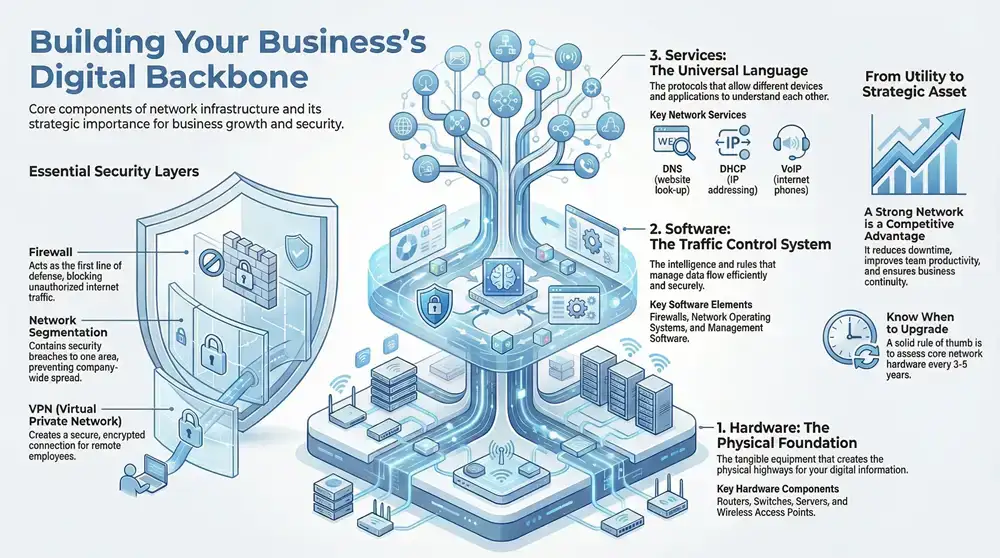
Think of your business as a bustling city. The network infrastructure is the entire system of roads, bridges, and traffic signals that keeps everything moving smoothly. It determines how quickly and reliably your company’s most valuable asset—its data—gets from one point to another.
Without this system, every department would be an isolated island. A well-designed network, however, makes sure your sales team can pull up customer data on the fly, your finance department can process invoices instantly, and your employees can collaborate on projects whether they’re across the hall or across the state.
It’s the foundational layer that supports every digital process, from sending a simple email to running complex cloud applications. This system isn’t just a utility like electricity; it’s a strategic asset that directly fuels your growth, productivity, and security.
The Core Purpose of a Network
On the surface, a business network is all about providing connectivity. But when you dig a little deeper, you find several critical functions that are absolutely vital for any modern Michigan business to operate effectively.
A solid network allows your business to thrive by enabling these core functions. Below is a quick breakdown of what a well-built network infrastructure actually does for you, translating the technical capabilities into real-world business advantages.
Core Functions of a Business Network Infrastructure
| Function | Description | Business Impact |
|---|---|---|
| Resource Sharing | Enables multiple users to access shared hardware like printers, servers, and storage drives from a central location. | Reduces hardware costs, improves team efficiency, and minimizes redundant equipment. |
| Data & Communication Flow | Facilitates the fast exchange of information through email, instant messaging, and video conferencing. | Connects teams instantly, speeds up decision-making, and supports remote and hybrid work models. |
| Secure Internet Access | Provides a managed and protected gateway to the internet for all connected devices and users. | Allows for safe access to cloud services, online research, and customer engagement while blocking threats. |
| Centralized Management | Allows IT administrators to monitor performance, apply security updates, and manage the entire system from one place. | Ensures the network remains healthy, secure, and reliable with less administrative overhead. |
Each of these functions plays a part in building a cohesive, functional whole that supports your day-to-day operations and long-term goals.
A well-architected network infrastructure isn’t just about connecting computers. It’s about creating a secure, reliable, and scalable environment that allows your business to adapt and thrive. It’s the difference between a dirt path and a superhighway for your company’s data.
More Than Just Wires and Routers
While hardware is the most visible part, a complete network infrastructure is a complex interplay of physical devices and the software that runs them. This concept is closely tied to the bigger picture of your company’s overall IT systems.
To get a fuller perspective, it’s helpful to see how these network elements fit into the larger puzzle. You can explore this relationship by learning more about a business’s complete IT infrastructure. Understanding this connection makes it clear why a strong network is so fundamental—it’s the platform every other piece of your technology relies on to deliver the speed and security your organization needs every single day.
The Three Pillars of Network Infrastructure
Every solid structure needs a strong foundation. Your business network is no different, and it’s built on three core pillars that work together to keep you connected and productive: hardware, software, and services. Getting a handle on how these pieces fit together is the key to understanding what makes a network tick.
Think of these three as a layered system where each part has a specific job. The hardware is the physical foundation, the software directs all the traffic, and the services act as the universal translator. If one of them isn’t pulling its weight, your network simply can’t function.
You can dive deeper into the trends shaping the network infrastructure market to see where things are headed.
Pillar 1: Hardware — The Physical Foundation
Hardware is all the tangible gear you can see and touch—the physical devices that shuttle your data from point A to point B. A great analogy is the physical side of a postal service: the mail trucks, the sorting centers, and your local post office.
These devices are the real workhorses, creating the physical highways your digital information travels on. They are the essential foundation, and without them, nothing else can be built.
Here are the main pieces of hardware you’ll find in almost any business network:
- Routers: These devices connect different networks, like linking your internal office network to the wider internet. A router is like a major mail sorting facility, making sure data packets get sent to the right destination network.
- Switches: A switch is what connects all your devices—computers, printers, servers—within a single local network (LAN). It’s the local post office, ensuring a file sent from one computer reliably arrives at the correct printer down the hall.
- Servers: These are powerful, purpose-built computers that store, process, and manage network data and applications. They’re the central libraries or warehouses of information that everyone else in the office needs to access.
- Access Points (APs): Wireless Access Points are what allow your Wi-Fi devices to connect to the network without being plugged in. They’re the on-ramps to your digital highway for laptops, tablets, and smartphones.
Without this physical layer, there would be no way for your data to even begin its journey.
Pillar 2: Software — The Traffic Control System
If hardware makes up the roads, then network software is the sophisticated air traffic control system that manages everything moving along them. This software runs on the hardware, providing the intelligence, rules, and security needed to direct data flow efficiently and safely.
This pillar covers everything from the operating systems running on your routers to the security applications protecting your data. It’s the brain of the operation, making split-second decisions to keep information moving without collisions or security breaches.
Software defines the rules of the road for your network. It decides which data gets priority, who has permission to access certain information, and how to block potential threats before they can cause disruption.
Key software elements include:
- Network Operating Systems (NOS): This is the specialized software running on routers and switches that manages the hardware and controls network traffic.
- Firewalls: A firewall is a critical security tool that acts as a digital gatekeeper. It monitors and controls all incoming and outgoing network traffic based on a set of security rules you define.
- Network Management Software: These applications give administrators a bird’s-eye view of the network, allowing them to monitor its health, analyze performance, and fix issues from a single dashboard.
Pillar 3: Services & Protocols — The Universal Language
The final pillar is made up of the services and protocols that allow all the different devices and software to understand each other. Protocols are simply established sets of rules for formatting and processing data. In short, they’re the universal language of the network.
Imagine two people trying to have a conversation without speaking the same language. It wouldn’t get very far. Protocols like TCP/IP (Transmission Control Protocol/Internet Protocol) are what ensure a computer in Detroit and a server up in Traverse City can communicate perfectly.
These services are what make the network truly useful by defining how specific, critical tasks get done.
- DNS (Domain Name System): This service is the phonebook for the internet. It translates human-friendly domain names (like
kraftbusiness.com) into the machine-readable IP addresses that computers use to find each other. - DHCP (Dynamic Host Configuration Protocol): This handy protocol automatically assigns IP addresses to devices as they connect to the network, which saves a massive amount of manual configuration time.
- VoIP (Voice over Internet Protocol): This is the service that enables modern business phone systems, allowing voice calls and video meetings to run over the internet instead of old-school phone lines.
Together, these three pillars—hardware, software, and services—create the complete, functional network infrastructure that serves as the indispensable digital foundation for any modern Michigan business.
How Network Components Are Arranged and Connected
Having all the right hardware, software, and services is a great start, but it’s only half the battle. The real magic happens in how you arrange and connect these pieces. This layout—what we call architecture and topology—is what determines if your network is fast and reliable or a constant source of frustration.
Think of it like planning a city. You could build a hub-and-spoke road system where everything flows through a central point, or you could create an interconnected grid. Each design serves a different purpose, and the same is true for your network. This physical and logical blueprint dictates how your data moves.
Get it right, and information flows smoothly. Get it wrong, and you’re stuck with bottlenecks and security holes. Understanding these layouts helps you build a network that actually helps your business, instead of holding it back.
The infographic below recaps the three core pillars we just covered, showing how they have to work together to build a network that just works.
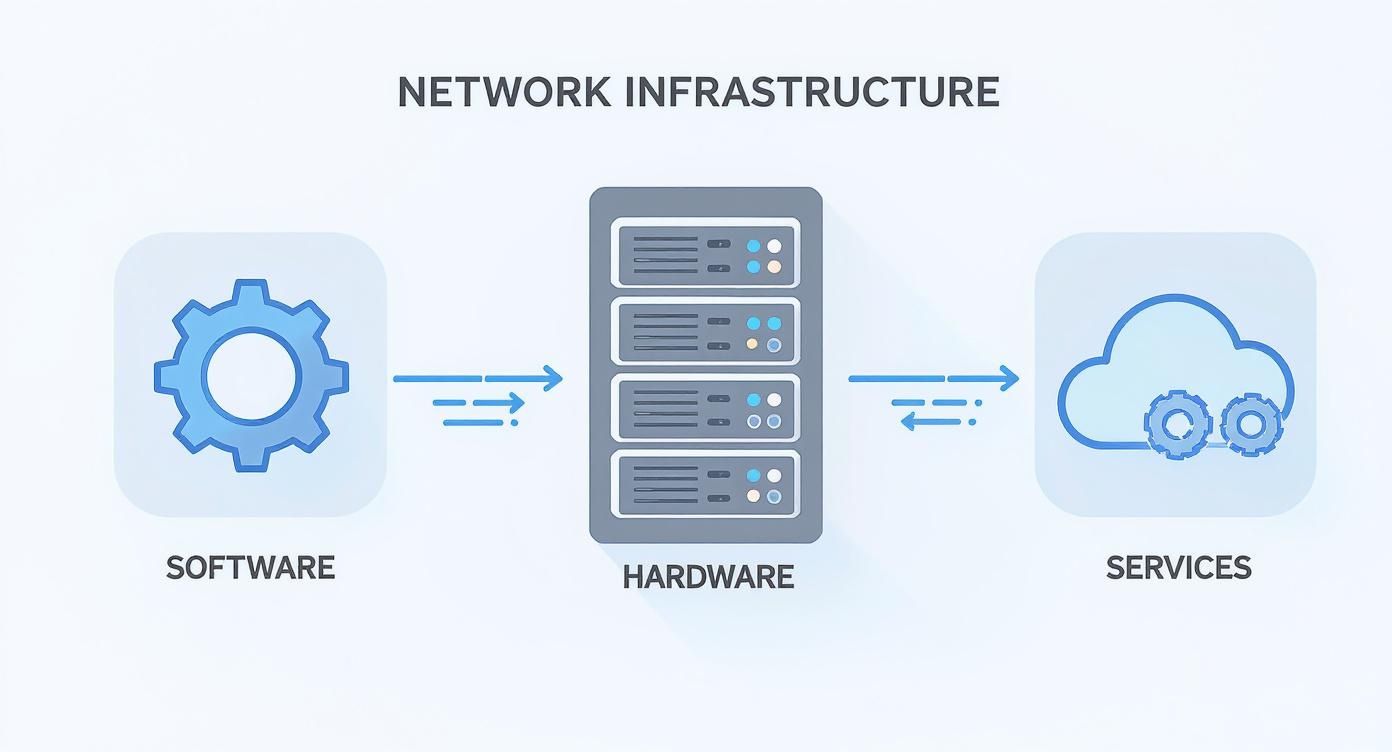
This visual really drives home how hardware, software, and services need to be in sync for your network to be both functional and resilient.
Understanding Network Topologies
Network topology is simply the specific layout of your devices and all the connections between them. It’s the schematic that shows how everything is wired up to talk to everything else. To really get a handle on how devices communicate, you need a solid grasp of the fundamental network topologies.
Two of the most common designs you’ll run into are the Star and the Mesh.
- Star Topology: Picture the spokes of a wheel. In a star setup, every single device connects directly to a central piece of equipment, like a switch or a router. It’s clean and simple to manage. If one computer goes offline, it doesn’t affect anyone else. The big catch? If that central hub fails, the whole network goes down with it.
- Mesh Topology: Now imagine a spiderweb. In a mesh network, devices are interconnected with multiple redundant paths. If one connection breaks, data just finds another way to get where it’s going. This makes it incredibly reliable but also more complex and expensive because of all the extra cabling and setup.
Your choice often boils down to your budget and just how critical 100% uptime is for your business. A small office can usually get by just fine with a simple star topology. But a manufacturing plant in Michigan that loses money every minute it’s offline? They’ll likely invest in a mesh design for their most critical systems.
Defining Network Architecture
If topology is the detailed layout, then architecture is the big-picture design. It defines the overall scope and scale of your network, whether it’s for a single office or a global operation.
Network architecture defines the boundaries and rules of your digital workspace. It determines whether your network serves a single room, an entire building, or connects multiple locations across Michigan.
Here are the main architectural models you’ll see:
- Local Area Network (LAN): This is your private, internal network. It connects all the devices within a specific area, like your office building. It’s the digital home base for your company, and learning how to keep a small office network rack organized is key to keeping it running smoothly.
- Wide Area Network (WAN): A WAN is what you use to connect multiple LANs across a large geographical area. If your business has offices in Grand Rapids, Detroit, and Traverse City, a WAN is the technology that links them all together, letting them share files and resources securely as if they were all under one roof.
Embracing Cloud and Hybrid Models
Businesses are no longer limited to the hardware in their own buildings. The cloud has opened up a world of more flexible and powerful network designs.
A cloud infrastructure means your servers, storage, and networking gear are all hosted by a provider like Amazon Web Services (AWS) or Microsoft Azure. This gets rid of the need for huge upfront hardware costs and lets you scale your resources up or down whenever you need to.
Many businesses are landing on a hybrid infrastructure. This model combines the security and direct control of an on-premise network with the flexibility of the public cloud. It really gives you the best of both worlds. You can keep your most sensitive customer data on your own servers while using the cloud for things like email, collaboration tools, and other apps that need to scale.
How a Strong Network Puts Your Business Miles Ahead
Let’s be honest, “network infrastructure” sounds like a dry, technical expense. But viewing it that way is a huge mistake. Think of your network less like plumbing and more like the central nervous system of your entire operation. It’s the invisible force that connects your team, protects your data, and ultimately drives real, measurable business results.
When your network just works, everything else follows. Video calls with clients are crisp and clear. Files are shared in an instant. Your team can collaborate seamlessly whether they’re across the office in Grand Rapids or working from home in Detroit. This isn’t just about convenience; it’s about eliminating the daily friction that quietly drains productivity and morale.
This shift from a technical cost to a strategic asset is happening everywhere. You can get more details on the growing global demand for network solutions from cognitivemarketresearch.com. Businesses are investing because they know a powerful network is no longer optional.
From Operational Cost to Competitive Advantage
Investing in your network isn’t just about keeping the lights on; it’s about building a serious competitive edge. A rock-solid, well-managed network directly translates into operational excellence, protecting both your bottom line and your hard-earned reputation. The difference between a proactive and a reactive approach here is night and day.
A slow or spotty network creates a constant, low-grade headache for your entire team. When employees are fighting with dropped calls, lagging applications, and glacial file access, the wasted minutes add up to a massive loss of time and focus. A strong network gets rid of those roadblocks, letting your people concentrate on the work that actually grows your business.
A high-performance network infrastructure is the foundation for business continuity. It ensures that even when facing disruptions, your core operations remain online, your data stays accessible, and your customers continue to be served without interruption.
Protecting Your Most Valuable Assets
Beyond sheer speed, a modern network is your first and most important line of defense against cyber threats. It’s where you build the walls that protect your sensitive customer data, financial records, and proprietary information. A single breach can lead to devastating financial loss and cause permanent damage to your company’s reputation.
A well-designed network is the backbone of a robust security strategy, protecting your business from the inside out. This includes critical functions like:
- Secure Remote Access: Giving your team the freedom to connect securely from anywhere without punching dangerous holes in your internal systems.
- Data Protection: Making sure sensitive information is encrypted and locked down, accessible only to authorized people, whether it’s sitting on a server or flying across the internet.
- Threat Prevention: Using advanced firewalls and monitoring tools that spot and block malicious activity before it can do any harm.
Ultimately, a strong network infrastructure is a direct investment in your business’s ability to function, grow, and compete. It slashes costly downtime, empowers your team to get more done, and builds a secure foundation that lets you pursue new opportunities with confidence. It transforms technology from a simple utility into a powerful tool for hitting your most ambitious goals.
Securing Your Network and Protecting Digital Assets

Treating network security as an afterthought is one of the most dangerous—and common—mistakes a business can make. Real security isn’t a feature you bolt on after the fact. It’s the digital moat, the watchtowers, and the armored gates that must be designed into your network from day one.
Think about it: every connection to the internet is a potential doorway for someone you don’t want inside. A truly secure network anticipates these threats and builds multiple layers of defense to keep your sensitive data safe and your operations running smoothly. Without that focus, even the fastest and most reliable network is just a liability waiting to happen.
The Gatekeepers of Your Digital Assets
Several core technologies form the bedrock of a secure network. You can think of them as a dedicated security team, where each member plays a distinct but coordinated role in protecting your digital property. Two of the most critical roles are filled by firewalls and intrusion detection systems.
- Firewalls: Your firewall is the digital bouncer standing between your internal business network and the wild west of the internet. It inspects every piece of data coming in or going out, checking it against a strict set of security rules. Only traffic that meets the criteria gets through, effectively blocking malicious attempts before they ever reach your systems.
- Intrusion Detection Systems (IDS): An IDS acts like a vigilant security guard, constantly patrolling your network for suspicious activity or known attack patterns. If it spots a potential threat, it immediately sends an alert so your IT team can investigate and shut it down before a full-blown breach occurs.
These tools work in tandem, creating a formidable first line of defense.
A well-secured network operates on the principle of least privilege. This simply means every user, device, and application is given only the bare minimum level of access required to do its job, which drastically shrinks the area an attacker can target.
Strategies for Containing Threats
Beyond blocking external attacks, a smart security strategy involves internal measures to contain threats that might slip through the cracks. Network segmentation is a powerful technique for this, working much like the watertight bulkheads in a ship’s hull.
By dividing your network into smaller, isolated sub-networks, you can contain a security breach to a single area. For example, your guest Wi-Fi should be completely separate from the network housing your financial data. If a device on the guest network gets compromised, the infection can’t spread to your critical systems.
This segmentation is a core piece of building a resilient network. For a deeper dive into how to put this and other strategies into practice, you can explore some essential network security best practices that Michigan businesses can apply right away.
To build a robust defense, it helps to understand the specific roles different security tools play.
Key Network Security Measures and Their Functions
Here’s a quick look at some of the most essential security tools, what they do, and why they are so critical for protecting your business network.
| Security Measure | Primary Function | Key Benefit |
|---|---|---|
| Firewall | Filters incoming and outgoing network traffic based on security rules. | Acts as the first line of defense, blocking unauthorized access from the internet. |
| Intrusion Detection/Prevention System (IDS/IPS) | Monitors network traffic for malicious activity and policy violations. | Detects and can automatically block active threats before they cause damage. |
| Network Segmentation | Divides the network into smaller, isolated sub-networks (segments). | Contains security breaches to a single segment, preventing lateral movement. |
| Virtual Private Network (VPN) | Creates a secure, encrypted connection over a public network. | Protects data in transit for remote employees and site-to-site connections. |
| Endpoint Security | Protects individual devices (laptops, servers, phones) from threats. | Secures the weakest link in the chain—the end-user device. |
| Access Control | Restricts user access to only the resources they absolutely need. | Minimizes the potential damage a compromised user account can cause. |
Each of these measures adds another layer to your security posture, making it progressively harder for attackers to succeed.
The Evolution of Network Security
As businesses embrace cloud services and support employees working from anywhere, the old-school security perimeter has all but disappeared. This shift has given rise to new, integrated security models like Secure Access Service Edge (SASE).
SASE (pronounced “sassy”) essentially combines networking and security functions into a single, cloud-delivered service. It provides consistent, powerful protection for users no matter where they are or what device they’re using.
This convergence of networking and security is a major force in the industry. Despite some ups and downs, enterprise networking markets are poised for significant expansion, with forecasts showing a potential 9% worldwide growth in 2025. This trend, detailed in an analysis of the enterprise networking market by Dell’Oro Group, shows that modern security is no longer about defending a building; it’s about protecting your data everywhere it goes.
Building and Maintaining Your Network Infrastructure
Alright, you understand the core components and security principles of network infrastructure. That’s the first hurdle cleared. Now, it’s time to turn that knowledge into action. This next phase is all about assessing what you currently have, deciding how to manage it, and making sure your network is ready to support your business as it grows.
A proactive approach here is critical. It’s what shifts your technology from a reactive cost center—something you only think about when it breaks—into a strategic asset that actually fuels productivity and protects your operations. The goal isn’t just to build a system that works today, but one that’s flexible enough for whatever tomorrow throws at you.
Assessing Your Current Network
Before you can map out a route, you need to know where you’re starting from. A thorough network assessment gives you a clear, honest picture of your existing setup. It helps pinpoint performance bottlenecks, uncover security gaps, and identify limitations that could stunt your growth down the road.
Think of it like a mechanic’s diagnostic check before starting any repairs. It’s an essential first step.
Use this simple checklist to take your network’s pulse:
- Performance and Speed: Do employees complain about slow applications or crawling file transfers? A sluggish network is a direct drain on your team’s productivity.
- Reliability and Uptime: How often does your network go down? Unplanned downtime can bring your entire business to a grinding halt, costing you both time and money.
- Security Posture: When was your last security audit? Seriously. Are your firewalls, access controls, and software patches all up-to-date to defend against modern cyber threats?
- Scalability: If you doubled your staff or opened a new office next year, could your current infrastructure handle the load without a complete, budget-busting overhaul?
Answering these questions honestly will quickly reveal where your network is solid and where it needs immediate attention.
In-House IT vs. Managed Service Provider (MSP)
Once you have a handle on what needs to be fixed or upgraded, the next big question is who is going to do the work. For most Michigan businesses, this choice boils down to two paths: managing the network with an internal IT team or partnering with an external Managed Service Provider (MSP).
An in-house IT team gives you direct control and a deep, built-in familiarity with your unique business processes. The flip side? This model requires a significant investment in salaries, ongoing training, and specialized tools. It can also be a huge challenge for a small team to maintain true expertise across every facet of modern networking and cybersecurity.
A Managed Service Provider (MSP), on the other hand, gives you access to a whole team of specialized experts for a predictable monthly fee. This often turns out to be more cost-effective and provides a much broader range of skills, from 24/7 network monitoring to emergency incident response. The tradeoff is less direct, day-to-day control, which makes it absolutely crucial to choose a partner who understands and aligns with your business goals.
The right choice really depends on your company’s size, complexity, and strategic priorities. The key is to ensure you have dedicated resources focused on keeping your network secure, efficient, and ready for growth.
Effective network maintenance also means proactively tackling potential issues before they cause painful downtime. This covers everything from routine updates to more complex diagnostics. For example, successfully resolving common DNS server issues is vital for ensuring your team and customers can reliably get to the online resources they need.
Looking ahead, the future of network management is becoming more and more automated. We’re seeing the rise of trends like AI-driven network operations (AIOps), which promise to predict and resolve issues before users are even aware of a problem. This represents the next leap forward in creating a truly resilient and self-healing network infrastructure.
Got Questions About Network Infrastructure? We’ve Got Answers.
When we talk with Michigan business owners about their technology, the same questions about network infrastructure pop up again and again. It’s the kind of topic that seems simple on the surface but gets complicated fast. Let’s clear up some of the most common points of confusion.
A robust, secure, and well-maintained network infrastructure is not just a technical requirement—it’s a powerful asset that drives productivity and protects your business. At Kraft Business Systems, we specialize in designing, managing, and securing the network solutions that Michigan organizations rely on to thrive. To learn how we can optimize your technology, visit us at https://kraftbusiness.com.

