


AI Overview:
This blog explains what an Incident Response Plan (IRP) is, why it’s critical for business resilience, and how it reduces financial loss, downtime, and reputational damage during cyber incidents. It breaks down the core components of an effective plan, the six-phase incident response lifecycle, and the roles of a cross-functional response team. The article emphasizes proactive planning, regular testing, and continuous improvement, while highlighting how managed cybersecurity partners can provide expert support, advanced tools, and 24/7 coverage to strengthen incident response capabilities for organizations of any size.
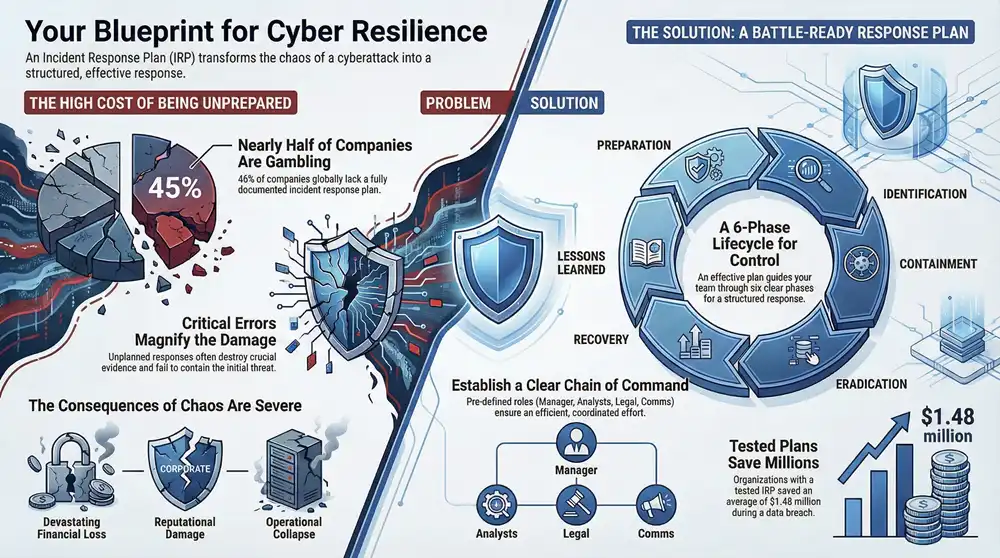
An incident response plan is a documented, step-by-step guide for detecting, responding to, and recovering from a cybersecurity incident. It’s the strategic playbook that transforms a chaotic scramble during a crisis into a structured, effective response.
What an Incident Response Plan Actually Is
Think of an incident response plan as your company’s fire drill for a digital disaster. When the alarm sounds, you don’t want your team fumbling around, trying to figure out the exit routes for the first time. You want them to have a pre-defined, practiced set of actions to follow, ensuring everyone moves swiftly and purposefully to safety.
A well-crafted IRP does the exact same thing for a cyberattack. Instead of panic and confusion, it provides a clear roadmap. This document outlines exactly who to call, what systems to unplug, how to talk to stakeholders, and the precise steps to get operations back online with minimal damage.
The Dangers of Being Unprepared
Without a formal plan, a security event can quickly spiral into a catastrophe. The immediate aftermath of a breach is a high-pressure environment where mistakes are incredibly costly. Teams flying blind often make critical errors, like tipping off attackers, destroying crucial forensic evidence, or failing to contain the threat before it infects the entire network.
These missteps lead directly to severe consequences:
- Devastating Financial Loss from operational downtime, ransom payments, and steep regulatory fines.
- Significant Reputational Damage as customer trust evaporates due to a poorly managed crisis.
- Complete Operational Collapse if critical systems can’t be restored in a timely and orderly fashion.
An incident response plan isn’t just a technical document; it’s a business continuity tool. Its primary job is to protect the organization’s mission, assets, and reputation by shrinking the impact of a security breach.
An IRP brings a host of tangible benefits that directly impact your bottom line and operational stability.
Key Benefits of an Incident Response Plan
| Benefit | Business Impact |
|---|---|
| Reduced Downtime | Minimizes financial losses by getting critical systems back online faster. |
| Lower Recovery Costs | Avoids expensive mistakes and streamlines the recovery process, saving time and money. |
| Protected Reputation | Demonstrates competence and control, preserving customer and partner trust. |
| Improved Security Posture | The planning process itself reveals and helps remediate security weaknesses. |
| Regulatory Compliance | Helps meet legal and industry requirements (like HIPAA or PCI-DSS), avoiding fines. |
Ultimately, having a plan is about turning a potential business-ending event into a manageable problem.
Why Proactive Planning Is Critical
Unfortunately, far too many organizations are operating without this essential safety net. Research shows that only 55% of companies globally have a fully documented incident response plan, meaning nearly half are just hoping for the best. Worse yet, of those with a plan, 42% fail to update it regularly, leaving them vulnerable to new threats.
This lack of preparation is a huge gamble. Creating a plan isn’t just about reacting to threats; it’s about building resilience. The process forces you to identify your most critical assets, understand your biggest vulnerabilities, and establish a clear chain of command before a crisis hits.
For those just getting started, a practical tool like a free incident response plan generator can be a great first step. At the end of the day, an IRP is your best defense for ensuring a swift, controlled, and effective recovery when—not if—an incident occurs.
The Building Blocks of an Effective Plan
An effective incident response plan isn’t a single, monolithic document you can just download and forget about. It’s a carefully assembled blueprint, built from several critical pieces that have to work together perfectly. Moving from the idea of a plan to the practical reality of one means getting crystal clear on its mission, structure, communication channels, and the resources you’ll need before disaster strikes.

Think of it like building a house. You wouldn’t start laying bricks without architectural plans, a clear understanding of who’s in charge of plumbing versus electrical, and a complete list of materials. In the same way, a strong IRP needs a solid foundation built on these core pillars.
Defining Your Mission and Scope
The very first building block is a clear mission statement. This isn’t just corporate fluff; it’s the guiding principle that sets the tone for everything else. It should state, in no uncertain terms, the plan’s main goals—things like minimizing operational disruption, protecting customer data, and preserving the company’s reputation.
This statement acts as a north star during a crisis, making sure every action taken aligns with the most important objectives. Right after the mission, the plan has to define its scope. This clarifies what kinds of incidents the plan actually covers—from malware and ransomware to insider threats and data breaches—and identifies the critical assets, systems, and data that fall under its protection.
A well-defined mission and scope prevent “scope creep” during a high-stress incident. It keeps the response team focused on the most critical priorities instead of getting sidetracked by secondary issues.
By setting these boundaries upfront, you create a focused framework that guides decision-making when every second counts.
Establishing a Clear Chain of Command
When an incident hits, confusion over who’s in charge can be paralyzing. An effective plan completely removes that ambiguity by establishing a clear chain of command and defining specific roles and responsibilities. This ensures a structured, efficient response where everyone knows exactly what they need to do.
Key roles typically include:
- Incident Response Manager: The person running the show. They direct the entire response effort, coordinate team activities, and are the main point of contact for executive leadership.
- Security Analysts: These are your technical experts on the front lines. They’re responsible for digging into the incident, analyzing forensic data, and figuring out how the attackers got in.
- IT and Network Engineers: The hands-on team responsible for implementing technical fixes, like isolating compromised systems or restoring data from backups.
- Legal and Compliance Teams: These folks make sure all response activities stick to regulatory requirements, like the strict breach notification rules under GDPR or HIPAA.
- Communications Lead: This person manages all messaging, both internal and external. They ensure stakeholders, employees, and customers get clear and timely updates without causing a panic.
Assigning these roles before a crisis hits prevents a chaotic scramble and empowers people to act decisively within their designated areas.
Creating Foolproof Communication Protocols
Communication breakdown is one of the most common ways a security response goes off the rails. Your IRP absolutely must outline foolproof communication protocols for keeping everyone in the loop without spreading misinformation. This is way more than just a contact list; it’s a detailed strategy.
The plan should specify:
- Secure Channels: You need pre-defined, out-of-band communication methods (like encrypted messaging apps) for when your primary systems like email are compromised or untrustworthy.
- Internal Updates: A set schedule and format for briefing key stakeholders, leadership, and the rest of your employees on the situation and any security steps they need to take.
- External Messaging: A clear process for roping in public relations and legal teams to craft transparent, accurate messages for customers, partners, and regulators, especially when you’re up against strict disclosure deadlines.
These protocols make sure information flows correctly, which is crucial for maintaining order and trust. Without them, even the best technical response can be completely undermined by poor communication.
An effective incident response plan isn’t just a static document you file away; it’s a dynamic, living process that guides your team from the initial chaos of an attack back to a state of control. This process is universally broken down into six distinct phases, often called the incident response lifecycle.
Understanding this lifecycle turns abstract security concepts into a clear, actionable roadmap for handling a crisis, from the first flicker of trouble to the final resolution.

Let’s walk through it using a scenario every business dreads: a ransomware attack. It starts when an employee unknowingly clicks a malicious link in an email, and suddenly, critical files start getting encrypted. This is the exact moment your plan springs to life, moving logically through each phase to minimize the damage and get you back to business.
This visual shows the key building blocks that support the entire incident response process, from establishing a mission to having the right tools.
Think of it this way: your mission, roles, communication plan, and tools are the foundation. The six-phase lifecycle is the structure you build on top of it.
Phase 1 and 2: Preparation and Identification
The first phase, Preparation, is arguably the most critical, and it all happens long before an attacker ever knocks on your door. This is where you build your defenses and stack the deck in your favor.
For our ransomware scenario, solid preparation means having regularly tested, air-gapped backups of all critical data. It means training employees to spot phishing attempts from a mile away and deploying advanced endpoint protection tools. A strong preparation phase is what separates a manageable event from a business-ending catastrophe.
Next up is Identification, that “uh-oh” moment when you realize something is seriously wrong. This isn’t just about a single alert firing; it’s the process of confirming you have a genuine security incident on your hands. Your monitoring tools might detect unusual file encryption activity, or the employee might report a suspicious pop-up demanding a hefty payment. The goal here is to quickly validate the threat, figure out what you’re dealing with, and get an initial read on the impact.
The Identification phase is all about speed and accuracy. The sooner you can correctly identify the type and scope of an incident, the more effectively you can contain the damage before it spreads like wildfire across your network.
This phase sets the stage for everything that follows, turning a vague suspicion into a confirmed, classified incident that’s ready for a targeted response.
Phase 3 and 4: Containment and Eradication
Once the ransomware is identified, the immediate priority is Containment. Think of this as firefighters building a perimeter around a blaze to stop it from consuming the entire forest. The response team’s first move is to isolate the infected computer from the network, cutting off the malware’s ability to spread to other machines or servers.
Containment typically involves a two-pronged strategy:
- Short-Term Containment: These are the emergency actions, like yanking the network cable from the infected machine or disabling a compromised user account. It’s the quick-and-dirty fix to stop the bleeding.
- Long-Term Containment: This involves more strategic moves, like segmenting the network to place temporary digital walls between critical systems and any potentially affected areas.
After the threat is successfully boxed in, the Eradication phase begins. This is all about completely removing the threat from your environment. It’s not enough to just stop the attack; you have to surgically remove the source of the infection. For our ransomware example, this means wiping the infected machine clean, making sure no remnants of the malware are left behind, and hunting down the root cause—that phishing email—to delete it from any other inboxes where it might be lurking.
Phase 5 and 6: Recovery and Lessons Learned
With the threat eliminated, the Recovery phase focuses on safely getting back to business as usual. This is where all that good preparation really pays off. The team would use those clean, offline backups to restore the encrypted files, methodically bringing systems back online. This process is deliberate, not rushed, and involves constant monitoring to ensure the threat doesn’t pop back up. For more detailed insights into managing these events, you can explore our guide on security incident management.
The final—and perhaps most important—phase is Lessons Learned. A crisis is a powerful, if painful, teacher. Once the dust settles, the incident response team conducts a post-mortem review. They analyze what went right, what went horribly wrong, and what can be improved. Was the identification process too slow? Did the containment procedures work as planned?
This analysis is absolutely critical because it feeds directly back into the Preparation phase, strengthening your plan for the future. In fact, research shows that in 85% of incidents, responders had to correlate data from multiple sources to understand the full scope, underlining the need for unified visibility. This constant cycle of improvement is what transforms an incident response plan from a simple document into a living, effective shield for your business.
Assembling Your Incident Response Team
A detailed incident response plan is just a script. Without a cast of characters who know their lines, it’s pretty much worthless. When a real cyber crisis hits, the human element becomes the single most important factor in whether you navigate it successfully or watch it spiral out of control. Putting together a high-performing incident response team (IRT) ensures that when the alarm bells go off, you have the right people with the right skills ready to execute the plan.
And this isn’t just a job for your IT department. A modern IRT is a cross-functional unit, built to handle every angle of a breach—from the technical firefight happening on your servers to the legal notices you’re required to send and the story you tell the public. Each member has a specific role, and how well they work together under extreme pressure will determine if your response is a coordinated success or a chaotic mess.
Core Roles on the Incident Response Team
For an incident response plan to actually work, everyone needs to know their job long before a crisis hits. The size of your team will obviously change depending on how big your company is, but a few key roles are almost always non-negotiable. In smaller businesses, one person might have to wear a few of these hats, but the responsibilities are just as critical.
Here are the essential roles that form the backbone of a strong IRT:
- Incident Response Manager: This person is the director of the whole show. They coordinate everything the team does, make the tough calls, and act as the main point of contact for executive leadership. Their job is to keep the entire response effort on track and focused.
- Security Analysts: Think of these folks as your digital detectives. They’re the first ones on the scene from a technical standpoint, digging through logs, figuring out the scope of the breach, and understanding how the attackers got in. Their forensic work is what containment and eradication are built on.
- IT Specialists and Engineers: This is your hands-on crew, the people who actually implement the technical fixes. They’re responsible for tasks like taking infected systems offline, restoring data from backups, patching holes, and carefully bringing services back online during the recovery phase.
- Legal Counsel: The world of data breaches makes this role absolutely indispensable. They’re your guide through the maze of compliance rules, potential liabilities, and the legal hoops you have to jump through for notifying customers and regulators. Getting this wrong can lead to massive fines.
- Communications Lead: Controlling the story is vital. This person manages all messaging, both inside and outside the company. They make sure employees, customers, partners, and the public get clear, consistent information without causing a panic or torching the company’s reputation.
An effective incident response team operates like an emergency room surgical team. Each member has a specialized function, but they communicate constantly and work in perfect sync to stabilize the patient—your organization.
This coordinated effort is what turns a well-written plan into a real-world success. Every person needs to understand not just their own duties but also how their actions affect the rest of the team.
Mapping Roles to Response Phases
The real power of a defined team structure becomes obvious when you look at how each role contributes across the different phases of an incident. When everyone knows who does what—and when—you eliminate the confusion and delays that can make a bad situation catastrophic.
The table below gives you a practical look at how these key roles chip in during a security event. This is a great way for any size organization to visualize how their team should function as a single, cohesive unit, from the moment an incident is spotted until the final lessons are learned.
Incident Response Team Roles and Key Responsibilities
| Role | Primary Responsibility | Key Tasks |
|---|---|---|
| Incident Response Manager | Overall coordination and leadership of the response effort. | Activating the plan, briefing leadership, managing resources, and making final decisions on containment and recovery strategies. |
| Security Analysts | Technical investigation and forensic analysis of the incident. | Analyzing security alerts, determining the attack vector, preserving evidence, and identifying the full scope of the compromise. |
| IT Specialists | Execution of technical containment, eradication, and recovery tasks. | Isolating affected systems, applying security patches, restoring data from backups, and monitoring systems post-recovery. |
| Legal Counsel | Ensuring all response activities are compliant with laws and regulations. | Advising on breach notification requirements, managing legal risks, and liaising with law enforcement or regulatory bodies. |
| Communications Lead | Managing all internal and external communications. | Crafting public statements, providing updates to stakeholders, and ensuring a consistent message across all channels. |
Ultimately, building this team is a core part of your preparation. Having these roles assigned and understood is what makes your incident response plan more than just a document—it becomes a battle-ready strategy, ready to be deployed at a moment’s notice.
Keeping Your Response Plan Battle-Ready
An incident response plan isn’t a “set it and forget it” document. You can’t just draft it up, file it away, and hope you never have to look at it again. It’s a living strategy that needs constant attention to stay sharp against the threats that are actually out there.
Without regular testing and maintenance, even the most brilliantly written plan will collect dust and become useless. It creates a dangerous false sense of security.
Think of your plan like a muscle. If you don’t exercise it, it gets weak. When you finally need it to lift something heavy—like a real cyberattack—it’s going to fail you. Testing builds the “muscle memory” your team needs to act decisively when the pressure is on.
An untested plan is just a theory. A tested one is a reliable shield.
Why Regular Testing Is Non-Negotiable
So, why go through all the trouble of testing? Simple: you need to find the weaknesses in your plan before an attacker does. Drills and simulations are your chance to fail safely.
These exercises are where you uncover the hidden gaps in your procedures, find out who really owns which task, and discover the tech shortcomings that would be catastrophic during a live incident. It’s a controlled fire drill, not a real fire.
Your business is also constantly changing. New software gets adopted, people change roles, and fresh threats pop up every week. A plan that hasn’t been touched in a year might not even mention that new cloud application your entire business now depends on.
A study found that organizations with a tested incident response plan and team saved an average of $1.48 million during a data breach compared to those without. The numbers don’t lie—practice delivers a serious return on investment.
These drills aren’t just about finding flaws; they’re about building a confident, cohesive response team.
Practical Methods for Testing Your Plan
Testing doesn’t have to be some massive, all-hands-on-deck simulation every single time. There are several ways to keep your team sharp and your plan up-to-date, each with a different level of intensity.
Here are a few common methods you can use:
- Plan Review: This is the easiest one. At least once a year, get the key players in a room to read through the IRP. You’ll be amazed at how many outdated phone numbers and obsolete procedures you find.
- Tabletop Exercises: These are guided, low-stress discussions. The team walks through a simulated scenario, like a ransomware attack, and talks through their roles and actions. It’s all theoretical—no live systems are touched—but it’s fantastic for spotting confusion or procedural holes.
- Walkthroughs: A step up from a tabletop, walkthroughs have team members actually perform some of their duties. This could mean drafting a mock communication email or following the steps to isolate a test system from the network.
- Simulations: This is the big one. A “red team” (the good guys pretending to be attackers) launches a controlled, simulated attack on your systems. Your “blue team” (your responders) then has to use the IRP to detect, contain, and kick them out in real-time.
Maintaining and Updating Your Plan
Testing is only half the battle. The other half is actually doing something with what you learn.
After every single drill, your team needs to huddle up for a post-mortem. Talk about what went right, but more importantly, be brutally honest about what went wrong. That feedback is pure gold.
Use those findings to update the incident response plan right away. This continuous cycle of testing, learning, and updating is what transforms your IRP from a static document into an agile, battle-ready strategy. It’s the same core idea behind a strong IT disaster recovery plan, which works hand-in-hand with your IRP to keep the business running no matter what.
Leveraging a Partner for Expert Incident Response
For most businesses, keeping a fully staffed, 24/7 incident response team on the payroll just isn’t realistic. The cost of salaries, sophisticated security tools, and the constant training required is a massive financial and operational weight. This is exactly where bringing in a managed cybersecurity partner becomes a game-changing strategic move.
An outside partner doesn’t just help; they elevate every single part of your incident response plan. They bring specialized expertise to the table from day one, helping you build and test your plan to make sure it’s tough enough to handle the specific threats you face. Then, when an incident actually happens, you get on-demand access to a team of seasoned pros who have seen it all before.
The Value of On-Demand Expertise
Working with a managed security partner gives you an immediate pipeline to elite talent that would be incredibly difficult and expensive to hire and keep in-house. These aren’t general IT folks; they are experts who live and breathe cybersecurity, dealing with incidents across dozens of industries every single day. That kind of hands-on experience is priceless when you’re in the middle of a high-stakes crisis.
Instead of your internal team scrambling to figure out a threat they’ve never seen before, an external partner comes in with a deep well of knowledge and battle-tested procedures.
The real benefit of a partnership is turning your incident response from a reactive scramble into a practiced, expert-led operation. It’s the difference between having a general practitioner on call versus a team of emergency room surgeons for a critical event.
This instant access to specialized skills can dramatically slash the time it takes to contain a threat, which directly cuts down on the financial and reputational damage.
Beyond Talent: Access to Advanced Technology
Top-tier managed cybersecurity providers also bring an arsenal of advanced security tech that is often way out of reach for small and mid-sized businesses. We’re talking about sophisticated threat intelligence platforms, digital forensics tools, and high-end Security Information and Event Management (SIEM) systems.
This technology gives you much deeper visibility into what’s happening on your network, which means incidents are spotted and analyzed faster and more accurately. The provider manages and monitors all these tools, freeing up your team to focus on what they do best—running the business. This blend of expert people and powerful technology creates a level of defense that’s nearly impossible to build on your own.
A partnership delivers several key benefits:
- Cost-Effectiveness: Get a full security team for a fraction of what it would cost to hire them yourself.
- 24/7/365 Coverage: Your business is protected around the clock, not just from 9 to 5.
- Reduced Alert Fatigue: Experts cut through the noise, so your team only deals with credible threats.
- Peace of Mind: Knowing a dedicated team is ready to jump in and defend your business is invaluable.
By teaming up with an expert partner, you can seriously strengthen your security posture. To see how this works in the real world, learn more about dedicated cyber incident response services that offer this level of support. It’s a strategic decision that makes sure your organization is ready to handle any threat with speed and precision.
Frequently Asked Questions
Even with a solid plan in place, a few common questions always pop up when we’re helping clients build out their incident response capabilities. Let’s tackle some of the most frequent ones we hear.
Developing and managing an effective incident response plan doesn’t have to be a headache, no matter the size of your company. Kraft Business Systems offers comprehensive cybersecurity services to ensure your Michigan-based business is prepared for whatever comes next. Learn more about our managed IT and security solutions.

