



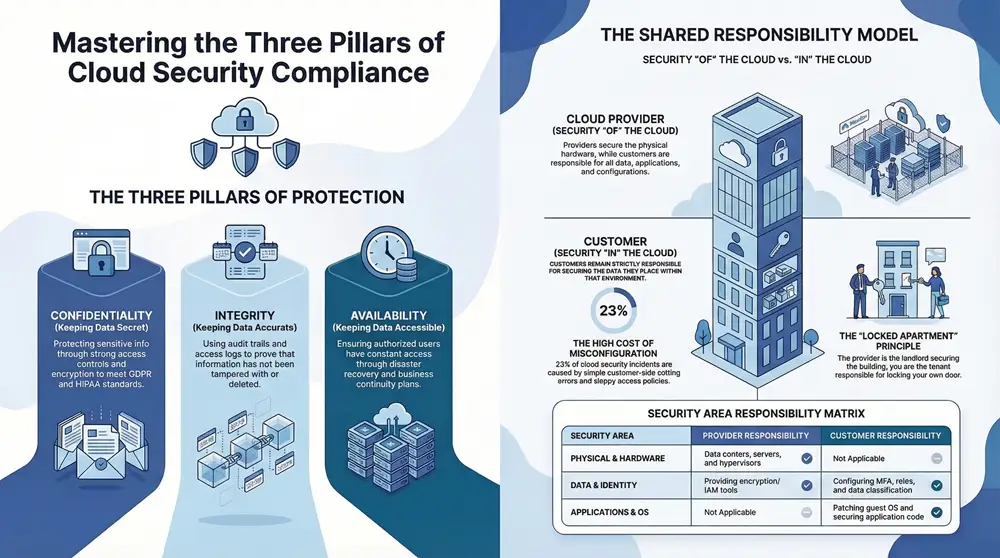
Cloud computing security compliance isn’t just a technical to-do list; it’s the rulebook for protecting data you’ve stored in the cloud. At its core, it means following industry-specific laws and regulations to ensure data privacy, sidestep hefty penalties, and build the kind of trust that keeps customers coming back. The fundamental idea is simple but critical: you are ultimately responsible for securing your data, even when it’s sitting on someone else’s servers.
What Is Cloud Security Compliance Really About

Think of it like renting a secure apartment in a well-guarded building. Your cloud provider—whether it’s AWS, Azure, or Google Cloud—is the landlord. They’re responsible for the building’s foundation, the outer walls, and the security guard at the main entrance. But you, the tenant, are the only one responsible for locking your apartment door and protecting everything inside.
This division of duties is the absolute key to operating safely in the cloud. One of the most common—and costly—mistakes we see is businesses assuming their provider handles everything. If a data breach happens because you misconfigured a security setting, that’s on you, not them.
The Bedrock of Cloud Security
When you strip away all the acronyms and regulations, you find that cloud security compliance rests on three timeless principles. These pillars are the foundation of data protection and should guide every security decision you make.
To help clarify, we’ve broken down these core concepts and why they’re so important for meeting compliance standards.
The Three Pillars of Cloud Security Compliance
| Pillar | What It Means | Why It Matters for Compliance |
|---|---|---|
| Confidentiality | Keeping data secret. This is about making sure only authorized people can access sensitive information, usually through strong access controls and encryption. | Most regulations (like HIPAA or GDPR) have strict rules about preventing unauthorized disclosure of personal or sensitive data. |
| Integrity | Keeping data accurate. This guarantees that your information remains trustworthy and hasn’t been secretly changed or deleted. | Compliance requires proof that your data hasn’t been tampered with. Audit trails and access logs are crucial for demonstrating integrity. |
| Availability | Keeping data accessible. This ensures that authorized users can get to their data and applications whenever they need them, protecting against downtime or attacks. | Many standards require you to have disaster recovery and business continuity plans in place to ensure services remain available. |
Mastering these three pillars is the essential first step toward building a security posture that can stand up to scrutiny. Before getting bogged down in specific rules, it pays to have a solid grasp of what cloud computing security really entails at a foundational level.
Compliance is so much more than just dodging fines. It’s a direct reflection of your company’s commitment to protecting customer data. With 75% of attacks now using identity-based threats, being able to prove you can be trusted is a massive competitive advantage.
Getting there requires a structured game plan. It involves carefully mapping your business operations to specific regulatory demands and then putting the right controls in place to meet them. This process is often managed within a broader governance, risk, and compliance (GRC) framework, which helps organizations line up their IT activities with business goals while keeping risks in check.
You can explore a detailed governance, risk, and compliance framework to see how all these pieces fit together. In the end, a strong compliance strategy isn’t a reactive chore; it’s a proactive measure that safeguards both your reputation and your bottom line.
Understanding the abstract pillars of security is one thing; applying them to the real world of rules and regulations is a completely different ballgame. Different industries and regions operate under very specific legal frameworks built to protect sensitive information. Getting cloud compliance right means figuring out which of these rulebooks applies to your business and then meticulously building your cloud environment to meet every single demand.
Ignoring these mandates can be devastating. For businesses in healthcare, finance, or handling European customer data, failing to comply with rules like HIPAA, PCI DSS, or GDPR can lead to crippling fines, a complete loss of customer trust, and serious legal trouble. The problem is, many businesses have blind spots. In fact, 58% of organizations admit their security tools only cover about half of their SaaS applications, leaving huge compliance gaps wide open. You can find more stats on these challenges and discover more insights about cloud computing on faddom.com.
Let’s demystify three of the biggest frameworks you’re likely to run into.
GDPR: The Gold Standard for Data Privacy
The General Data Protection Regulation (GDPR) is a European Union law, but don’t let that fool you—its reach is global. It has become the benchmark for data privacy worldwide. Even if your business is based in Michigan, GDPR applies to you if you handle the personal data of anyone living in the EU. Think of it as a universal bill of rights for personal data.
At its heart, GDPR is built on common-sense principles like collecting only the data you absolutely need (data minimization), using it only for the reason you said you would (purpose limitation), and giving people control over their own information.
- Data Protected: Anything that can identify a living person. This includes the obvious stuff like names and emails, but also IP addresses and even biometric data.
- Geographical Reach: It protects the data of EU residents, no matter where the company processing it is located.
- Consequences of Non-Compliance: The fines are staggering, reaching up to €20 million or 4% of a company’s global annual revenue, whichever is higher.
This screenshot from the official GDPR portal highlights the regulation’s core ideas.
Concepts like “lawfulness, fairness and transparency” are front and center, and they should be the foundation of any cloud strategy you build.
HIPAA: Protecting Sensitive Health Information
The Health Insurance Portability and Accountability Act (HIPAA) is a U.S. federal law that lays down the law for protecting any and all Protected Health Information (PHI). If your business is a healthcare provider, an insurance plan, or a “business associate” that handles PHI—like an IT provider for a hospital—then HIPAA isn’t just a suggestion; it’s the law.
HIPAA’s Security Rule gets very specific, detailing the administrative, physical, and technical safeguards you must have in place to protect electronic PHI (ePHI). A critical piece of this is performing regular risk assessments, a job that gets much more complicated when your data lives in the cloud. For a deeper dive into what these assessments involve, you can check out our guide on IT compliance and certification services.
When it comes to the cloud, HIPAA compliance hinges on one crucial document: the Business Associate Agreement (BAA). This is a legal contract you must have with your cloud provider. It legally obligates them to uphold HIPAA-compliant safeguards for any patient data you store with them. Without a signed BAA, you simply cannot use that cloud service for PHI. Period.
PCI DSS: Securing Cardholder Data
The Payment Card Industry Data Security Standard (PCI DSS) is a set of security rules created by the major credit card brands like Visa, MasterCard, and American Express. The goal is simple: ensure that any company that accepts, processes, stores, or transmits credit card information does so in a secure environment.
Unlike GDPR or HIPAA, PCI DSS isn’t a government law but an industry mandate. Make no mistake, though—the penalties for non-compliance are just as severe. They can include hefty fines from the card brands and, in the worst-case scenario, having your ability to accept card payments revoked entirely.
Here’s a quick look at what it demands:
- Build and Maintain a Secure Network: This means using firewalls correctly and never, ever using default passwords on your systems.
- Protect Cardholder Data: Encrypt data when it’s flying across the internet and when it’s sitting on your servers.
- Maintain a Vulnerability Management Program: This involves using and religiously updating anti-virus software and other security systems.
- Implement Strong Access Control Measures: Restrict access to cardholder data to only those who absolutely need it for their job.
- Regularly Monitor and Test Networks: You need to track who is accessing your network and cardholder data at all times.
Each of these frameworks requires a different game plan for your cloud security. They dictate how you set up services, who gets access to what, and how you keep an eye on everything. The first step, always, is to clearly identify which of these regulations has your company’s name on it.
Moving to the cloud is a partnership. But it’s a partnership with very specific, and often misunderstood, boundaries. One of the most dangerous myths in cloud computing security compliance is thinking your provider—whether it’s Amazon Web Services (AWS), Microsoft Azure, or Google Cloud—handles all the security. That single assumption can lead to catastrophic data breaches.
The truth is governed by the Shared Responsibility Model. It’s the framework that draws a clear line in the sand, defining who is responsible for what.
Simply put, the provider is responsible for the security OF the cloud. You are responsible for security IN the cloud.
The Provider’s Side Of The Bargain
Cloud providers operate at a scale that’s hard to comprehend. Their part of the deal is to lock down the foundational infrastructure that everything else runs on. Think of them as securing the physical world your digital assets live in.
This means they’re on the hook for:
- Physical Security: We’re talking guards, fences, biometric scanners, and strict access controls at the actual data centers. You don’t have to worry about someone walking out the door with a server holding your data.
- Hardware and Networking: They maintain and secure the physical servers, storage arrays, and the complex network fabric that stitches it all together.
- Hypervisor Security: This is the software that creates and runs virtual machines. They ensure one customer’s virtual server is completely isolated and can’t peek into another’s.
Their job is to give you a secure, resilient plot of land to build on. But their responsibility stops right at the property line.
Where Your Responsibility Begins
Once you have that secure foundation, everything you build on top of it is yours to protect. This is where the vast majority of compliance failures happen. It’s not because the cloud itself was hacked, but because a customer left a digital window unlocked. You are always responsible for your data.
Your duties cover a wide territory, including:
- Data Security: Classifying your data, encrypting it both at rest (sitting on a drive) and in transit (moving across the network), and managing its entire lifecycle.
- Identity and Access Management (IAM): This is all about who gets the keys. You decide who can access your cloud resources and exactly what they’re allowed to do, enforcing strong practices like multi-factor authentication (MFA).
- Operating System and Application Security: If you spin up a virtual machine, you’re responsible for patching its operating system, securing your own applications against vulnerabilities, and configuring its firewall.
- Network Configuration: You build the virtual walls. This means setting up your virtual private clouds (VPCs), subnets, and security groups to control every bit of traffic flowing to and from your resources.
This is a critical distinction, especially when different regulations come into play.
As the diagram shows, whether it’s GDPR, HIPAA, or PCI DSS, the burden of protecting the actual sensitive data—the patient records, the credit card numbers, the personal info—falls squarely on you.
To get a sense of how this breaks down in practice, let’s look at a typical Infrastructure as a Service (IaaS) model.
| Security Area | Cloud Provider Responsibility | Customer Responsibility |
|---|---|---|
| Physical Security | Securing data centers, servers, and network hardware. | Not applicable. |
| Infrastructure | Securing the hypervisor and core network services. | Patching guest OS, managing virtual network configs. |
| Identity & Access | Providing IAM tools and services. | Configuring users, roles, permissions, and MFA. |
| Data | Providing encryption tools and secure storage options. | Classifying data, configuring encryption, managing access. |
| Applications | Not applicable. | Securing application code and managing vulnerabilities. |
| Compliance | Compliance of the underlying infrastructure (e.g., ISO 27001). | Compliance of workloads and data running in the cloud. |
This table makes it crystal clear: the provider gives you the secure tools, but you are responsible for using them correctly to protect your own assets.
A recent study highlighted a massive gap here. Many organizations still don’t fully grasp this division of labor, leading to dangerous security blind spots. You can read the full Tenable risk report for more findings on this topic.
A simple analogy is building a house. The cloud provider gives you a secured plot of land with utilities hookups. But it’s up to you to build the house, lock the doors, install an alarm system, and decide who gets a key. If a burglar gets in through an unlocked window, it’s not the landowner’s fault.
This distinction is the absolute cornerstone of cloud computing security compliance. An auditor will never accept “we thought our provider handled that” as an excuse. Understanding exactly where your provider’s job ends and yours begins is the first—and most important—step to building a secure, compliant cloud environment.
Putting Essential Security Controls into Practice
Once you’ve wrapped your head around the Shared Responsibility Model, it’s time to move from theory to action. This is where cloud computing security compliance gets real. You need to implement specific technical and organizational controls—think of them as the digital locks, security cameras, and access logs that protect your data and prove to auditors you’re doing your job.
These aren’t just checkboxes on a list; they’re the functional backbone of a secure cloud. This is how you hold up your end of the shared responsibility bargain.
Fortifying The Digital Front Door
Your first and most critical line of defense is controlling who can get into your cloud environment and what they can do once they’re inside. This is all handled by Identity and Access Management (IAM), and it’s the absolute foundation of your security. Get IAM wrong, and nothing else matters—it’s a leading cause of major security incidents.
The hard truth is that human error is still one of the biggest threats out there. A staggering 80% of companies globally ran into a serious cloud security issue in 2023. Simple misconfigurations were behind 23% of those incidents, with sloppy IAM policies being a primary culprit. You can dig into more of these cloud security statistics on exabeam.com.
To get your IAM posture right, there are two principles you simply can’t ignore:
- Principle of Least Privilege (PoLP): This is a simple but powerful idea: a user should only have the bare minimum permissions needed to do their job. Someone on your marketing team, for instance, has zero reason to access production databases. Enforcing PoLP shrinks your attack surface dramatically.
- Multi-Factor Authentication (MFA): Passwords just don’t cut it anymore. MFA forces users to provide at least two pieces of evidence to prove they are who they say they are—usually a password plus a one-time code from their phone. It’s one of the single most effective ways to shut down unauthorized access.
For example, HIPAA requires you to implement technical policies that control access to electronic protected health information (ePHI). A properly configured IAM system that enforces PoLP and makes MFA mandatory for every single user directly satisfies this rule. It also gives you a clean audit trail showing exactly who accessed what, and when.
Shielding Your Data With Encryption
With access under control, the next job is to protect the data itself. Encryption is the process of scrambling your data into an unreadable format that can only be unlocked with a secret key. This isn’t optional; it’s a mandatory control for nearly every major compliance framework, from PCI DSS to GDPR.
To be effective, you need to apply encryption in two different states:
- Encryption at Rest: This protects data that’s just sitting there, stored on a disk in a database or an object storage bucket. Cloud providers like AWS make this incredibly easy with native services like AWS Key Management Service (KMS), which lets you encrypt entire databases or storage volumes with a few clicks.
- Encryption in Transit: This protects data as it’s moving from one place to another, like from your app to a user’s web browser or between different microservices. Using Transport Layer Security (TLS)—the tech that powers HTTPS—is the industry standard for keeping data safe on the move.
Think of it this way: Encryption at rest is like locking your valuables in a safe. Encryption in transit is like putting that safe inside an armored truck for the journey. You absolutely need both for end-to-end protection.
Building Secure Network Perimeters
You wouldn’t build a house without walls, and you can’t run workloads in the cloud without a secure network perimeter. In the cloud, we build these walls using Virtual Private Clouds (VPCs) and a handful of related security tools. A VPC is essentially your own private, isolated section of the public cloud where you can launch resources without exposing them to the wild west of the internet.
Inside your VPC, you have a few tools to direct traffic:
- Security Groups: These act like a virtual firewall for your cloud servers (or instances), controlling what traffic is allowed in and out at the server level.
- Network Access Control Lists (NACLs): These are an extra, optional layer of security. They function like a firewall for an entire subnet, controlling traffic for a group of resources.
- Private Subnets: This is non-negotiable for sensitive resources like databases. Placing them in a private subnet ensures they can’t be reached from the public internet and can only be accessed from inside your secure network.
For instance, PCI DSS Requirement 1 demands that you install and maintain a firewall to protect cardholder data. In the cloud, you meet this requirement by correctly configuring your VPCs, security groups, and NACLs to lock down traffic to only what is absolutely necessary. When used together, these controls create a strong, defensible architecture that forms the very foundation of your cloud computing security compliance strategy.
Your Practical Compliance Roadmap
Trying to tackle cloud security compliance can feel like staring at a mountain with no trail. The key is to stop seeing it as one giant obstacle and start treating it as a series of manageable steps. This roadmap breaks down the complex world of compliance into a clear, structured plan that will take you from uncertainty to a state of sustained, confident compliance.
And this journey doesn’t start with technology. It starts with knowledge.
You can’t protect what you don’t understand, which is why the first, non-negotiable step is getting a crystal-clear picture of the data you’re handling in the cloud. This simple truth will shape every decision you make from here on out.
Phase 1: Foundational Assessment
Before you can build a fortress, you need to survey the land and know what you’re protecting. This first phase is all about discovery and analysis. You’re creating a detailed map of your data, your responsibilities, and where you stand right now.
- Discover and Classify Your Data: The single most important question you need to answer is this: what kind of data are we storing, and where is it? You have to identify and categorize everything. Is it public marketing collateral? Internal operational notes? Or is it highly sensitive stuff like Protected Health Information (PHI) or credit card numbers?
- Identify Applicable Frameworks: The answer to the first question tells you exactly which rulebooks apply. If you’re handling PHI, HIPAA is mandatory. Processing payments? PCI DSS comes into play. Managing data for EU residents means you’re on the hook for GDPR. Make a list of your specific obligations—this is a critical milestone.
- Conduct a Risk Assessment: Now that you know what data you have and what rules you must follow, you can start looking for weak spots. A risk assessment shines a light on vulnerabilities—things like misconfigured storage buckets or user accounts with way too many permissions—and helps you understand the potential damage if a bad actor found them first.
A classic mistake is doing a risk assessment once and then shoving it in a drawer. Real cloud compliance means making risk assessment a continuous habit. New services get spun up, and settings change daily. Your risks are always evolving, and so should your evaluations.
Phase 2: Implementation and Remediation
With your assessment complete, it’s time to roll up your sleeves. This is the hands-on phase where you close security gaps and put the right controls in place. Think of it as building the walls, installing the locks, and setting up the cameras based on the blueprint you created in Phase 1.
The trick is to be methodical. Tackle the biggest risks first—the ones most likely to happen and cause the most damage if they do.
- Select and Implement Controls: Match every risk you found to a specific security control. For example, to fight the risk of unauthorized access, you’ll want to implement tight Identity and Access Management (IAM) policies, enforce multi-factor authentication (MFA) everywhere, and live by the principle of least privilege.
- Develop an Incident Response Plan: Compliance isn’t just about preventing a breach; it’s about proving you have a solid plan for when one happens. A formal Incident Response (IR) plan is your playbook for a security event, detailing every step from detection and containment to kicking the intruders out and recovering. For most frameworks, having a tested IR plan is a non-negotiable requirement.
- Train Your Team: Your expensive security tools and brilliant policies are only as good as the people using them. Regular security awareness training is essential. It ensures everyone in the company understands their role in protecting data, knows how to spot a phishing email, and follows security best practices. Human error is still a top cause of security failures, making this a critical control.
Phase 3: Continuous Monitoring and Improvement
You did it. You’re compliant. But you can’t just set it and forget it. Achieving compliance is a milestone, not a finish line. The cloud is always changing, and your security efforts have to keep pace. This final phase is all about staying vigilant and constantly improving your defenses over time.
This means using smart tools and solid procedures to keep an eye on everything.
- Automate Monitoring and Auditing: Use cloud-native tools or third-party Cloud Security Posture Management (CSPM) platforms to constantly scan your environment. These tools hunt for misconfigurations, vulnerabilities, and any drift from your compliance baseline, sending real-time alerts so you can fix issues before they blow up.
- Regularly Review and Test: Put it on the calendar. Schedule periodic reviews of your access controls, security policies, and your incident response plan. Run penetration tests and vulnerability scans to proactively find weaknesses before attackers do. These activities aren’t just good practice; they provide the proof auditors need to see that you’re actively managing your security.
By following this roadmap, you can systematically build a tough, defensible cloud computing security compliance program. It’s an approach that not only satisfies regulators but also builds a genuine culture of security within your entire organization.
How to Prepare for Audits and Prove Compliance

Getting compliant is a huge win, but the real test is when the auditor walks through the door. Proving your cloud computing security compliance isn’t just about having the right controls in place; it’s about showing them off with clear, undeniable evidence. This is where solid preparation can turn a stressful audit into a smooth validation of all your hard work.
The whole process really boils down to keeping a complete and organized documentation trail. Think of it as the storybook for your entire security program. Every policy you’ve written, every procedure you’ve implemented, and every configuration choice you’ve made needs to be documented so auditors have a clear narrative to follow.
Mastering Evidence Collection
Auditors live by a simple rule: “If it’s not documented, it didn’t happen.” Your job is to make their job easy by presenting a rock-solid case from the get-go. This means you need to be proactively collecting and organizing evidence that proves your controls are actually working as intended.
- Automate Log Collection: Use cloud-native tools like AWS CloudTrail or Azure Monitor to automatically log every single action taken in your environment. These logs are your definitive, timestamped record of who did what, and when.
- Generate Configuration Reports: Take advantage of Cloud Security Posture Management (CSPM) tools to generate on-demand reports. These show that your resources are configured precisely according to your compliance baselines.
- Keep Records of Training: Maintain detailed records of security awareness training sessions, complete with dates and employee attendance lists. This is how you prove your commitment to keeping your team sharp.
This kind of systematic approach to gathering evidence is fundamental to a successful audit. For a more detailed walkthrough of the entire process, our IT compliance audit guide provides a comprehensive look at what to expect and how to prepare.
Showcasing Your Security Posture
Beyond just paperwork, auditors want to see your security in action. This is where third-party attestations become incredibly powerful. A SOC 2 report, for example, is an independent audit that validates your controls around security, availability, processing integrity, confidentiality, and privacy.
Presenting a clean SOC 2 report to a potential customer or auditor is one of the most effective ways to build trust. It’s an independent, expert opinion that says you don’t just talk about security—you live it.
At the end of the day, audit preparation is a continuous activity, not a last-minute scramble. When you embed documentation and evidence collection into your daily operations, you create an environment of audit readiness. This not only makes the formal audit process a breeze but also strengthens your overall security posture, turning compliance from a periodic chore into a constant state of confidence.
Common Cloud Compliance Questions
Diving into cloud compliance often feels like opening a can of worms—a lot of questions pop right out. Let’s tackle some of the most common ones we hear from businesses trying to get their cloud operations in line with regulatory demands.
Getting these answers straight can clear up a ton of confusion and help you make much smarter decisions.
What Is the First Step for Cloud Compliance?
Before you do anything else, you need to figure out exactly what kind of data you’re putting in the cloud. This is called data discovery and classification, and it’s the absolute first step.
Are you storing public marketing flyers or sensitive stuff like customer names, health records, or credit card numbers? Once you know what you have, you’ll know which regulations—like HIPAA or GDPR—are watching you. From there, you can run a risk assessment to see where your current security is falling short.
Can I Be Compliant by Using a Compliant Provider?
No, and this is a big one. Just because you use a compliant cloud provider like AWS or Azure doesn’t mean your business is automatically compliant. Believing this is a common and dangerous mistake that comes from misunderstanding the Shared Responsibility Model.
Your provider is responsible for the security of the cloud—the physical data centers, the hardware, their network. But you are always, without exception, responsible for your security in the cloud. It’s up to you to configure their services correctly and secure your own data to meet your specific compliance needs.
How Do I Manage Multi-Cloud Compliance?
Trying to keep up with compliance across multiple cloud environments can feel like herding cats. The secret is standardization and automation. You need to create one unified set of security policies and apply it everywhere, consistently.
Here’s how to make that happen without pulling your hair out:
- Use a Cloud Security Posture Management (CSPM) tool. This gives you a single pane of glass to see your security status everywhere and automates the grunt work of enforcing your policies.
- Centralize your logging and monitoring. Instead of juggling dashboards from different providers, pull all your security event logs into one place. This makes it infinitely easier to spot and respond to threats.
Achieving and maintaining cloud computing security compliance isn’t a one-time project; it requires expertise and constant attention. At Kraft Business Systems, we provide managed IT and cybersecurity solutions that help Michigan organizations secure their cloud environments and confidently meet regulatory demands. Find out how we can protect your business at https://kraftbusiness.com.

