AI Overview:
Document management software (DMS) is a digital system that stores, organizes, and secures all your electronic files in one place. It boosts productivity by making documents easy to find, improves collaboration with real-time editing and version control, and strengthens security through encryption, permissions, and audit trails.
Unlike basic cloud storage, a DMS automates workflows, enforces compliance, and manages the full document lifecycle. With AI-powered search, automated routing, and strong access controls, a DMS helps businesses reduce errors, save time, support remote teams, and keep information organized and protected as they grow.
What is Document Management Software?
A document management software (DMS) is a digital platform that stores, organizes, and tracks electronic documents in a central hub. It replaces outdated paper-based methods, turning digital clutter into a streamlined asset. With a DMS, businesses can:
- Simplify document access.
- Improve team collaboration.
- Strengthen document security.
When digital files like contracts and invoices pile up fast, a DMS brings order to the chaos. It helps you maintain compliance, smooth out daily workflows, and manage the entire document lifecycle efficiently.
This guide will explain what document management software is, cover its essential features, and help you choose the right system to boost your business’s efficiency.
What is Document Management Software and Why Does Your Business Need It?
At its core, a document management software (DMS) is a sophisticated digital platform that acts as an intelligent central repository for all your electronic files. Instead of documents being scattered across hard drives, emails, and various cloud services, everything is consolidated into one secure, accessible location. This shift from manual, paper-based processes represents a significant digital change, streamlining workflows and automating tasks. The result is a reduction in operational costs associated with printing, storage, and wasted employee time.

A robust DMS is crucial in today’s business landscape for keeping files organized, compliant, and accessible, ultimately making it easier to manage document lifecycles across your entire organization.
Key Benefits:
Implementing a document management software solution is a strategic move that delivers tangible benefits:
- Increased Productivity: A DMS makes files easy to retrieve, share, and manage, allowing teams to work more efficiently. By automating repetitive tasks like filing and routing, employees can focus on core business activities that drive results.
- Improved Security: A DMS provides robust security features like granular access controls, file encryption, and multi-factor authentication. This protects sensitive data from external threats and internal misuse, with every action logged in an unalterable audit trail.
- Improved Collaboration: A DMS enables real-time collaboration, allowing multiple users to work on the same file simultaneously while maintaining version control. This eliminates confusion and facilitates smoother teamwork, especially for remote and hybrid teams.
- Simplified Compliance: A DMS helps automate record-keeping, enforce document retention policies, and provide detailed audit logs. This makes it significantly easier to meet strict regulatory requirements and prepare for audits, reducing the risk of non-compliance.
Beyond Basic Cloud Storage: What Makes a DMS Different?
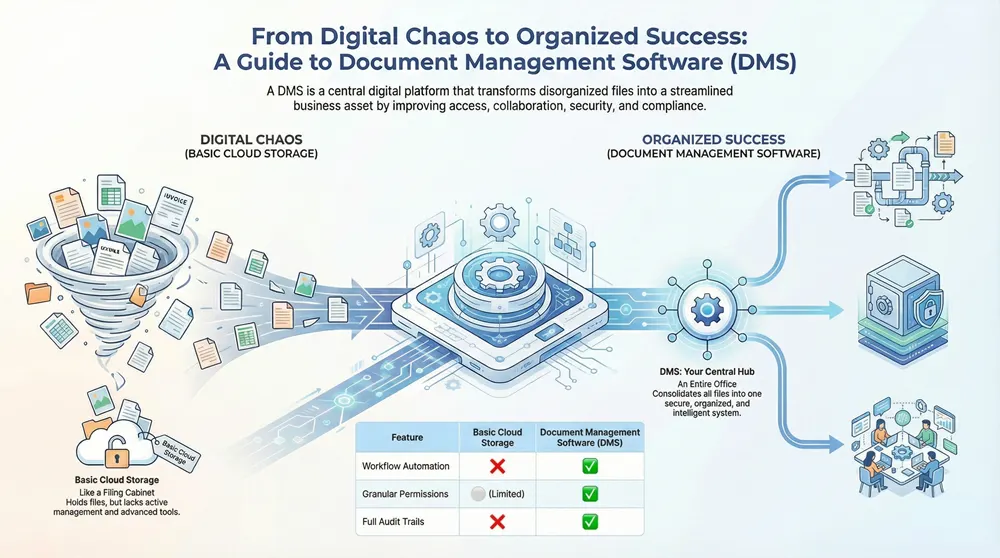
While services like Google Drive or Dropbox are useful for simple file sharing, they lack the comprehensive capabilities of a dedicated document management software. A DMS is fundamentally different:
- Workflow Automation: A DMS can automate complex business processes, such as routing an invoice for approval or sending contract review notifications. This level of automation is not available in basic cloud storage.
- Granular Permissions: A DMS offers precise control over who can view, edit, print, or delete a document, which is vital for security and compliance with sensitive information.
- Version Tracking: A DMS eliminates confusion over file versions by automatically tracking every change, including who made it and when. You can easily revert to previous versions, ensuring a complete document history.
- Audit Trails: For compliance and accountability, a DMS maintains a complete audit log of every action performed on every document—a critical feature for regulatory adherence.
In short, while cloud storage is a digital filing cabinet, a DMS is an entire organized office. To see how these advanced capabilities can improve your setup, learn more about our IT solutions.
The Business Case for a DMS
Investing in document management software is a strategic decision with a clear return on investment:
- Time Savings: A DMS drastically cuts search times with advanced search capabilities, freeing up employee time for more productive, revenue-generating activities.
- Reduced Human Error: By automating manual processes and enforcing consistent procedures, a DMS significantly reduces the risk of costly mistakes like misfiling or using outdated versions.
- Better Decision-Making: With organized, accessible, and accurate information at their fingertips, decision-makers can make faster, more informed choices.
- Business Continuity: A cloud-based DMS ensures your critical documents are securely backed up and retrievable after a disaster, minimizing downtime.
- Scalability: A well-chosen DMS scales with your business, accommodating more users and documents without compromising performance.
Core Features Every DMS Should Offer
A true document management software is more than a digital filing cabinet; it’s a dynamic system packed with features designed to transform how your business handles information. These core functionalities automate, secure, and streamline your critical data.
Document Capture and Indexing
The first step is getting documents into the system efficiently. A powerful DMS should offer:
- Scanning and OCR: Seamlessly integrate with scanners to digitize paper documents. With Optical Character Recognition (OCR), the system “reads” text within scanned images, making them fully searchable and editable.
- Automated Tagging and Indexing: Instead of manual data entry, the system uses AI and OCR to automatically extract key metadata like dates, client names, or project IDs. Content indexing ensures every word within every document is searchable.
Advanced Search and Retrieval
A key time-saver is turning “hunting for files” into “instant retrieval.” Look for:
- Full-Text Search: Find any word or phrase within any document, regardless of file type.
- Metadata Filtering: Quickly narrow down results based on criteria like creator, date modified, or department.
- Saved Searches: Create one-click access to frequently needed categories of information.
Version Control and Audit Trails
To manage collaboration and prevent confusion, a DMS provides:
- Document History: A complete record of every change made to a document, including who changed what and when.
- Check-in/Check-out: Prevents multiple users from making conflicting edits simultaneously.
- Rollback Capabilities: Easily revert to a previous version if a mistake is made.
- Complete Audit Log: A detailed record of who accessed a document, when, and what actions they took, which is crucial for accountability and compliance.
Workflow Automation
This feature turns static documents into dynamic assets that drive business processes.

- Automated Routing: Automatically send documents like invoices to the correct person or department for approval based on predefined rules.
- Notifications and Alerts: Keep everyone informed about document status, upcoming deadlines, or required actions.
- Business Process Automation: Apply automation to routine tasks like employee onboarding or contract management to reduce manual work and speed up operations.
Security and Access Control
A robust DMS provides multiple layers of security to protect sensitive information:
- Role-Based and User-Level Permissions: Assign access rights based on a user’s job role or set granular controls for individuals to determine who can view, edit, or share specific documents.
- File Encryption: Protects data both when stored (at rest) and when being accessed or shared (in transit).
- Data Loss Prevention (DLP): Advanced features help prevent sensitive information from leaving your system.
- Secure File Sharing: Share documents with options like password protection, expiry dates, and download restrictions.
How to Choose the Right Document Management Software
Choosing the right document management software is about finding a system that fits your unique needs, budget, and future goals. Focusing on a few critical factors can simplify this important decision.
Critical Factors for Selection
- Assess Business Needs: Before looking at software, identify the problems you need to solve. Are you drowning in paper, struggling with version control, or facing strict compliance rules? Knowing your pain points helps you prioritize essential features.
- Scalability for Growth: Your DMS should grow with your business. Choose a solution that can handle more users, documents, and new processes without performance issues.
- Deployment Model (Cloud vs. On-premise): A cloud-based DMS is hosted online, offering flexibility, remote access, and lower upfront costs. An on-premise DMS is installed on your servers, giving you total control but requiring your IT team to handle maintenance and updates.
- User-Friendliness: A powerful DMS is useless if your team finds it too complex. Look for an intuitive interface that is easy to learn and use, ensuring quick adoption.
- Integration Capabilities: Your DMS must work with your existing software, like CRM or ERP systems. Seamless integration prevents information silos and keeps your tech stack running smoothly.
Understanding Pricing Models and Costs
Understanding how DMS pricing works is crucial to avoid budget surprises. Common models include:
- Per-User/Per-Month Subscriptions: A recurring fee for each user, common for cloud-based systems.
- Tiered Feature Plans: Different packages (e.g., Basic, Premium) with more features at higher price points.
- One-Time License Fees: An upfront payment for the software, often for on-premise solutions, with separate fees for ongoing support.
Be sure to ask about potential hidden costs for services like implementation, training, support, customization, or data storage overages. A detailed quote is essential. A strong DMS works best with robust security practices; consider our managed cybersecurity services to improve your protection.
Overcoming Migration Challenges
Moving your existing documents to a new system can feel daunting, but it’s manageable with smart planning. The upfront effort pays off with a newly organized digital environment.
- Data Cleanup: Before migrating, declutter your current files. Removing old, duplicated, or useless documents speeds up the process and ensures your new DMS starts fresh.
- Phased Migration: Instead of moving everything at once, migrate in stages—for example, department by department. This allows your team to adapt gradually and makes troubleshooting easier.
- User Adoption and Training: Prioritize training to ensure your team uses the new system effectively. Provide clear guides, hands-on workshops, and identify internal “champions” to help colleagues.
- Minimize Downtime: Plan the migration during off-peak hours or a weekend to avoid disrupting daily operations.
- Leverage Vendor Support: Your DMS provider has expertise, specialized tools, and best practices to ensure a successful and stress-free transition.
The Future of Document Management: AI, Compliance, and Remote Work
The digital landscape is constantly shifting, and document management software is evolving with it. Key trends are making information management smarter, more secure, and more integrated than ever.

The Impact of AI and Emerging Technology
Artificial Intelligence (AI) is actively changing DMS capabilities.
- AI-Powered Classification: AI can automatically analyze a document’s content to assign relevant tags and categories, speeding up indexing and improving search accuracy.
- Automated Summarization and Analytics: AI can summarize long reports or contracts to provide key takeaways. Predictive analytics can learn work patterns to suggest relevant documents or workflows.
- Blockchain for Authenticity: Emerging technologies like blockchain can create tamper-proof, irrefutable audit trails for documents, adding a powerful layer of trust and security, especially for legal or sensitive files. You can learn more about this technology and its impact on document authenticity.
Supporting Remote and Distributed Teams
The rise of remote and hybrid work has made document management software more critical than ever.
- Single Source of Truth: A DMS ensures everyone, regardless of location, accesses the latest version of any document, eliminating confusion.
- Secure Remote Access: Teams can safely access documents from any device, maintaining productivity while working from home or traveling.
- Real-Time Collaboration: Modern DMS solutions allow multiple team members to edit the same document simultaneously, with changes appearing instantly.
- Mobile Accessibility: Dedicated mobile apps allow users to view, upload, and approve documents on the go, ensuring workflows continue without interruption.
Maintaining Regulatory Compliance
A DMS is an invaluable tool for navigating complex regulatory landscapes.
- Automated Record-Keeping: The system captures and organizes records required for compliance with minimal manual effort, reducing errors.
- Enforced Retention Policies: Automatically archive or delete documents according to predefined schedules, mitigating legal risks.
- Audit Preparation: A complete audit log, version control, and advanced search make it easy to pull up any document and its history for auditors. Many DMS solutions are designed to help comply with specific regulations like the Health Insurance Portability and Accountability Act (HIPAA).
Frequently Asked Questions about Document Management Software
What is the main difference between a DMS and cloud storage?
While cloud storage (like Google Drive or Dropbox) is great for basic file storage and sharing, a document management software (DMS) is a comprehensive business solution. A DMS offers advanced features that cloud storage lacks, including workflow automation, granular security controls, automatic version tracking, and detailed audit trails for compliance.
How does a DMS improve document security?
A document management software improves security with multiple layers of protection. It uses granular access controls to define who can view, edit, or share documents. All files are protected with full encryption, both in storage and during transfer. Finally, a complete audit trail logs every action, providing accountability and protecting against both external threats and internal misuse.
s it difficult to migrate to a new document management system?
Migrating to a new document management software can be straightforward with proper planning. The key to a smooth transition is preparation. This includes data cleanup (removing old or duplicate files before moving), phased migration (moving data in stages), and comprehensive user training. Leveraging the support and expertise of your DMS provider is also crucial to minimize downtime and ensure success.
Take Control of Your Digital Chaos
From digital chaos to organized efficiency is a strategic investment in your business’s future. The right document management software delivers measurable returns in productivity, security, and peace of mind by eliminating wasted time, reducing costly errors, and creating streamlined workflows.
By embracing a system that actively organizes, automates, and protects your critical information, you empower your team to focus on what they do best. Compliance becomes simpler, collaboration flows naturally, and security is strengthened without hindering productivity.
If your business is ready to build a more efficient and secure technological foundation, the experts at Kraft Business Systems can help. We’ll help you explore your options and implement the perfect solution that grows with your business.
Ready to turn your digital chaos into organized success? Learn more about our Document Management Systems and find how the right document management software can transform your operations.