
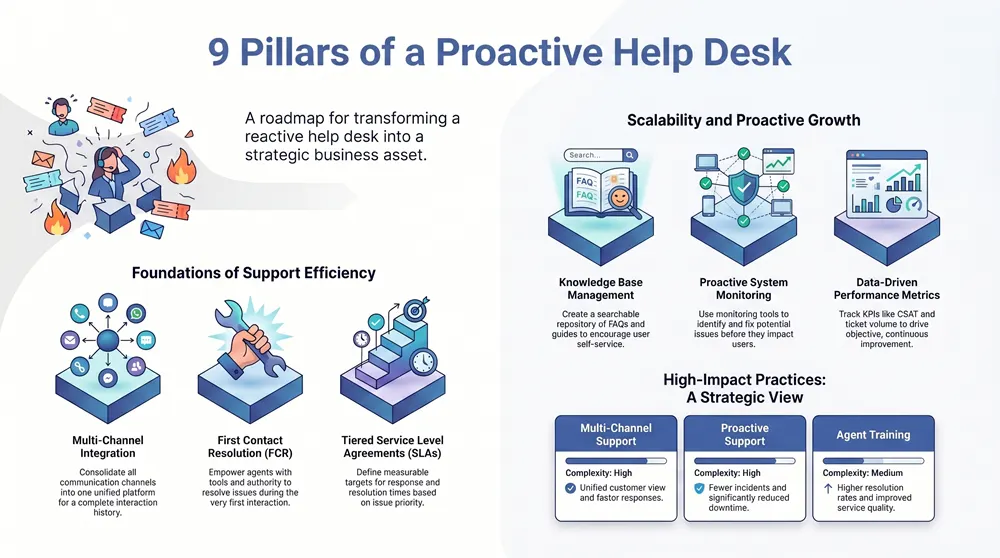
Efficient help desk operations are the backbone of a productive organization, directly influencing user satisfaction, operational uptime, and business continuity. Moving beyond simple ticket resolution requires a structured, strategic approach. A reactive help desk simply puts out fires; a proactive one prevents them, streamlines workflows, and becomes a genuine asset for business growth. This is especially true for small and mid-sized organizations where every resource must deliver maximum impact.
This guide outlines 10 foundational help desk best practices designed for immediate implementation. Each practice offers a clear roadmap for success, from establishing robust ticketing processes and Service Level Agreements (SLAs) to fostering powerful self-service options through comprehensive knowledge bases. We will explore how these principles can be adapted for specific sectors, including healthcare (HIPAA), manufacturing, education, and government, ensuring your support framework is not just effective, but also compliant and strategically aligned with your unique goals.
We will cover actionable strategies for multi-channel support, first contact resolution, agent training, and performance measurement. By focusing on these core areas, you can transform your support team from a cost center into a value-driver. For a comprehensive overview of how to achieve smarter, scalable support, explore the ultimate guide to Help Desk Solutions. The following sections provide the specific, detailed steps you need to elevate your support function, improve user experience, and drive organizational efficiency. Let’s dive into the practices that will make a tangible difference.
1. Multi-Channel Support Integration
One of the most impactful help desk best practices is to consolidate all user support interactions into a single, unified platform. This approach, known as multi-channel support integration, means that whether a user reaches out via email, a phone call, a live chat, or a social media message, the request is funneled into one centralized system. This eliminates fragmented conversations and ensures that support staff have a complete view of every user’s interaction history, regardless of the channel they used.
This method ensures consistent service quality and empowers users to seek help through their preferred communication method. For the help desk team, it translates into greater efficiency, as agents can manage all tickets from a single dashboard instead of toggling between multiple applications. For example, a healthcare provider can track a HIPAA-compliant email request and a subsequent phone call from the same user within one ticket, preserving context and accelerating resolution.
How to Implement Multi-Channel Support
Successfully integrating your support channels requires a strategic approach. Start by identifying the communication methods your users favor most-typically email and phone-and focus on integrating them first.
- Select a Unified Platform: Choose a help desk software solution that offers robust integrations. Platforms like Zendesk, Freshdesk, and Salesforce Service Cloud are designed to centralize various channels. For a deeper dive, explore the capabilities of different managed service provider help desk software solutions.
- Gradual Rollout: Begin with your two most popular channels. Once they are functioning smoothly, gradually add others like live chat or a self-service portal.
- Train Your Team: Ensure technicians are trained on the nuances of each channel. A chat conversation requires a different tone and response time than an email.
- Establish Channel-Specific SLAs: While maintaining overall consistency, you can set different Service Level Agreements (SLAs) for different channels. For instance, a live chat may have a 60-second response time target, while email might be two hours. This structured approach is a cornerstone of effective help desk best practices.
2. First Contact Resolution (FCR)
A core tenet of effective support is resolving a user’s issue during the first interaction, a metric and strategy known as First Contact Resolution (FCR). This help desk best practice focuses on empowering agents with the knowledge, authority, and tools to solve problems completely on the first call, email, or chat session without requiring escalation or multiple follow-ups. High FCR rates directly correlate with increased user satisfaction and reduced operational costs, as it eliminates the need for repeated contacts for the same issue.
This approach boosts efficiency and builds user confidence in the support team’s capabilities. For the help desk, it means fewer repetitive tickets and more time to address complex challenges. For example, a manufacturing firm can improve FCR by giving technicians remote access tools to fix a production line computer issue immediately, rather than scheduling an on-site visit. Similarly, a government agency can empower its help desk to reset passwords and grant access to specific systems on the first call, preventing delays in public service.
How to Improve First Contact Resolution
Boosting your FCR rate requires a commitment to agent empowerment and process refinement. Start by identifying the most common recurring issues that require escalation and build a strategy to address them at the initial support tier.
- Build a Comprehensive Knowledge Base: Create and maintain a searchable, internal knowledge base with detailed solutions, troubleshooting guides, and process documentation. This gives agents instant access to the information they need.
- Invest in Agent Training: Go beyond initial onboarding. Provide continuous education on new systems, common problems, and soft skills to equip agents to handle a wider variety of issues confidently.
- Empower Your Agents: Give front-line staff the authority to make decisions, such as issuing a replacement part or granting temporary access credentials, without needing managerial approval for routine matters.
- Measure FCR Accurately: Implement a consistent method for tracking FCR. A common approach is to ask users in a post-interaction survey, “Was your issue resolved in this first contact?” This direct feedback is a vital part of refining your help desk best practices.
3. Knowledge Base Management
A core component of modern support is empowering users to find answers independently. Effective knowledge base management involves creating and maintaining a centralized, searchable repository of information, including FAQs, troubleshooting guides, and step-by-step solutions. This practice directly reduces ticket volume by deflecting common inquiries, freeing up support staff to focus on more complex, high-impact issues. A well-curated knowledge base serves both end-users and help desk agents, ensuring consistent and accurate information is always accessible.
This approach not only improves efficiency but also enhances the user experience by providing instant answers without the wait time associated with submitting a ticket. For example, a K-12 school district can create articles on how to connect to classroom projectors or access online learning platforms, allowing teachers to resolve minor issues immediately. Similarly, a manufacturing firm can document standard procedures for operating specific machinery software, reducing production delays caused by simple user errors.
How to Implement Knowledge Base Management
Building a valuable knowledge base requires a systematic process focused on user needs and continuous improvement. Begin by analyzing your existing ticket data to identify the most common problems your users face.
- Choose the Right Platform: Select a system with robust search capabilities and easy content creation tools. Platforms like Confluence, Zendesk Guide, and Freshdesk Solutions are built for this purpose, often integrating directly with your ticketing system. For more options, consider exploring the features of various help desk tools and software.
- Create High-Value Content First: Use ticket data to identify frequently asked questions. Write articles that directly answer these queries, using clear, simple language.
- Optimize for Scannability: Structure articles with headings, bullet points, and bold text to make them easy to read. Incorporate screenshots and short videos for complex, multi-step processes.
- Establish a Review Cadence: Content can become outdated quickly. Implement a process to review and update articles quarterly or whenever a system or process changes. This commitment to maintenance is a critical aspect of help desk best practices.
4. Service Level Agreements (SLAs)
Establishing formal Service Level Agreements (SLAs) is a foundational help desk best practice that transforms support from a reactive function into a predictable, accountable service. An SLA is a documented commitment between the help desk and its users that defines specific, measurable targets for service delivery, such as response times and resolution times. This creates clear expectations for users and provides the support team with concrete goals to strive for, ensuring a consistent level of service quality.
This structured approach removes ambiguity and builds trust. For example, a manufacturing firm can establish an SLA where a production line-halting IT issue has a 15-minute response time, while a routine software installation request has a 24-hour resolution target. This prioritization ensures critical business operations receive the immediate attention they require, directly tying IT support efforts to business outcomes.
How to Implement Service Level Agreements
Effective SLAs are realistic, clearly communicated, and consistently monitored. They provide the framework for measuring performance and driving continuous improvement within your support operations.
- Create Tiered SLAs: Not all issues are equal. Develop different SLA targets based on the priority and impact of the ticket. A high-priority “system down” ticket should have a much shorter response and resolution time than a low-priority “how-to” question.
- Set Realistic Goals: Analyze your help desk’s historical performance data to set achievable targets. Build a small buffer (10-20%) into your goals to account for unexpected complexities or volume spikes without constantly breaching your commitments.
- Automate Monitoring and Escalations: Use your help desk software to automatically track time against SLA targets. Configure rules to escalate tickets or notify management when an SLA is in danger of being breached, allowing for proactive intervention.
- Communicate and Review Regularly: Make sure users are aware of the SLAs. Report on performance against these metrics weekly to the team and quarterly to stakeholders. This process, central to frameworks like ITIL, helps identify trends and areas for improvement. For a more detailed look at how SLAs fit into a broader strategy, explore this guide on IT service management frameworks.
5. Agent Training and Development Programs
Investing in your support team is one of the most fundamental help desk best practices, yet it is often overlooked. A robust agent training and development program is a continuous initiative designed to enhance technical proficiency, refine soft skills, and deepen product expertise. This commitment goes beyond a one-time orientation; it’s an ongoing process that empowers agents to handle complex issues confidently, adapt to new technologies, and deliver exceptional service consistently.
This approach transforms the help desk from a reactive cost center into a proactive value driver. When agents are well-trained, they resolve tickets faster and more accurately, which improves key metrics like First Call Resolution (FCR). For example, a K-12 school district can train its technicians on new educational software, enabling them to troubleshoot classroom technology issues effectively and minimize instructional downtime. This directly impacts user satisfaction, reduces employee turnover, and strengthens the overall service culture.
How to Implement Agent Training and Development
Creating an effective training program requires a structured and multi-faceted approach. It should cover everything from initial onboarding to long-term career growth, ensuring your team’s skills remain sharp and relevant.
- Implement a Structured Onboarding Program: Develop a comprehensive onboarding process that lasts 4-8 weeks. This should cover company culture, support tools, standard operating procedures, and hands-on technical training.
- Create Role-Specific Training Tracks: Tailor training paths to specific roles or tiers within the help desk. A Tier 1 agent needs strong customer service and basic troubleshooting skills, while a Tier 3 agent requires deep technical expertise in specific systems.
- Establish a Mentorship System: Pair new hires with seasoned agents who can provide guidance, answer questions, and offer real-world advice. This accelerates learning and helps build team cohesion.
- Foster Continuous Learning: Promote ongoing education through a mix of methods, including peer-to-peer knowledge sharing sessions, lunch-and-learns, and access to online courses. Encouraging certifications in areas like CompTIA or ITIL is a key component of effective help desk best practices.
6. Customer Satisfaction (CSAT) Measurement and Feedback
One of the most vital help desk best practices involves systematically collecting and analyzing user feedback to gauge satisfaction with support interactions. This process, known as Customer Satisfaction (CSAT) measurement, provides direct insight into your team’s performance and highlights areas for improvement. By actively soliciting feedback, you transform support from a reactive function into a proactive, user-centric operation that continuously refines its processes.
This methodology goes beyond just solving tickets; it focuses on the quality of the user’s experience. A structured feedback loop helps identify process gaps, training needs, and high-performing agents. For example, a K-12 school district can use CSAT surveys after each ticket resolution to understand if teachers feel their classroom technology issues are being handled effectively, ensuring that IT support directly contributes to a better learning environment.
How to Implement CSAT Measurement
Implementing an effective feedback system requires a simple, consistent, and actionable approach. The goal is to make providing feedback easy for the user and to use the data to drive meaningful change.
- Keep Surveys Brief: To maximize response rates, limit surveys to 1-3 essential questions. A common approach is to ask, “How satisfied were you with the support you received?” followed by an optional open-ended comment field.
- Time Your Requests: Send feedback requests immediately after a ticket is resolved. This ensures the interaction is fresh in the user’s mind, leading to more accurate and relevant feedback.
- Track and Share Results: Don’t let data sit idle. Use your help desk software to track CSAT trends over time, not just individual scores. Share these results-both positive and negative-with the entire team monthly to foster transparency and a culture of continuous improvement.
- Create Action Plans: When you identify areas with consistently low satisfaction scores, collaborate with your team to create a specific action plan. This demonstrates that you value user feedback and are committed to enhancing service quality, a core tenet of effective help desk best practices.
7. Ticket Prioritization and Routing
Establishing a systematic process for ticket prioritization and routing is fundamental to managing a high-volume help desk. This practice involves creating intelligent systems that categorize, prioritize, and automatically assign incoming support tickets to the most appropriate agent. This routing is based on defined criteria such as urgency, impact, required technical skills, and current agent workload, ensuring critical issues receive immediate attention and resources are allocated efficiently.
This strategic assignment prevents high-priority tickets from getting lost in the queue and stops less critical issues from consuming valuable resources. For a manufacturing firm, this means a production line system failure is instantly routed to a senior engineer, while a printer toner request is assigned to a junior technician. This structured approach is one of the most effective help desk best practices for minimizing downtime and optimizing team performance.
How to Implement Ticket Prioritization and Routing
Effective routing relies on a combination of clear rules and capable software. The goal is to automate the initial assignment process as much as possible while allowing for manual adjustments when needed.
- Define Priority Levels: Create a clear, documented matrix for priority levels (e.g., P1-Critical, P2-High, P3-Medium, P4-Low) based on business impact and urgency. This ensures consistency in how all team members classify incoming tickets.
- Map Agent Skills: Maintain a database of your support agents’ skills, certifications, and areas of expertise. Modern help desk platforms can use this data to route specialized tickets, such as HIPAA compliance queries in a healthcare setting, directly to a qualified expert.
- Utilize Automation Rules: Configure your help desk software to use automation for routing. Platforms like Freshdesk and Zendesk offer round-robin, skill-based, and workload-based routing. These rules ensure equitable distribution and fast assignment. You can find more details on how these systems operate within comprehensive IT service desk solutions.
- Monitor and Adjust: Regularly review routing effectiveness. Track metrics like time to first response, resolution time by priority level, and ticket reassignment rates. Use this data to fine-tune your routing rules and prevent bottlenecks from forming in specific queues.
8. Proactive Support and Issue Prevention
A truly effective help desk moves beyond simply reacting to problems; it actively prevents them. This forward-thinking approach, known as proactive support, involves monitoring systems to identify potential issues and resolving them before they impact users. Instead of waiting for a ticket to be submitted, the help desk anticipates needs, analyzes trends, and communicates preventative guidance to stop disruptions before they start.
This methodology shifts the support dynamic from a reactive fire-fighting model to a strategic, value-adding function. For example, a cloud service provider like AWS uses its Health Dashboard to notify customers about upcoming maintenance or potential service degradations, allowing them to prepare. Similarly, a manufacturing firm can use proactive alerts to warn floor managers about a network switch that is showing early signs of failure, preventing a costly production line stoppage.
How to Implement Proactive Support
Building a proactive support model requires a combination of the right tools, processes, and mindset. The goal is to get ahead of user-facing problems by leveraging data and automation.
- Establish System Monitoring: Deploy monitoring tools that provide real-time visibility into your critical infrastructure, including servers, networks, and key applications. Configure intelligent alerts to notify your team of anomalies or performance thresholds that indicate a potential problem.
- Analyze Patterns and Trends: Regularly review ticket data and system logs to identify recurring issues. If multiple users report the same minor software glitch, a proactive fix can be developed and deployed before it becomes a widespread complaint.
- Develop Proactive Communication: Create templates for common preventive notifications. When you identify a potential issue, you can quickly reach out to affected users with clear information and instructions. Always provide an opt-out for these communications to respect user preferences.
- Create Supporting Knowledge: Accompany proactive notifications with links to detailed knowledge base articles. This empowers users to understand the issue and any required actions, further reducing the inbound ticket volume. Implementing these proactive measures is one of the most impactful help desk best practices for improving user satisfaction and operational efficiency.
9. Documentation and Process Standardization
A core tenet of high-performing help desks is the creation and maintenance of standardized procedures. This practice involves documenting every key workflow, from ticket triage to incident resolution, ensuring every agent follows the same steps for similar issues. Standardized processes reduce errors, accelerate new-hire training, and create a consistent, reliable support experience for end-users. This systematic approach is a cornerstone of effective help desk best practices.
This method moves support operations from a reactive, ad-hoc model to a predictable, scalable one. For a manufacturing firm, a documented procedure for troubleshooting a CNC machine’s network connection ensures the issue is resolved the same way every time, minimizing production downtime. Likewise, a healthcare provider can create a standardized workflow for handling access requests to patient data, ensuring every step complies with HIPAA regulations and is fully auditable. This discipline builds institutional knowledge and prevents reliance on a few key individuals.
How to Implement Documentation and Standardization
Building a library of standardized processes requires a commitment to clarity and continuous improvement. Start by identifying the most common or critical support tasks and document them first to achieve the quickest impact.
- Adopt a Framework: Use established frameworks like ITIL (Information Technology Infrastructure Library) as a guide. You don’t need to adopt the entire framework, but its principles for service management provide a proven starting point.
- Centralize Your Documentation: Choose a single, accessible location for all documentation, such as a knowledge base, a company wiki (like Confluence), or a shared document repository. Ensure it has version control to track updates.
- Involve Your Team: Ask frontline agents to help create and refine the documentation. They have the most practical knowledge of what works and where processes break down. This also increases buy-in.
- Use Visuals and Checklists: Supplement text with flowcharts, screenshots, and simple checklists. These visual aids make complex processes easier to follow, especially under pressure. Review and update documentation quarterly or whenever a process changes.
10. Performance Metrics and Analytics
Establishing Key Performance Indicators (KPIs) and leveraging data analytics are foundational help desk best practices that transform operations from reactive to proactive. A metrics-driven approach means using hard data to measure efficiency, gauge user satisfaction, and identify areas for improvement. This allows managers to make informed decisions based on performance trends rather than intuition, ensuring the help desk consistently aligns with organizational goals.
This methodology provides clear, objective insights into both team and individual performance. For instance, a manufacturing firm can track “First Contact Resolution” (FCR) rates to see if technicians are effectively solving production line IT issues on the initial call, minimizing downtime. By analyzing ticket volume by category, a school district could identify a recurring problem with classroom smart boards and develop a permanent fix or targeted training, reducing future support requests.
How to Implement Performance Metrics and Analytics
A successful metrics program focuses on a balanced set of relevant indicators without overwhelming your team. It’s about tracking what truly matters to service quality and operational health.
- Define a Balanced Scorecard: Select 8-12 key metrics that provide a holistic view. Balance efficiency metrics like Average Handle Time with quality metrics like Customer Satisfaction (CSAT). Other crucial KPIs include Ticket Volume, FCR, and Agent Utilization.
- Set Realistic Baselines: Use historical data to establish achievable targets. If your current average resolution time is eight hours, setting a goal of one hour is unrealistic; aim for a gradual, measurable improvement to six hours first.
- Utilize Analytics Tools: Leverage the built-in reporting features of your help desk software, such as Zendesk Insights, or integrate with powerful analytics platforms like Tableau or Salesforce Einstein Analytics. These tools help visualize trends and simplify data interpretation.
- Establish a Review Cadence: Discuss metrics in weekly team huddles to address immediate issues and in monthly reviews to analyze long-term trends. Use this data to identify coaching opportunities and celebrate successes, reinforcing a culture of continuous improvement.
10-Point Help Desk Best Practices Comparison
| Practice/Tool | Implementation Complexity | Resource Requirements | Expected Outcomes | Ideal Use Cases | Key Advantages |
|---|---|---|---|---|---|
| Multi-Channel Support Integration | High — complex integrations and APIs | High — platform licenses, infra, integration work, training | Unified customer view; faster responses; consistent service | Organizations serving customers across email, chat, phone, social | Consolidated tickets; cross-channel continuity; cross-channel analytics |
| First Contact Resolution (FCR) | Medium — process changes and enablement | Medium‑High — training, KB, agent authority | Fewer repeat interactions; lower support costs; higher CSAT | High-volume contact centers aiming to reduce repeat contacts | Reduces cost and effort; increases customer loyalty and agent satisfaction |
| Knowledge Base Management | Low‑Medium — content systems and structure | Low‑Medium — content creators, CMS, search tools | Reduced ticket volume; increased self‑service; consistent answers | Products with repeat questions or self-service goals | 24/7 self‑service; scalable knowledge; supports onboarding |
| Service Level Agreements (SLAs) | Medium — policy definition and tooling | Medium‑High — monitoring, reporting, staffing to meet targets | Clear expectations; measurable performance; improved accountability | B2B contracts, enterprise services, regulated environments | Transparent commitments; performance targets; customer trust |
| Agent Training and Development Programs | Medium — curriculum design and rollout | High — trainers, time, ongoing learning budget | Higher FCR, lower turnover, improved service quality | Teams with complex products or high churn | Builds skills, retention, and consistent service quality |
| Customer Satisfaction (CSAT) Measurement and Feedback | Low‑Medium — survey setup and analysis | Low‑Medium — survey tools, analytics, follow-up processes | Direct insight into customer experience; targeted improvements | Continuous improvement programs and agent performance tracking | Actionable customer feedback; identifies improvement areas |
| Ticket Prioritization and Routing | Medium‑High — rules and routing algorithms | Medium — automation config, skill mapping, monitoring | Faster handling of critical issues; better agent utilization | High-volume or skill-diverse support environments | Ensures urgent issues handled first; improves match to expertise |
| Proactive Support and Issue Prevention | High — monitoring, analytics, predictive models | High — monitoring tools, data analysts, outreach resources | Fewer incidents; reduced downtime; higher customer satisfaction | SaaS, platforms, and services where uptime/experience is critical | Prevents issues before customers notice; lowers long-term support cost |
| Documentation and Process Standardization | Medium — process mapping and documentation | Medium — time to create and maintain SOPs | Consistent service delivery; faster onboarding; fewer errors | Scaling teams, regulated industries, complex workflows | Repeatable quality; easier training; supports compliance |
| Performance Metrics and Analytics | Medium — KPI selection and dashboarding | Medium‑High — analytics tools, data collection, analysts | Data-driven improvements; visibility into trends and bottlenecks | Organizations focused on continuous improvement and benchmarking | Enables objective decision-making; identifies coaching and process gaps |
Implementing Your Help Desk Strategy

Mastering the principles of an effective help desk is not about a single, massive overhaul. It’s about a strategic, incremental journey toward operational excellence. The path from a reactive, chaotic support environment to a proactive, value-generating asset is paved with the consistent application of proven help desk best practices. By deconstructing this complex goal into manageable components, any organization, regardless of size or industry, can achieve a remarkable transformation.
The ten practices detailed in this guide serve as a comprehensive blueprint. From establishing clear Service Level Agreements (SLAs) that manage user expectations to implementing robust agent training programs that foster expertise and confidence, each element plays a vital role. You have seen how integrating multi-channel support meets users where they are, while a focus on First Contact Resolution (FCR) directly enhances productivity and reduces frustration across your entire organization.
From Theory to Tangible Results
The real value of these concepts emerges when they are put into action. A well-curated knowledge base, for example, does more than just deflect tickets; it empowers your team with self-service capabilities, freeing up your skilled technicians to focus on complex, high-impact incidents. Similarly, disciplined ticket prioritization and routing ensure that critical business functions, whether a production line in a manufacturing facility or a patient records system in a healthcare clinic, receive immediate attention.
Think of these practices as interconnected gears in a machine:
- Documentation and standardization are the lubricants that ensure every gear turns smoothly and predictably.
- Performance metrics and analytics act as the dashboard, giving you the real-time data needed to make informed adjustments.
- Proactive support is the preventative maintenance that stops problems before they start, minimizing downtime and maximizing operational uptime.
The ultimate goal is to shift your help desk’s role. It should evolve from a team that simply fixes broken things to a strategic partner that enhances business operations, strengthens security, and contributes directly to your bottom line. This evolution is the core benefit of diligently implementing these help desk best practices.
Your Actionable Next Steps
Embarking on this journey can feel daunting, but progress begins with a single, focused step. Don’t attempt to implement all ten practices at once. Instead, identify your organization’s most significant pain point and start there.
- Assess Your Current State: Where are you struggling the most? Is it inconsistent response times? A high volume of repeat, simple questions? Use customer satisfaction (CSAT) feedback and ticket data to pinpoint the one or two areas that will deliver the biggest initial impact.
- Prioritize an Initiative: If ticket chaos is the primary issue, begin by implementing a formal ticket prioritization and routing system. If your team is constantly answering the same questions, focus your efforts on building the first version of your knowledge base.
- Define Success and Measure: For your chosen initiative, set a clear, measurable goal. For example, “Reduce ticket response times for high-priority incidents by 25% within 90 days” or “Create 15 knowledge base articles for our top 5 most common issues by the end of the quarter.”
- Iterate and Expand: Once you achieve success in one area, use that momentum to tackle the next. Each small win builds confidence and demonstrates the value of this structured approach, making it easier to gain buy-in for future improvements.
By adopting this methodical approach, you create a sustainable cycle of continuous improvement. You are not just solving today’s problems; you are building a resilient, efficient, and user-centric support framework that will scale with your organization and adapt to future challenges. This strategic investment in your help desk is an investment in the productivity, security, and success of your entire business.
Ready to accelerate your journey toward a world-class help desk without the internal burden? The experts at Kraft Business Systems specialize in implementing these very best practices for Michigan organizations across healthcare, manufacturing, education, and government. We provide the managed IT services and strategic guidance to transform your support operations into a powerful business asset. Learn more about how we can help at Kraft Business Systems.