


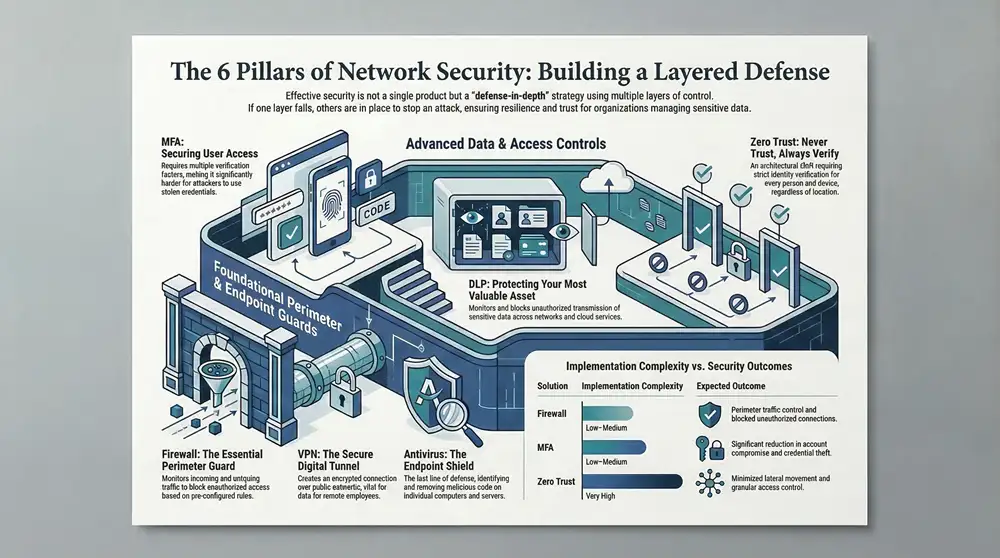
Protecting your digital assets is non-negotiable for any Michigan-based organization. From healthcare providers in Traverse City managing sensitive HIPAA data to manufacturers in Detroit safeguarding proprietary designs, a robust security posture is the foundation of resilience and trust. Understanding the various types of network security is the first step toward building a layered defense that effectively mitigates risk. This strategy, often called “defense-in-depth,” involves using multiple security controls to protect information, ensuring that if one layer fails, another is in place to stop an attack.
This guide provides a comprehensive roundup of ten essential security controls, breaking down how each one works, its benefits, and practical implementation advice tailored for small and mid-sized businesses across the state. While this article focuses specifically on network protections, a holistic security strategy incorporates more than just digital defenses. For a broader understanding of overall business security, including both digital and physical components, consider exploring a guide to essential security solutions for businesses.
Here, we will dive deep into specific network tools, from foundational firewalls and access controls to advanced concepts like network segmentation and Zero Trust architecture. You will gain actionable insights into how to select the right tools to protect your operations and when to partner with a managed services provider like Kraft Business Systems to ensure your defenses are expertly managed, monitored, and ready for any threat. This practical approach will equip you to make informed decisions and build a more secure environment for your employees, customers, and data.
1. Firewall: The Essential Perimeter Guard
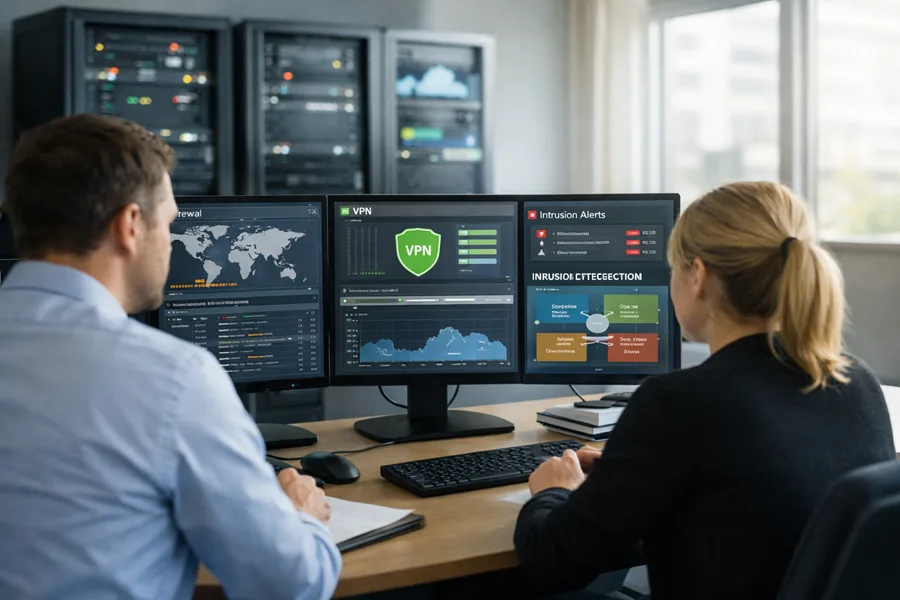
A firewall is a core network security system that monitors and controls all incoming and outgoing network traffic. It operates based on a set of pre-configured security rules, establishing a barrier between your trusted internal network and untrusted external networks like the internet. This function makes it a fundamental first line of defense against unauthorized access and a wide array of cyber threats.
How a Firewall Works
At its core, a firewall inspects data packets attempting to cross the network perimeter. Each packet is analyzed against the established rule set, and the firewall makes a simple decision: allow or block. Modern Next-Generation Firewalls (NGFWs) provide more advanced capabilities, including deep packet inspection, intrusion prevention, and application-level awareness, offering a more granular level of control.
For a Michigan-based healthcare provider, this means the firewall can be configured to block access from known malicious IP addresses while allowing secure, encrypted traffic from a trusted satellite clinic. This control is a foundational requirement for protecting sensitive patient data and achieving HIPAA compliance.
Implementation and Best Practices
Effectively deploying a firewall is crucial for its success as one of the essential types of network security.
- Rule of Least Privilege: Start by blocking all traffic and only permit specific, necessary connections. For example, a manufacturing firm in Grand Rapids should only allow traffic on ports required for its specific operational technology (OT) and business applications, not all ports.
- Layered Defense: Combine a hardware firewall at the network edge with software firewalls on individual endpoints (like servers and employee laptops) for comprehensive protection.
- Regular Audits: Schedule quarterly reviews of firewall rules. Remove outdated or unnecessary rules that could create security gaps.
- Firmware Updates: Always keep your firewall’s firmware updated. Vendors like Cisco, Fortinet, and Palo Alto Networks regularly release patches to fix vulnerabilities.
Key Insight: A “set-it-and-forget-it” approach to firewalls is a significant security risk. Active management and monitoring are non-negotiable for maintaining a strong defense.
Engaging a managed service provider like Kraft Business Systems ensures your firewall is not only configured correctly but also monitored 24/7. This constant oversight is critical for detecting and responding to anomalies or attack attempts that occur outside of standard business hours, providing peace of mind and robust protection.
2. Intrusion Detection and Prevention Systems (IDS/IPS): The Vigilant Sentinels
Intrusion Detection and Prevention Systems (IDS/IPS) are security solutions that act like a surveillance system for your network, actively monitoring traffic for malicious activity and policy violations. An IDS passively detects potential threats and generates an alert, while an IPS takes an active role by not only detecting but also blocking the threat in real-time. This makes IDS/IPS a critical layer of defense that operates inside the perimeter established by a firewall.
How an IDS/IPS Works
These systems analyze network traffic using two primary methods: signature-based detection, which identifies known threats by matching them against a database of attack patterns, and anomaly-based detection, which looks for unusual traffic patterns that deviate from a pre-established baseline of normal activity. When a threat is identified, the system takes action.
For a K-12 school district in Michigan, an IPS can automatically block a student’s attempt to use a known exploit to bypass web filters. It can also alert administrators to unusual data transfers from a server holding student records, a potential sign of a data breach, fulfilling a key requirement for protecting sensitive information.
Implementation and Best Practices
Deploying an IDS/IPS effectively is a key step in building a robust security posture as one of the essential types of network security.
- Strategic Placement: Position IPS sensors at critical network chokepoints, such as between the firewall and the internal network, to ensure all relevant traffic is inspected.
- Tune for Accuracy: Diligently tune detection rules to minimize “false positives” (legitimate traffic flagged as malicious). This prevents business disruptions and reduces alert fatigue for your IT team.
- Use Threat Intelligence: Integrate up-to-date threat intelligence feeds. This keeps your signature database current with the latest malware and attack techniques.
- Combine Detection Methods: Utilize both signature-based and anomaly-based detection. This approach allows you to catch well-known threats while also identifying new, zero-day attacks.
Key Insight: An IDS/IPS is not a passive tool. It requires continuous tuning and log analysis to be effective; otherwise, you risk being overwhelmed by false alerts or missing genuine threats.
Partnering with a managed service provider like Kraft Business Systems ensures your IDS/IPS is professionally configured, tuned, and monitored. This expert oversight is vital for interpreting complex logs, responding to credible threats, and continuously adapting the system’s rules to protect against emerging cyberattacks, safeguarding your critical business operations.
3. Virtual Private Network (VPN): The Secure Digital Tunnel
A Virtual Private Network (VPN) creates an encrypted, private connection over a public network, such as the internet. It acts like a secure tunnel, protecting data from being intercepted or viewed by unauthorized parties as it travels between a user’s device and the company network. This function is vital for businesses with remote employees or multiple office locations, ensuring that sensitive information remains confidential and secure, regardless of the user’s physical location.
How a VPN Works
A VPN works by establishing a secure connection protocol, encrypting all data packets sent from the user’s device, and routing them through a VPN server before they reach their final destination on the internet or private network. This process authenticates the user and masks their IP address, making their online activities private and secure. The encryption renders the data unreadable to anyone who might intercept it.
For a law firm in Detroit, this allows an attorney to securely access confidential client files from a public courthouse Wi-Fi network. The VPN ensures that all transmitted data is encrypted, meeting professional conduct requirements and protecting client-attorney privilege from potential eavesdroppers on the unsecured network.
Implementation and Best Practices
Deploying a VPN correctly is a critical step in securing remote access, making it one of the most important types of network security for a modern workforce.
- Implement Multi-Factor Authentication (MFA): Require a second form of verification in addition to a password for all VPN logins. This drastically reduces the risk of unauthorized access from compromised credentials.
- Use Strong Encryption Protocols: Configure your VPN to use modern, secure protocols like OpenVPN or WireGuard. Avoid older, vulnerable protocols like PPTP.
- Monitor VPN Connections: Actively monitor VPN logs for unusual activity, such as logins from unexpected geographic locations or at odd hours, which could indicate a compromised account.
- Split-Tunneling with Caution: If you use split-tunneling (allowing some traffic to bypass the VPN), ensure rules are strictly defined to prevent sensitive corporate data from being exposed to the open internet.
Key Insight: A VPN is no longer just a tool for privacy enthusiasts; it is a foundational component for enabling secure remote work and protecting data in transit.
Managing VPN access, monitoring connections, and ensuring configurations are secure can be complex. Partnering with Kraft Business Systems provides expert management, ensuring your VPN is deployed according to best practices, integrated with MFA, and monitored 24/7. This proactive oversight is essential for maintaining secure access for your team while defending against potential threats.
4. Web Application Firewall (WAF): The Application Layer Shield
A Web Application Firewall (WAF) is a specialized security system designed to protect web applications by monitoring, filtering, and blocking malicious HTTP/HTTPS traffic. Unlike a traditional firewall that guards the perimeter of a network, a WAF operates at the application layer (Layer 7) of the OSI model. This focus allows it to defend against specific web-based attacks that a standard firewall might miss, making it a critical tool for any organization that relies on web applications.
How a WAF Works
A WAF sits in front of your web application, acting as an intermediary between the user and the server. It inspects every request and response for patterns that match known attack vectors, such as SQL injection, cross-site scripting (XSS), and improper file inclusion. It uses a combination of rule-based logic, signatures, and sometimes machine learning to distinguish between legitimate and malicious traffic, blocking threats before they can reach and exploit the application code.
For a K-12 school district in Michigan with a public-facing student portal, a WAF is essential. It can prevent attackers from using the portal’s login form to attempt SQL injection attacks or from exploiting a vulnerability to gain access to sensitive student information, thereby helping to protect data and maintain regulatory compliance.
Implementation and Best Practices
Deploying a WAF correctly is key to its effectiveness as one of the most important types of network security for online assets.
- Initial Learning Mode: Deploy the WAF in a non-blocking “learning mode” first. This allows the system to analyze normal traffic patterns and build a baseline, minimizing false positives when you switch to active blocking.
- Use Core Rule Sets: Start with a baseline like the OWASP ModSecurity Core Rule Set. This provides a strong foundation of protection against the most common web application vulnerabilities.
- Bot Detection: Implement bot detection and mitigation features. This helps block malicious automated traffic, such as credential stuffing bots and vulnerability scanners, from ever reaching your application.
- Integrate and Monitor: Connect your WAF logs to a Security Information and Event Management (SIEM) system. This provides a holistic view of threats and helps correlate web-based attacks with other network events.
Key Insight: A WAF is not a substitute for secure coding practices, but it serves as a powerful and necessary protective layer that can block exploits against both known and unknown application vulnerabilities.
For organizations that lack in-house security expertise, managing a WAF’s complex rule sets can be daunting. Engaging Kraft Business Systems for managed security services ensures your WAF is configured, tuned, and monitored by experts. This continuous management adapts to emerging threats and application changes, providing robust protection for your critical web-facing systems.
5. Antivirus and Anti-Malware Software: The Endpoint Shield
Antivirus and anti-malware software is a foundational security measure designed to protect individual computers, servers, and other endpoints from malicious code. This software identifies, blocks, and removes various threats, including viruses, worms, trojans, ransomware, and spyware. It acts as a critical last line of defense, catching threats that may bypass perimeter security controls.
How Antivirus and Anti-Malware Works
These tools operate by continuously scanning files and programs as they are accessed or executed. They use several detection methods: signature-based detection (matching files to a database of known malware), heuristic analysis (identifying suspicious characteristics of new, unknown threats), and behavioral monitoring (watching for unusual program actions). When a threat is detected, the software quarantines or removes the malicious file to prevent it from causing damage.
For a K-12 school district in Oakland County, this means the software can prevent a student from accidentally running a malware-laden file downloaded from the internet on a school computer. This immediate detection and neutralization protects the single device and prevents the threat from spreading across the school’s network.
Implementation and Best Practices
Deploying endpoint protection is a critical step in a layered security strategy, and it is a fundamental element of the different types of network security.
- Daily Definition Updates: Ensure that all antivirus and anti-malware programs are set to update their threat definition databases automatically at least once a day.
- Scheduled and Real-Time Scanning: Enable real-time scanning for continuous protection while scheduling comprehensive full-system scans during off-hours, like overnight, to minimize disruption.
- User Education: Train employees to recognize phishing emails and suspicious downloads. An informed user is less likely to accidentally override security warnings and introduce malware.
- Centralized Management: Use a centralized management console to deploy, monitor, and update endpoint protection across all devices in your organization, ensuring consistent coverage.
Key Insight: Relying solely on a free or consumer-grade antivirus solution for a business is inadequate. Professional-grade endpoint protection offers centralized management, advanced threat detection, and detailed reporting essential for organizational security.
Properly managing endpoint security across an entire organization can be complex. Kraft Business Systems provides managed endpoint detection and response (EDR) services, ensuring that your software is always up-to-date, alerts are monitored 24/7, and any threats are remediated swiftly by security experts.
6. Network Access Control (NAC): The Digital Gatekeeper
Network Access Control (NAC) is a security approach that restricts unauthorized users and devices from gaining access to corporate or private networks. It acts as a digital gatekeeper, enforcing security policies on any device attempting to connect. NAC solutions ensure that only compliant and trusted endpoints can access network resources, significantly reducing the risk of security breaches originating from compromised or rogue devices.
How Network Access Control Works
A NAC system authenticates users and scans their devices before granting network access. It checks the device’s security posture, verifying factors like up-to-date antivirus software, the latest operating system patches, and proper firewall configuration. If a device fails this compliance check, NAC can either block access entirely or place it in a quarantined, restricted network where it can be remediated.
For a K-12 school district in Oakland County, this means a student’s personal laptop attempting to connect to the Wi-Fi can be automatically scanned. If it lacks required security updates, the NAC system can block it from the main network while providing instructions on how to become compliant, protecting the entire district from potential malware.
Implementation and Best Practices
Deploying NAC is a powerful step in securing your network, and it is a critical component among the various types of network security.
- Define Clear Policies: Before deployment, establish strict compliance policies. What are the minimum OS patch levels and antivirus definitions required for devices to connect?
- Phased Rollout: Begin with a pilot program in a single department or for a specific user group. This allows you to fine-tune policies and remediation workflows before a full-scale deployment.
- Automate Remediation: Create automated workflows to guide users of non-compliant devices. This can include directing them to a self-service portal with links to download necessary software or updates.
- Integrate with Other Systems: Connect your NAC solution (like Cisco ISE or FortiNAC) with your identity management systems and Mobile Device Management (MDM) for a unified view of users and their devices.
Key Insight: NAC is not just about blocking devices; it’s about gaining visibility and enforcing security hygiene across every single endpoint that touches your network, including IoT devices.
Managing a NAC system requires continuous policy refinement and monitoring. Partnering with Kraft Business Systems provides the expertise to not only deploy a solution tailored to your organization’s needs but also to manage the ongoing policy administration and log analysis, ensuring your network’s entry points are always secure.
7. Data Loss Prevention (DLP): Protecting Your Most Valuable Asset
Data Loss Prevention (DLP) is a strategic approach to network security that focuses on ensuring sensitive data is not lost, misused, or accessed by unauthorized users. DLP solutions monitor, detect, and block the unauthorized transmission of confidential information across endpoints, networks, and cloud services. This makes DLP a critical tool for protecting intellectual property and achieving compliance with data privacy regulations.
How Data Loss Prevention Works
DLP systems function by identifying sensitive content based on predefined policies. These policies can use regular expressions (like finding social security or credit card numbers), keyword matching, or file fingerprinting to locate confidential data. When a user attempts to send this data via email, upload it to a cloud drive, or copy it to a USB stick, the DLP system intervenes based on its rules, either blocking the action, encrypting the data, or alerting an administrator.
For a local Michigan government agency, a DLP policy could automatically prevent an employee from accidentally emailing a spreadsheet containing personally identifiable information (PII) to an external recipient. This proactive measure is a key component in preventing data breaches and maintaining public trust.
Implementation and Best Practices
Deploying DLP is a significant step in maturing your security posture and is one of the most important types of network security for data-centric organizations.
- Classify Your Data: Before implementation, identify and classify your critical data. A law firm in Detroit must first define what constitutes confidential client case files versus general correspondence.
- Start in Monitor-Only Mode: Begin by deploying DLP in a non-blocking, monitoring mode to understand how sensitive data flows through your organization without disrupting workflows.
- Create Granular Policies: Develop policies based on user roles. The finance department needs different data access rules than the marketing team.
- Refine and Review: Regularly review DLP alerts to tune policies, reduce false positives, and adapt to changing business needs.
Key Insight: Technology alone cannot prevent data loss. DLP is most effective when combined with robust user training and clear, enforceable data handling policies.
Managing DLP policies and alerts requires dedicated expertise. Engaging a managed service provider like Kraft Business Systems ensures your DLP system is not just installed but is actively managed. We can help you define data policies, monitor for violations 24/7, and integrate DLP alerts into a comprehensive incident response plan, safeguarding your most critical information around the clock.
8. Multi-Factor Authentication (MFA): Securing User Access
Multi-Factor Authentication (MFA) is a critical security layer that requires users to provide two or more verification factors to gain access to a resource such as an application, online account, or VPN. By combining different types of credentials, MFA creates a layered defense, making it significantly more difficult for an unauthorized person to access a network, even if they have stolen a user’s password.
How MFA Works
MFA strengthens access security by requiring two or more categories of authentication: something you know (a password or PIN), something you have (a smartphone with an authenticator app like Google Authenticator or a physical YubiKey), and something you are (a fingerprint or facial scan). When a user logs in, they first enter their password and are then prompted to provide the second factor, like a one-time code from their phone app, to complete the login.
For a K-12 school district in Michigan, implementing MFA for teacher and staff access to student information systems is a non-negotiable step. It ensures that even a compromised password doesn’t lead to a data breach, protecting sensitive student records and helping to meet FERPA compliance requirements.
Implementation and Best Practices
Deploying MFA correctly is essential for it to be an effective control in your lineup of types of network security.
- Prioritize Privileged Accounts: Immediately enforce MFA for all administrative and executive accounts that have elevated access to critical systems and data.
- Use Authenticator Apps: Whenever possible, use app-based authenticators (like Duo or Microsoft Authenticator) over SMS-based codes, which are more vulnerable to interception. For more information, learn about the best practices for Multi-Factor Authentication in Grand Rapids.
- Hardware for High-Risk Users: For users with access to highly sensitive data, such as financial controllers or system administrators, deploy phishing-resistant hardware keys like YubiKey.
- User Training and Support: Provide clear instructions and support during the MFA rollout. A smooth enrollment process encourages user adoption and reduces friction.
Key Insight: A password alone is no longer a sufficient defense. MFA is one of the most effective and affordable ways to prevent the vast majority of account takeover attacks.
Partnering with a managed service provider like Kraft Business Systems simplifies the deployment and management of MFA across your organization. We can help you choose the right MFA solution, integrate it with your existing applications, and provide ongoing support to your users, ensuring this critical security measure is adopted successfully.
9. Secure Email Gateway: Protecting the #1 Threat Vector
An email gateway is a dedicated security solution, either an on-premise appliance or a cloud service, that filters all incoming and outgoing email traffic. It acts as a specialized checkpoint, scrutinizing every message for malicious content like spam, phishing attempts, and malware before it can reach an employee’s inbox or leave the organization. This targeted defense is critical, as email remains the most common entry point for cyberattacks.
How a Secure Email Gateway Works
At its core, a secure email gateway inspects emails against a robust set of security policies and threat intelligence feeds. It uses multiple layers of analysis, including reputation checks of sender domains, content scanning for malicious links, and sandboxing to safely detonate suspicious attachments in an isolated environment. Advanced gateways also prevent data loss by scanning outbound emails for sensitive information.
For a K-12 school district in Oakland County, this means the gateway can automatically block a phishing email impersonating the superintendent and quarantine a student’s outgoing email containing personally identifiable information (PII), preventing a potential data breach and ensuring CIPA compliance.
Implementation and Best Practices
Deploying a secure email gateway is a vital step in strengthening your overall security posture and is one of the most impactful types of network security.
- Enable Authentication: Configure and enforce email authentication protocols like SPF, DKIM, and DMARC to prevent domain spoofing and validate legitimate senders.
- Layered Detection: Combine threat intelligence feeds with sandboxing and advanced phishing detection to catch sophisticated and zero-day threats that traditional filters might miss.
- User Training: Integrate the gateway with regular phishing simulation campaigns. Use the data to provide targeted training to employees who are more susceptible to clicking malicious links.
- Log Monitoring: Regularly review gateway logs to identify trends, policy violations, and targeted attack campaigns, and integrate these logs with a SIEM for broader threat correlation.
Key Insight: Relying solely on the built-in security of a cloud email provider like Microsoft 365 or Google Workspace is insufficient. A dedicated secure email gateway provides a necessary, more advanced layer of defense.
Partnering with a managed service provider like Kraft Business Systems ensures your email gateway is not just implemented but expertly configured and continuously fine-tuned. We manage whitelists and blacklists, analyze threat reports, and integrate the system into your broader security strategy, transforming email from your biggest vulnerability into a well-defended asset.
10. Network Segmentation and Zero Trust Architecture
Network segmentation is the practice of dividing a network into smaller, isolated sub-networks or segments. This architectural approach contains threats and limits an attacker’s ability to move laterally across your infrastructure. Zero Trust Architecture (ZTA) builds upon this by adopting a “never trust, always verify” mindset, requiring strict identity verification for every person and device trying to access resources on a private network, regardless of their location.
How Network Segmentation and Zero Trust Work
These concepts work together to create a more resilient and secure environment. Segmentation creates the “moats” and “walls” within your network, while Zero Trust acts as the vigilant guard at every gate, demanding credentials from everyone. Even if a threat breaches one segment, it is contained and cannot easily spread to critical areas like financial databases or protected health information (PHI) servers.
For a Michigan state government agency, this means an employee logging in from a state-owned device inside the office is subject to the same rigorous multi-factor authentication and device health checks as a remote contractor. This approach drastically reduces the attack surface by eliminating the outdated concept of a trusted internal network, a crucial step for protecting sensitive constituent data.
Implementation and Best Practices
A successful rollout of these advanced security models requires careful planning and is a key component among the different types of network security.
- Start with Critical Assets: Begin by identifying your most sensitive data and systems. Build your first secure segments around these “crown jewels.”
- Map Network Flows: Before creating segments, you must understand how data and applications communicate. Use tools to map all traffic flows to avoid disrupting critical business operations.
- Implement Microsegmentation: For granular control, especially in cloud or virtualized environments, use microsegmentation to isolate individual workloads or applications from each other.
- Continuous Monitoring: Deploy tools to continuously monitor all traffic, both within and between segments, to detect anomalous behavior that could indicate a breach.
Key Insight: Zero Trust is not a single product but a strategic security model. It represents a fundamental shift from protecting the perimeter to protecting individual resources and data.
Adopting a Zero Trust framework can be a complex undertaking. A managed service provider like Kraft Business Systems can guide your organization through the process, from initial assessment and network mapping to policy implementation and ongoing monitoring. This expert partnership ensures your network architecture aligns with the best practices for modern security and regulatory compliance.
10 Network Security Types Compared
| Solution | Implementation complexity | Resource requirements | Expected outcomes | Ideal use cases | Key advantages |
|---|---|---|---|---|---|
| Firewall | Low–Medium — rule setup and maintenance | Moderate — hardware/software and admin time | Perimeter traffic control; blocks unauthorized connections | Perimeter protection for small–medium networks, basic segmentation | Cost‑effective first line of defense; logging and NAT |
| IDS/IPS | Medium–High — tuning and placement required | High — compute, signature feeds, skilled staff | Real‑time detection and (with IPS) automatic blocking | Networks needing active intrusion detection/prevention | Behavioral and signature detection; reduces response time |
| Virtual Private Network (VPN) | Medium — key management and config | Low–Moderate — servers/clients, certificates/licenses | Encrypted remote access and confidentiality of traffic | Remote workers, site‑to‑site secure links, dispersed teams | Strong encryption, wide compatibility, protects data in transit |
| Web Application Firewall (WAF) | Medium — application‑layer rules and tuning | Moderate — appliance/cloud, threat feeds, monitoring | Blocks web attacks (SQLi, XSS); protects APIs and sites | Public web applications and APIs exposed to the Internet | OWASP‑focused protection without code changes; bot mitigation |
| Antivirus / Anti‑Malware | Low — straightforward endpoint deployment | Low–Moderate — endpoint resources and update services | Detects and removes known malware; baseline endpoint security | All endpoints in organizations and individual users | Essential baseline protection; easy to deploy and manage |
| Network Access Control (NAC) | High — policy design and integration complexity | High — agents, servers, identity/MDM integration | Ensures only compliant devices gain network access | Enterprises enforcing endpoint posture, BYOD environments | Enforces device compliance and reduces lateral movement |
| Data Loss Prevention (DLP) | High — data classification and policy tuning | High — agents, storage, processing, admin overhead | Prevents unauthorized sensitive data exfiltration; compliance | Regulated industries, IP‑sensitive environments, finance/health | Data‑centric control and visibility across endpoints/networks/cloud |
| Multi‑Factor Authentication (MFA) | Low–Medium — IAM integration and user rollout | Low — auth apps, tokens, optional hardware keys | Significantly reduces account compromise and credential theft | Privileged accounts, remote access, SaaS applications | Dramatically lowers unauthorized access risk; widely supported |
| Secure Email Gateway | Medium — mail system integration and tuning | Moderate — scanning engines, sandboxes, policy management | Reduces phishing, malware, spam and email‑based data loss | Organizations reliant on email communications | Protects primary attack vector; attachment and link analysis |
| Network Segmentation & Zero Trust | Very High — architectural redesign and continuous enforcement | High — identity, microsegmentation tools, monitoring | Minimizes lateral movement; enforces least privilege continuously | Large enterprises, hybrid/multi‑cloud environments | Strong containment, granular access control, improved visibility |
Building a Resilient Security Strategy with the Right Partner
Navigating the various types of network security we’ve explored, from foundational firewalls to advanced Zero Trust architectures, reveals a clear truth: effective security is not a single product but a multi-layered, dynamic strategy. Each component, whether it’s a Web Application Firewall (WAF) guarding your online portals or a Network Access Control (NAC) system vetting every device, plays a crucial role. Their real strength, however, is unleashed when they operate in concert, forming a cohesive and resilient defense system.

For a Michigan-based manufacturing firm, this might mean combining network segmentation to protect sensitive operational technology with robust VPNs for secure remote access. For a local healthcare provider, it means layering HIPAA-compliant Data Loss Prevention (DLP) with Multi-Factor Authentication (MFA) to safeguard patient records. The goal is to build a defense-in-depth model where if one layer is compromised, another is ready to stop the threat.
From Knowledge to Action: Weaving Your Security Fabric
Understanding what each security tool does is the first step. The next, more challenging step is integrating, managing, and continuously optimizing them. This is where many small and mid-sized organizations face significant hurdles. The resources required to manage an IDS/IPS, fine-tune a secure email gateway, and respond to the constant stream of alerts can easily overwhelm an internal IT team whose primary focus is often on operational uptime and user support.
This is not a failure of capacity but a reality of complexity. A security strategy is not a “set it and forget it” project. It requires:
- Constant Monitoring: Threats evolve daily. Your security posture needs 24/7 vigilance to detect anomalies and potential breaches.
- Expert Configuration: Misconfiguring a firewall or DLP policy can be as dangerous as having no protection at all. Expertise is needed to align these tools with your specific business processes and compliance needs.
- Proactive Maintenance: Security tools require regular updates, patching, and policy reviews to remain effective against emerging threats.
- Rapid Incident Response: When an incident occurs, having a documented plan and a skilled team ready to execute it is critical to minimizing damage and downtime.
The Strategic Advantage of a Managed Security Partner
This is precisely where partnering with a managed security service provider becomes a strategic advantage. Instead of shouldering the immense burden of building and maintaining a sophisticated security apparatus alone, you gain access to a dedicated team of experts. This approach transforms your security from a reactive, resource-draining cost center into a proactive, business-enabling asset.
A partner like Kraft Business Systems doesn’t just sell you security products; we manage the entire ecosystem for you. We handle the complex integrations between the different types of network security, ensuring your firewall rules align with your network segmentation strategy and that your MFA policies are enforced by your NAC solution. We provide the 24/7 monitoring that catches threats before they become disasters and the incident response expertise that guides you through a crisis with confidence. This partnership allows you to focus on your core mission, secure in the knowledge that your digital assets, client data, and reputation are protected by a resilient, professionally managed security framework.
Ready to move from understanding the types of network security to implementing a robust, managed strategy? The experts at Kraft Business Systems specialize in designing, deploying, and managing comprehensive security solutions tailored for Michigan organizations. Contact us today to schedule a security assessment and build a defense that empowers your growth.

