Is your business drowning in documents, with files scattered across desktops and servers? If you’re tired of searching for crucial contracts, understanding cloud document storage is your next step toward a more organized and secure future.
So, what is cloud document storage?
- It’s a service for saving your documents and other files online.
- Your data lives on secure, remote servers managed by a third-party provider.
- You can access your files from any internet-connected device, like a laptop, tablet, or phone.
- It often includes automatic file backups.
This guide covers what cloud document storage is, its benefits, key features, and how to keep your data safe.
Cloud document storage terms you need:
What is Cloud Storage and How Does It Differ from Local Storage?

Cloud document storage means keeping your files on secure, remote servers managed by a specialized third-party provider, rather than on your office computer or local server. You access your data over the internet through a cloud computing model.
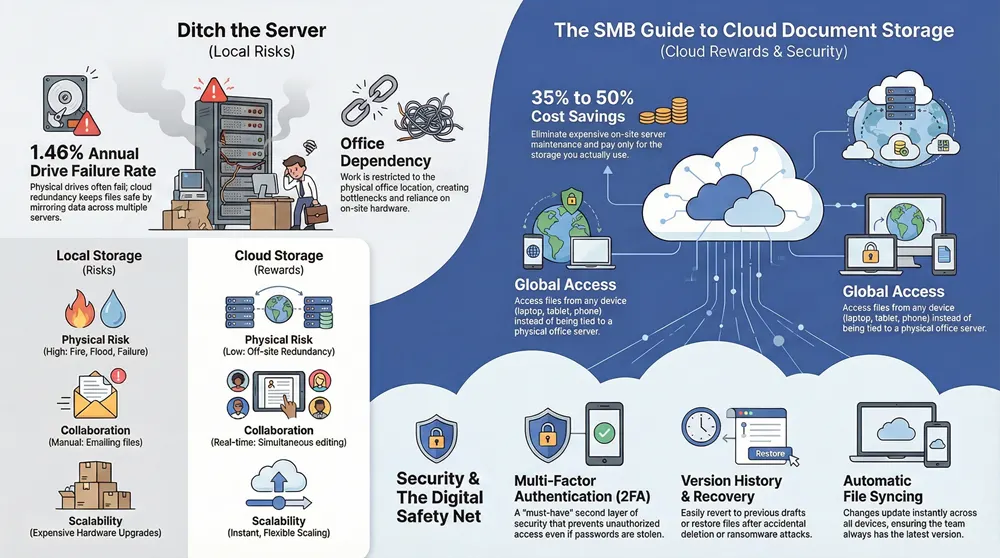
This differs from traditional local storage, where your documents live on physical devices you own, like your computer’s hard drive, external drives, or an office server. Local storage has significant risks; physical drives have an average annual failure rate of 1.46%, and if a device fails or is lost, your data could be gone.
Cloud storage eliminates this physical device dependency. Your data is copied across multiple servers (data redundancy), so if one server fails, your files remain safe and accessible. When you save a file to the cloud, it’s sent securely to these servers. You can retrieve it by logging into your account from any web browser or app, essentially carrying your entire filing cabinet with you anywhere.
The Core Benefits for Your Business
Moving to the cloud offers advantages that improve efficiency, teamwork, and your bottom line. Here are the key benefits for small and medium-sized businesses (SMBs):
- Best Accessibility: Your team can access documents instantly from any computer or mobile device, anywhere. This is ideal for remote teams, traveling employees, or anyone working outside the office.
- Improved Collaboration: Cloud storage is a collaborative workspace. Multiple team members can edit the same document simultaneously, see changes in real-time, and use features like commenting to streamline workflows.
- Significant Cost Savings: Avoid the high upfront and maintenance costs of on-site servers. Cloud solutions can be 35% to 50% cheaper, as you pay only for the storage you use. This frees up capital for other business areas. Explore our IT solutions to learn more.
- Robust Disaster Recovery: Storing documents in a secure, off-site location protects them from local disasters like fires, floods, or hardware failure. If your office equipment is compromised, your files remain safe and restorable in the cloud.
- Centralized File Management: Cloud storage creates a single, organized, and searchable hub for all your documents. This ends the chaos of scattered files and reduces the time spent searching for information.
- Scalability for Growth: As your business and data grow, cloud storage scales with you. You can easily increase capacity without expensive hardware upgrades, a flexibility that can realize significant annual benefits for growing companies.
The shift to the cloud is a fundamental change in how modern businesses operate, with a majority of SMBs now relying on it for their IT infrastructure.
Key Features of a Modern Cloud Document Storage Solution
When choosing a cloud document storage solution, look beyond storage space. A great provider offers features that boost productivity, collaboration, and security.
Here are essential features to evaluate:
- Robust Security: Top-notch encryption, multi-factor authentication, and clear privacy policies are non-negotiable.
- Scalable Storage: Ensure the plan meets current needs and can be easily upgraded as your business grows.
- Intuitive User Interface: A simple, clean platform reduces training time and encourages adoption.
- High Uptime and Reliability: Choose providers with a proven record of consistent service.
- Responsive Customer Support: Accessible support is invaluable when you encounter issues.
- Integration Capabilities: The ability to connect with other business software (like CRM or accounting tools) can automate workflows.
Let’s explore some of these features in more detail.
File Syncing and Device Access
The core power of cloud document storage is its ability to keep files synced and accessible anywhere. You can start a proposal on your office desktop, continue on your tablet during a commute, and finish on your laptop at home—no manual saving or emailing files required.
Key features include:
- Automatic Syncing: Changes made to a document are instantly updated across all connected devices, ensuring everyone works with the latest version.
- Cross-Platform Compatibility: A good solution works seamlessly across Windows, macOS, iOS, and Android devices.
- Multiple Access Options: Access files via dedicated mobile apps, desktop software, or a web browser.
- Offline Access: Many providers allow you to work on documents without an internet connection. Changes sync automatically once you’re back online.
- “On-Demand” Files: This feature lets you see all your cloud files on your device but only downloads them when needed, saving valuable local disk space.
Collaboration and Productivity Tools
Modern cloud document storage solutions are powerful collaboration platforms that turn static files into dynamic workspaces.
Key collaboration features include:
- Real-Time Co-Editing: Multiple users can edit the same document simultaneously, seeing each other’s changes as they happen.
- Commenting and Communication: Add comments and tag team members directly within a document, keeping feedback centralized and in context.
- Integrated Office Suites: Many providers integrate with or offer their own office applications, allowing you to create and edit documents, spreadsheets, and presentations in the cloud.
- Advanced Sharing Controls: Securely share documents with features like password-protected links, expiring links, and granular permissions that let you control who can view, comment on, or edit a file.
Version History and File Recovery
Accidentally saving over a crucial file or deleting something important is no longer a disaster with cloud document storage. Version history and file recovery features act as a digital safety net.
Here’s how these features protect your work:
- File Versioning: The system automatically saves multiple versions of your files as you work. If you make a mistake or want to revert to an earlier draft, you can easily browse and restore a previous version.
- Accidental Deletion Recovery: Most services have a “deleted items” folder, similar to a recycle bin. Accidentally deleted files can be recovered within a specific timeframe.
- Ransomware Recovery: In the event of a ransomware attack, file versioning can be a lifesaver. You can often roll back your files to a point before the attack, restoring unencrypted versions.
- Data Loss Prevention: Some systems offer proactive features, like warnings when a user attempts to delete or move large numbers of files, helping prevent accidental loss.
These features provide peace of mind that your work is always protected. To learn more about comprehensive document strategies, check out our insights on document management systems.
Security & Best Practices for Protecting Your Digital Documents
When we talk about cloud document storage, the question of security is paramount. You’re entrusting valuable business documents to a third-party provider, and the good news is that reputable cloud companies invest far more in security than most small businesses can afford for on-site systems.

Think of it as a shared responsibility: the provider builds a secure vault, but you control the keys. Let’s explore what makes cloud storage secure and how you can keep your data safe.
Security in Cloud Document Storage: What to Look For
When choosing a provider, prioritize one that takes security seriously. Here are the key features to look for:
- Encryption: Your data should be scrambled and unreadable without a key. Look for both Encryption In-Transit (protecting data as it travels to the cloud) and Encryption At-Rest (protecting data stored on servers).
- Access Controls and User Permissions: This feature lets you define who can view, edit, share, or delete documents, preventing unauthorized access to sensitive information.
- Two-Factor Authentication (2FA): A must-have feature that adds a second layer of security to your account, usually a code sent to your phone, making it much harder for criminals to gain access.
- Compliance Certifications: For businesses in regulated industries, look for certifications like HIPAA or GDPR, which prove the provider meets high industry security standards.
- Data Residency: A good provider will offer options for where your data is physically stored, which can be a legal requirement for some businesses.
Potential Risks and How to Mitigate Them
While cloud storage is highly secure, it’s wise to understand and prepare for potential risks.
- Internet Outages: Without an internet connection, you may lose access to online files.
- Mitigation: Use offline access features, keep local copies of critical documents, and consider a backup internet connection.
- Human Error: Accidental deletions, improper sharing, or falling for phishing scams are common.
- Mitigation: Train your team on safe practices, use versioning and recovery features, and always double-check sharing permissions.
- Data Breaches: While major providers have excellent security, no system is impenetrable.
- Mitigation: Choose reputable providers, use strong, unique passwords, and enable 2FA on all accounts. Consider encrypting highly sensitive files before uploading.
- Vendor Lock-in: It can be difficult to switch providers later.
- Mitigation: Before committing, confirm the provider allows easy data export in standard formats.
- Service Provider Downtime: Though rare for major players, service interruptions can happen.
- Mitigation: Review the provider’s Service Level Agreement (SLA) for uptime guarantees and consider a multi-cloud strategy or local backups for critical data.
For comprehensive protection, explore our managed cybersecurity services.
Here are some best practices for your team:
- Use Strong, Unique Passwords and 2FA Everywhere.
- Understand and Double-Check Sharing Permissions before sending.
- Regularly Review Who Has Access to your files and revoke permissions when no longer needed.
- Encrypt Sensitive Files Locally before uploading for an extra layer of security.
- Maintain Local Backups of critical data for a hybrid approach.
- Be Wary of Phishing emails asking for login details or containing suspicious links.
- Use “Personal Vaults” or similar high-security folders for your most confidential documents.
- Stay Informed about your provider’s security updates and new features.
Frequently Asked Questions about Cloud Document Storage
Stepping into cloud document storage can bring up many questions. Here are some of the most common ones, answered simply to help you move forward with confidence.
How much storage space does my business need?
There's no single answer, as it depends on your current data volume, projected growth, and the types of files you use (documents vs. large media files). A good starting point is to assess your current storage use. The great thing about cloud document storage is its flexibility; most providers offer tiered plans, so you can start with what you need and easily scale up as your business grows. You don't have to predict your exact needs years in advance.
Can I move my existing documents to the cloud?
Absolutely. Migrating existing files is a common process. Providers offer data migration tools like bulk uploaders that let you move large batches of files and folders from your computer to the cloud. For very large or complex migrations, a phased approach (moving active files first) or professional migration services can ensure a smooth transition. A little planning and cleanup of old files beforehand can make the process even easier.
Is cloud storage secure enough for confidential documents?
Yes, provided you choose a reputable provider and follow best security practices. Top cloud document storage providers invest heavily in security, using measures like end-to-end encryption to protect your data both in transit and at rest. Look for providers that offer features like private vaults, strong access policies, and granular user permissions to control who can see or edit confidential files. Also, vet a provider's security by checking for industry certifications like ISO 27001 or HIPAA compliance. Combining a secure provider with your own good habits (like strong passwords and 2FA) often creates a more reliable and secure environment than a local hard drive.
Conclusion
Moving to cloud document storage is more than a tech upgrade; it’s a strategic step toward greater efficiency, security, and scalability. By freeing your team from managing messy servers and lost files, you future-proof your operations. This shift empowers your team with seamless collaboration, ensures business continuity, and saves money on IT overhead, making your business more agile and adaptable.
Here at Kraft Business Systems, we understand the complexities of this digital transition. Based in Grand Rapids, we proudly serve businesses across Michigan, from Detroit to Traverse City. Our expert consultants are ready to provide secure, custom technology solutions to guide your business through a smooth and successful cloud adoption.
Let us help you open up the full potential of cloud document storage so you can focus on what you do best: growing your business.
Contact us for a consultation.