


Office printer leasing is a strategic move that lets businesses get their hands on top-notch printing equipment without the massive upfront cost. It rolls hardware, maintenance, and supplies into one predictable monthly payment, effectively eliminating the risk of owning outdated tech. For a lot of organizations, it’s just a smarter way to manage costs and keep the office running smoothly.
Is Office Printer Leasing Right for Your Business?
Choosing between leasing and buying an office printer is a major financial and operational decision. Sure, buying a printer gives you full ownership, but it also saddles you with a depreciating asset that demands ongoing—and often unpredictable—maintenance costs. Leasing completely flips that script.
Think of it like getting a vehicle for your company. Buying a delivery van means a huge initial investment, and you’re on the hook for every oil change, tire rotation, and surprise repair bill. Leasing, on the other hand, is like having a fleet service that gives you a reliable vehicle for a fixed monthly fee, with all the maintenance included. That’s the core advantage of office printer leasing—predictability and service, all rolled into one.
Here’s a quick look at how the two approaches stack up against each other.
Leasing vs Buying an Office Printer at a Glance
| Consideration | Office Printer Leasing | Buying an Office Printer |
|---|---|---|
| Initial Cost | Low (first month’s payment) | High (full purchase price) |
| Ongoing Costs | Predictable monthly payment | Unpredictable (repairs, toner) |
| Maintenance | Included in the contract | Your responsibility (extra cost) |
| Technology | Easy to upgrade at end of term | Locked into aging hardware |
| Capital | Preserved for other investments | Tied up in a depreciating asset |
| IT Burden | Managed by the leasing provider | Falls on your internal IT team |
| Ownership | You don’t own the asset | You own the asset outright |
As you can see, the choice isn’t just about the machine itself; it’s about your entire financial and operational strategy.
Preserve Capital and Predict Your Expenses
The most immediate win with leasing is the impact on your cash flow. Instead of dropping thousands of dollars on a capital expenditure, you have a manageable operational expense. This frees up your money for things that actually grow your business, like marketing, hiring, or product development.
Leasing also brings a welcome dose of budgetary certainty. That one, consistent monthly payment typically covers everything you need:
- The printer or copier hardware itself
- All the necessary consumables like toner and drum cartridges (you just buy the paper)
- Preventative maintenance and on-site repairs when things go wrong
- Access to a tech support or help desk team
This all-in-one structure means no more surprise repair bills or sudden, budget-busting toner purchases. It makes forecasting your finances a whole lot simpler.
Access Modern Tech and Lighten the Load on IT
Technology moves fast. A printer you buy today can feel like a dinosaur in just a few years. Leasing ensures your team always has access to modern equipment packed with the latest security features and productivity tools. When the lease is up, you can simply upgrade to the newest model without the headache of selling or disposing of old hardware.
Better yet, a good lease agreement offloads the entire maintenance burden from your internal IT staff. Instead of getting bogged down troubleshooting paper jams or network issues, your tech team can focus on the critical projects that drive your business forward. Understanding the differences between Digital Printing vs Offset Printing can also help you figure out if a leased office printer can handle your specific needs for volume and quality.
It’s no surprise the global office printer leasing market is projected to hit about USD 17.8 billion by 2030. This growth is being driven by businesses that are saving 20% to 30% on their printing costs through leasing. In fact, roughly 60% of companies now prefer this model to manage their expenses and stay current with technology.
Understanding What’s Inside a Printer Lease Agreement
To make a smart decision on leasing an office printer, you need to be able to read the language of the lease itself. The agreement is much more than just a monthly price; it’s the full blueprint for your costs, the service you’ll receive, and what’s expected of you. Getting a handle on these details is the key to comparing quotes accurately and finding a real partner, not just someone dropping off a piece of hardware.
The best way to think about it is like signing up for a new mobile phone plan. That plan includes the phone itself (the hardware), a set amount of talk and data (your print volume), and a line for tech support. The goal is to find the plan that fits how you actually use your phone, so you’re not overpaying for data you’ll never touch.
Operating Lease vs. Capital Lease: What’s the Difference?
Not every lease is built the same. You’ll run into two main types—Operating Leases and Capital Leases—and they have completely different impacts on your finances and ownership.
An Operating Lease is what you’ll see 99% of the time for office equipment. It works just like a long-term rental. You pay a consistent monthly fee for a fixed period, and when the term is up, you send the printer back. This approach keeps the machine off your company’s balance sheet, treating it as a straightforward operating expense.
A Capital Lease, sometimes called a finance lease, is much closer to a rent-to-own deal. The terms are usually longer, and the total payments are designed to cover the printer’s full value. When the lease ends, you’ll typically have the option to buy the equipment for a small fee, officially making it a company asset.
For most businesses that want to stay flexible and have access to current technology, the Operating Lease is the clear winner. It sidesteps the headache of asset depreciation and makes upgrading your equipment every few years a simple, predictable process.
Cracking the Code on Pricing Models
The next layer to peel back is understanding how your monthly bill gets calculated. Most office printer leases use a hybrid model that blends a base fee for the equipment with a charge for your actual usage. This creates a cost structure that’s both predictable and fair.
The Cost-Per-Page Model
The most common structure by far is the cost-per-page (CPP) model, also known as cost-per-click. It’s pretty simple when you break it down:
- Base Rate: This is your fixed monthly payment that covers the physical printer hardware.
- Page Allowance: Your agreement will include a certain number of black and white (monochrome) and color pages you can print each month at a set rate. For example, your plan might cover 5,000 monochrome pages at $0.01 each and 1,000 color pages at $0.07 each.
- Meter Readings: The printer keeps an automatic, running tally of every page it produces. This is your “meter read,” and your provider uses this data to bill you accurately.
- Overage Charges: If you print more than your allowance, you pay an overage rate for each extra page. This rate is usually a little higher than your standard CPP.
This model has become the industry standard because it directly ties your costs to your actual print volume. If you want to get into the weeds on what to look for in the fine print, you can learn more by exploring a breakdown of typical printer lease agreements and their most important clauses.
So, what are you actually paying for in that tiny per-page fee? A good service agreement bundles all the essentials into that click charge, which radically simplifies your budgeting and day-to-day operations.
- Toner and Supplies: All the toner, drums, and other consumables you need (except for paper and staples) are shipped to you automatically, often triggered when the machine sends out a low-supply alert.
- Preventative Maintenance: This covers scheduled check-ups to keep the printer running smoothly and catch small issues before they turn into major downtime.
- On-Site Repairs: If the machine goes down, the cost of sending a technician out to fix it—parts and labor included—is covered.
This all-in-one approach turns a bunch of unpredictable printing costs into one clean, manageable line item on your monthly budget.
The True Cost of Buying Versus Leasing a Printer
That shiny new office printer’s sticker price? It’s just the tip of the iceberg. What looks like a simple one-and-done purchase quickly turns into a snowball of ongoing, often unpredictable, expenses that drain your budget and your IT team’s precious time. This hidden financial drag is called the Total Cost of Ownership (TCO), and it tells the real story of buying equipment outright.
When you buy a printer, you’re not just paying for the machine. You’re also signing up for a future of unbudgeted costs, from emergency service calls for sudden breakdowns to panicked, expensive toner runs right before a huge deadline.
Every time a printer hiccups, the costs add up. Your IT staff has to drop what they’re doing to wrestle with paper jams or network errors, leading to hours of lost productivity across the whole company. Over the printer’s life, these “little” interruptions become a major financial drain.
Uncovering the Hidden Expenses of Ownership
Past the initial purchase, the financial hits of owning a printer just keep on coming. Many businesses don’t account for these operational costs, which gives them a completely skewed idea of what their print environment actually costs them.
Here are just a few of the expenses that usually fly under the radar:
- Emergency Repairs: Once that warranty expires, you’re on the hook for every expensive service call, every replacement part, and all the labor costs.
- Supply Management: Ordering and stocking toner, drums, and other parts takes up staff time and storage space. And that’s not even mentioning the cost of ordering the wrong supplies for a mixed fleet of printers.
- IT Intervention: A recent study found that a staggering 23% of all IT help desk calls are printer-related. Every call pulls your tech team away from projects that could actually be growing the business.
- Secure Disposal: At the end of its life, a printer’s hard drive is full of sensitive company data. You can’t just toss it in a dumpster; secure data destruction and environmentally safe disposal are necessary, additional costs.
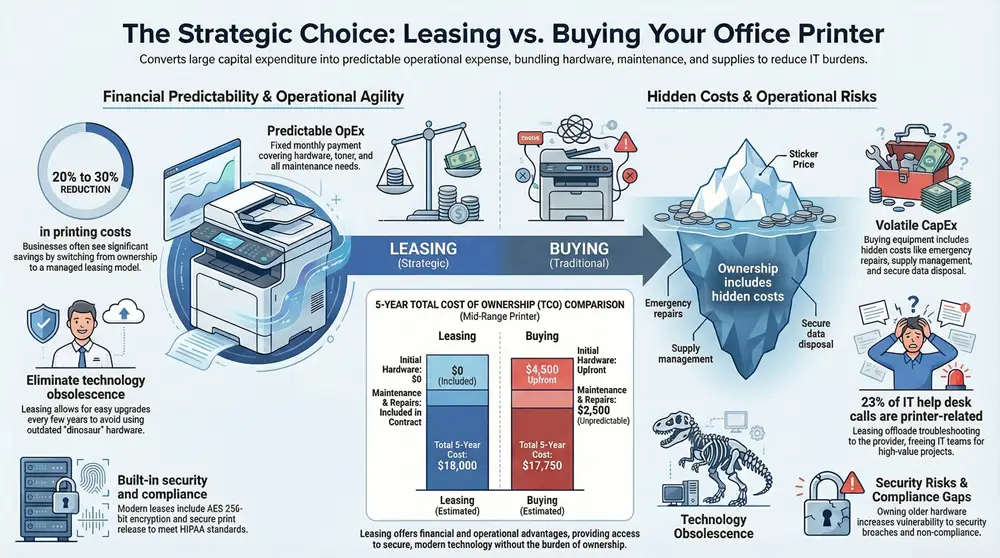
This graphic really breaks down the core financial differences between leasing and buying.
It’s easy to see how leasing can turn a large, unpredictable expense into a manageable and consistent operational cost.
How Leasing Creates Predictability and Savings
An office printer lease, especially when it’s bundled with Managed Print Services (MPS), completely changes the game. It takes all that chaotic spending and rolls it into a single, predictable monthly payment. This all-in-one approach is designed to get costs under control and make your entire print setup work smarter, not harder. You stop reacting to problems and start preventing them.
This strategy gives you a clear financial edge by including key services:
- Automated Supply Fulfillment: The printer tells your provider when toner is low, and new cartridges show up automatically before you even know you need them.
- Proactive Maintenance: Technicians perform regular tune-ups to stop common issues in their tracks, which drastically cuts down on downtime.
- Comprehensive Support: All repairs, parts, and labor are covered in the agreement. No more surprise bills.
By streamlining these processes, a well-managed lease doesn’t just make budgeting easier—it actively lowers your total spending. Tying leasing together with MPS can slash printing costs by as much as 30%. Those are serious savings that come from smarter workflows and centralized management.
This financial efficiency is a big reason why the U.S. computer and printer leasing market is a $4.0 billion industry. Businesses are choosing to lease so they can get the latest technology, like cloud-connected multifunction devices, without the massive upfront investment.
5-Year Total Cost of Ownership Breakdown
To really see the difference, let’s crunch the numbers. Below is a typical 5-year cost projection for a mid-range office multifunction printer, comparing the path of buying it yourself versus leasing it with a Managed Print Services plan.
| Cost Factor | Buying (Estimated Cost) | Leasing with MPS (Estimated Cost) |
|---|---|---|
| Initial Hardware Cost | $4,500 (Upfront) | $0 (Rolled into lease) |
| Toner & Supplies (5 Yrs) | $7,500 (Variable) | Included in Monthly Payment |
| Maintenance & Repairs (5 Yrs) | $2,500 (Unpredictable) | Included in Monthly Payment |
| IT Staff Time (5 Yrs) | $3,000 (Productivity Loss) | Minimal (Managed by provider) |
| Secure Disposal | $250 (End-of-life) | Included (Provider handles return) |
| Monthly Payment | $0 | $300 |
| Total 5-Year Cost | $17,750 | $18,000 |
At first glance, the total costs look pretty close. But the real story is in the details: the “Buying” column is filled with unpredictable, reactive expenses and hidden costs like lost IT productivity. The “Leasing” column represents a stable, budgeted operational expense with no surprises, which is a huge win for financial planning and peace of mind.
Ultimately, comparing the total costs reveals the full picture. For a more detailed look, check out our guide on understanding printer leasing costs and how they’re calculated. While buying feels like a single event, leasing provides a sustainable, long-term financial strategy that shields your budget from the inevitable headaches and costs of owning technology.

A printer leasing agreement is way more than just a rental form. It’s the legal blueprint for your relationship with the provider for the next several years. All those promises made during the sales pitch? They only count if they’re actually written into this document. Signing without a thorough review is like giving a stranger the keys to your budget and office efficiency.
This contract dictates everything, from how fast a technician shows up when your main printer dies to what happens when your business needs to scale up or down. Getting a handle on these clauses is the best way to dodge surprise costs, frustrating downtime, and future operational headaches. The goal is simple: make sure the agreement works for you, not just for the leasing company.
Unpacking the Service Level Agreement
The Service Level Agreement (SLA) is arguably the most important part of your entire contract. It’s where vague assurances like “fast service” get turned into hard, measurable commitments. A solid SLA is your best defense against slow support and long stretches of downtime.
Here are the key metrics to look for in any SLA:
- Guaranteed Response Time: This tells you the absolute maximum time you’ll wait for a technician to be on-site after you call in a problem. For urgent issues, a four-hour response time is a good industry benchmark to shoot for.
- First-Time Fix Rate: This is the percentage of service calls that get resolved on the very first visit. A high rate—ideally over 85%—is a great indicator of experienced technicians who show up with the right parts and knowledge.
- Uptime Guarantee: Some of the better agreements will guarantee a specific operational uptime for your equipment, like 98%. If the provider slips below this number, you should be entitled to a credit on your next bill.
Without a clearly defined SLA, you have no real power when service is slow. It’s the difference between a legally binding promise and wishful thinking.
Common Contract Clauses to Watch For
Beyond the SLA, a few other clauses can hit your wallet hard if you’re not paying attention. They’re often buried in dense legal jargon, but you absolutely have to find them and understand what they mean before you sign. Knowing about these potential traps gives you the leverage to negotiate better terms.
A printer lease is a multi-year commitment. Scrutinizing the fine print now prevents years of potential frustration and hidden costs. Pay close attention to automatic renewals and end-of-lease terms, as these are common areas where unexpected expenses arise.
One of the most notorious clauses is the automatic renewal, sometimes called an “evergreen clause.” If you don’t give written notice that you plan to terminate the lease within a specific window (often 60-90 days before it ends), the contract can automatically roll over for another full year, locking you in.
Other critical terms to put under the microscope include:
- Overuse Penalties: Get a clear understanding of the cost-per-page for printing more than your monthly allowance. You should negotiate this rate to be as close to your standard page rate as you can get.
- Insurance Requirements: The contract will almost certainly require you to carry insurance on the leased equipment. You’ll need to provide proof of coverage to avoid being charged for the provider’s own insurance policy, which is usually much more expensive.
- End-of-Lease Options: The contract needs to spell out your options when the term is up. Typically, you can return the equipment, upgrade to a newer model, or buy the current printer at its Fair Market Value (FMV). Make sure you understand the process and any costs tied to each option.
For a more structured way to manage all your business agreements, including your printer lease, it’s worth checking out a modern contract management guide. It can help you establish best practices across all your vendor relationships, ensuring no critical detail ever gets missed.
Why Security and Compliance Matter in Printer Leasing
It’s easy to think of an office printer as a simple machine that just puts ink on paper. But that’s a dangerously outdated view. Your modern multifunction printer is a full-fledged computer—it scans, stores, and sends your company’s most sensitive data across the network every single day.
That makes your printer a prime target for cyberattacks, and your choice of a leasing provider a critical security decision.
Ignoring printer security is like installing a state-of-the-art alarm system on your building but leaving the back door unlocked. Your provider has to be a partner who gets these risks and gives you the tools to defend your information from both internal mistakes and external threats.
Essential Security Features in Modern Printers
A good leasing partner won’t treat security features as optional add-ons. They’ll offer equipment with built-in protections designed to safeguard your data at every step. These are must-haves for any business that handles confidential information.
Make sure your leased devices include these key security controls:
- Secure Print Release: This is a game-changer. Instead of spitting out sensitive documents for anyone to see, the printer holds the job until the user walks up and authenticates with a PIN, badge, or even a fingerprint. No more confidential reports sitting unattended in the output tray.
- User Authentication: This feature requires users to log in before they can scan to email or access the address book. It stops unauthorized use in its tracks and creates a clear audit trail of who did what, and when.
- Hard Drive Encryption: Modern printers have hard drives that store images of everything you scan and print. AES 256-bit encryption scrambles this data, making it completely unreadable to anyone who might try to physically steal the drive.
These features are your first line of defense. For a deeper look into the threats you might be missing, check out our guide to comprehensive printer security.
Meeting Compliance Standards Like HIPAA
For businesses in healthcare, finance, or legal services, compliance isn’t just a good idea—it’s the law. A data breach that traces back to a printer can trigger massive penalties, making your leasing provider’s role even more critical.
A provider that specializes in compliance helps ensure your print environment meets stringent regulatory requirements. This includes not only the technology itself but also the secure handling and disposal of the equipment at the end of the lease term.
A partner with HIPAA experience, for instance, understands exactly what it takes to protect Patient Health Information (PHI). They’ll provide printers with the right access controls and audit logs to track every interaction with sensitive documents.
Even more important is what happens when the lease ends. Your provider must follow a certified data destruction process, securely wiping the printer’s hard drive to Department of Defense standards before the machine is returned or recycled. Getting this documented process is a crucial piece of your compliance puzzle.
This intense focus on security is a major reason the global printer rental market, valued at USD 11.86 billion in 2024, is projected to hit USD 15.07 billion by 2032. North America accounts for over 41% of this market, driven by businesses that demand secure, managed print solutions. You can dig into more printer rental market trends in this market report from Data Insights Market.
Your Go-To Checklist for Picking a Leasing Partner
Choosing a partner for your office printer lease is about way more than just the monthly price tag. This is a long-term relationship that hits your office productivity, your budget, and even your data security. A great partner feels like an extension of your own team, while a bad one can become a constant source of headaches.
Think of this final checklist as your practical guide to cut through the sales pitches. Use it to focus on what really defines a reliable, supportive leasing partnership that will actually serve your business for years to come.
How Good is Their Service, Really?
When a critical printer goes down in the middle of a proposal deadline, your whole operation can grind to a halt. The quality and speed of your provider’s technical support are everything. Don’t let them get away with vague promises of “great service”—you need to see the proof.
- Local Techs on Deck: Do they have a solid, local team of technicians right here in your area? A national company with one tech covering half of Michigan is a recipe for long, frustrating wait times.
- Guaranteed Response Times (SLAs): Ask to see their standard Service Level Agreement (SLA). It should clearly state a maximum on-site response time. For most businesses, a 4-hour response time for critical issues is the gold standard.
- The First-Time Fix Rate: This is a huge one. A high first-time fix rate (you want to see something over 85%) tells you their technicians are experienced and carry the right parts. It means they solve the problem on the first visit instead of making you wait for a part to be ordered.
Are They Stuck in the Past or Ready for the Future?
The right leasing partner helps you stay current with technology, not just for today but for what’s coming next. Their product lineup and how they handle upgrades tell you a lot about their commitment to your long-term success.
A forward-thinking leasing provider doesn’t just lease you a box; they give you a clear technology roadmap. Your goal is to find a partner who can adapt as your business grows and technology inevitably changes.
Here are a few key questions to dig into:
- What are your standard end-of-lease options for upgrading our technology?
- How do you help clients manage the security features on all these networked devices?
- Do you offer solutions beyond just printing, like document management software or workflow automation, that we might need down the road?
Do They Walk the Walk? (Checking Credibility)
Finally, it’s time to do your homework and make sure their claims hold up. A truly reputable company will be transparent and have no problem showing you their track record of happy customers.
- Ask for Customer References: This is non-negotiable. Ask for references from businesses in your industry or of a similar size. If a provider gets cagey about sharing references, consider it a major red flag.
- Read the Online Reviews: Check Google, industry forums, and the Better Business Bureau. You’ll get an unfiltered look at their reputation. Look for consistent themes—good or bad—about their service and support.
- Confirm Their Experience: How long have they actually been in the office printer leasing game? A provider with decades of experience is far more likely to have rock-solid processes and a stable support team ready to handle whatever you throw at them.
Common Questions About Office Printer Leasing
Alright, we’ve covered a lot of ground on the benefits and nuts and bolts of leasing. But even after all that, a few practical questions almost always pop up. Getting straight answers to these is the final step before you can feel 100% confident in your decision.
Think of this as the “what-if” conversation you’d have with a trusted partner before signing on the dotted line. Let’s tackle the most common queries we hear from businesses, clearing up any last-minute doubts about how a lease actually works day-to-day.
What Happens If Our Printing Needs Change During the Lease?
Businesses don’t stand still, and what you need today might be completely different two years from now. A good leasing partner gets this. They understand that flexibility isn’t a “nice-to-have”—it’s essential, and they build it right into their agreements. If your print volume suddenly spikes or drops off, you should be able to renegotiate.
This could look like a few different things:
- Upgrading your equipment to a machine that can keep up with higher demand.
- Swapping to a smaller model if you find you’re not printing nearly as much as you thought.
- Adjusting your monthly page allowance and, of course, the payment that goes with it.
The key is to have this conversation before you sign. Ask potential partners to walk you through their exact process for handling these changes. A true partner will have a clear, fair system for adapting your lease as your business evolves.
Are Supplies Like Paper Included in the Lease?
This is a huge point of confusion, so let’s clear it up. When your lease includes a service agreement, it will almost always cover the core consumables needed to keep the machine running—things like toner, drums, and fusers. These are typically shipped to you automatically when the printer sends a low-level alert.
But here’s the important distinction: paper and staples are almost always your responsibility. The lease is designed to cover the hardware and the service to maintain it, not the raw materials you feed into it. You’ll still need to budget for and purchase your own paper stock.
Can We Lease a Used or Refurbished Office Printer?
Absolutely, and it’s a smart, cost-effective move for a lot of organizations. When we say “refurbished,” we’re not talking about some dusty machine pulled from a back room. These are certified devices that have been professionally inspected, serviced with new parts where needed, and put through rigorous testing to make sure they meet the original performance standards.
Opting for a refurbished model can seriously lower your monthly payment while still giving you access to a reliable, high-performance machine. More importantly, these printers are usually backed by the very same comprehensive service and maintenance guarantees you’d get with new equipment. It’s a fantastic way to protect your budget without compromising on quality or support.
At Kraft Business Systems, we build leasing solutions around your unique operational and financial goals. Our team is here to answer every last one of your questions and find the perfect office printer lease for your Michigan-based business. Learn more about our Managed Print Services at kraftbusiness.com.

