AI Overview:
The article explains that ransomware prevention starts with three essentials: consistent patching, MFA everywhere, and secure 3-2-1 backups. These fundamentals block most attacks and ensure you can recover without paying ransom.
It also covers strengthening human defenses through phishing training, adding advanced tools like EDR, limiting damage with network segmentation and least privilege, and preparing a strong incident response plan. The core message: master the basics first, then layer on advanced protections to build a resilient, multi-layered defense.
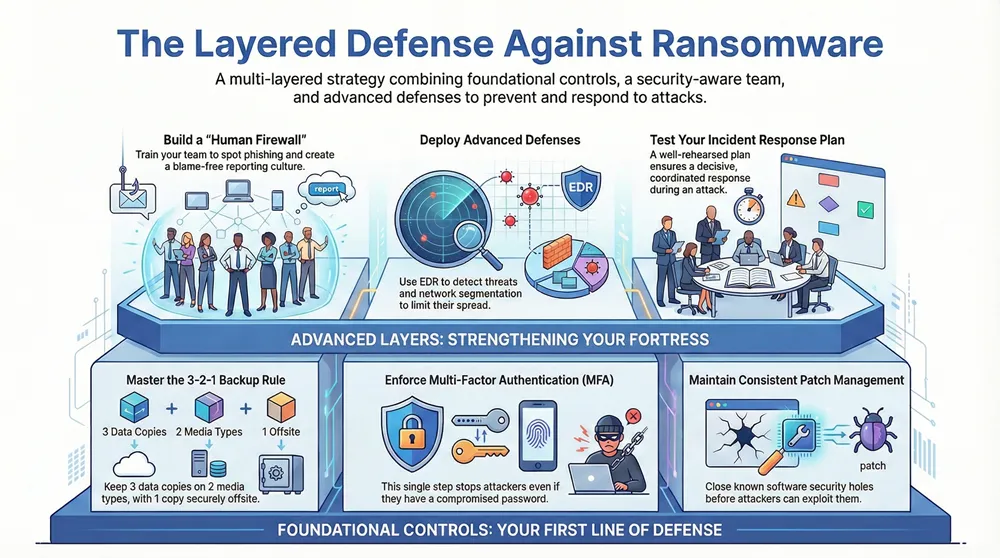
Preventing a ransomware attack comes down to a layered defense that combines proactive technical controls with a bulletproof recovery plan. From what I’ve seen in the field, the most effective strategies boil down to three core pillars: consistently patching software vulnerabilities, enforcing multi-factor authentication (MFA) on every single account, and maintaining secure, isolated data backups. If you can master these fundamentals, you’ve already built a powerful barrier against the vast majority of threats out there.
Building Your First Line of Defense
A successful ransomware prevention strategy doesn’t start with a massive budget or an army of security experts; it starts with mastering the essentials. Think of these core actions as the non-negotiable foundation of your security. Without them, any fancy tools or policies you add later will be sitting on shaky ground.
The goal is simple: make your organization a much harder and less appealing target. You want attackers to take one look, see the effort involved, and move on to an easier victim.
This layered approach is key. Patching, MFA, and backups aren’t just separate tasks; they work together to form a cohesive defense.
As you can see, each step closes a common door that attackers love to kick open, which drastically reduces your overall risk.
The table below breaks down these high-impact priorities into a quick, scannable format. These are the actions that deliver the biggest security bang for your buck and should be at the top of your to-do list.
| Defense Layer | Primary Goal | Key Action |
|---|---|---|
| Data Recovery | Ensure you can restore operations without paying a ransom. | Implement and test the 3-2-1 backup rule (3 copies, 2 media, 1 offsite). |
| Vulnerability Management | Close known security holes before attackers can exploit them. | Establish a consistent patch management schedule for all software and systems. |
| Identity & Access | Prevent unauthorized access, even with compromised credentials. | Enforce Multi-Factor Authentication (MFA) on all user accounts and services. |
Focusing on these three areas first will have an immediate and measurable impact on your organization’s resilience against ransomware. They are the bedrock of any solid security program.
Master the 3-2-1 Backup Rule
Your ultimate safety net in a ransomware incident is a solid backup strategy. Nothing else comes close. The industry-standard 3-2-1 rule is beautifully simple yet incredibly effective for ensuring you can always get your data back.
Here’s how it works:
- Three Copies: Keep at least three complete copies of your critical data.
- Two Media Types: Store these copies on at least two different types of media (e.g., an external hard drive and a cloud service).
- One Offsite Copy: Keep at least one copy in a physically separate, offsite location. This protects you from local disasters like fire, flood, or theft.
Sticking to the 3-2-1 rule means that even if attackers encrypt your entire live network, you have a clean, isolated copy ready to restore. It completely neutralizes their ransom demand.
Patch Management and MFA are Non-Negotiable
Attackers thrive on two things: exploiting known software bugs and using weak or stolen passwords. It’s that simple. One of the most powerful ways to shut them down is by combining aggressive patch management with robust authentication.
Attack frequencies and ransom demands have exploded, largely because criminals are exploiting well-known flaws that already have patches available. Timely patching isn’t just a good idea; it’s critical.
Just as important is rolling out MFA everywhere you possibly can. MFA is a game-changer, stopping attackers cold even if they manage to get their hands on a valid password. For a deeper dive into securing your environment, explore these essential network security best practices that build on these foundational steps.
By closing these two massive entry points—unpatched systems and single-factor authentication—you drastically shrink your attack surface and make your network a much tougher nut to crack.
Turning Your Team into Security Assets
Technical controls are absolutely essential, but they only solve one piece of the ransomware puzzle. Attackers know the path of least resistance into a network isn’t through a firewall—it’s through a person. Your employees are the primary target for ransomware gangs, but with the right approach, they can become your most powerful line of defense.
This isn’t about tacking up generic security awareness posters in the breakroom. It’s about building a resilient, security-conscious culture where every single team member feels empowered and equipped to act as a human firewall.
Understanding Modern Phishing Tactics
To defend against modern threats, your team needs to know what they look like. Phishing is still the number one way ransomware gets a foothold, preying on simple human error. In fact, a staggering 59% of organizations worldwide were hit by ransomware in 2023, and most of those attacks started with a malicious email.
Attackers have moved far beyond the poorly worded emails of the past. Today’s phishing campaigns are sophisticated, targeted, and dangerously convincing.
For instance, an employee might get an email that looks like it’s from Microsoft, warning them about “unusual sign-in activity.” The email uses official branding, has perfect grammar, and links to a pixel-perfect clone of the Microsoft login page. The only giveaway is a slightly misspelled domain in the browser’s address bar—a tiny detail easily missed by someone busy or distracted.
Another classic is the “urgent invoice” scam. A message lands in the finance team’s inbox from what appears to be a known vendor. Attached is a PDF invoice that needs “immediate payment.” That attachment is actually a malicious file designed to deploy ransomware the moment it’s opened.
Building a Strong Human Firewall
The key to turning your team into a solid defense layer is continuous, engaging training—not a one-off annual PowerPoint presentation. People learn best by doing, which is why simulated phishing campaigns are so effective.
These are controlled tests where you send harmless, but realistic, phishing emails to your employees. The goal isn’t to trick them; it’s to provide a safe, teachable moment. When a user clicks a link, they’re taken to a page that explains the red flags they missed, turning a potential mistake into a memorable lesson.
Effective training needs to cover these core areas:
- Spotting Phishing Red Flags: Teach them to scrutinize sender addresses, look for unusual grammar or urgent language, and always hover over links to see the true destination before clicking.
- Social Engineering Awareness: Explain how attackers use urgency, authority, and curiosity to manipulate people into bypassing security protocols.
- Secure Password Practices: Reinforce the importance of using strong, unique passwords for every single account, managed with a good password manager.
- Reporting Suspicious Activity: Create a simple, blame-free process for reporting anything that seems off. Make it crystal clear that you would rather investigate 100 false alarms than miss one real threat.
Empowering your team means celebrating when they report a suspicious email, even if it turns out to be legit. This positive reinforcement builds a culture where security is a shared responsibility, not just an IT problem.
For a deeper dive into structuring these programs, our guide on effective cybersecurity training for employees offers practical steps and strategies.
Beyond Training: Systems and Tools
A security-aware culture is also supported by the right technology. To truly make your team a security asset, it’s vital to have systems that can spot potential threats from the inside. This is where proactive insider threat detection tools come in. These systems monitor for unusual user behavior that might indicate a compromised account or an internal risk.
By combining consistent, practical training with supportive technologies, you transform your biggest potential vulnerability—your people—into your most vigilant line of defense. This proactive approach doesn’t just reduce risk; it builds a more resilient and secure organization from the inside out.
Deploying Advanced Technical Defenses
Once you have your foundational controls locked down and a security-aware team in place, it’s time to layer in the heavy hitters. These are the advanced technical defenses that shift you from a passive, reactive stance to an active one, ready to spot and stop a ransomware attack as it happens. Think of this layer as the high-tech surveillance and containment system for your entire network.
Legacy antivirus software still plays a part, but it mostly relies on known signatures to catch malware. That’s like having a security guard who only recognizes criminals from a photo book. The problem is, modern threats—especially zero-day ransomware—are designed to waltz right past that kind of outdated approach.
This is where more sophisticated solutions become absolutely essential.
Go Beyond Antivirus with Endpoint Detection and Response
The modern answer to today’s threats is Endpoint Detection and Response (EDR). EDR solutions are the intelligent evolution of antivirus, giving you deep visibility into what’s happening on your endpoints—the desktops, laptops, and servers that ransomware crews love to target.
Instead of just scanning for known bad files, EDR tools monitor behaviors. They watch for suspicious patterns and actions that signal an attack is underway, even if the specific malware has never been seen before.
Picture this real-world scenario: An employee accidentally opens a malicious email attachment. Legacy antivirus might not see a threat, but a good EDR solution will notice a whole chain of red flags:
- A Word document suddenly launching a PowerShell script.
- That script attempting to disable security services or backups.
- A process trying to rapidly encrypt files in user directories.
When it detects this sequence of events, a solid EDR tool can automatically isolate the infected machine from the network, stopping the ransomware from spreading. This can all happen in seconds, containing a potential disaster before your IT team even gets the alert.
Shrink the Blast Radius with Network Segmentation
Even with the best endpoint protection money can buy, you have to operate on the assumption that a breach is still possible. The next critical move is to limit the damage an attacker can do once they get inside. That’s where network segmentation comes in, a powerful strategy that acts like a series of fire doors in your digital building.
The concept is pretty simple: instead of having one big, flat network where every device can talk to every other device, you chop it up into smaller, isolated zones. Each segment gets its own access rules, so traffic can’t just flow freely between them.
By segmenting your network, you force an attacker to break through multiple internal barriers. A breach in one segment—like your user workstations—doesn’t automatically grant them access to your critical servers or your backup systems.
For instance, a hospital might create separate network segments for:
- Medical Devices (IoMT): Isolating infusion pumps and monitors to shield them from general network traffic.
- Guest Wi-Fi: Keeping public users completely walled off from internal hospital systems.
- Administrative Systems: Containing HR, finance, and other business-critical servers in their own zone.
- Clinical Data: Securing the Electronic Health Record (EHR) database in its own highly restricted segment.
This approach dramatically shrinks the potential blast radius of a ransomware attack, containing an infection to a small area and protecting your most valuable assets.
Enforce the Principle of Least Privilege
Working hand-in-hand with segmentation is the Principle of Least Privilege (PoLP). This is a core security concept that dictates users and systems should only be given the absolute minimum levels of access—or permissions—they need to do their jobs. Nothing more.
A lot of organizations, especially smaller ones, fall into the trap of giving everyone administrative rights just for convenience. This is unbelievably dangerous. If a user with admin rights clicks on a phishing link, the ransomware inherits those same powerful permissions, allowing it to rip through your entire network in minutes.
Implementing PoLP means:
- Standard user accounts should never have administrative privileges.
- Applications and services should run with the lowest possible permissions needed to function.
- Access to sensitive data folders must be restricted to only the employees who absolutely require it.
When you combine PoLP with segmentation, you create a truly formidable defense. Even if an attacker compromises a user’s account, their ability to move laterally and cause widespread damage is severely choked off. They might find themselves stuck in one small segment with very limited permissions, giving your security tools and team more than enough time to spot and neutralize the threat. For the ultimate protection against data loss, explore robust strategies like employing immutable backup solutions for ransomware defense, which ensures your backups cannot be altered or deleted by attackers.
Even with the best defenses in the world, you have to work under the assumption that an attack might eventually get through. This isn’t being pessimistic; it’s being realistic.
What separates a minor security event from a business-ending catastrophe is what happens in the critical minutes and hours after a breach is detected. A well-rehearsed Incident Response (IR) plan is your playbook for acting decisively when the pressure is on.
Without a plan, chaos takes over. Teams scramble, critical evidence gets wiped out, and expensive mistakes are made. A proper IR plan replaces that panic with a clear, step-by-step process, ensuring a coordinated and effective response that minimizes damage and downtime.
Defining the Key Phases of Response
A strong IR plan isn’t just a single document; it’s a living framework that guides your team through the entire lifecycle of an incident. While every attack is unique, the response process generally follows a predictable path. Breaking your plan into these distinct phases helps ensure no critical steps are missed during a high-stress event.
- Preparation: This is all the work you do before an incident happens. It includes creating the plan itself, training the team, and having the right tools in place.
- Detection & Analysis: How do you even know you’re under attack? This phase covers the tools and processes used to spot suspicious activity and confirm if it’s a genuine threat or just a false alarm.
- Containment: Once an attack is confirmed, the immediate priority is to stop the bleeding. This means isolating affected systems to prevent the ransomware from spreading further across your network.
- Eradication: After you’ve contained the threat, the focus shifts to removing it completely. This involves scrubbing every trace of malware and patching the vulnerabilities the attackers used to get in.
- Recovery: This phase is all about safely restoring affected systems and data from clean backups, verifying their integrity, and getting back to normal business operations.
- Post-Incident Activity: Often called “lessons learned,” this final step is where you analyze the entire incident to find weaknesses and improve your defenses for the future.
Identifying Key Stakeholders and Roles
Technology alone doesn’t resolve a ransomware attack—people do. One of the most common failure points we see is confusion over who is responsible for what. Long before a crisis hits, you need to clearly define roles and establish a solid chain of command.
Your core IR team should pull people from several key areas:
| Role/Department | Primary Responsibility |
|---|---|
| IT/Security Team | Leads the hands-on technical response, from containment and eradication to recovery. |
| Executive Leadership | Makes the big-picture business decisions, like whether to engage with attackers or notify authorities. |
| Legal Counsel | Advises on regulatory and legal obligations, including data breach notification laws. |
| Communications/PR | Manages all internal and external messaging to employees, customers, and the media. |
| Department Heads | Provides crucial context on the business impact of affected systems and helps prioritize recovery efforts. |
Every single person on this team needs to know their exact duties and have the authority to act without delay. Hesitation during an active ransomware attack can dramatically increase the scope—and the cost—of the damage. For a more detailed breakdown, our guide to building an IT security incident response strategy offers a comprehensive look at team structures and responsibilities.
Establishing Clear Communication Protocols
During an incident, communication is everything. Rumors and bad information can spread like wildfire, causing panic among employees and shattering trust with your customers. Your IR plan has to include a clear communication strategy.
A critical mistake is relying on your primary communication channels, like your company email server. If attackers compromise your network, those systems may be unavailable or monitored. Establish secure, out-of-band communication methods beforehand.
Think about using a dedicated, encrypted messaging app (like Signal) or a simple phone tree for the core response team. Your plan should also include pre-drafted communication templates for different audiences—employees, customers, regulators, and law enforcement. This prep work allows you to get accurate information out quickly, control the narrative, and show that you’re managing the crisis effectively. Acting with speed and transparency builds confidence when it matters most.
Putting Your Security to the Test
A security strategy is just a theory until it’s been punched in the face. To get ahead of an attack, you have to move from a passive defense—just hoping your walls are high enough—to an active one. That means constantly validating that your controls, policies, and plans actually work under pressure.
Without proactive testing, you’re essentially crossing your fingers and hoping for the best. It’s about uncovering the hidden cracks in your foundation before a real adversary does. By stress-testing your systems and your team in a controlled environment, you can gather invaluable, real-world evidence to strengthen your defenses.
Find Your Weak Spots with Penetration Testing
One of the best reality checks you can get is a penetration test, or “pen test.” This is where you hire ethical hackers to simulate a real cyberattack, using the same tools and tricks the bad guys use to try and break into your network.
A good pen test will almost always find things a simple vulnerability scan would miss. We’ve seen them uncover all sorts of issues, like:
- A single misconfigured firewall rule that left a door wide open to a critical server.
- An overlooked vulnerability in a web app that could have led to a complete database compromise.
- A path for an attacker to jump from a low-level user account all the way to a domain administrator.
The goal here isn’t just to find flaws; it’s to understand their actual business impact. The report you get back is a prioritized roadmap for fixing the things that pose a genuine, immediate risk to your organization.
Think of a pen test as a fire drill for your digital infrastructure. It’s far better to discover your fire escape is blocked during a scheduled drill than when the building is actually on fire.
Run Drills to Test Your People and Processes
While pen testing validates your tech, tabletop exercises validate your team and your incident response plan. These are guided, discussion-based sessions where you walk your team through a simulated crisis, like a full-blown ransomware attack, step by step.
There’s no live hacking involved. Instead, a facilitator lays out an escalating scenario. It might start with something simple: “A user in accounting just reported a ransomware note on their screen. What’s the first thing you do?”
From there, the team talks through their actions. Who gets notified? How do you figure out how bad the damage is? What’s step one for containment? The facilitator keeps throwing in curveballs, like, “Okay, your primary communication tool, email, is now offline,” to see how the team adapts under pressure.
These drills are incredibly effective at finding the gaps in your incident response plan. You might discover:
- Total confusion over who is supposed to do what.
- A complete breakdown in the communication chain.
- Technical dependencies you never even thought about.
Running these exercises regularly turns your response plan from a dusty binder on a shelf into a living, practical playbook. It builds the muscle memory your team needs to act decisively when a real crisis hits. After each drill, you can immediately update your plan to fix the weaknesses you found, making your team stronger and more resilient for the next time.
Common Ransomware Prevention Questions
When it comes to ransomware, there are always a ton of questions. Business owners and IT managers want to know where to start, how to justify the costs to leadership, and what really makes a difference. Let’s tackle some of the most common questions we hear from businesses looking to get serious about their defenses.
Getting these answers right is what helps you move from just talking about security to actually doing something that provides real-world protection.
How Much Should We Spend on Ransomware Prevention?
There’s no magic number here. Your security budget depends on your company’s size, your industry, and the kind of data you handle. Instead of chasing a specific dollar amount, it’s much smarter to frame the investment against the staggering cost of an attack.
Think about this: on average, businesses lose 20 days of downtime after a ransomware incident. That number doesn’t even touch the ransom itself, the recovery bills, or the hit to your reputation.
A practical way to start is by budgeting for the absolute non-negotiables we’ve discussed. You need a rock-solid backup and recovery system, a reliable patch management process, and multi-factor authentication for everyone. These fundamentals give you the biggest bang for your buck in preventing a catastrophe.
Do We Really Need Expensive Tools to Be Secure?
While advanced tools like Endpoint Detection and Response (EDR) are incredibly valuable, you can dramatically improve your security without a huge upfront investment. Honestly, the most critical prevention measures are more about process and discipline than pricey software.
- Consistent Patching: This is all about process. Yes, tools can automate it, but the core of it is just making sure you apply security updates as soon as they’re available.
- Multi-Factor Authentication (MFA): Chances are, services you already pay for—like Microsoft 365 or Google Workspace—include MFA at no extra cost. The real work is in making sure it’s turned on and used everywhere.
- The 3-2-1 Backup Rule: This strategy is more about discipline than dollars. You can pull it off with a mix of on-site hardware and affordable cloud storage. The part that truly makes it work is testing your backups regularly.
Nail these foundational practices first. Once they’re running like a well-oiled machine, you can start strategically layering in more advanced solutions on top of that strong base.
What Is the Single Most Important Prevention Step?
If I had to pick just one, it’s this: maintain and regularly test secure, offline backups. It’s the ultimate safety net.
Every other control is designed to keep the bad guys out. A functional backup is your guarantee that you can get back to business without paying a dime if they somehow get in. It’s the one thing that completely deflates their leverage over you.
An effective backup strategy means your data is isolated from your main network and immutable—meaning an attacker who’s inside your system can’t touch it, change it, or encrypt it. If you don’t have a tested, viable way to recover, you’re left with a handful of very bad options during an attack.
And let’s be clear: a backup you haven’t tested isn’t a strategy—it’s a liability. You have to prove you can restore from it long before you’re in the middle of a crisis.
Ready to build a resilient, multi-layered defense against ransomware? Kraft Business Systems delivers the expert guidance and managed IT solutions Michigan businesses need to stay secure and productive. Learn how we can protect your organization from modern threats.