
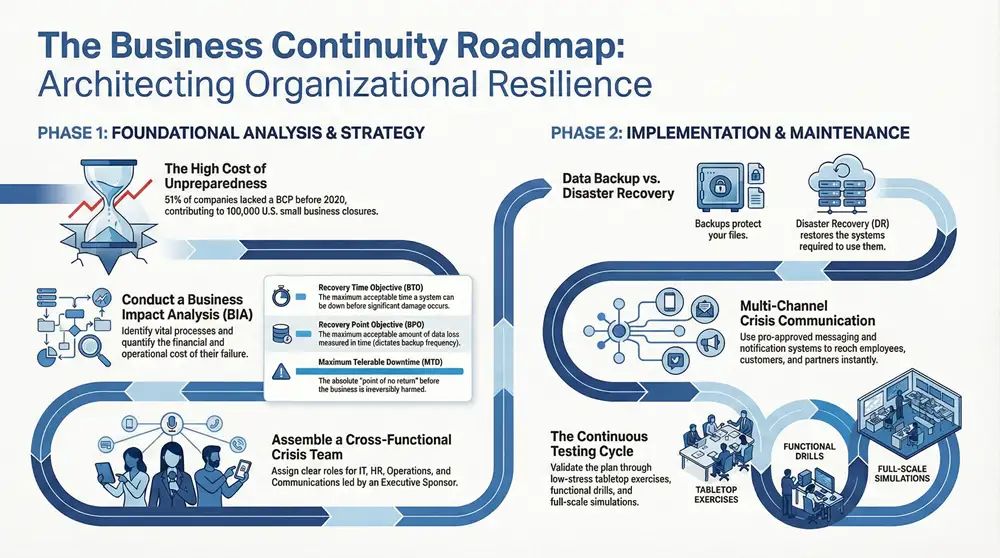
A solid business continuity plan template isn’t just a document; it’s your strategic roadmap for getting through a crisis. It lays out the exact procedures and instructions your team needs to follow to keep the lights on, protect your assets, and stay viable when the unexpected happens.
Why a Business Continuity Plan Is Non-Negotiable

Here’s the thing about disruptions: it’s not a matter of if, but when. The threat could be anything from a localized power outage or a key supplier going dark to a full-blown cyberattack. Whatever the cause, the potential for a complete operational halt is very real.
Without a plan, a sudden event can kick off a domino effect of disaster. We’re talking significant financial losses, a hammered brand reputation, and a complete breakdown in customer trust. A business continuity plan (BCP) shifts your organization from a reactive, panicked stance to a proactive one, making sure you have the tools and procedures ready before a crisis hits.
This isn’t just an IT checklist. It’s a holistic strategy for organizational resilience. A well-thought-out plan makes sure every single department, from HR to operations, knows its role during an emergency. That level of preparedness is what separates the businesses that stumble from those that stand strong.
The Real Cost of Being Unprepared
So many organizations underestimate just how vulnerable they are until it’s far too late. The COVID-19 pandemic was a brutal, global-scale lesson in the dangers of poor planning.
A 2020 Mercer survey dropped a bombshell of a statistic: a staggering 51% of companies worldwide had no business continuity plan in place before the crisis. That lack of foresight had devastating consequences, contributing to the permanent closure of around 100,000 small businesses in the U.S. alone. These numbers show just how critical this kind of preparation is.
A business continuity plan is your organization’s insurance policy against chaos. It doesn’t prevent disasters, but it provides the structure and clarity needed to navigate them successfully, protecting your people, processes, and profitability.
Key Benefits of Proactive Planning
Investing the time to build a BCP pays off in tangible ways that protect your bottom line and secure your future. The process itself forces you to pinpoint your most critical business functions and figure out exactly what you need to keep them running. That clarity alone is invaluable.
The main benefits really boil down to this:
- Minimized Financial Impact: By slashing downtime, you protect your revenue streams and avoid the compounding costs that come with long operational shutdowns.
- Enhanced Customer Confidence: When you can prove that you’ll still be there for your clients during a crisis, it builds immense trust and loyalty.
- Improved Employee Safety: At its core, a good BCP is about people. It ensures the well-being of your team through clear communication and emergency protocols.
- Streamlined Recovery Process: Instead of your team making panicked decisions on the fly, they can follow a pre-approved, logical set of steps. This leads to a much faster and more efficient recovery.
It’s important to understand how this strategic planning fits with a more focused IT approach. To see the full picture, you can learn more about how business continuity and disaster recovery work together in our detailed guide. Ultimately, a BCP is a foundational asset for survival and long-term success.
Laying the Groundwork for Your BCP
Before you write a single line of your business continuity plan, you have to do the foundational work. This means taking a deep, honest look at your operations to figure out what truly matters and what could bring everything to a grinding halt. If you skip this part, your entire plan will be based on guesswork, not strategy.
An unexpected disruption can paralyze a business that isn’t ready. On the other hand, a thoughtful recovery strategy can turn a potential catastrophe into a manageable incident.
This visual flow shows the stark difference between being caught off guard and having a clear path to recovery.
The key takeaway here is that recovery only happens with intentional, structured planning that occurs long before a crisis hits.
Conduct a Business Impact Analysis
The first and most critical step is the Business Impact Analysis (BIA). Think of the BIA as the diagnostic scan for your entire organization. Its goal is to identify your most essential business functions and then map out how a disruption would hurt them over time.
You’re not just listing departments; you’re pinpointing specific, vital processes. For a manufacturing firm, that might be the production line for its highest-margin product. For a healthcare clinic, it’s probably the patient scheduling and electronic health record (EHR) systems.
Once you’ve identified these critical functions, you have to quantify what their failure would actually cost you. To make sure you cover all your bases, it’s a good idea to lean on a structured guide like this ultimate Business Continuity Planning Checklist. It helps ensure no stone is left unturned during this vital phase.
A proper BIA hinges on a few key metrics. These numbers aren’t just jargon; they are the bedrock of your entire recovery strategy.
Business Impact Analysis Key Metrics
This table breaks down the essential metrics you’ll use to measure the potential impact of an outage on your core business operations.
| Metric | Description | Example |
|---|---|---|
| Recovery Time Objective (RTO) | The maximum acceptable time a system or function can be down before the business suffers significant damage. It’s your deadline to get things back online. | An e-commerce site’s payment gateway might have an RTO of less than 30 minutes to avoid major revenue loss and customer frustration. |
| Recovery Point Objective (RPO) | This defines the maximum acceptable amount of data loss, measured in time. It dictates how frequently you need to back up your data. | If your accounting department has an RPO of one hour, your backups must be, at most, one hour old to prevent unacceptable data loss. |
| Maximum Tolerable Downtime (MTD) | The absolute longest a function can be unavailable before the business is irreversibly harmed. This is the point of no return. | A patient-facing portal at a hospital might have an MTD of four hours before patient care is critically compromised. The RTO would be much shorter. |
Understanding these metrics is non-negotiable. They directly inform your technology choices, backup schedules, and the urgency of your response.
Perform a Thorough Risk Assessment
With your BIA complete, you know what you need to protect. Now it’s time for a Risk Assessment to figure out what you’re protecting it from. This process involves identifying potential threats and evaluating both their likelihood and their potential impact.
It helps to categorize the threats you face:
- Natural Disasters: Think floods, tornadoes, severe winter storms, or fires relevant to your specific location.
- Technical Failures: This could be anything from a simple power outage to server hardware failure or a major internet service disruption.
- Human-Caused Threats: This broad category includes everything from cyberattacks (like ransomware) and internal sabotage to simple but significant human error.
Get specific. Instead of just listing “cyberattack,” break it down into realistic scenarios like a phishing attack that compromises employee credentials versus a DDoS attack that knocks your website offline. Rank each risk on a simple matrix of probability (low, medium, high) and impact (low, medium, high).
A high-probability, high-impact risk—like a ransomware attack on a healthcare provider’s patient data—should be the absolute top priority in your BCP. This focus allows you to allocate resources effectively instead of trying to plan for every conceivable disaster at once.
Establish Your Crisis Management Team
A plan is just a document without the right people to execute it. Your Crisis Management Team is the command center that will activate and manage the BCP during an actual incident. This is not a one-person job; it demands a cross-functional group with crystal-clear roles.
Your team should absolutely include representatives from these key areas:
- Team Leader (Executive Sponsor): Has the final authority to declare a disaster and approve major decisions and spending.
- IT/Technology Lead: Responsible for the hands-on work of data recovery, restoring systems, and managing technical infrastructure. This is where Kraft Business Systems’ Backup & Disaster Recovery services become your lifeline, providing the expertise to hit those aggressive RTOs and RPOs.
- Operations Lead: Manages the restoration of core business processes, whether that means redirecting production or setting up a temporary workspace.
- Communications Lead: Handles all internal and external messaging, keeping employees, customers, and stakeholders in the loop with a single, consistent voice.
- HR Lead: Focuses on employee safety and well-being, managing payroll, and communicating benefits during a disruption.
For every role, you need to document specific responsibilities and a clear line of succession. What happens if the Team Leader is on a plane with no Wi-Fi? Who is their designated backup? These details are what make a plan truly functional when a crisis unfolds.
Developing Your Response and Recovery Strategies

Alright, you’ve done the hard work of identifying what keeps your business running and what could knock it offline. Now it’s time to build the engine of your business continuity plan. This is where we shift from analysis to action, creating the specific, hands-on strategies that will guide your team through the chaos of a real disruption.
The goal here is a multi-layered defense. You need distinct but interconnected plans for your technology, your physical operations, and your people. A failure in one area can easily cascade into others, so a holistic approach is the only way to build true resilience.
Fortifying Your Technology Backbone
Technology is the central nervous system in nearly every business I’ve worked with. When it goes down, everything grinds to a halt. Your tech recovery strategy has to be robust and, most importantly, directly tied to those RTOs and RPOs you already defined.
The two pillars of tech resilience are data backup and disaster recovery (DR). People often use these terms interchangeably, but they are absolutely not the same thing.
- Data Backup: Think of this as your data’s insurance policy. It’s the process of making copies of your data to protect against hardware failure, corruption, or a ransomware attack. Kraft Business Systems provides automated, secure backup solutions that ensure your critical information is consistently copied and stored safely off-site.
- Disaster Recovery (DR): This is the broader game plan. DR is all about restoring your entire IT infrastructure—servers, networks, applications—after a major incident. It uses your backups to bring systems back online, aiming to slash downtime.
A classic mistake is thinking a simple backup is a disaster recovery plan. Backups protect your files, but a DR plan protects your ability to use those files by restoring the systems they run on. You need both.
This reliance on digital infrastructure is why the global market for Business Continuity Management Planning Solutions is exploding. It’s expected to hit about US$ 720.5 million in 2024 and is projected to grow at a 16.5% compound annual growth rate over the next ten years. This growth is all about businesses realizing they need scalable, real-time solutions to stay afloat.
Securing Your Operations and People
Technology is just one piece of the puzzle. You also have to figure out how, where, and with what resources your team will actually get work done if the office is a no-go zone. This requires some creative thinking about your physical and logistical needs.
A huge, often-overlooked aspect of this is effective supply chain disruption management. A single point of failure with a key vendor can stop your operations just as effectively as a server crash.
Consider these key operational strategies:
- Alternate Worksite Arrangements: If a fire or flood makes your office inaccessible, where does everyone go? This could range from a pre-arranged “hot site” (a fully equipped office on standby) to simply having a formalized and tested remote work policy.
- Supply Chain Diversification: Pinpoint your most critical suppliers and find backups now. Having established relationships with alternate vendors before a crisis hits prevents that panicked scrambling when your primary supplier can’t deliver.
- Critical Asset Management: Keep a detailed inventory of essential equipment, documents, and other physical assets. Know where they are, who can access them, and how you would replace them if they were lost.
Building out the IT-specific components of your plan is crucial. You can dive deeper with our complete guide on creating an effective disaster recovery plan to really flesh this part out.
Maintaining Clear and Consistent Communication
During a crisis, chaos thrives on silence and misinformation. A clear, pre-planned communication strategy is your most powerful tool for keeping order, reassuring stakeholders, and protecting your reputation.
Your plan needs to address multiple audiences with tailored messaging.
Internal Communications (Your Team)
Your employees are your first priority. They need to know they’re safe and understand what’s expected of them. Your plan must include:
- An Emergency Notification System: How will you contact everyone instantly? A multi-channel system using text, email, and phone calls is the only way to ensure the message gets through.
- A Regular Update Cadence: Designate a single source of truth—like a specific manager or an intranet page—and commit to regular updates. Even if the update is “no new information,” the consistency is reassuring.
- Role-Specific Instructions: Provide clear directions for different teams. The IT crew needs technical instructions, while the sales team needs guidance on what to tell clients.
External Communications (Customers, Partners, and Media)
How you communicate with the outside world will shape their perception of your company’s competence and reliability long after the crisis is over.
- Pre-Approved Holding Statements: Draft simple, empathetic statements you can release immediately. These buy you time to gather the facts while showing you’re on top of the situation.
- Designated Spokesperson: Funnel all external inquiries to a single, trained spokesperson. This ensures a consistent and controlled message, preventing conflicting information from getting out.
- Proactive Updates: Don’t wait for anxious customers to call you. Use email, social media, and your website to proactively inform them of the situation, the impact on services, and your best guess on a timeline for resolution.
Creating Actionable Department-Specific Plans
An organization-wide business continuity plan gives you the 30,000-foot view, but the real work of getting back on your feet happens down in the trenches—within each department. A high-level strategy is essential, don’t get me wrong. But it’s the detailed, function-specific playbooks that let your teams act decisively when a crisis hits. Without them, your master plan is just a theory.
Think of it this way: the main BCP is the blueprint for a house. The department-specific plans are the detailed instructions for the electricians, plumbers, and framers. Each expert knows exactly what to do in their specialized area to build a resilient structure. This is how you turn a broad strategy into practical, actionable steps for everyone on your team.
The IT Department Playbook
No department is more critical during a disruption than Information Technology. The IT team’s plan is the technical heart of your recovery, laser-focused on restoring systems, protecting data, and fending off the secondary threats that always pop up during the chaos. Their playbook needs to be precise and methodical.
Key elements of a solid IT plan should include:
- System Restoration Priority List: Not all systems are created equal. This list, pulled directly from your Business Impact Analysis, must rank applications and servers in order of recovery. For instance, your customer database and payment processing system will always trump internal development servers. Always.
- Step-by-Step Recovery Procedures: Document the exact technical steps needed to restore critical systems from backups. This means everything: server configurations, application dependencies, network settings. The goal is to create a guide so clear that another qualified IT pro could follow it if your primary tech is unavailable.
- Cybersecurity Incident Response: A disaster is a gold mine for cybercriminals. The IT plan must detail how to monitor for, identify, and contain threats during the recovery phase. This is a specialized field, and having a clear process is non-negotiable. For a deeper look, understanding the core components of an IT security incident response plan is a critical next step for protecting your digital assets.
The Human Resources Lifeline
While IT handles the tech, the Human Resources department takes care of your most valuable asset: your people. The HR plan is all about employee safety, communication, and well-being, ensuring the team stays supported and in-the-know throughout an incident.
Their responsibilities are absolutely vital:
- Employee Communication Tree: You need a rock-solid system to contact all employees quickly. This should use multiple channels—text, email, a designated phone line—because you can’t assume every channel will work.
- Payroll Continuity: Making sure people get paid on time, even during a major disruption, is non-negotiable for morale and stability. The HR plan has to outline a backup process for payroll, maybe involving a third-party service or alternate bank accounts.
- Welfare and Support: A crisis is stressful. The plan should point to resources like employee assistance programs (EAPs), provide guidance on remote work policies, and have clear protocols for reporting safety status.
A common oversight we see is forgetting to test the employee contact list. An outdated list is completely useless in an emergency. HR should be verifying all employee contact information at least quarterly.
The Operations and Communications Response
The Operations team faces the practical challenge of keeping service delivery going with what might be very limited resources. Their plan is all about adapting on the fly to keep the core business moving, even if it’s at a reduced capacity.
For example, a manufacturing firm’s ops plan might detail how to shift production to another facility or prioritize orders for top clients. A service-based business might outline how to triage customer requests and manage expectations with a skeleton crew.
Finally, the Communications team becomes the public voice of the organization. Their plan ensures a consistent, credible message is delivered to everyone who matters.
Key Communication Actions
| Audience | Primary Goal | Sample Action |
|---|---|---|
| Employees | Ensure safety and clarity | Deploy pre-scripted messages via the emergency notification system. |
| Customers | Maintain trust and manage expectations | Post regular updates on the company website and social media channels. |
| Suppliers & Partners | Coordinate recovery efforts | Contact key vendors to activate contingency plans and confirm supply availability. |
| Media/Public | Control the narrative | Funnel all inquiries to a single designated spokesperson to prevent mixed messaging. |
By breaking down the main business continuity plan into these detailed departmental playbooks, you create a truly resilient organization where every single team understands its specific role in the recovery.
Keeping Your BCP Relevant and Ready
Putting the final touches on your business continuity plan feels like a huge win, and it is. But don’t make the mistake of sticking it on a shelf to collect dust. A BCP that isn’t regularly tested and updated is almost as bad as having no plan at all.
To be truly effective, your plan needs to be a living document. This final phase—testing and maintenance—is what turns a theoretical strategy into a proven, reliable roadmap. It’s how you find the holes in your plan before a real crisis does it for you.
Putting Your Plan to the Test
You’d never install a fire alarm and just assume it works, right? The same logic applies here. Testing is the only way you can validate your assumptions, find the weak spots, and build your team’s muscle memory for when a real event unfolds. The goal isn’t to pass or fail; it’s to learn and get better.
There are a few different ways to kick the tires on your plan, each with its own level of intensity.
- Tabletop Exercises: This is your low-stress starting point. Get the crisis team in a room, present a simulated disaster scenario, and talk through it. It’s a perfect way to clarify roles, responsibilities, and communication flows without the pressure of a live event.
- Functional Drills: Time to get a little more hands-on. Here, you test one specific piece of your plan. Can you actually restore that critical server from the backup? Does the emergency notification system reach everyone? These drills confirm the individual technical bits and pieces actually work.
- Full-Scale Simulations: This is the big one—a dress rehearsal for a real disaster. You might fail over to your DR site, have employees work from their alternate locations, and run the business in “disaster mode” for a few hours. It’s as close as you can get to the real thing.
A common mistake we see is companies only doing tabletop exercises. While they’re great for strategy, they don’t test your tech or your processes under any real pressure. A solid testing schedule should mix in all three types to build genuine resilience.
Establishing a Maintenance Cadence
Your business changes constantly. You bring in new tech, key people come and go, and your daily operations evolve. Every one of these changes can create a new vulnerability or make a part of your BCP totally irrelevant. A structured maintenance schedule is non-negotiable.
This growing awareness is why the Business Continuity Management (BCM) market is booming. Valued at about US$ 510 million in 2021, it’s projected to hit US$ 1.81 billion by 2030. This isn’t just about big corporations; it shows a widespread understanding that structured planning, often starting with a business continuity plan template, is vital for survival. You can dig deeper into the market trends and drivers in BCM research if you’re curious.
At a minimum, your plan should be reviewed immediately following certain trigger events:
- Technology Changes: Rolling out a new ERP system or moving to a different cloud provider? That’s an automatic BCP update.
- Personnel Shifts: If a key member of your crisis team leaves, their responsibilities must be reassigned and documented right away. Don’t wait.
- Operational Updates: Did you switch to a new critical supplier or change a core manufacturing process? Your recovery priorities might have just changed, too.
- Physical Moves: Relocating your office or data center fundamentally changes your entire risk profile and recovery logistics.
Beyond those triggers, you need to schedule a full-blown review of the entire plan at least once a year. This regular check-in ensures nothing slips through the cracks and keeps your plan ready to go at a moment’s notice.
Digging into Your Business Continuity Questions
Even with a great template in hand, putting together your first business continuity plan is going to bring up some questions. It’s totally normal. Getting these common points of confusion cleared up is the key to building a plan that actually works when you need it most, not just one that looks good in a binder. Let’s tackle some of the most frequent questions we hear.
What’s the Difference Between a BCP and a Disaster Recovery Plan?
This is, without a doubt, the number one question we get. It’s easy to see why they get mixed up, but the distinction is critical.
Think of it this way: your Disaster Recovery (DR) plan is a specialized, technical chapter within your much broader Business Continuity Plan (BCP).
- A DR plan is all about the tech. Its sole purpose is to answer the question, “How do we get our servers, data, and critical systems back online after they go down?” It’s the playbook for your IT team, covering backups, failover sites, and network restoration.
- A BCP takes a bird’s-eye view of the entire business. It answers the bigger question, “How do we keep the whole company operating during and after a crisis?” This plan goes way beyond servers—it covers your people, physical locations, customer communication, and supply chains.
A DR plan might bring your network back to life, but the BCP is what tells your employees where to go work from and how to let customers know you’re still open for business. You can’t have one without the other.
How Often Should We Actually Test This Thing?
A plan you’ve never tested isn’t a plan; it’s a theory. And you don’t want to be testing theories when disaster strikes. How often you test depends on your business, but a layered approach is usually best.
- Annual Full-Scale Simulations: Once a year, you need to go all-in with a test that mimics a real disaster. This could mean actually failing over your systems to a secondary location or having a whole department work remotely for a day to see what breaks.
- Quarterly Functional Drills: Every few months, pick one piece of the plan and test it. Have IT restore a specific server from backup. Ask HR to run a test of the emergency employee contact tree. These smaller drills keep individual components sharp.
- Ongoing Tabletop Exercises: These are basically guided brainstorming sessions. Get the key players in a room twice a year and talk through a scenario. “Okay, the power is out and the generator failed. What’s the first phone call you make?” These are low-cost ways to find big gaps in your strategy.
Consistent testing builds muscle memory. It turns a document into a living, breathing process that adapts as your company changes.
Don’t make the classic mistake of writing a plan, putting it on a shelf, and forgetting about it. According to FEMA, a jaw-dropping 43% of small businesses never reopen after a major disaster. Regular testing is your best defense against becoming part of that statistic.
Is a BCP Really Necessary for a Small Business?
Yes. 100%. In fact, you could argue it’s more critical for a small business.
Larger corporations often have the deep pockets and redundant resources to weather a storm. But for a small business, an event that’s just a headache for a big company could be a complete knockout punch. You don’t have the same financial cushion to survive a week—or even a few days—of being completely offline.
The good news is that a BCP for a smaller company doesn’t need to be a 300-page novel. It can be a lean, focused document that zeroes in on the most critical functions you identified in your Business Impact Analysis. A solid business continuity plan template is the perfect launchpad, letting you scale the plan to fit your actual needs without starting from scratch.
FAQ on Business Continuity Plans
As you get deeper into the process, more specific questions are bound to pop up. Here are quick answers to some of the most common ones we field from businesses just like yours.
Who should be on the BCP team?
Your team should be cross-functional. You absolutely need someone from IT, but don't forget Operations, HR, Communications, and a senior leader to act as the executive sponsor. Each department sees risks the others might miss.
How long should our BCP be?
As long as it needs to be, and no longer. Focus on clarity and action. Use checklists, flowcharts, and simple language. In a crisis, nobody has time to read a dense manual. It should be a quick-action guide.
Where should we store the plan?
In multiple accessible locations! A digital copy in the cloud (like on Microsoft 365 or Google Workspace), a copy on a local server, and printed hard copies in the office and at key leaders' homes. If your only copy is on a server that just went offline, it's useless.
What's the biggest mistake people make?
Focusing only on IT. A plan that only restores servers but ignores how your team will communicate, where they will work, or how you'll manage your supply chain is destined to fail. The human element is just as important as the technology.
Conclusion
Building a plan is a major step, but it’s only half the battle. A truly resilient business is one where the plan is known, tested, and constantly refined.
Protecting your business requires more than just a document; it demands the right technology and expertise to bring that plan to life. Kraft Business Systems delivers the secure, end-to-end solutions that form the backbone of a resilient organization, from robust Backup & Disaster Recovery to proactive Cybersecurity and efficient Document Management Systems. Let our experts help you build a truly effective continuity strategy.