


Effective multi-factor authentication best practices go way beyond just asking for a password. It’s all about layering security, requiring your people to prove who they are with a second, separate method. This simple step acts as a powerful barrier, dramatically cutting the risk of a breach even if a hacker manages to steal a password.
Why MFA Is Your First Line of Defense

Let’s be clear: Multi-factor authentication isn’t just another IT checkbox. It’s a fundamental business survival strategy. We live in a world where passwords are stolen, bought, and sold every single day on the dark web. Relying on just a password is like leaving your office front door wide open overnight.
MFA creates a crucial, powerful barrier that protects your most valuable digital assets.
This security layer is your best defense against common—and devastating—cyberattacks like credential theft and business email compromise (BEC). When a threat actor gets their hands on a password, MFA is the one thing that stops them in their tracks. Without physical access to your employee’s phone or a hardware key, that stolen password is completely useless.
Protecting Your Business Essentials
Rolling out a solid MFA policy isn’t about creating hassle for your team; it’s about protecting the very core of your business. It’s a simple step that safeguards:
- Sensitive Data: Prevents intruders from accessing client information, financial records, and your company’s intellectual property.
- Client Trust: Shows you’re serious about security, which is a massive factor in winning and keeping customer confidence.
- Revenue and Operations: Helps you avoid the catastrophic financial and operational mess that follows a data breach or account takeover.
If you’re curious about just how easily employee credentials can be compromised, take a look at our guide on whether your employees’ credentials are for sale on the dark web.
MFA completely changes the security game. It moves you away from a single point of failure (a password) to a multi-layered defense. It’s one of the most effective operational safeguards you can deploy to enable secure business growth, not slow it down.
The Puzzling Adoption Gap
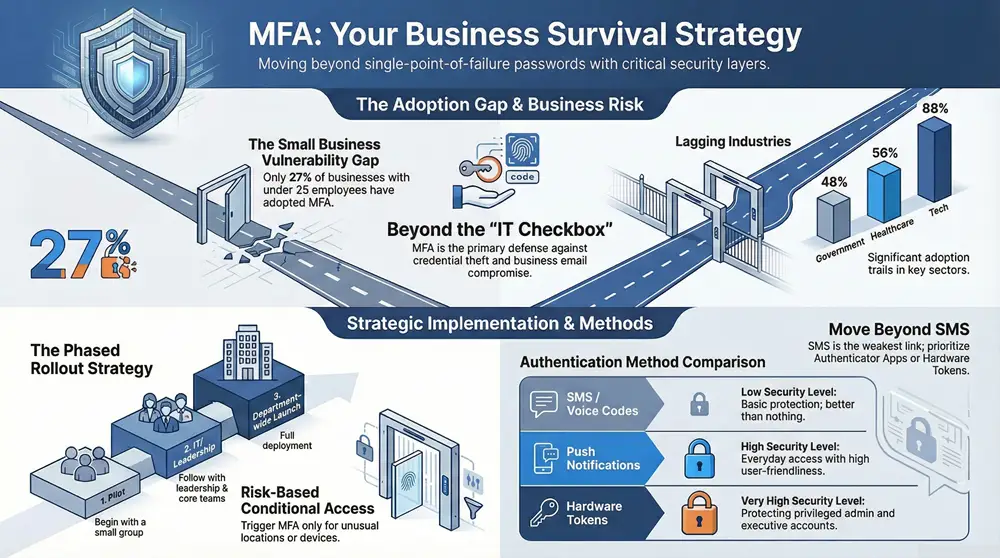
Despite being a proven powerhouse, MFA isn’t everywhere yet. The latest data from January 2025 shows that while overall workforce adoption has hit 70%, the numbers tell a different story when you break them down by company size.
Large enterprises are leading the charge with 87% adoption. But those numbers plummet for smaller businesses—only 34% for companies with 26-100 employees and a startlingly low 27% for those with 25 or fewer.
So, why the gap? Smaller organizations often see MFA as too complex or disruptive, a misconception we’re here to clear up. Email is a prime target for attacks, so understanding how MFA bolsters its security is a great place to start. A detailed guide on multi-factor authentication for email security can provide some excellent context on this.
This guide will give you the practical, real-world advice you need to get MFA implemented effectively, no matter the size of your company.
Building Your Strategic MFA Deployment Plan
Any successful multi-factor authentication rollout is 90% planning and 10% execution. I’ve seen too many projects stumble because a team jumped straight into configuring software without a clear strategy. That’s a surefire recipe for user frustration, security gaps, and a project that ultimately fails. Before you touch a single setting, you need to lay a strong foundation.
This whole process kicks off with a complete inventory. You simply have to know exactly what you’re protecting. This means identifying every single system, application, and user account that holds sensitive data or provides access to critical infrastructure. And don’t just stop at the obvious stuff like Microsoft 365 or your main financial software.
You need to think like an attacker. Consider every possible point of entry they could exploit:
- Cloud Applications: All your SaaS platforms, including CRM, HR tools, and project management software.
- On-Premises Servers: Remote Desktop Protocol (RDP) access, administrative server logins, and internal databases.
- Network Hardware: Access to firewalls, switches, and VPN concentrators.
- Privileged Accounts: Any administrator, service, and executive accounts that have elevated permissions.
This is how a well-planned MFA strategy acts as a shield, stopping threats before they ever get near your valuable data.
As you can see, MFA is that critical checkpoint that turns a potential breach into a blocked attempt, keeping your digital assets safe and sound.
Defining Your MFA Policy
Once you know what to protect, you have to define how you’ll protect it. A formal MFA policy is a non-negotiable document that sets crystal-clear expectations for everyone in the organization. It gets rid of any ambiguity and creates a consistent security standard across the board.
Your policy should explicitly state which user groups are covered and which authentication methods are approved for use. For instance, you might require phishing-resistant methods for administrators while allowing authenticator app push notifications for general staff. This foundational step is a key part of any thorough security plan. To get a better handle on where MFA fits into your bigger security picture, you can check out our detailed guide on conducting a complete cybersecurity risk assessment.
This level of detailed planning prevents security inconsistencies and ensures everyone knows exactly what their responsibilities are.
Embracing a Phased Rollout
A “big bang” approach to deploying MFA is just asking for trouble. Turning it on for everyone all at once often leads to an overwhelmed help desk and a wave of user pushback. A phased rollout is one of the most important multi factor authentication best practices you can adopt.
Start with a pilot group. It’s a small, controlled test that lets you work out any technical kinks and gather invaluable feedback before you go live.
Your pilot group is your secret weapon. It should include a mix of tech-savvy employees who can give you detailed feedback and less technical users who will quickly highlight potential user experience problems. Their insights will help you refine your training materials and support process before the company-wide launch.
After a successful pilot, you can start rolling out MFA to the rest of the organization in manageable waves. A logical approach might look something like this:
- IT Department: Your technical team should always go first. They can identify backend issues and become champions for the new system.
- Leadership and Privileged Users: Secure your highest-risk accounts next, including executives and system administrators.
- Department by Department: Roll out MFA to individual departments, which allows you to provide focused support and training for each group.
This methodical strategy minimizes disruption and builds positive momentum. It allows your IT team to manage the change effectively, providing targeted support right where it’s needed most. By establishing achievable timelines and assessing your organization’s readiness at each stage, you transform a potentially chaotic project into a controlled and successful security upgrade.
Choosing the Right MFA Methods for Your Team

Picking the right multi-factor authentication method isn’t just a technical task—it’s a strategic business decision. Get it right, and you’ve got a seamless layer of protection that your team barely notices. Get it wrong, and you’re facing frustrated employees, low adoption, and security gaps that attackers are more than happy to exploit.
The real goal here is to strike that perfect balance between rock-solid security and day-to-day usability. If a method is too clunky, your team will find workarounds. It’s human nature. But if it’s too simple, it might not stand up to the sophisticated threats we’re all facing today.
Understanding Your Options
At its core, MFA is all about proving you are who you say you are by combining different “factors.” These typically fall into three buckets: something you know (like a password), something you have (like your phone), and something you are (like your fingerprint).
Let’s walk through the most common methods you’ll come across.
- SMS and Voice Codes: This sends a one-time code to a user’s phone via text or a call. While everyone understands it, this is the weakest link in the MFA chain. It’s vulnerable to “SIM-swapping,” where an attacker tricks a mobile carrier into transferring a phone number to their own device.
- Authenticator Apps: Apps like Google Authenticator or Microsoft Authenticator generate a constantly changing, one-time password (TOTP). This is a huge security upgrade from SMS because the code is generated on the device itself and never travels over an insecure network.
- Push Notifications: This is the user-friendly evolution of authenticator apps. Instead of typing a code, users just get a simple “Approve” or “Deny” pop-up on their smartphone. It’s fast, simple, and a favorite for many businesses.
- Hardware Tokens: These are small physical devices, like a YubiKey, that you plug into a USB port. They are incredibly secure and resistant to phishing attacks, but they do have a hardware cost and need to be managed and distributed.
- Biometrics: This uses a unique physical trait—a fingerprint, face, or even an iris scan—for verification. It’s about as convenient as it gets, but it does depend on your team having devices with the right hardware, like a fingerprint reader.
This variety of options is a direct result of market innovation. The global MFA market was valued at $18.12 billion in 2024 and is projected to hit $24.1 billion by 2025. This growth is driven by the demand for stronger security, with the adoption of phishing-resistant methods growing 63% in just one year. You can dive deeper into the booming MFA market and its trends at njda.org-statistics-you-need-to-know-in-2025—dental-technologies).
Making an Informed Decision
So, how do you choose? You need to weigh each method against your company’s specific needs, risk profile, and your team’s comfort level with technology. Often, the best strategy involves using a mix of methods defined by a clear policy. This approach is a key part of any solid security framework, and you can see how it fits into the bigger picture in our article on identity and access management solutions.
To make this critical decision a bit easier, we’ve broken down how the most common MFA factors stack up against each other.
Comparison of Common MFA Authentication Methods
This table should give you a quick, at-a-glance idea of which methods might work best for different scenarios within your organization.
| Authentication Method | Security Level | User Convenience | Best For |
|---|---|---|---|
| SMS/Voice Codes | Low | High | Basic protection where no sensitive data is involved; better than nothing. |
| Authenticator Apps | High | Medium | Securing most business applications for general staff; offers a strong security baseline. |
| Push Notifications | High | High | Organizations looking for a user-friendly and secure option for everyday access. |
| Hardware Tokens | Very High | Medium | Protecting privileged accounts (admins, executives) and high-value systems. |
| Biometrics | Very High | Very High | Environments where users have modern devices and convenience is a top priority. |
As you can see, there’s a clear trade-off between convenience and security at the lower end of the spectrum, while more advanced methods manage to deliver both.
The single most critical of all multi factor authentication best practices is to get away from SMS-based MFA. It was a decent first step years ago, but its known vulnerabilities make it an unacceptable risk for protecting important business data today. Make authenticator apps, push notifications, or hardware tokens your standard.
Ultimately, your goal is to support your security objectives without creating a ton of friction for your team. A well-chosen MFA method just becomes part of the daily workflow, while a bad choice becomes a constant source of help desk tickets and security exceptions. By carefully looking at these options, you can land on a solution that your team will actually use—and that gives your business the robust protection it deserves.
A Practical Guide to MFA Implementation and Enforcement
Alright, you’ve got a solid plan and you’ve picked your MFA methods. Now it’s time to roll up your sleeves and get to work. This is the part where the technical setup meets the human side of things, and making both work together is the secret to a smooth rollout.
Most of the heavy lifting on the tech side starts right inside your core identity platform, whether that’s Microsoft 365 or Google Workspace. These platforms have incredibly powerful, built-in tools for enforcing MFA. Getting these settings dialed in correctly is a non-negotiable step for following multi-factor authentication best practices.
Fine-Tuning Your Technical Controls
Modern MFA isn’t just a simple on/off switch; it’s a sophisticated control panel. In the Microsoft 365 world, for example, Conditional Access policies are your absolute best friend. Think of them as a smart security guard at the front door, checking everyone’s credentials and the context of their visit before letting them in.
You can set up policies that react to all sorts of risk signals in real-time:
- Where is the user? You might let people sign in without a prompt from the main office network but challenge them with MFA if they’re trying to log in from an unfamiliar country.
- Is their device healthy? If someone is on a company-managed laptop that’s up-to-date and compliant, maybe they get a pass. If they’re on a personal device or one that’s flagged as risky, you can trigger an MFA prompt or block access entirely.
- Does this sign-in look sketchy? The system can spot bizarre behavior, like a user logging in from Michigan and then from another continent 10 minutes later. When that happens, it automatically throws up an MFA challenge.
This kind of intelligent, risk-based approach is key. It makes life easier for your team in low-risk situations but ramps up security the moment something seems off.
Communicating the Change Effectively
Let’s be clear: the human element is just as critical as your technical setup. Your team needs to know why this is happening and how it will change their daily routine. A poorly communicated rollout will create resentment and resistance, and that can sink the whole project before it even starts.
Start talking to your team early, and keep it simple. Ditch the technical jargon. Frame MFA as what it is: a tool that protects both the company’s data and their own personal information tied to their work accounts.
Clear, proactive communication is non-negotiable. Explain that MFA is a modern security standard that safeguards everyone’s work. Providing simple, step-by-step guides and being transparent about the timeline will make your team feel supported rather than dictated to.
A good communication plan should include a mix of announcement emails, short training guides (maybe even a quick video), and some drop-in Q&A sessions. By preparing your team for the change, you can turn potential critics into security champions who help their colleagues through the transition.
Managing Legacy Systems and Exceptions
You’re almost guaranteed to run into systems that simply can’t handle modern MFA. We see it all the time—old on-prem applications, specialized hardware, or other legacy tech that was built long before MFA was a thing. You can’t just ignore them; that would leave a massive hole in your security.
The first step is to find these systems during your initial inventory. For each one, you need a specific game plan. Can it be retired or replaced? If not, you have to layer on other protections, often called compensating controls.
- Network Segmentation: Isolate that old system on its own network segment to limit its exposure to the rest of your environment.
- Strict Access Control: Lock down access to the absolute minimum number of people who truly need it. No exceptions.
- Intensive Monitoring: Keep a close eye on all activity and login attempts on that legacy system. You need to be able to spot any sign of trouble immediately.
Your exception policy needs to be formal and, crucially, time-bound. An exception should never be a permanent “get out of jail free” card. It’s a temporary fix with a clear plan and a deadline for getting that system modernized or replaced. For businesses pursuing broader security certifications, knowing how to manage these risks is essential. The practical security controls in ISO 27001 Annex A offer great context for building out these kinds of comprehensive strategies.
The technology sector has clearly gotten the message, showing that security-focused industries understand just how critical MFA is. As of 2024, tech companies hit an 87-88% MFA adoption rate, blowing other sectors out of the water. Unfortunately, industries vital to Michigan’s economy—like manufacturing, healthcare, and government—are lagging. The healthcare and government sectors are particularly concerning at 56% and 48% respectively, especially given their strict regulatory duties and the sensitive data they handle. You can discover more insights about these MFA adoption statistics at electroiq.com.
This gap shows why a structured rollout is so important. By carefully combining strong technical controls, clear communication, and a smart plan for exceptions, you can make sure your MFA deployment is both secure and successful.
How to Monitor and Maintain Your MFA Security
Getting multi-factor authentication rolled out is a huge security win, but your job isn’t done. MFA is not a “set it and forget it” tool. Its real strength comes from consistent, ongoing attention. An unmonitored MFA system can slowly develop weaknesses, creating the exact kind of blind spots that attackers love to exploit.
Effective security is a process, not a project. You need to treat MFA as a living, breathing part of your security posture. That means regular check-ups and proactive management to stay ahead of new threats.
Actively Monitor Authentication Logs
Your authentication logs are a goldmine of security intelligence. Think of them as a real-time feed of every login attempt—successful or not—across your entire organization. Ignoring them is like installing a state-of-the-art alarm system and then never arming it.
Regularly reviewing these logs is one of the most fundamental multi factor authentication best practices. You’re hunting for the weird stuff, the red flags that could signal an attack in progress.
What should you be looking for?
- Impossible Travel: This is a classic. If a user logs in from Detroit and then, five minutes later, from another continent, something is seriously wrong. A good system flags this automatically.
- Failed Logins from Multiple Locations: A spray of failed login attempts for a single user account coming from all over the world? That’s a brute-force attack, plain and simple.
- Unusual MFA Prompts: A sudden spike in MFA denial notifications for one user could mean an attacker has their password. They’re spamming the user with push requests, just hoping for an accidental tap of “Approve.”
- Login Attempts at Odd Hours: An employee who works a standard 9-to-5 suddenly trying to get into your systems at 3 AM should set off immediate alarm bells.
Setting up automated alerts for these kinds of suspicious activities is critical. It gives your IT team a fighting chance to investigate potential threats immediately, instead of finding out about a compromise days or weeks after the fact.
Schedule Regular Policy and Access Reviews
Your business changes constantly, and your security policies need to keep up. The rules that made sense during your initial rollout might be totally wrong six months down the road. People change roles, new apps get added, and the threat environment shifts. A scheduled review process keeps your MFA policies in sync with reality.
A quarterly review is a great place to start. During this review, you should be asking tough questions about your MFA setup to make sure it’s still doing its job.
This isn’t just about ticking boxes on a checklist. It’s a proactive security measure that closes gaps before they can be exploited. For example, a user who moved from the finance department to marketing three months ago shouldn’t still have access to sensitive financial systems. A regular review catches these kinds of discrepancies.
Treat your MFA policy as a living document. Regular, scheduled reviews ensure your security controls evolve with your business, preventing the slow drift into outdated rules and excessive permissions that can create significant vulnerabilities.
This disciplined approach ensures your multi factor authentication best practices are consistently applied and refined over time.
Streamline Your User Lifecycle Management
People are always joining, leaving, and changing roles within your company. Your MFA system has to keep pace with this natural churn. A strong user lifecycle management process is absolutely essential for maintaining a tight security perimeter.
This process really boils down to three key moments:
- Onboarding: When a new employee starts, their access and MFA setup should be part of a standard, automated workflow. They get what they need—and only what they need—from day one.
- Role Changes: The minute an employee moves to a new department or gets a promotion, their access rights have to be updated. This means revoking old permissions and granting new ones, all protected by the right MFA policies.
- Offboarding: This is the most critical stage. The moment an employee leaves the company, all of their access must be revoked instantly. That includes disabling their accounts and invalidating their MFA tokens to slam the door on any chance of unauthorized post-employment access.
Even with strong MFA, attackers are always looking for a way in. Research shows that 28% of users with MFA enabled are still targeted with sophisticated attacks like SIM-jacking and MFA fatigue bombing. This just highlights why vigilant monitoring and maintenance are so important—they give you the visibility needed to catch these advanced threats in action. An adaptive and well-maintained MFA system is truly your best defense.
Got Questions About MFA? We’ve Got Answers.
When we help businesses roll out multi-factor authentication, a few key questions always pop up. It’s natural to wonder about the impact on your team, how it fits with compliance rules like HIPAA, and whether it will play nice with your existing tech. Let’s tackle the most common concerns we hear from clients.
Getting these details sorted out is often the last step before a smooth, successful deployment.
“Will My Employees Find MFA Too Complicated?”
This is the number one concern we hear, and it’s a valid one. Nobody wants to add friction to their team’s workday. The good news is that modern MFA is designed to be as painless as possible.
Solutions that use push notifications on an authenticator app have boiled the process down to a single tap on a smartphone. It’s far less intrusive than most people imagine.
Plus, we can set up smart policies to make it even easier. For instance, we can configure the system to skip MFA prompts when your team is logged in on the secure office network. It’s a tiny shift in daily habits that delivers a massive security upgrade, stopping the vast majority of account takeovers cold.
“What’s the Best Type of MFA for HIPAA Compliance?”
If you’re handling electronic Protected Health Information (ePHI), HIPAA requires you to use MFA that is both secure and, crucially, auditable. While you could technically use SMS text codes, they are widely seen as too weak for protecting sensitive patient data. The risk of vulnerabilities like SIM-swapping is just too high.
For HIPAA compliance, the gold standard is using phishing-resistant methods that provide a much higher level of assurance. This really boils down to three great options:
- Authenticator Apps: Tools like Microsoft Authenticator or Google Authenticator that generate time-based codes (TOTP).
- Hardware Keys: Physical security keys like a YubiKey are the top tier. The user must physically possess the key to log in.
- Biometrics: Using a fingerprint or facial scan on a trusted, company-managed device.
These methods create a solid audit trail and give you the robust protection that patient data demands, keeping you in line with HIPAA’s strict security rules.
Choosing the right MFA for compliance isn’t just about ticking a box. It’s about building a security posture you can actually defend. The goal is to prove you’ve put strong, modern safeguards in place to protect sensitive information, and phishing-resistant factors are how you do it.
“Can We Use MFA for Both Our Cloud and On-Premises Apps?”
Absolutely. In fact, this is how most businesses operate today. You don’t need to juggle separate MFA systems for your different resources—that would be a management nightmare.
This hybrid environment is exactly what modern Identity and Access Management (IAM) platforms are built for. Leading solutions like Microsoft Entra ID (what used to be Azure AD) or Okta are designed to connect seamlessly with both your cloud services and your legacy on-prem applications.
Using tools like application proxies or other connectors, you can extend one unified MFA policy across all your critical resources, no matter where they live. This centralized approach makes administration a breeze and guarantees consistent security across your entire tech stack.
At Kraft Business Systems, we specialize in implementing secure, end-to-end technology solutions that align with your business goals. Our experts can help you deploy robust MFA strategies that protect your Michigan-based organization without disrupting productivity. Learn how we can strengthen your security posture.

