


So, what exactly are managed print services (MPS)? In short, it’s a program where an expert provider takes over the complete management of your office printing—everything from the printers and supplies to the maintenance and security—all bundled into one predictable monthly cost.
Think of it like a subscription service for your entire print environment. The responsibility for keeping everything running smoothly shifts from your team to a dedicated partner.
Unpacking Your Print Environment as a Service
Most businesses handle printing the old-fashioned way. You buy a printer from a big-box store, an employee makes a mad dash to an office supply store for toner when a cartridge runs dry, and your IT team gets pulled away from critical projects to wrestle with a paper jam. This reactive, piecemeal approach is riddled with hidden costs, kills productivity, and often leaves your network wide open to security risks.
Managed print services completely flips that model on its head.
Instead of trying to juggle different vendors and getting hit with surprise repair bills, an MPS provider becomes your single point of contact for anything and everything print-related. This is more than just leasing a copier; it’s a strategic service designed to optimize your entire document workflow from the moment you hit “print” to the final page.
The core idea is simple: offload the headaches of print management so your team can get back to focusing on their actual jobs.
From Chaos to Control

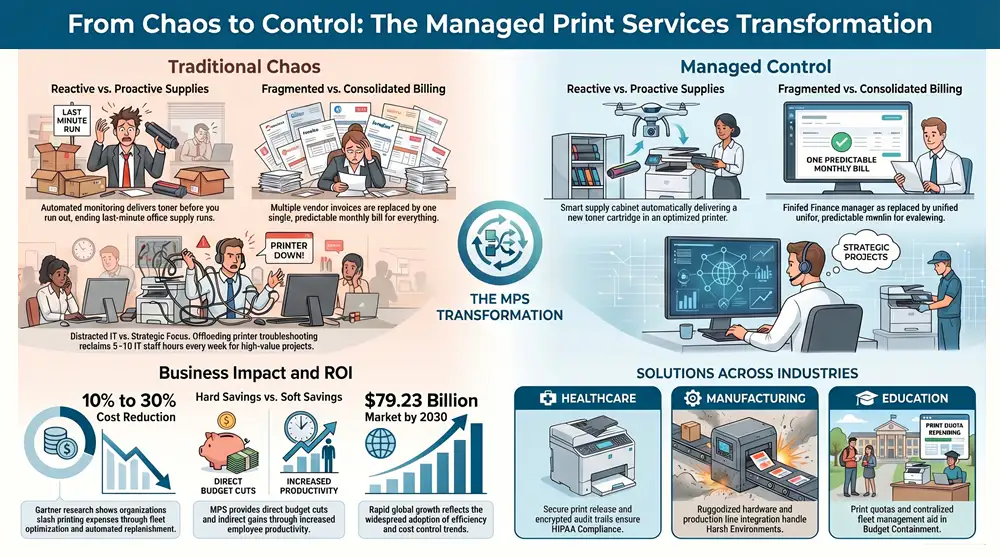
The move to MPS is a shift from disorganized, reactive firefighting to a proactive, consolidated strategy. It’s the difference between constantly putting out small fires and preventing them from ever starting in the first place.
Here’s a quick look at the difference this makes in the real world.
| Aspect | Traditional Approach | Managed Print Services Approach |
|---|---|---|
| Supplies | Reactive ordering; someone runs out when toner is empty. | Proactive monitoring; new supplies arrive automatically before you run out. |
| Maintenance | Unpredictable service calls to different vendors when a device breaks. | One call to your provider for all issues, often with preventative maintenance included. |
| Billing | Multiple invoices for toner, paper, and various repair services. | One consolidated, predictable monthly invoice for everything. |
| Hardware | A mixed fleet of different brands and models, creating supply and support chaos. | A standardized, optimized fleet of devices chosen for your specific needs. |
| IT Involvement | IT team is frequently distracted by printer-related helpdesk tickets. | IT team is freed up to focus on strategic, high-value projects. |
This proactive management is precisely why the global managed print services market is booming. Valued at roughly USD 49.78 billion, the market is on track to hit USD 79.23 billion by 2030. That kind of growth sends a clear signal: businesses are catching on to the immense value of efficiency and cost control. You can explore more data about the managed print services market to see just how widespread this trend has become.
A well-designed MPS program doesn’t just manage printers; it manages an entire business process. The goal is to make printing so seamless and reliable that you rarely have to think about it, freeing up valuable time and resources. This operational efficiency is the true power behind the service.
What Are the Core Components of an MPS Program?
A Managed Print Services program isn’t a single product you buy off the shelf. It’s a comprehensive service strategy made up of several interconnected parts, each designed to tackle a specific headache that comes with traditional office printing. Think of them as the pillars holding up a much more efficient, secure, and cost-effective printing environment for your business.
This diagram shows how the core pillars of an MPS program—devices, supplies, and service—all come together to create one unified strategy.
The key takeaway here is that MPS centralizes control. It takes a bunch of separate, reactive tasks (like fixing a jam or ordering toner) and turns them into a single, proactive system. Let’s break down exactly what that looks like.
Comprehensive Assessment and Fleet Optimization
The journey always begins with a thorough assessment of what you have right now. An MPS partner will dig into everything: how many printers and copiers you have, how old they are, where they’re located, and—most importantly—how much they’re actually being used. This deep dive almost always uncovers some surprising inefficiencies, like those little-used desktop printers quietly racking up huge supply costs.
From there, your provider develops an optimization strategy. This isn’t just about swapping out old machines for new ones; it’s about right-sizing your entire fleet. The goal is to make sure you have the right number and type of devices, placed strategically to meet your team’s needs without any waste. For example, they might consolidate three small, expensive desktop printers into one high-capacity multifunction device that costs a fraction to operate.
This initial optimization sets the stage for every cost saving and productivity boost that follows. It replaces guesswork with a clear, data-driven plan.
Proactive Monitoring and Maintenance
This is where the magic really happens. One of the biggest game-changers with MPS is the shift from reactive repairs to proactive maintenance. Instead of waiting for a printer to break down and bring a whole department to a standstill, your provider uses remote monitoring software to keep a constant eye on the health of every single device.
This software is always tracking device status, error codes, and performance.
- Predictive Alerts: The system can often see that a part, like a fuser or roller, is about to fail and schedule a technician to fix it before it breaks.
- Automated Ticketing: When an issue pops up, the system can automatically create a service ticket, often before your team even notices there’s a problem.
- Reduced Downtime: By catching issues early, this proactive approach keeps your team working without those frustrating interruptions.
This constant oversight slashes equipment downtime, a major source of hidden costs and frustration. Your IT team is no longer getting pulled off critical projects to go wrestle with a paper jam.
A core tenet of what is managed print services is preventing problems, not just fixing them. Proactive maintenance transforms your print environment from a source of unpredictable disruption into a reliable business utility, much like electricity or internet service.
Automated Supply Replenishment
Remember that panicked, last-minute search for a toner cartridge right before a big meeting? With automated supply replenishment, that’s a thing of the past. The same software that watches device health also keeps tabs on your toner, ink, and other supply levels.
When a cartridge starts running low, the system automatically triggers an order. A new one is shipped directly to your office, usually arriving well before you run out. This ensures you always have what you need without having to stockpile supplies or make an emergency run to the office supply store.
This automated process delivers a few key wins:
- Eliminates Stockpiling: You no longer need to tie up cash and closet space with a hoard of expensive toner cartridges.
- Prevents Downtime: Critical print jobs are never held up because someone forgot to reorder supplies.
- Simplifies Ordering: The whole process is handled for you, freeing up your administrative staff for more important work.
Consolidated Billing and Security Management
Finally, a good MPS program brings simplicity to your accounting and muscle to your security. Instead of juggling multiple invoices from different vendors for machines, service calls, and supplies, you get one single, predictable monthly bill. This consolidated invoice covers everything, making your budgeting clean, simple, and transparent.
At the same time, a robust MPS program tackles the often-ignored security risks of printers. Networked multifunction devices are endpoints just like computers, and they can be a backdoor for cyberattacks if they aren’t properly secured. Your provider will manage key security measures like user authentication, data encryption, and regular firmware updates to patch vulnerabilities, ensuring your sensitive business data stays protected.
Uncovering the Business Benefits of Adopting MPS
Knowing what Managed Print Services are is one thing, but seeing how those features translate into real-world business advantages is what really matters. When you move past the list of services and strategically adopt an MPS program, you start to see significant, measurable improvements—to your bottom line, your team’s productivity, your data security, and even your company’s environmental impact.
It’s all about transforming a necessary—but often chaotic—business function into a streamlined, strategic asset.
These benefits aren’t just theoretical talking points; they represent tangible gains that businesses experience the moment they switch from a reactive to a proactive print management model. Let’s dig into the key areas where you’ll see the most significant positive changes.
Driving Down Costs and Creating Predictable Budgets
The most immediate and compelling benefit of MPS is, without a doubt, a major reduction in costs. Most businesses don’t realize how much they’re overspending on printing through hidden expenses like emergency toner runs, expensive repairs for aging desktop printers, and the sheer amount of wasted employee time. An MPS program gathers all these scattered expenses under one umbrella, giving you clarity and control.
Research from Gartner has shown that organizations can often slash their printing expenses by 10% to 30% by bringing in MPS. This isn’t magic; it comes from consolidating the printer fleet, optimizing which devices get used for which jobs, and automating supply replenishment so you never over-order or run out.
A huge advantage of Managed Print Services (MPS) is its ability to turn unpredictable capital expenses into a steady, manageable operational cost. To really get a handle on this financial shift, it’s helpful to understand how MPS stacks up against traditional buying methods, much like when you’re weighing the pros and cons of leasing vs buying equipment.
Enhancing Productivity and Freeing Up IT Resources
Every minute your IT team spends wrestling with a jammed printer is a minute they aren’t spending on critical projects that actually move your business forward. In the same way, when your other employees are slowed down by device errors or a surprise “out of toner” message, productivity grinds to a halt. MPS tackles these frustrations head-on.
With proactive monitoring and automated supply delivery, downtime is drastically minimized. Often, problems get fixed before your team even knows there was an issue. This simple change delivers two powerful results:
- Your IT Team is Liberated: They can refocus their skills on high-value initiatives like network security, system upgrades, and strategic planning.
- Your Employees Stay Productive: Workflows keep moving without print-related hiccups, letting your staff focus on their actual jobs.
This boost in efficiency sends positive ripples across the entire organization, leading to smoother operations and better output. We go into even more detail on this in our guide on the top benefits of managed print services.
Improving Document Security and Compliance
Networked printers and multifunction devices are potential backdoors for cyber threats, yet their security is frequently overlooked. A modern MPS program puts a heavy emphasis on protecting your sensitive information at every step of a document’s life.
Providers implement robust security measures to lock down your data and help you meet strict compliance standards.
- Access Control: Requiring user authentication—like a PIN code or a badge swipe—at the device ensures that sensitive documents don’t end up in the wrong hands.
- Data Encryption: Information is encrypted both on its way to the printer and while it’s stored on the device’s hard drive.
- Network Protection: Devices are configured to close common security gaps, and firmware is kept up-to-date to shield you from the latest vulnerabilities.
Achieving Sustainability Goals
Finally, adopting MPS is a practical, concrete way for your business to shrink its environmental footprint. When you optimize your printer fleet, you naturally use less energy. An effective program also cuts down on waste in a few key ways.
For instance, a provider can set up print rules that encourage double-sided printing or restrict unnecessary color jobs, which directly cuts down on paper and toner consumption. On top of that, many MPS partners offer recycling programs for old devices and used toner cartridges, ensuring responsible disposal and helping you meet your corporate sustainability goals.
How to Calculate Your Return on Investment
Making any smart business decision comes down to understanding the financial impact. When it comes to Managed Print Services, figuring out the Return on Investment (ROI) helps clarify its true value, which goes way beyond a simple monthly fee. This means looking at both the direct, obvious savings and the less visible—but equally important—indirect benefits.
To really get a handle on the ROI, you have to separate two types of savings: hard and soft. Each one plays a huge part in the overall financial picture, but you measure them in very different ways.
Distinguishing Between Hard and Soft Savings
Hard savings are the tangible, direct cost reductions you can actually see on a balance sheet. These are the most straightforward benefits to calculate and usually form the core of the business case for bringing in an MPS partner.
These direct financial wins typically include:
- Reduced spending on consumables: Stop overpaying for toner and ink cartridges at retail prices. MPS providers buy in bulk, and those savings get passed right on to you.
- Lower maintenance and repair costs: Those unpredictable, eye-watering repair bills for broken printers? They get replaced by a single, predictable service cost.
- Consolidated hardware expenses: A good MPS plan often means getting rid of those inefficient, costly desktop printers and moving the work to more economical multifunction devices.
Soft savings, on the other hand, are the indirect benefits you get from better productivity and efficiency. While it’s harder to stick a precise dollar value on them, their impact on your operations is profound and adds a ton to the long-term ROI.
Think of it this way: hard savings are like getting a discount on your groceries, while soft savings are like getting an extra hour back in your day. Both have real value, but one is much easier to count.
Examples of powerful soft savings include:
- Reclaimed IT staff hours: By offloading printer troubleshooting, your IT team can finally focus on strategic projects that actually grow the business instead of just fixing paper jams. This can free up 5-10 hours per week for a typical mid-sized business.
- Increased employee productivity: When printers aren’t breaking down or running out of toner, your team stays focused and on task. No more frustrating downtime.
- Simplified accounting and procurement: Getting one single monthly invoice saves a ton of administrative time that used to be spent chasing multiple vendors and purchase orders.
Key Factors That Influence MPS Costs
Understanding what goes into the cost of an MPS agreement is the first step in figuring out your potential savings. Providers don’t just pull a number out of a hat; they tailor quotes based on several key variables specific to your organization.
- Number and Type of Devices: The size of your printer fleet is a primary cost driver. A small office with a couple of multifunction printers will have a completely different cost structure than a manufacturing facility with dozens of specialized devices.
- Monthly Print Volume: It matters how much you print. Most agreements are built around a cost-per-page model, so your expected monthly volume of black-and-white and color prints directly impacts the price.
- Included Security Features: Advanced security options, like user authentication or secure print release, might add to the monthly cost but deliver critical protection for your data that you can’t afford to ignore.
Knowing these factors prepares you for much smarter conversations with potential providers. For a deeper dive, our guide on what drives managed print services costs breaks it down even further. By calculating what you’re currently spending in these areas, you can create a clear baseline to compare against any quote you receive, revealing the true ROI.
Tailoring MPS to Your Industry Needs
Managed Print Services isn’t some rigid, off-the-shelf product. Its real power comes from adapting to the specific headaches and hurdles of your industry. A print strategy that works beautifully for a quiet law office would be a complete disaster for a bustling hospital or a sprawling university campus.
A truly effective MPS program is custom-built to solve the unique problems found in different business sectors. This is what elevates it from a simple cost-saving exercise to a genuine strategic advantage. By aligning the service with your industry’s specific demands for security, compliance, and workflow, a provider can target distinct pain points and deliver far greater value. Let’s look at how this plays out in a few key industries.
Healthcare: Secure and HIPAA-Compliant Printing
For hospitals, clinics, and anyone in healthcare, printing isn’t just about putting ink on paper. It’s a critical function governed by the strict privacy and security rules of the Health Insurance Portability and Accountability Act (HIPAA). Patient records, billing statements, and prescriptions all contain protected health information (PHI) that has to be locked down tight.
A generic MPS solution just won’t cut it. A healthcare-focused program is built from the ground up to ensure compliance with features like:
- Secure Print Release: This requires users to authenticate themselves right at the printer—often with a keycard or a PIN—before their documents are released. It’s a simple step that completely eliminates the risk of sensitive patient charts sitting unattended in an output tray.
- Device Hardening: Printers and copiers are configured to meet tough security standards. This includes encrypting the data on the hard drive and shutting down any unused network ports to block potential backdoors for attackers.
- Audit Trails: The system tracks exactly who prints what, when, and from where. This creates a detailed log that’s invaluable for compliance audits and any internal investigations that might come up.
In a healthcare setting, a data breach isn’t just an inconvenience; it can trigger massive financial penalties and shatter patient trust. Tailoring MPS for HIPAA compliance transforms your printers from a potential liability into a secure, trusted part of the patient care workflow.
Manufacturing: Durable and Integrated Workflows
The manufacturing floor is a tough environment. Unlike a typical office, these spaces deal with dust, temperature swings, and the need for specialized printing on things like durable labels or multi-part forms. An MPS strategy for manufacturing has to prioritize durability and seamless workflow integration.
This means deploying rugged, heavy-duty devices built to withstand tougher conditions. It also involves plugging printing directly into production lines. For example, a worker on an assembly line might need to print a specific compliance label or a quality control checklist right from their workstation. A smart MPS solution makes this happen instantly, ensuring the right document gets printed on the right material at the right time.
Education: Cost Control Across Campus
Educational institutions, from K-12 districts to large universities, face a unique set of challenges. They’re managing a huge, scattered fleet of devices across classrooms, libraries, and administrative offices, all while working with tight budgets. The main goals here are almost always cost control and easy access for users.
An MPS provider can tackle these needs by:
- Implementing Print Quotas: Setting reasonable printing limits for students and departments helps put a stop to spiraling supply costs.
- Centralized Management: A single, unified system lets IT staff monitor and manage hundreds of devices across multiple buildings from one central dashboard.
- Secure Mobile Printing: Giving students and faculty an easy, secure way to print from their laptops, tablets, and phones is a must-have for any modern learning environment.
By tailoring the solution, a school can provide the resources everyone needs while keeping a firm grip on its budget. This shows how a deep understanding of what managed print services can do allows it to solve very different problems for very different organizations.
To see how MPS adapts to various sectors, consider the specific challenges and solutions for each.
MPS Solutions For Key Industries
The table below summarizes how Managed Print Services addresses the unique compliance, security, and operational needs of different business sectors.
| Industry | Primary Challenge | How MPS Provides a Solution |
|---|---|---|
| Healthcare | HIPAA Compliance & PHI Security: Protecting sensitive patient data is non-negotiable, with severe penalties for breaches. | Implements secure print release (badge/PIN authentication), device hardening with data encryption, and detailed audit trails for tracking all print activity. |
| Manufacturing | Harsh Environments & Workflow Integration: Standard office printers fail in dusty, variable-temperature settings, and printing must integrate with production lines. | Deploys ruggedized, durable printers built for industrial use and integrates them with ERP/MRP systems for on-demand label and form printing. |
| Education | Cost Containment & Fleet Management: Managing hundreds of devices across a large campus on a tight budget while serving students and faculty. | Establishes print quotas for users/departments, provides centralized dashboard management for the entire fleet, and enables secure mobile printing. |
| Legal | Client Confidentiality & Cost Tracking: Ensuring attorney-client privilege is maintained on shared devices and accurately billing print costs back to specific cases. | Uses secure pull printing to protect confidential documents and implements job accounting software to track and allocate costs by client or matter number. |
| Government | Security Mandates & Budget Accountability: Adhering to strict government security protocols (like FIPS) and demonstrating responsible use of taxpayer funds. | Configures devices to meet federal security standards, provides detailed usage reports for budget transparency, and restricts access to authorized personnel. |
As you can see, a strategic MPS partner doesn’t just sell you printers; they analyze your operational DNA to build a system that solves real-world problems, enhances security, and supports your core mission.
Choosing the Right MPS Partner for Your Business
Picking a Managed Print Services provider is one of those decisions that can quietly make or break your operational budget. This isn’t like choosing a new coffee supplier; you’re selecting a long-term business partner who will be deeply integrated into your daily workflow. The right one will feel like an extension of your own team, aligning with your goals. The wrong one? Well, that path leads to endless frustration, surprise costs, and a whole lot of disruption.
Forget just comparing price sheets. A successful partnership is built on trust, transparency, and a genuine understanding of what you’re trying to achieve. It requires a real look at their capabilities, their track record, and their service philosophy.
The Implementation Roadmap: What to Expect
Starting your journey with MPS isn’t as complicated as it might sound. A good provider will follow a clear, structured path that takes the mystery out of the process. Understanding these steps helps you know what’s coming and ensures a smooth switch from your current chaos to a fully managed environment.
- Initial Assessment: This is the deep dive. The provider will get into the weeds of your current print setup—analyzing every device, its location, how much it’s used, and what it’s costing you. This is where they hunt for the inefficiencies and find the real opportunities.
- Strategy and Design: Using what they learned, the partner builds a custom game plan. This isn’t a one-size-fits-all solution. It involves recommending the right mix of hardware, designing a smarter fleet layout, and outlining security rules and workflow upgrades.
- Deployment and Rollout: Out with the old, in with the new. This is the hands-on phase where new equipment is installed and configured on your network. Your old, clunky devices are responsibly decommissioned and hauled away.
- Training and Onboarding: A new system is only as good as the people using it. Your team gets practical training on the new hardware and software. This step is absolutely crucial for making sure everyone is comfortable and can actually use the new tools to be more productive.
- Ongoing Management and Review: Once you’re live, the real service begins. The provider starts proactive monitoring, automated toner shipments show up before you run out, and service calls are handled swiftly. They should also schedule regular check-ins to review performance, costs, and look for new ways to optimize.
Critical Questions to Ask Potential Providers
To separate the true partners from the slick salespeople, you need to ask the tough questions. Their answers (or lack thereof) will tell you everything you need to know about their expertise, honesty, and whether they’re the right fit. Don’t let them off the hook with vague promises; demand specifics.
- Service and Support: What are your guaranteed response times in the Service Level Agreement (SLA)? Are your own technicians providing the service, or are you outsourcing it to a third party?
- Industry Experience: Can you show me case studies or give me references from other Michigan businesses in my industry? How do you handle specific compliance needs, like HIPAA for healthcare?
- Security Protocols: How, specifically, do you protect our printers and our network from cyberattacks? What security features, like data encryption and user authentication, come standard?
- Contract Flexibility: What happens if our business shrinks or grows? Can we add or remove devices in the middle of our contract? What are the terms if we need to end the agreement early?
Your MPS partner should function as an extension of your team, dedicated to improving your operational efficiency. Their ability to provide clear, detailed answers to these questions is a strong indicator of their commitment and expertise.
The need for smart print management is only getting bigger, especially as businesses navigate the complexities of hybrid work. The global MPS market is set to grow by over USD 13.5 billion, driven by the challenge of managing printers spread across offices and homes.
This growth highlights why finding an effective, trustworthy partner is more critical than ever. For a more detailed checklist of questions, read our complete guide on choosing managed print service companies.
Frequently Asked Questions About MPS
Even after seeing all the benefits laid out, it’s smart to have a few questions before you jump into a new way of managing your office print environment. Let’s tackle some of the most common things business leaders ask when they’re figuring out what managed print services can do for them.
Can MPS Work With My Existing Printers?
Absolutely. This is probably the biggest myth out there—that you have to scrap everything and buy a whole new fleet of printers. A good MPS partner starts by taking inventory of what you already have. They’ll figure out which machines can be rolled into the new program and only suggest replacing the old, inefficient ones that are secretly costing you a fortune in repairs and expensive toner.
The goal is to optimize your setup, not force a complete and costly overhaul. It’s all about getting the most value out of the equipment you already own while still hitting those big savings and efficiency goals.
How Much Control Do I Lose?
You don’t lose control at all—you actually gain it. Right now, your print spending is probably a bit of a black box. An MPS partnership shines a light on that by giving you detailed reports on who is printing what, how much it costs, and how your devices are performing. For the first time, you get real visibility into an area that was likely a blind spot.
Think of it this way: The point of MPS isn’t for someone to take over. It’s to give you the data and the expert support to make smarter decisions. You still call the shots on policies and budgets, but now you have a dedicated partner to handle the day-to-day grind, freeing up your team to focus on more important work.
What Happens If My Business Needs Change?
A solid MPS agreement is designed to be flexible because business is never static. You might open a new office, have a department go fully remote, or see your printing needs shrink or grow. Your provider should be right there with you, ready to adjust the plan.
A flexible partnership means you can:
- Scale Devices: Easily add or remove printers as your team and locations evolve.
- Adjust Volumes: Modify your contract if your monthly print volume changes dramatically.
- Evolve Security: Your provider should be on top of new security threats, updating protocols to keep your network and data safe.
This kind of adaptability is what separates a true managed service from a rigid hardware lease. If you have more questions about the nuts and bolts of printing, you can find helpful information in these related printing and toner FAQs.
Ready to discover how much time and money your Michigan business could save with a truly optimized print environment? The experts at Kraft Business Systems are here to provide a no-obligation assessment to show you the hidden costs in your current setup and build a strategy that fits your unique goals. Contact us today to get started.

