
AI Overview:
This blog explains network redundancy as a layered strategy for keeping businesses online by eliminating single points of failure across internet links, devices, power, and locations. It shows how redundancy, combined with automated failover protocols, minimizes downtime, protects revenue, and supports business continuity when outages or disasters occur. The takeaway: smart redundancy is a cost-effective insurance policy for uptime, reliability, and resilience.
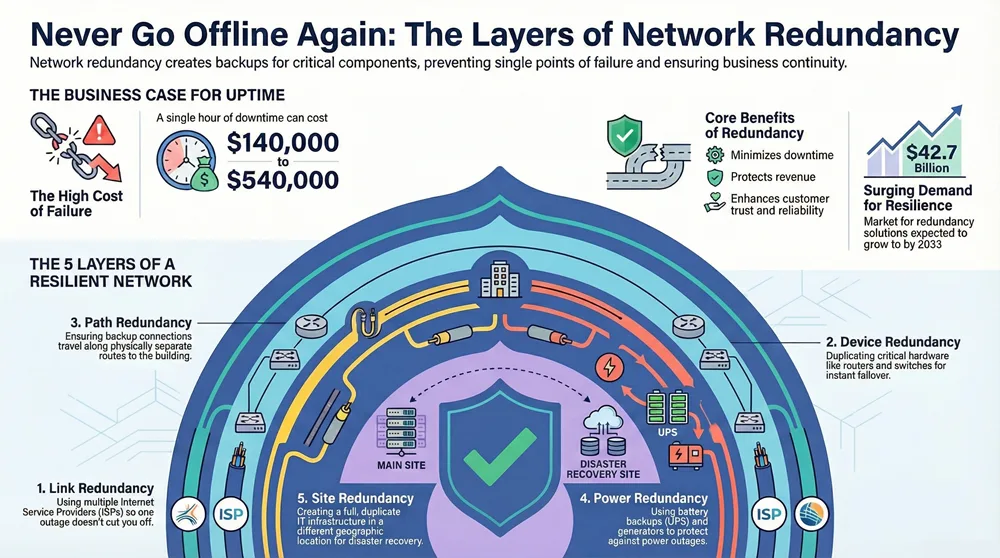
When you hear the term network redundancy, don’t let your eyes glaze over. It’s simply the practice of creating backups for the critical parts of your network to keep your business running when something inevitably fails. Think of it as creating a “Plan B” (and maybe even a “Plan C”) for your data. If one connection goes down, traffic automatically finds another way to its destination, preventing a complete shutdown.
Understanding the Foundation of Network Uptime
Imagine your business is a bustling city, and all your internet traffic flows over a single bridge. If that bridge closes for any reason—a clumsy construction crew, a storm, or just a technical glitch—your entire city is cut off. No one gets in, no one gets out. Commerce grinds to a halt. This is what a single point of failure looks like, and it’s a massive risk.
Network redundancy is the act of building a second, or even a third, bridge into that city. It isn’t a single product you buy off the shelf. Instead, it’s a layered strategy that builds resilience by creating duplicates of both your physical hardware (like routers and switches) and the data pathways that connect you to the outside world. The whole point is to eliminate any weak link that could take your entire operation down.
Why Redundancy Is a Business Necessity
Without a solid redundancy plan, something as simple as a fried router or a severed fiber optic cable can bring your business to its knees. This isn’t just an IT headache; it directly impacts employee productivity, customer trust, and your bottom line. Building a redundant network is essential for staying operational and is also a critical part of strengthening cybersecurity.
The goal is to create a network that can heal itself. When a primary component fails, a backup takes over so seamlessly that your team often won’t even notice a disruption. This principle is a cornerstone of any real plan for business continuity and data recovery. The benefits are crystal clear:
- Minimized Downtime: Guarantees your business stays online and your team stays productive.
- Protected Revenue: Prevents the steep financial losses that come with every minute of an outage.
- Enhanced Reliability: Builds trust with customers who depend on your services being available.
A redundant network is your insurance policy against the unexpected. The investment in backup gear and connections is almost always a fraction of the cost of a single hour of downtime, which can easily run into thousands—or even hundreds of thousands—of dollars.
The demand for these robust solutions is surging. The global market for network redundancy providers was valued at around USD 17.5 billion and is expected to grow at an 11.6% compound annual growth rate, reaching about USD 42.7 billion by 2033. This shows just how critical uptime has become for businesses everywhere.
To help put these concepts into perspective, let’s look at the core ideas that drive any effective redundancy strategy.
Core Principles of Network Redundancy at a Glance
This table breaks down the fundamental goals behind building a resilient network. Each principle contributes to the ultimate objective: ensuring your business operations are never at the mercy of a single component failure.
| Principle | Description | Key Benefit |
|---|---|---|
| Eliminate Single Points of Failure | Identify and duplicate any component (hardware, link, power) whose failure would cause an outage. | High Availability |
| Automatic Failover | Implement systems that can detect a failure and switch to a backup component without human intervention. | Seamless Continuity |
| Load Balancing | Distribute network traffic across multiple paths to optimize performance and prevent overloads. | Improved Performance |
| Fault Tolerance | Design the network to withstand failures and continue operating, albeit potentially at a reduced capacity. | Operational Resilience |
| Geographic Diversity | Place redundant components in physically separate locations to protect against site-wide disasters. | Disaster Recovery |
By weaving these principles into your network design, you move from a fragile, reactive IT setup to a proactive and resilient one that supports your business no matter what.
Diving Into the Five Core Types of Network Redundancy
Building a truly resilient network isn’t about finding a single magic bullet. It’s about creating a layered defense with several distinct strategies. To really get what network redundancy is, we need to break it down into its core components. Each type tackles a specific weak spot, and when you combine them, you get a rock-solid infrastructure that can shrug off unexpected problems.

Let’s walk through the five fundamental types of redundancy.
This image shows how these different layers of resilience work together to deliver on the big three business goals: uptime, continuity, and protection.
As you can see, genuine network resilience is less of a single action and more of a complete strategy. The whole point is to make sure your network is always on, your operations keep running smoothly, and your data stays safe.
1. Link Redundancy
For most businesses, the most common point of failure is the physical connection to the outside world. Link redundancy is all about creating multiple pathways for data to get in and out of your network.
Think of it like having two different internet service providers (ISPs) wired into your building. If a construction crew accidentally cuts your main fiber optic line from one provider, your network automatically switches over to the backup connection—maybe a cable or 5G wireless link—from the second provider. This ensures your internet access never skips a beat.
This is one of the most cost-effective ways to boost uptime and is a foundational first step for any business that relies on its internet connection.
2. Device Redundancy
Having multiple internet links is great, but it won’t help you if the router managing those links dies. Device redundancy means duplicating critical pieces of network gear, like your routers, switches, and firewalls.
Imagine you have two identical routers operating in tandem. If the primary one suddenly gives up the ghost due to a hardware failure or a buggy software update, the secondary router instantly takes over all the traffic-handling duties. This failover process is usually automated and happens in seconds, so your users might not even notice anything happened.
By duplicating key hardware, you transform a potential crisis into a non-event for your users. The goal is to ensure that the failure of a single piece of equipment never brings down the entire system.
Getting both link and device redundancy right requires careful planning and configuration. It’s why many organizations turn to expert providers for comprehensive network management services to ensure these systems are set up for a truly seamless failover.
3. Path Redundancy
Okay, so you have multiple links and backup devices. But what if both of your ISP connections enter the building through the same physical pipe? A single backhoe digging in the wrong spot could sever both lines at once. Path redundancy solves this by making sure your backup connections travel along physically separate routes.
For example, your main fiber line might enter your building from the north, while your backup connection comes in from the south. This geographic separation, also called path diversity, protects you from localized physical screw-ups that could take out multiple connections at the same time. It adds a powerful layer of real-world, physical security to your network’s resilience.
4. Power Redundancy
All your fancy network hardware is just a collection of expensive paperweights without electricity. Power redundancy is simply the practice of having backup power sources to keep critical network gear online during an outage.
This can be done in a few different ways:
- Uninterruptible Power Supply (UPS): These are essentially big battery backups. The moment the main power cuts out, a UPS provides immediate, short-term power to devices like routers and switches, giving your systems enough time to either shut down gracefully or for a bigger backup source to kick in.
- Backup Generators: For outages that last longer than a few minutes, an on-site generator can supply power to your whole office or data center for hours or even days. This ensures business can continue as usual, no matter what’s happening with the grid.
- Dual Power Supplies: Much of the enterprise-grade network hardware we use is built with two power supplies. Each can be plugged into a different power circuit, protecting the device if one breaker trips or a power strip fails.
5. Site Redundancy
For organizations that absolutely cannot tolerate any downtime—even from a building-wide disaster like a fire or flood—site redundancy is the ultimate safety net. This involves creating a complete, duplicate IT infrastructure at a geographically separate location.
This “hot site” or “failover site” perfectly mirrors your primary data center. If your main office becomes completely inaccessible, you can redirect all network traffic and operations to the backup location. While this is the most complex and expensive form of redundancy to implement, it provides the highest possible level of business continuity. It’s essential for industries where 99.999% uptime isn’t a goal, but a requirement.
Key Protocols That Make Seamless Failover Possible
Having backup hardware and extra connections is a great start, but it’s only half the battle. How does a network actually know when to switch from a failed primary path to a backup one without anyone noticing? The real magic lies in a set of smart, automated protocols that act as the network’s brain and nervous system.
These protocols are constantly communicating, monitoring the health of devices and links, and making split-second decisions to reroute traffic. They are the unsung heroes that turn a collection of redundant parts into a resilient, self-healing network. Let’s look at the key players that make this seamless failover possible.
VRRP and HSRP for Router Redundancy
Imagine you have two routers at the edge of your network, but all your computers are configured to send traffic to just one of them. If that primary router fails, everything stops. First Hop Redundancy Protocols (FHRPs) solve this problem elegantly.
Virtual Router Redundancy Protocol (VRRP) and its Cisco-proprietary counterpart, Hot Standby Router Protocol (HSRP), create a single virtual router from two or more physical ones. Your computers send their traffic to this one virtual IP address, completely unaware of the complex dance happening behind the scenes.
One physical router is elected as the “active” router, handling all the traffic. The other sits in “standby” mode, quietly monitoring its partner. If the standby router stops hearing from the active one, it instantly takes over, assuming the virtual IP address and traffic-forwarding duties.
This switchover happens so quickly—often in milliseconds—that ongoing processes like file downloads or voice calls continue without a hitch. Modern business phone systems depend on this kind of rapid failover, a topic we explore more in our guide on IP PBX and SIP trunking.
These protocols are like having a co-pilot ready to grab the controls at a moment’s notice. The primary pilot is flying the plane, but if they become incapacitated, the co-pilot takes over so seamlessly that the passengers don’t even realize a change has occurred.
BGP for Intelligent Internet Routing
While VRRP and HSRP manage redundancy inside your local network, the Border Gateway Protocol (BGP) handles it on a global scale. Think of BGP as the routing protocol of the entire internet, directing traffic between the massive networks run by ISPs, cloud providers, and large enterprises.
When your organization has connections from two different ISPs, BGP is what makes true, automatic internet failover possible. It continuously announces the best paths to reach your network. If your primary ISP connection goes down, BGP automatically withdraws the routes associated with it and tells the rest of the internet to start sending traffic through your backup ISP instead. This powerful protocol is what keeps the internet running during major fiber cuts and regional outages.
STP to Prevent Crippling Network Loops
When you add redundant switches and links to your internal network to eliminate single points of failure, you can accidentally create a dangerous problem: a bridging loop. This happens when there are multiple active paths between two points, causing data packets to circle endlessly, consuming all available bandwidth and bringing the network to a crashing halt.
The Spanning Tree Protocol (STP) is the traffic cop that prevents this chaos. It intelligently maps out your network, detects potential loops, and logically blocks redundant paths to ensure there is only one active route at a time. If the primary path ever fails, STP automatically unblocks the backup path, restoring connectivity within seconds. It allows you to build a resilient, looped physical topology while maintaining a safe, loop-free logical one.
LACP for Speed and Resilience
What if you could combine multiple physical network connections into one single, logical super-highway? That’s exactly what the Link Aggregation Control Protocol (LACP) does. It allows you to bundle two or more physical Ethernet cables connecting two devices (like a server and a switch) into a single, high-bandwidth channel.
This technique delivers two key benefits at once:
- Increased Bandwidth: If you bundle four 1Gbps links, you get a single 4Gbps connection, dramatically improving performance for data-heavy tasks.
- Automatic Failover: If one of the cables in the bundle is unplugged or fails, traffic is automatically redistributed across the remaining active links without any interruption.
LACP provides a simple yet powerful way to boost both speed and reliability for critical connections within your network.
These protocols, working in concert, form the intelligent foundation of a truly resilient network. To help you see how they compare, we’ve put together a quick reference table.
Comparing Common Redundancy Protocols
| Protocol/Technology | Primary Function | Common Use Case |
|---|---|---|
| VRRP / HSRP | Provides router failover within a local network. | Ensuring devices can always reach their default gateway. |
| BGP | Routes traffic between different internet networks. | Managing internet connections from multiple ISPs. |
| STP | Prevents data loops in a switched network. | Building resilient internal networks with redundant switches. |
| LACP | Bundles multiple physical links into one logical link. | Increasing bandwidth and link resilience for servers or switches. |
Each of these technologies plays a specialized role. Understanding which one to apply in a given situation is key to designing a network that can withstand the unexpected without missing a beat.
Weighing the Payoffs and the Price Tag of Redundancy
Thinking about network redundancy isn’t just a technical exercise—it’s a core business decision. You have to take a hard, honest look at what you gain versus what you’ll spend. Getting this balance right is the key to figuring out just how much resilience your organization really needs.
The biggest, most obvious win is a massive boost in uptime. Every single minute your network is down, the business is bleeding money. Productivity grinds to a halt, and maybe worst of all, customer trust starts to evaporate. Redundancy is your first and best line of defense against those outages.
At its heart, a redundant network is all about business continuity. It protects your revenue and your reputation. It turns a potential crisis—like a dead router or a construction crew accidentally cutting a fiber line—into a minor background hiccup that your team handles without anyone else even noticing.
The Upside: More Than Just Staying Online
Beyond just keeping the lights on, a thoughtfully designed redundant system brings some powerful secondary benefits to the table. These advantages go hand-in-hand with the main goal of uptime, making your whole network healthier and more efficient.
- Better Network Performance: Those extra links don’t have to just sit there waiting for a disaster. With load balancing, you can spread traffic across multiple connections. This prevents any one path from becoming a bottleneck and actually improves speed and responsiveness for everyone.
- Serious Fault Tolerance: A redundant setup is naturally more forgiving. It can handle one or even multiple components failing while the network keeps humming along. This buys your IT team precious time to figure out what went wrong and fix it without the immense pressure of a full-blown outage.
- Maintenance Without the Migraines: Need to take your main firewall offline for a critical security patch? No problem. With a redundant system, you can seamlessly shift traffic to the backup device, perform the maintenance during normal business hours, and switch back with zero disruption.
A study on network downtime found that the average cost can be staggering, ranging from $140,000 to $540,000 per hour, depending on the business. When you stack that number up against the investment in some backup hardware, the value of redundancy snaps into sharp focus.
The Other Side of the Coin: Practical Costs
Of course, all these benefits have a price tag. Building a truly resilient network means investing real money and operational resources. The most obvious factor is the increased cost of hardware.
To get device or link redundancy, you have to buy duplicates—a second router, an extra firewall, another internet circuit. These initial purchasing costs are a major consideration for any organization, especially for small and mid-sized businesses where budgets are tight.
Then there’s the added complexity. A redundant network has more moving parts, and that means it needs more sophisticated configuration and careful, ongoing management. Your engineers need real expertise in the failover protocols and monitoring tools that make sure the backup systems actually kick in when they’re supposed to. If it isn’t managed well, this complexity can create more operational headaches than it solves.
In the end, the decision boils down to one simple question: What does an hour of downtime truly cost your business? For most, the investment in a smart redundancy plan is a small price to pay for the peace of mind that comes from knowing your operations won’t grind to a halt when something inevitably goes wrong.
Seeing Redundancy in Real-World Network Designs
Theory is one thing, but seeing how these concepts play out in the real world makes everything click. When you can visualize how different types of redundancy and smart protocols come together, you start to see what a truly resilient network looks like. The principles are the same whether you’re a small business just trying to keep your internet on or a massive enterprise building out a complete disaster recovery plan—it all scales to meet specific needs.
Let’s walk through a few simplified network designs to see these ideas in action. Each example shows how a network can intelligently pivot around a failure, keeping the business online and your team productive.
Small Business with Dual Internet Connections
For almost any small business, the most common point of failure is its single internet connection. A simple but incredibly effective design uses two different Internet Service Providers (ISPs) to create link redundancy.
Picture a local accounting firm. They have a primary fiber connection from ISP A and a backup cable connection from ISP B. Both of these links plug into a single, intelligent firewall that knows how to handle an automatic failover.
- Normal Operation: All business traffic zips along the faster, more reliable fiber connection from ISP A.
- Failure Scenario: A construction crew down the street accidentally cuts the fiber line for ISP A. The firewall detects the connection loss in milliseconds.
- Automatic Rerouting: Instantly, the firewall reroutes all incoming and outgoing traffic through the backup cable connection from ISP B. Employees keep working, and clients can still access the firm’s portal without ever knowing there was a problem.
This basic setup is the first and most important step in building a resilient network, protecting the business from the most frequent type of outage.
Mid-Sized Company with Device and Path Redundancy
A growing manufacturing company with multiple sites can’t afford for its main office network to go dark. This situation calls for both device and path redundancy, using protocols like VRRP/HSRP to manage the whole process.
Their network is designed with two identical routers and two separate fiber internet connections that enter the building from different physical locations—one from the front of the building, one from the back.
- Normal Operation: Router 1 is the “active” router, handling all traffic over the primary fiber link. Router 2 sits in standby mode, constantly checking the health of Router 1.
- Failure Scenario: The power supply in Router 1 suddenly dies, taking it completely offline.
- Seamless Failover: The HSRP protocol sees that Router 1 is down. Within a second, it promotes Router 2 to become the new active router. Router 2 immediately starts pushing all traffic through the secondary fiber link. Since both routers share a virtual IP address, none of the computers or servers on the network even notice the switch.
This design knocks out two major single points of failure: the router itself and the physical path the internet connection takes to get into the building.
Enterprise with Multi-Site Disaster Recovery
For industries like finance and healthcare, even a few minutes of downtime can be catastrophic. These organizations need full-blown site redundancy to protect against a facility-wide disaster like a fire, flood, or a major power grid failure.
Tier-four data centers, the gold standard for reliability, use sophisticated network redundancy to achieve 99.999% uptime—less than five minutes of downtime per year. This level of resilience is non-negotiable for industries that operate 24/7. Explore more about these advanced designs and their importance in scaling data center infrastructure with McKinsey.
This setup involves a primary data center and a backup data center in a completely different geographic region, with all critical data constantly mirrored between them. Advanced routing protocols like BGP manage the traffic flow on a global scale.
- Normal Operation: All production traffic is directed to the primary data center.
- Failure Scenario: A natural disaster forces the complete shutdown of the primary data center.
- Disaster Recovery in Action: BGP automatically detects that the primary site is unreachable. It instantly pulls the network routes for that location and begins directing all traffic—from customers, employees, and partners—to the backup data center. The entire business operation fails over to the secondary site, ensuring total continuity.
These examples show how network redundancy is a scalable strategy. It can be as simple as a backup internet link or as complex as a multi-site architecture, but it’s all designed to achieve one goal: keeping your business running, no matter what happens.
Building and Maintaining Your Redundancy Strategy
Putting a network redundancy plan in place is a huge step, but it’s definitely not a “set it and forget it” project. A redundant system is a living, breathing part of your infrastructure, and it needs consistent attention to make sure it actually works when a crisis hits.
Without proper care, your backup systems can become just as unreliable as the primary components they’re supposed to protect. It’s a harsh truth, but one we see all too often.
Your Strategy is Only as Good as Your Last Test
This proactive approach starts with constant network monitoring. Specialized tools should be keeping an eye on the health of every redundant link and device in real time. This way, your IT team gets an instant alert if a backup component fails, preventing that dreaded scenario where a secondary failure causes a full-blown outage because no one knew the safety net was already gone.
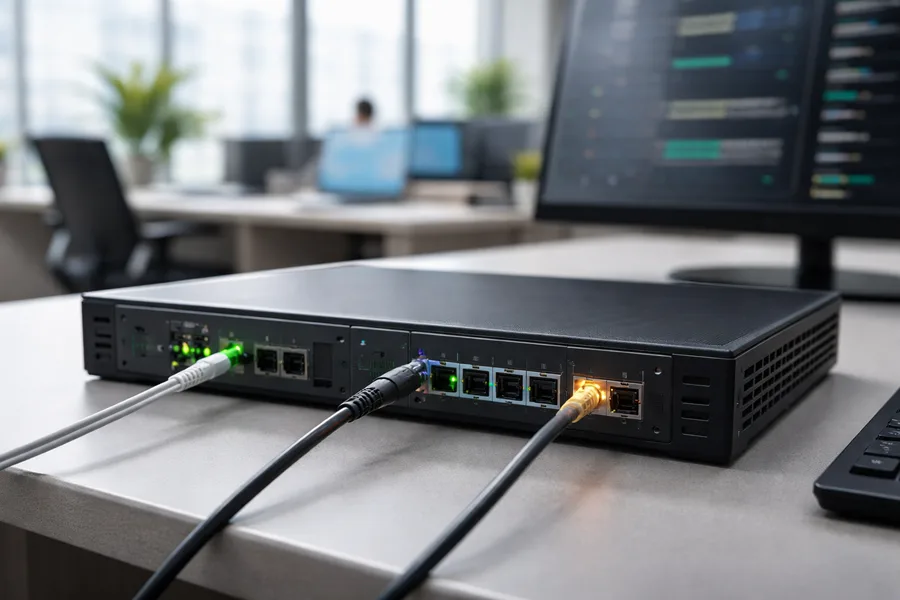
Simply having backup gear isn’t enough; you have to know it will work. Scheduled failover testing is completely non-negotiable. This means intentionally simulating an outage—like pulling the plug on your primary internet connection—to prove that traffic automatically and seamlessly shifts to the backup path. We typically recommend clients do this quarterly to confirm everything is configured correctly and ready for action.
A redundant system that hasn’t been tested is merely a hope, not a strategy. The goal is to discover and fix potential failover issues during a controlled test, not during a real emergency when every second of downtime costs money.
This ongoing management is where having an expert in your corner becomes critical. Designing, implementing, and maintaining a redundancy plan that fits your specific operational needs and budget requires some deep expertise. It’s why so many businesses choose to partner with a proven expert.
At Kraft Business Systems, this is what we do. We specialize in creating and managing robust redundancy strategies for organizations all over Michigan. Our process starts with a thorough assessment to pinpoint your unique vulnerabilities. From there, we design and implement a tailored plan—from straightforward dual internet links to more complex device failovers—and provide the ongoing monitoring and testing needed to deliver the resilience your business depends on.
Frequently Asked Questions About Network Redundancy
Even with the best plans, a few questions always pop up when businesses start thinking seriously about network redundancy. We get these all the time, so let’s clear up some of the most common ones.
What Is the Difference Between Redundancy and High Availability
This is a great question because people use these terms together so often they start to sound like the same thing. They’re related, but they're not interchangeable. Think of it like this: Redundancy is what you do. It's the practical step of adding a second internet connection, a backup router, or a duplicate switch. It’s the method. High availability is the result you get. It’s the goal—a network that stays online 99.99% of the time or more. Redundancy is one of the most powerful tools in your toolbox for achieving high availability.
Can a Small Business Afford Network Redundancy
Absolutely. In fact, most small businesses can't afford not to have it. The key is understanding that redundancy isn't an all-or-nothing game; it's completely scalable to your needs and budget. You don't need to build a million-dollar disaster recovery site to get a massive benefit.
The easiest and most effective place to start is with link redundancy—just adding a second internet connection from a different provider. The monthly cost for that backup line is almost always a tiny fraction of what a single day of an internet outage would cost you in lost sales, stalled productivity, and customer frustration. It’s about matching the solution to the risk.
Redundancy for a small business isn't about extravagance; it's about practical risk management. The investment protects against the most common failures that can halt operations and frustrate customers.
How Often Should I Test My Redundant Network
Having a backup is one thing. Knowing it will actually kick in during a real emergency is another. This is why testing your failover systems isn't just a good idea—it's non-negotiable.
Our rule of thumb is to run a scheduled failover test at least quarterly. This means intentionally simulating an outage, like unplugging the primary internet line or powering down the main router, and making sure the backup systems take over seamlessly. For businesses in critical fields like healthcare or finance, more frequent testing might even be required for compliance. Without regular testing, your redundancy plan is just a hopeful theory.
A reliable, resilient network isn’t a luxury; it’s the bedrock of modern business. At Kraft Business Systems, our experts design, implement, and manage robust network solutions that keep Michigan organizations secure and productive. Learn how we can build the resilience your business needs.