


AI Overview (Brief):
This blog explains why every business needs a strong Disaster Recovery Plan (DRP) and provides a downloadable template to build one. It highlights how a DRP protects your company from financial loss, reputational damage, and operational downtime by giving your team a clear, step-by-step playbook during a crisis.
The article covers the core elements of an effective DRP—risk assessment, Business Impact Analysis (BIA), defined recovery objectives (RTO/RPO), backup strategies, recovery team roles, and communication plans. It also stresses the importance of ongoing testing and maintenance to keep the plan reliable.
Readers learn how to choose the right backup methods, follow the 3-2-1 rule, tailor the plan for compliance needs, and understand the difference between disaster recovery and business continuity.
In short, the template helps businesses quickly build a practical, real-world DRP that minimizes downtime and ensures fast, organized recovery after any disruption.
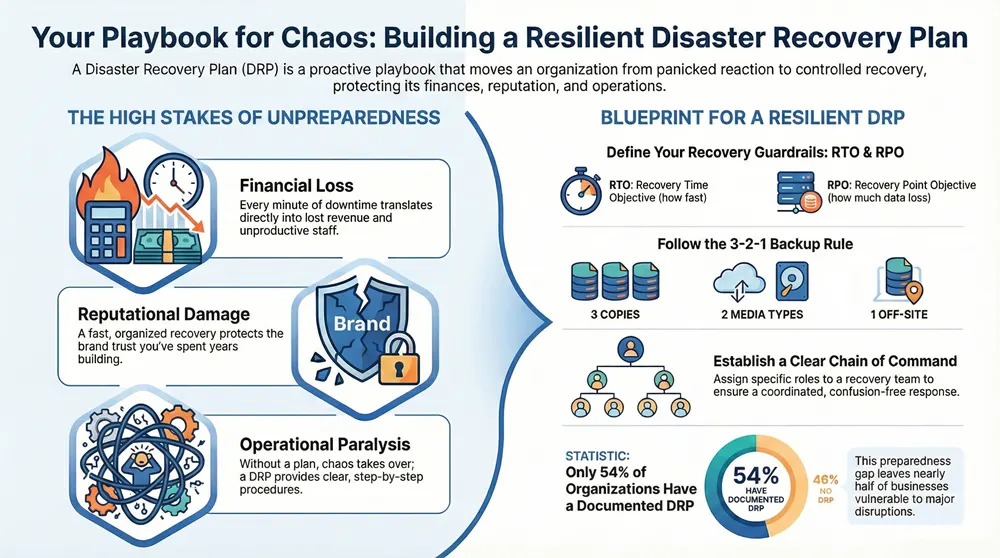
Let’s be honest: a disaster recovery plan (DRP) is more than just a box to check for compliance. It’s the critical playbook that shows your team exactly how to respond and get back on its feet after an incident. This isn’t about reacting in a panic; it’s about having a structured, proactive plan to stay in control during a crisis.
The real goal here is to sidestep the tangible risks that hit hard after a disruption. We’re talking about threats like:
- Financial Loss: Every single minute of downtime costs you money. It means lost revenue, unproductive staff, and even potential fines. A good DRP gets you back online faster, protecting your bottom line.
- Reputational Damage: How you handle a crisis tells your customers everything. A fast, organized recovery shows you’re competent and protects the brand image you’ve spent years building.
- Operational Paralysis: Without a clear guide, chaos takes over and teams are left scrambling. A DRP gives everyone the step-by-step procedures to restore critical systems and get back to business.
The Foundation of a Resilient Plan
A truly useful DRP is built on a few core pillars. It all starts with a detailed risk assessment to figure out what could actually go wrong, from a ransomware attack to a burst pipe in the server room. Right after that comes a Business Impact Analysis (BIA), which is where you determine which parts of your business are absolutely essential and need to be restored first.
From there, you set clear recovery objectives—basically, how fast you need to get systems back online and how much data you can afford to lose. It’s shocking how many companies skip this. A 2021 study found that only 54% of organizations have a documented disaster recovery plan, leaving a huge preparedness gap.
A DRP is your organization’s playbook for chaos. It ensures that when an unexpected event occurs, your team has a clear, actionable guide to restore critical functions, protect valuable data, and maintain customer trust.
Inside Your Disaster Recovery Plan Template
To give you a head start, our downloadable template is broken down into the most essential sections. Each part has a specific job in building a plan that actually works when you need it most. For anyone starting from scratch, looking at a comprehensive emergency response plan template can also provide some great foundational ideas.
The table below gives you a quick look at what’s inside our template and why each piece is so important. Think of this as the blueprint for your entire recovery strategy.
Key Components of Your Disaster Recovery Plan Template
| Template Section | Purpose and Key Objectives |
|---|---|
| Scope and Objectives | Defines the plan’s boundaries, goals, and the specific systems it covers to ensure clear focus. |
| Risk Assessment & BIA Summary | Identifies potential threats and prioritizes business functions based on their criticality to guide recovery efforts. |
| Recovery Team & Roles | Assigns specific responsibilities to team members, creating a clear chain of command during a crisis. |
| Recovery Procedures | Provides step-by-step instructions for restoring hardware, software, and data to ensure consistent and efficient execution. |
| Communication Plan | Outlines how information will be shared with stakeholders (employees, customers, vendors) to maintain transparency and order. |
| Testing and Maintenance Schedule | Establishes a routine for validating and updating the plan to ensure it remains effective and relevant over time. |
This structure ensures you’ve covered all your bases, from who does what to how everyone stays informed.
A solid DRP is a vital piece of a much larger strategy. If you want to see how it all fits together, check out our guide on business continuity and disaster recovery. This template is the practical, hands-on tool you need to get started.
Putting Your Plan to the Test: Defining RTO and RPO
Alright, you’ve got the basic framework of your disaster recovery plan in place. Now it’s time to give it some teeth. This is where we move from theory to the practical, nitty-gritty details that actually make a recovery plan work: defining your Recovery Time Objective (RTO) and Recovery Point Objective (RPO).
Don’t let the acronyms intimidate you. Think of these as the two most important guardrails for your entire strategy. They aren’t just technical jargon; they’re critical business decisions that will directly impact your budget, the technology you choose, and ultimately, how fast you can get back to serving customers when something goes wrong.
How Fast Do You Need to Be? Understanding RTO
Your RTO is all about the clock. It’s the absolute maximum amount of time your business can tolerate a specific system being down before the consequences become unacceptable.
Put simply, it answers the question: How long can we afford to be offline?
For a busy e-commerce site that’s ringing up sales every minute, the RTO might be less than an hour. Any longer, and you’re not just losing money—you’re losing customer trust. But for an internal HR portal used for annual performance reviews, an RTO of 24 hours might be perfectly fine. Its absence is an inconvenience, but it isn’t going to bring the company to a screeching halt.
How Much Data Can You Stand to Lose? Grasping RPO
While RTO is about downtime, RPO is all about data loss. It defines the maximum age of the data you need to recover from your backups to get operations back to normal.
In other words, it answers this question: How much recent work are we willing to re-do from scratch?
For a bank’s online payment processor, the RPO needs to be as close to zero as possible. Losing even a few minutes of transaction data is a catastrophe. On the other hand, a file server that stores marketing materials updated a couple of times a week could likely handle an RPO of 12 or even 24 hours. Losing a day’s worth of changes to a PowerPoint deck is annoying, but it’s not going to sink the business.
Here’s the key takeaway: RTO and RPO are not one-size-fits-all. They are unique to each system and application. Getting them wrong means you either spend a fortune protecting non-critical systems or, far worse, you fail to protect the crown jewels of your business.
Setting Realistic Goals with a Business Impact Analysis (BIA)
So, how do you figure out the right RTO and RPO for each piece of your operation? You need to perform a Business Impact Analysis (BIA). This is just a structured way of figuring out what an interruption to your critical business functions will actually cost you.
A BIA forces you and your team to ask some tough questions:
- Which processes are absolutely essential for making money and keeping customers happy?
- What’s the real financial hit for every hour or day a particular system is down?
- Do we have any legal or compliance mandates (like HIPAA) that dictate how quickly we must recover?
- How do our systems depend on each other? If System A goes down, what happens to Systems B and C?
The answers you get from this analysis will directly feed into setting your RTO and RPO values. This is what provides the hard data to justify why your sales CRM needs an aggressive four-hour RTO, while the internal development server can live with a two-day RTO.
Ultimately, a BIA transforms your DR plan from a generic template into a sharp, business-focused strategy. These metrics create a clear roadmap, telling your IT team exactly what’s expected and ensuring your technology investments are perfectly aligned with your real-world business needs.
Building a Resilient Data Backup Strategy
Once you’ve nailed down your RTO and RPO, it’s time to build the technical backbone of your disaster recovery plan: a solid data backup strategy. This is where the theoretical becomes practical. You’ll be translating those recovery objectives into concrete actions, picking the right tech, and setting up the procedures that will actually save your data when things go wrong.
Think of it this way: your backup process is the ultimate safety net. The decisions you make here are directly tied to the recovery metrics you just set. For instance, a law firm with zero tolerance for losing client files might use a hybrid cloud model—keeping recent files local for speed but syncing everything to an off-site cloud for bulletproof redundancy. An e-commerce site, on the other hand, would probably need continuous data protection to hit those near-zero RPO/RTO targets for its constant stream of transaction data.
Choosing the Right Backup Method
Not all backups are created equal. Each type strikes a different balance between speed, storage space, and how complex it is to restore everything. Getting this right is critical to aligning your strategy with your recovery goals.
- Full Backups: This is the simplest approach. A full backup is exactly what it sounds like—a complete copy of all your data. They’re straightforward to manage and the fastest to restore from since you only need one file set. The downside? They take the longest to create and eat up the most storage space.
- Incremental Backups: After one initial full backup, this method only copies data that’s changed since the last backup session (full or incremental). These backups are lightning-fast and sip storage space. The trade-off is a more complicated restoration, as you’ll need the original full backup plus every single incremental backup since.
- Differential Backups: This method copies all data that has changed since the last full backup. They use more space than incrementals but make for a much faster and simpler restore. You just need the last full backup and the latest differential file.
This decision tree gives you a great visual for how your recovery goals for a critical system should guide your backup and restoration choices.

As the infographic shows, the more critical a system is, the more aggressive your RTO and RPO need to be, which directly shapes your technology decisions.
Where Will Your Backups Live?
After you’ve figured out how to back up your data, you need to decide where to keep it. The storage location you choose impacts everything from cost and accessibility to security. And with cyber threats getting more frequent, this isn’t a decision to take lightly. To put it in perspective, there were roughly 236.1 million ransomware attacks globally in just the first half of 2022 alone, which puts enormous pressure on businesses to keep their backups secure.
Here are the main options:
- On-Premise: Storing backups locally on tapes, disks, or a dedicated backup server. This gives you fast recovery speeds and total control, but it’s completely vulnerable to a local disaster like a fire, flood, or theft.
- Cloud: Storing backups with a third-party cloud provider. This is excellent protection against any on-site disaster and offers fantastic scalability. Just be aware that your recovery speed can be bottlenecked by your internet connection.
- Hybrid: This has become the most popular model because it combines the best of both worlds. You keep a recent backup on-site for quick, everyday restores, while also replicating older backups to the cloud for long-term safekeeping and true disaster protection.
For many businesses, leveraging cloud disaster recovery solutions provides the perfect balance of security, accessibility, and peace of mind.
The 3-2-1 Rule: A Timeless Foundation
A foundational best practice in data protection is the 3-2-1 rule. It’s simple: you should have three copies of your data, stored on two different types of media, with at least one of those copies stored off-site. This straightforward but powerful principle massively increases your data’s resilience against almost any failure scenario.
Documenting Your Restoration Procedures
Finally, a backup is only as good as your ability to restore it. Your disaster recovery plan absolutely must include clear, step-by-step instructions for bringing your data back online. Documenting these procedures ensures that anyone on your recovery team—even under immense pressure—can execute a restore quickly and correctly.
Don’t just write it and forget it. This documentation needs to be tested regularly to make sure it actually works. That’s how you turn a backup strategy into a reliable and repeatable recovery process.
Establishing Your Disaster Recovery Team and Comms
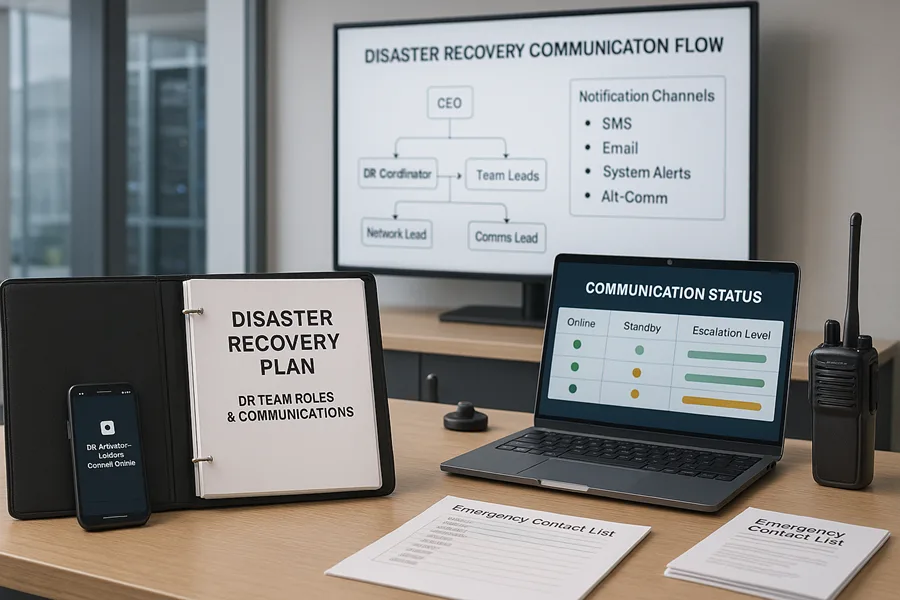
Let’s be honest: the best backup technology in the world is useless if no one knows who’s in charge during a crisis. A well-organized team and a clear communication plan are the human elements that make a disaster recovery plan actually work. This is all about building a solid command structure to maintain order when everything feels chaotic.
When an incident hits, confusion is your worst enemy. Every second wasted figuring out who should be doing what just increases downtime and piles on the stress. Having a pre-defined team with assigned roles means everyone can jump into action the moment a disaster is declared.
Defining Your Core Recovery Roles
Your disaster recovery plan template needs to spell out, with zero ambiguity, who is responsible for each part of the recovery. The specific job titles will change depending on your company’s size, but the core functions are universal. A solid team structure prevents people from stepping on each other’s toes and ensures no critical tasks fall through the cracks.
Here are the essential roles you’ll want to define:
- Disaster Recovery Coordinator: This is your incident commander, the central point of contact for everything. They are responsible for officially declaring a disaster, kicking the plan into gear, and overseeing the entire recovery effort from start to finish.
- Technical Recovery Teams: These are your hands-on specialists who get the systems back online. You’ll want separate teams for networks, servers, applications, and databases, each led by an expert who directs the technical restoration for their specific domain.
- Communications Lead: This person’s entire job is to manage all internal and external messaging. They keep stakeholders in the loop with accurate, timely updates, which is crucial for preventing rumors and managing expectations.
This clear division of labor is a cornerstone of effective security incident management, making sure that both the technical fix and the human side of the crisis are handled by dedicated experts. It’s also why having reliable emergency notification systems is so critical—you need a way to reach your team instantly when primary channels like email are down.
A disaster recovery plan is activated by people, not software. Defining roles and responsibilities beforehand eliminates the “who’s on first?” problem during a high-stakes event, allowing for a faster, more coordinated response.
Building a Clear Communication Plan
During a major disruption, silence breeds anxiety and speculation. A robust communication plan is how you maintain control over the narrative and provide much-needed reassurance to everyone involved. Your plan has to assume that your usual tools—like email or your internal chat system—might be completely offline.
Your communication strategy needs a few key components. First, a detailed contact list for all DR team members, key executives, critical vendors, and emergency services. This isn’t just a list of office numbers; it needs to include personal cell numbers and alternate email addresses.
Next, you need to map out your escalation paths. These are simple, clear flowcharts showing who to contact and in what order, depending on the severity and type of incident. This stops a minor issue from unnecessarily waking up the CEO at 3 a.m. while ensuring a major crisis gets executive attention immediately.
Finally, do yourself a favor and prepare message templates ahead of time. Pre-writing announcements for different scenarios (like a system outage, a data breach, or a physical office closure) saves precious minutes and helps you deliver calm, consistent messaging to employees, customers, and partners when stress is high.
Sample Disaster Recovery Team Roles and Responsibilities
When it’s time to put your team on paper, a simple table can make everyone’s duties crystal clear. It’s a quick reference that removes any guesswork during a high-pressure situation.
| Role | Primary Responsibilities | Example Tasks |
|---|---|---|
| DR Coordinator | Overall command and control of the recovery effort. | Activate the DRP, lead status meetings, approve major decisions. |
| Network Team Lead | Restore all network connectivity and security services. | Re-establish internet access, configure firewalls, restore VPNs. |
| App Recovery Lead | Bring critical business applications back online. | Restore databases, restart application servers, verify functionality. |
| Comms Lead | Manage all stakeholder communications. | Update the company status page, send out SMS alerts, draft customer emails. |
This kind of table ensures that from the moment the plan is activated, every key player knows their exact mission and can get to work without delay.
Keeping Your Disaster Recovery Plan Effective
Here’s a hard truth: a disaster recovery plan you file away and forget is worse than having no plan at all. It’s a ticking time bomb. A plan built on last year’s technology, team structure, or business priorities is already dangerously out of date.
The whole point of this exercise is to build a reliable roadmap for when a crisis hits. But if that map leads to disconnected phone numbers, retired server names, or procedures for software you decommissioned six months ago, it creates a false sense of security that will crumble under the slightest pressure.
Your DR plan is only as good as its last test. It needs to be a living, breathing document that’s clearly documented and consistently validated. Think of it less like a stone tablet and more like a training manual for a team that needs to be ready at a moment’s notice.
How to Actually Test Your Recovery Plan
Testing isn’t just about making sure your backups work—that’s the bare minimum. It’s about building muscle memory for your team and shining a harsh light on the inevitable weak spots in your strategy before a real emergency does.
Different testing methods dig to different depths, and you don’t always need to bring the whole company down to find out what’s broken. Here are a few practical ways to kick the tires:
- Tabletop Exercises: This is your low-stress starting point. Get the recovery team in a room, throw a hypothetical disaster at them—”Our main data center just went offline, and the backup generator failed to start”—and make them talk through the plan step-by-step. It’s amazing what you’ll uncover just by talking it out. You’ll find logical gaps and clarify who really owns what.
- Walk-through Tests: This is a small step up. Team members pull up their actual documented procedures and verbally confirm each step still makes sense. Your network lead might review the firewall recovery guide and realize half the interface screenshots are from the old model. It’s a simple gut check for accuracy.
- Component Recovery Tests: Now we’re getting hands-on. This is where you test a specific piece of the puzzle in an isolated environment. Maybe you try restoring a single critical server from backup or test the failover of one application. It validates technical procedures without disrupting daily operations.
- Full-Scale Failover Simulations: This is the final boss of DR testing. You simulate a complete disaster and fail over all critical systems to your secondary site. It’s resource-intensive and requires careful planning, but it’s the only way to be 100% certain your plan works as designed.
Don’t Let Test Results Vanish into Thin Air
Every single test, no matter how small, needs to be documented. This isn’t just about creating a paper trail; it’s about building a clear action list for improvements. Keep it simple.
A basic table is all you need to track what you found:
| Test Element | What We Tried to Do | What We Did | What Actually Happened | Who’s Fixing It & What’s Next |
|---|---|---|---|---|
| Vendor Contact List | Verify the emergency ISP contact is current. | Called the 24/7 support number listed in the plan. | We got a “disconnected number” message. Found the new number online. | J. Smith: Update the DRP with the correct contact info. |
| File Server Restore | Restore a 10 GB folder to an isolated server in under 30 mins. | Followed the documented steps for our cloud backup. | Took 45 minutes. The download speed was much slower than expected. | A. Lee: Investigate if our cloud provider is throttling the connection. |
| Team Communication | Test the SMS alert system for the DR team. | Sent a test alert through the emergency notification platform. | 2 of 10 people never got the text. | J. Smith: Verify and update cell numbers for those two team members. |
This format makes it painfully obvious what worked, what broke, and who’s on the hook to fix it. Each test becomes a productive step forward, not just a pass/fail exercise.
A Maintenance Schedule You’ll Actually Stick To
To keep your plan from gathering dust, you need a simple, repeatable schedule. Don’t try to review the entire thing at once—you’ll get overwhelmed and put it off. Break it down.
Here’s a practical rhythm that works:
- Quarterly Reviews (Every 3 Months): Focus on the moving parts. This is the perfect time to update contact lists for your team, key vendors, and local emergency services. People change jobs, and numbers change. This is also when you should glance at your vendor SLAs to make sure they still meet your recovery objectives.
- Annual Reviews (Once a Year): This is your deep dive. Do a full, top-to-bottom review of the entire plan. This is where you align everything with the big changes from the past year—new tech, different business processes, or major staff changes. It’s also the perfect time to schedule your more intensive tests, like a full failover simulation.
Tailoring Your Plan for Industry Compliance
A generic disaster recovery plan template is a great starting point, but it’s definitely not the finish line. Every industry plays by a different set of rules, and your DRP absolutely must reflect those obligations. Getting compliance wrong isn’t just an operational headache; it can bring on severe penalties, legal battles, and a total collapse of customer trust.
When you adapt your plan for industry-specific regulations, you transform it from a simple technical guide into a powerful tool for upholding legal and ethical standards, even when everything seems to be going wrong. This isn’t about adding red tape for the sake of it—it’s about making sure your recovery process is built to protect your most sensitive data and your stakeholders, just as the law demands.
Healthcare and HIPAA
If your organization handles patient information, the Health Insurance Portability and Accountability Act (HIPAA) has to be top of mind. A disaster doesn’t give you a free pass on protecting electronic Protected Health Information (ePHI).
Your DRP needs to spell out exactly how you will:
- Maintain ePHI Confidentiality: How will you ensure that even during a failover to a backup site, access to patient data is locked down and every action is logged?
- Ensure Data Integrity: What are the step-by-step procedures to verify that no patient records were corrupted or altered during the backup and restore process?
- Guarantee Availability: Your plan must meet specific RTOs and RPOs to ensure doctors and nurses can get to critical patient data without dangerous delays that could impact care.
HIPAA’s Security Rule isn’t messing around—it specifically requires covered entities to have a contingency plan. This is non-negotiable. Your disaster recovery plan is a core part of proving due diligence and protecting both your patients and your practice.
Manufacturing and Supply Chain Continuity
In manufacturing, downtime isn’t just an inconvenience; it’s measured in lost production runs and fractured supply chains. Here, regulatory compliance often tangles with the contractual promises you’ve made to partners and customers. The financial fallout from disasters has ballooned, with total costs now topping $2.3 trillion annually when you factor in ripple effects like supply chain chaos. You can read more about the extensive financial impacts of disasters and the critical need for resilience.
Your DRP should be laser-focused on:
- Minimizing Production Halts: Prioritize bringing systems back online that control robotics, manage inventory, and run the shop floor. Every minute counts.
- Protecting Intellectual Property: Your proprietary designs, chemical formulas, and unique manufacturing processes are the lifeblood of your business. Make sure they are securely backed up.
- Maintaining Supply Chain Comms: Detail how you’ll communicate with suppliers and distributors when your primary systems are down. Managing expectations and coordinating logistics is key to preventing a small problem from becoming a catastrophe.
Education and FERPA
Educational institutions are the guardians of a massive amount of sensitive student data, all protected under the Family Educational Rights and Privacy Act (FERPA). Protecting this information during a crisis is non-negotiable.
Your plan needs to clearly address:
- Securing Student Records: Make sure your backup and recovery processes slam the door on any unauthorized access to the student information system (SIS), grades, and personal details.
- Enabling Learning Continuity: How will you restore access to the learning management systems (LMS) and other core educational platforms to keep classes from grinding to a halt?
- Communication with Stakeholders: You need a clear, pre-defined plan for notifying students, parents, and faculty about system status and confirming that their data is secure.
Government and Public Services
Government agencies, from the local town hall to the federal level, have a unique responsibility to keep essential public services running no matter what. Their disaster recovery plans must ensure citizens can still get the critical support and information they depend on.
A few key things to think about:
- Continuity of Operations (COOP): The plan must ensure core government functions—everything from 911 dispatch to public health alerts—remain operational.
- Data Security and Compliance: Agencies have to follow strict regulations like FISMA (Federal Information Security Management Act), which sets the rules for how federal data is protected.
- Public Communication: The DRP needs a bulletproof strategy for keeping the public in the loop through multiple channels, especially if the primary government websites or phone lines are down.
Got Questions About DRP Templates? We’ve Got Answers.
When you start digging into disaster recovery planning, a lot of questions pop up. It’s natural. Let’s tackle some of the most common ones we hear from businesses that are just getting started with a DRP template.
What’s the Real Difference Between a DRP and a Business Continuity Plan?
People throw these terms around interchangeably, but they are not the same thing. Getting this right is the first step to a solid plan.
A Disaster Recovery Plan (DRP) is your technical playbook. It’s laser-focused on one thing: getting your IT infrastructure, systems, and data back online after something goes wrong. Think servers, networks, applications—the digital guts of your operation.
A Business Continuity Plan (BCP) is the big picture. It’s a much broader strategy that covers every single aspect of keeping the business running during a crisis. This includes things like managing personnel, dealing with supply chain disruptions, setting up temporary physical locations, and handling communications with customers and stakeholders.
The easiest way to think about it? Your DRP is a critical, technical piece that fits inside your overall Business Continuity Plan. You can’t have a complete BCP without a solid DRP.
How Often Should We Really Be Testing Our Disaster Recovery Plan?
Let’s be blunt: a plan you don’t test is just a document. It’s not a strategy. Regular testing is absolutely non-negotiable if you want it to work when it counts.
Best practice is to run a comprehensive, full-scale test at least annually. This is where you actually simulate a failover and switch your operations to your backup site. It’s the ultimate proof that your plan holds up under pressure.
But waiting a whole year is a big risk, especially since technology and teams change so fast. That’s why we strongly recommend weaving smaller, more frequent tests into your routine.
- Quarterly Tabletop Exercises: These are fantastic, low-impact meetings. You get the response team in a room, present a disaster scenario (“Okay, the main server room is flooded. What’s the first call you make?”), and talk through the plan step-by-step. It’s the perfect way to find logical gaps and make sure everyone knows their role without touching a single live system.
- Component Tests: Don’t just test the whole orchestra; make sure each instrument is in tune. On a more regular basis, test individual pieces of your plan. Try restoring a single critical database from a backup or failing over one specific virtual server. These smaller validations build confidence and keep technical skills sharp.
A plan’s real-world effectiveness is directly tied to how often you test it. Every time you add new software, switch a vendor, or change team members, you’ve introduced a variable that could break your plan. Test often.
Can Our Small Business Use a Template Built for a Big Company?
Absolutely, and you definitely should. A well-designed disaster recovery template provides a universal framework that scales up or down to fit any business. The core principles are the same whether you have five employees or five thousand: assess your risks, define your recovery goals, assign roles, and have a clear communication plan.
The difference isn’t in the what, but in the how complex. A small business will simply adapt the template to its own reality.
For instance, an enterprise might have dedicated teams for networks, databases, and security. In a small business, your “recovery team” might be two people wearing all of those hats. A small business might also have more forgiving RTOs and RPOs for less critical systems. The foundational structure the template provides, however, remains just as valuable. It gives you the blueprint, and you build the house that fits your lot.
At Kraft Business Systems, we help Michigan businesses build robust, real-world disaster recovery strategies that go beyond the template. We ensure your plan is not just documented but is also tested, maintained, and perfectly aligned with your operational needs. Learn more at https://kraftbusiness.com.

