
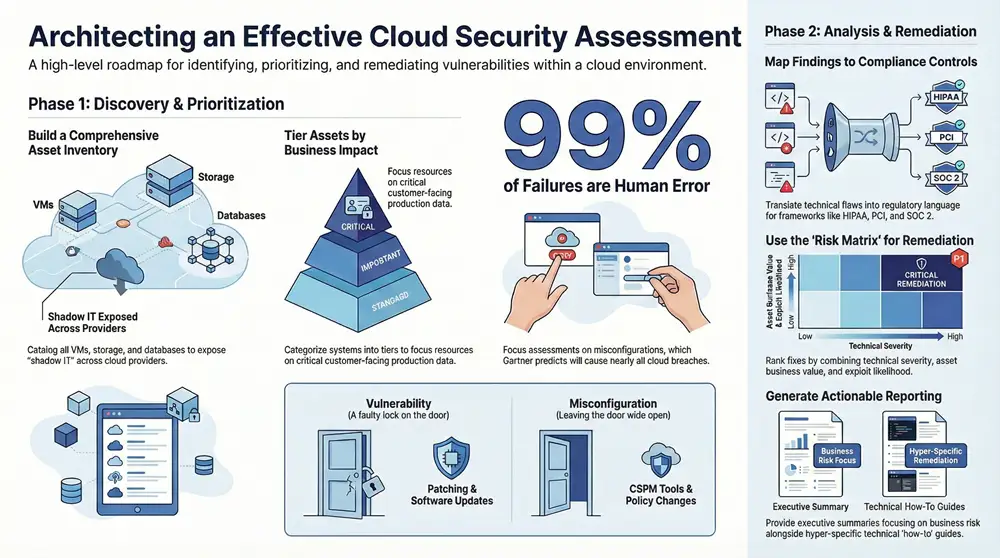
A cloud security assessment is, at its core, a systematic look under the hood of your cloud environment. It’s designed to hunt down misconfigurations, expose vulnerabilities, and shine a light on any gaps in your defenses. The end goal is to give you a clear, actionable roadmap to reduce risk and tighten up compliance.
Defining the Scope of Your Cloud Security Assessment
Any successful security assessment starts with drawing clear lines in the sand. Without a well-defined scope, it’s easy to get lost in the weeds, wasting valuable time and resources while leaving your most critical systems unchecked. This whole process is about deciding what to assess, why it matters, and where to even begin.
You’re essentially translating your business needs into concrete technical perimeters. This focus ensures you’re aiming your resources directly at the areas that pose the highest risk and are most important to your business.
Creating Your Cloud Asset Inventory
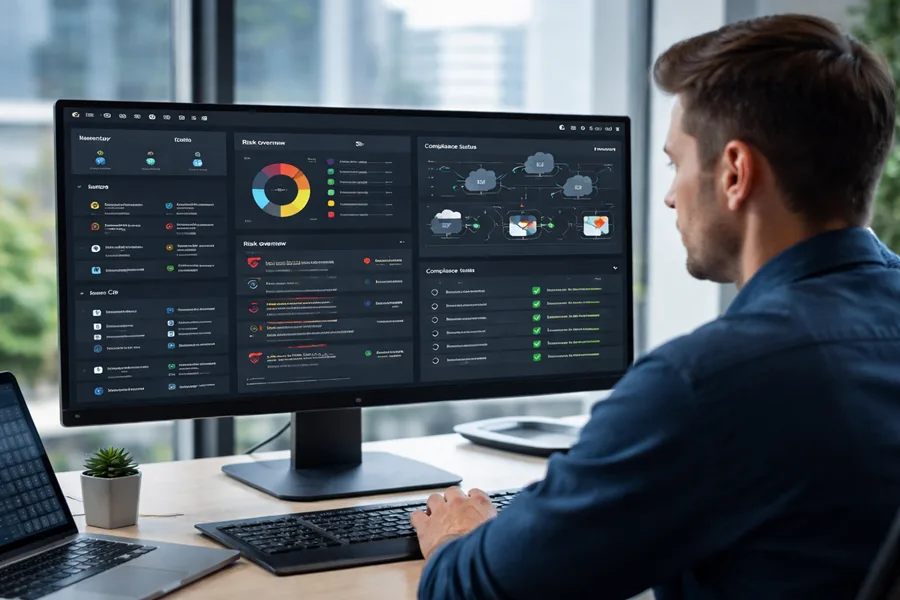
You can’t protect what you don’t know you have. The very first move is to build out a detailed inventory of every single one of your cloud assets. I’m talking about everything your organization uses across providers like Amazon Web Services (AWS), Microsoft Azure, and Google Cloud Platform (GCP).
This inventory needs to be more than just a list of services; it has to capture the context for each asset.
- Virtual Machines (VMs): What operating system is it running? What’s its job (e.g., web server, database)? What kind of data does it handle?
- Storage Buckets: Who owns the data inside? How sensitive is it (e.g., public, internal, confidential)? Is it being replicated?
- Databases: What type is it (SQL, NoSQL)? Which applications connect to it? Does it store regulated data like PII or PHI?
- Serverless Functions: What events trigger each function? What other services does it talk to?
- Containerized Environments: Get a list of all clusters, nodes, and the specific container images currently in use.
This initial discovery phase almost always uncovers “shadow IT”—those assets deployed outside of official channels that represent a massive security blind spot. Finding these is a huge early win.
Prioritizing Assets Based on Business Impact
With a complete inventory in hand, it’s time to prioritize. Let’s be honest, not all assets are created equal. A temporary dev server just doesn’t carry the same risk profile as a production database holding customer credit card information. Your job is to figure out which assets are absolutely critical to your operations.
To really nail the scope of your assessment and see how it fits into your larger security strategy, you need a solid grasp of essential cyber security risk management techniques. This kind of framework helps you evaluate assets based on their actual business value and the potential fallout if they were compromised.
A classic mistake I see all the time is treating every asset with the same level of scrutiny. A much smarter approach is to classify them into tiers. Tier 1 might be your customer-facing apps and sensitive data stores, while Tier 3 could be internal tools or staging environments. This lets you allocate your assessment resources where they’ll have the biggest impact.
This simple flow chart really helps visualize how to get from a messy inventory to a focused assessment scope.
It breaks the process down into three clear stages: inventory, prioritize, and define. This becomes the foundation for everything that follows.
Setting Clear Objectives and Boundaries
Finally, you have to define what you’re trying to achieve. Are you getting ready for a specific audit, like HIPAA or PCI DSS? Or is the goal to align with a framework like the NIST Cybersecurity Framework? Maybe you just want to find and shrink your overall attack surface. Your goals will dictate the assessment’s depth and focus.
Understanding the kinds of threats you’re up against can really sharpen these objectives. For a closer look, our guide on the primary https://kraftbusiness.com/blog/security-risks-of-the-cloud-guide/ offers some crucial context.
For instance, scoping an assessment for a multi-cloud SaaS application means you’ll be looking at identity providers, API gateways, and how data flows between different cloud providers. On the other hand, assessing a containerized data platform would focus more on container image security, Kubernetes configurations, and the network policies inside the cluster.
Stating these boundaries clearly from the start is the best way to prevent scope creep and ensure the final report gives you actionable insights that are actually relevant to your specific goals.
Finding Critical Cloud Vulnerabilities and Misconfigurations

Dynamic cloud environments are a breeding ground for two distinct but equally dangerous problems: software vulnerabilities and simple human-error misconfigurations. A huge part of any real cloud security assessment is digging in to find these weaknesses before an attacker does. It’s about looking beyond just code and getting brutally honest about the day-to-day security posture of your cloud services.
It’s easy to lump them together, but it’s critical to know the difference. A vulnerability is a flaw in the software itself—think of an unpatched library in a Docker container that a hacker can exploit. A misconfiguration, on the other hand, is just a setup error, like an S3 bucket left open to the public or a firewall rule that’s way too permissive.
Distinguishing Between Errors and Exploits
Here’s a simple way to think about it. A vulnerability is like having a faulty lock on your front door that can be picked. A misconfiguration is like leaving the back door unlocked and wide open. Both put you at risk, but you need different approaches to find and fix them.
Attackers absolutely love hunting for misconfigurations. Why? Because they’re incredibly common and easy to exploit, often requiring no special tools or zero-day exploits. This is precisely why they are a primary focus during an assessment. The stats don’t lie; study after study confirms that human error is the top cause of cloud security breaches. In fact, one Gartner prediction stated that by 2025, a staggering 99% of cloud security failures will be the customer’s fault. This just hammers home how urgent it is to find these configuration slip-ups.
Tools for Uncovering Hidden Risks
To hunt down these issues effectively, you need the right set of tools. There’s no single silver bullet, so a layered approach always works best. The goal is to get a clear view across your entire cloud footprint and automate the grunt work of finding known problems.
These are the essential tool categories we use in a thorough assessment:
- Cloud Security Posture Management (CSPM): These tools are your foundation. They constantly scan your cloud accounts against established security benchmarks (like those from CIS or NIST) to spot misconfigurations. A good CSPM will immediately flag things like public database snapshots or security groups allowing unrestricted access from anywhere on the internet.
- Vulnerability Scanners: This is where you inspect your virtual machines, containers, and serverless functions for known software flaws (CVEs). They check for outdated operating systems, insecure application dependencies, and unpatched packages that create an entry point for attackers.
- Cloud Infrastructure Entitlement Management (CIEM): This is a more specialized class of tool that focuses entirely on permissions. They analyze IAM roles and policies to find excessive or unused permissions that could be abused by an attacker to escalate their privileges.
When it’s implemented correctly, a CSPM solution is one of the most powerful tools you can have. For a deeper dive, our guide on Cloud Security Posture Management offers some great insights into how to choose and deploy these tools.
An experienced assessor knows that tools only tell part of the story. They give you the ‘what,’ but human analysis provides the ‘so what.’ A tool might flag an open port, but an expert determines if that port represents a genuine business risk or a properly secured, necessary function.
Hunting for Common but Critical Issues
Once your tools are scanning, the real hunt for high-impact problems begins. We’re looking for the “quick wins”—the issues that can dramatically shrink your attack surface with relatively little effort.
During any assessment, it’s also vital to check the security of your secure cloud backup for business solutions to ensure they aren’t introducing new risks. Your focus should be on the common mistakes that attackers look for first.
Here are some of the low-hanging fruit we always check for:
- Overly Permissive IAM Roles: Searching for roles with wildcard permissions (like
s3:*) or privileges that are no longer needed by the user or service. - Unencrypted Data Stores: Verifying that encryption-at-rest is enabled on all storage buckets, databases, and message queues.
- Missing Multi-Factor Authentication (MFA): Scrutinizing all privileged user accounts, especially the root or administrative ones, to confirm MFA is enforced.
- Publicly Exposed Assets: Hunting for any databases, storage buckets, or virtual machine ports that have been accidentally exposed to the entire internet.
- Inadequate Logging and Monitoring: Confirming that services like AWS CloudTrail or Azure Monitor are configured to capture all critical security events and that alerts are set up for suspicious activity.
Finding these seemingly small mistakes is what a successful cloud security assessment is all about. More often than not, they represent the easiest path for an attacker to get a foothold in your environment.
Mapping Your Findings to Compliance Frameworks
For any business in a regulated industry, a cloud security assessment does double duty. It’s not just about spotting security weaknesses—it’s about creating a clear record of due diligence that will satisfy auditors, regulators, and your own leadership team.
The real magic happens when you translate technical findings into the specific language of compliance. This is a critical step that turns a simple list of vulnerabilities into a powerful compliance artifact.
It’s the difference between telling an engineer “this database is unencrypted” and telling an executive “we have a gap in meeting HIPAA control § 164.312(a)(2)(iv).” One is a technical problem; the other is a business risk that directly impacts your compliance status.
Bridging the Gap Between Technical Findings and Controls
The process is straightforward but requires diligence. You take each finding from your assessment and methodically link it to one or more controls in your required framework, whether that’s HIPAA, PCI DSS, SOC 2, or NIST. This mapping exercise gives you irrefutable evidence that you are not only aware of your security posture but are also actively managing it against recognized standards.
Let’s take a common example: an assessment uncovers a publicly accessible Amazon S3 bucket containing sensitive customer documents. A single finding like this can ripple across multiple compliance frameworks.
- For HIPAA: This is a direct hit on the requirement to protect electronic protected health information (ePHI) from unauthorized access. It points to a failure in implementing necessary technical safeguards.
- For PCI DSS: This violates Requirement 3, which mandates the protection of stored cardholder data, and Requirement 7, which restricts access to that data on a need-to-know basis.
- For SOC 2: This finding would impact the Security Trust Service Criterion (TSC), specifically around access controls and the protection of the system against unauthorized access.
This translation is vital. It helps you build a remediation plan that auditors and leadership will immediately understand and get behind.
Creating an Actionable Compliance Artifact
Documenting this mapping is just as important as the mapping itself. A simple spreadsheet can work, but a dedicated GRC (Governance, Risk, and Compliance) tool will make your life much easier. This document becomes the definitive record of your assessment from a compliance perspective.
For each finding, your documentation needs to be crystal clear.
- The Technical Finding: State the issue concisely. For instance, “IAM user ‘dev-user’ has administrative privileges (
AdministratorAccess).” - The Associated Risk: Explain the business impact in plain English. Example: “Compromise of this account could lead to full control over our entire AWS environment.”
- Mapped Compliance Controls: List every specific control from your relevant frameworks that this finding violates, like “NIST AC-2, SOC 2 CC6.2.”
- Recommended Remediation: Provide clear, actionable steps to fix it. “Replace administrative privileges with a role-specific policy adhering to the principle of least privilege.”
- Ownership and Status: Assign a team or individual responsible for the fix and track its progress from “Identified” to “Resolved.”
This structured approach is a cornerstone of a mature security program. If your organization is looking to formalize this process, getting familiar with the fundamentals of a governance, risk, and compliance framework is a great next step.
By directly linking technical gaps to specific regulatory requirements, you provide auditors with exactly what they need: a clear demonstration of your control environment, identified deficiencies, and a documented plan to address them. This proactive documentation can significantly smooth out the entire audit process.
Ultimately, this mapping process is the key to proving due diligence. It shows you have a systematic method for identifying risks and aligning your security efforts with established best practices and legal obligations. It turns the raw data from your cloud assessment into a strategic tool for managing risk and satisfying regulators.
Prioritizing Your Remediation Plan for Maximum Impact
You’ve just finished a cloud security assessment, and now you’re staring at a report with dozens—maybe even hundreds—of findings. It’s overwhelming. This is the point where a massive remediation backlog can paralyze engineering and security teams before they even start.
The secret isn’t to try and fix everything at once. It’s to prioritize what actually matters to your business. A simple high, medium, and low rating system is a decent starting point, but it rarely captures real-world risk. To build an action plan that works, you need to look beyond a single data point and get smarter about remediation.
It’s all about combining multiple factors to get an accurate picture of your true exposure. You need to understand the context behind each finding, not just its technical severity.
Moving Beyond Basic Severity Ratings
A vulnerability’s CVSS (Common Vulnerability Scoring System) score is just one piece of the puzzle. Let’s be real: a “critical” vulnerability on an isolated internal system with no path to exploitation is far less urgent than a “high” severity flaw on a public-facing server that processes sensitive customer data.
To get a clearer picture, you have to look at these three core factors together:
- Vulnerability Severity: This is the technical rating, like a CVSS score. It tells you how bad the vulnerability could be if exploited.
- Asset Business Value: How critical is the affected system to your operations? Does it store sensitive data, handle financial transactions, or support a key customer-facing application?
- Exploit Likelihood: Is there a known public exploit for this vulnerability? Is the asset exposed to the internet, making it a juicy target for attackers?
When you combine these elements, you can build a priority matrix that reflects genuine business risk. This approach ensures your team’s limited resources are laser-focused on the issues that could cause the most damage.
Identifying Quick Wins and Long-Term Strategies
A well-prioritized plan naturally separates the immediate threats from the more complex, long-term projects. The goal is to identify the “quick wins”—the low-hanging fruit that can dramatically shrink your attack surface with minimal effort. These are often simple configuration issues you can fix in hours, not weeks.
Consider this real-world scenario. An assessment flags two “critical” issues:
- A development server running an outdated web framework with a known remote code execution (RCE) exploit. Someone accidentally exposed it to the public internet.
- An internal database server with a critical-rated vulnerability in its operating system. However, it’s isolated on a private network segment with strict firewall rules and no direct internet access.
While both are technically “critical,” that exposed development server is a ticking time bomb. It’s an immediate, easily exploitable entry point for an attacker. The internal database, while still a serious problem, has compensating controls that lower its immediate risk. The first issue is your quick win; the second becomes part of a longer-term patching strategy.
Your remediation plan should be a living document, not a static checklist. As you fix issues, the risk profile of your environment changes. Re-evaluating priorities regularly ensures you’re always working on what matters most.
The Problem of Neglected Assets
Prioritization becomes even more critical when you consider the sheer volume of vulnerabilities lurking in most cloud environments. One industry report analyzing cloud telemetry discovered that nearly one-third of cloud assets are neglected. These forgotten systems carry an average of 115 vulnerabilities per asset.
The same report connected this growing problem to real-world breaches, noting a significant year-over-year increase in exploited vulnerabilities. You can discover more insights about these cloud security findings in the full report.
This data is exactly why context is king. A huge portion of your findings will likely be on non-critical, neglected assets. While you can’t ignore them forever, they are almost certainly a lower priority than a moderate vulnerability on your primary production database.
Ultimately, a successful cloud security assessment doesn’t just hand you a list of problems. It gives you the intelligence to create a strategic, risk-aligned roadmap for improvement, ensuring your security efforts deliver the maximum possible impact.
Reporting Your Results to Get People to Actually Act
Let’s be honest: the final report is the only part of this whole assessment that most people will ever see. You can do the best technical work in the world, but if the report is a dud, those critical findings will end up collecting digital dust. A great report gets you the budget and buy-in you need. A bad one gets ignored.
The trick is realizing you’re writing for two completely different audiences. Your leadership team needs to understand the business risk, and your engineers need the gory details to actually fix things.
The Executive Summary: Getting to the Point, Fast
This is the most critical page of the entire document. Your C-suite is busy, and this might be the only section they read. It needs to be short, sharp, and stripped of all technical jargon. Your job here is to translate vulnerabilities into dollars, downtime, and regulatory headaches.
Don’t just list what you found. Frame it in terms of what keeps them up at night.
- Weak Summary: “We found 15 critical vulnerabilities, including CVE-2025-XXXX in our web servers.” (Their eyes have already glazed over.)
- Strong Summary: “Our assessment found a critical risk in our main e-commerce platform. If we don’t fix it, we could expose customer credit card data, putting us in violation of our PCI DSS compliance and facing serious fines.”
See the difference? One is a technical fact; the other is a business problem that demands a solution. End the summary with a clear, high-level recommendation that positions the fix as a smart investment in keeping the business running.
Technical Findings: The “How-To-Fix-It” Guide for Your Team
While the exec summary is for the corner office, this section is for the folks in the trenches. This is where you get hyper-specific. Every single finding needs to be a self-contained recipe for remediation. A developer or cloud engineer should be able to pick it up and know exactly what to do.
A solid, well-documented finding always includes:
- A Clear Title: “Unrestricted Inbound Access to Production Database”
- Severity Rating: Based on your risk model (e.g., Critical, High, etc.).
- The Technical Guts: A detailed breakdown of the misconfiguration or flaw.
- What’s Affected: A specific list of hosts, resource IDs, or URLs. No guesswork.
- Replication Steps: A step-by-step guide to prove the issue exists.
- Actionable Fixes: Precise guidance on how to remediate, maybe even with code snippets or configuration examples.
Don’t forget the proof. Screenshots and log excerpts are non-negotiable. They eliminate any back-and-forth and let the technical team get straight to fixing the problem.
Pro-Tip: The goal of the technical report is to empower your team, not to play the blame game. Frame the findings as a collaborative effort. When you present clear solutions instead of just problems, you build a partnership between security and engineering that gets things done.
Use Pictures to Make Your Point
Nobody wants to read a 50-page wall of text. Charts, graphs, and tables break up the monotony and make complex data easy to digest. Visuals are absolute gold for showing trends, comparing environments, or just getting a point across in seconds.
Even simple visuals can have a huge impact. A pie chart showing the distribution of findings by severity (e.g., 45% High, 30% Medium) immediately tells a story. A bar chart comparing misconfigurations in production versus development can highlight where your process is breaking down. These visuals help stakeholders see the big picture without getting lost in the weeds.
Got Questions About Your Cloud Security Assessment? We’ve Got Answers.
Even with a solid plan, you’re bound to have questions pop up as you get ready for a cloud security assessment. It happens every time. Getting clear, straightforward answers is the key to keeping the whole process on track and making sure everyone—from your engineers on the ground to the execs in the boardroom—is on the same page.
Let’s tackle some of the most common questions we hear from clients.
Our goal here is to cut through the jargon and demystify the process. When you address these points head-on, you sidestep a lot of confusion and save a ton of time down the road.
How Often Should We Perform an Assessment?
There’s no magic number here. The right frequency for a cloud security assessment really depends on your industry regulations, your tolerance for risk, and just how fast your cloud environment is changing.
As a baseline, we tell every client to plan for a comprehensive assessment at least annually. This gives you a consistent, detailed benchmark of your security posture, letting you see how you’re tracking year over year.
But let’s be realistic. If your team is pushing code daily with a CI/CD pipeline, an annual snapshot just isn’t enough. In those fast-moving environments, you need automated tools like a CSPM running constantly to give you real-time feedback and alerts.
A good rule of thumb is this: any major change should automatically trigger a targeted cloud security assessment. Think migrating a core application, acquiring another company, or bringing a new cloud provider like GCP or Azure into the mix.
Penetration Test vs. Cloud Security Assessment
People mix these up all the time, but they’re fundamentally different activities with very different goals. Knowing which one you need is crucial to getting the right kind of help.
A cloud security assessment is a broad, collaborative review. We’re looking at your configurations, policies, and controls and stacking them up against established best practices and security frameworks. It’s usually a “white-box” exercise where the assessors have significant access and documentation. The goal is to spot potential weaknesses across your entire cloud footprint.
A penetration test, on the other hand, is a focused, adversarial exercise. Its entire purpose is to simulate a real-world attack by actively trying to exploit the vulnerabilities we find.
Here’s a simple way to think about it:
- Assessment: Identifies a wide range of potential weaknesses and gaps.
- Penetration Test: Proves that a specific weakness can be exploited to cause damage.
An assessment tells you the lock on your front door is weak. A penetration test actually picks the lock to show you someone can get inside.
Using an In-House Team vs. a Third Party
So, should you use your own team or bring in outside experts? This really comes down to your team’s expertise, your available resources, and what you’re trying to accomplish with the assessment.
An in-house assessment is fantastic for continuous monitoring and building up that internal security muscle—if you have a skilled and dedicated team. It allows for more frequent checks and bakes security right into your development lifecycle.
But a third-party assessment brings an essential, unbiased perspective that an internal team can never fully replicate. External experts aren’t influenced by internal politics or blinded by “the way things have always been done.” They spot the issues your own team might have become accustomed to overlooking.
We find that many organizations get the best of both worlds with a hybrid model:
- Continuous Internal Checks: Your team uses automated tools and regular reviews to handle the day-to-day security hygiene.
- Annual Third-Party Review: An external firm comes in once a year for a deep-dive assessment, providing an objective audit and validating your internal team’s work.
And one final, critical point: for many compliance certifications like SOC 2 or HIPAA audits, a third-party assessment isn’t just a good idea—it’s a mandatory requirement to prove independent verification of your security controls.
Navigating the complexities of a cloud security assessment requires expertise and a deep understanding of today’s threats. At Kraft Business Systems, we provide comprehensive managed IT and cybersecurity services that protect your cloud environment and ensure your operations are secure and compliant.