
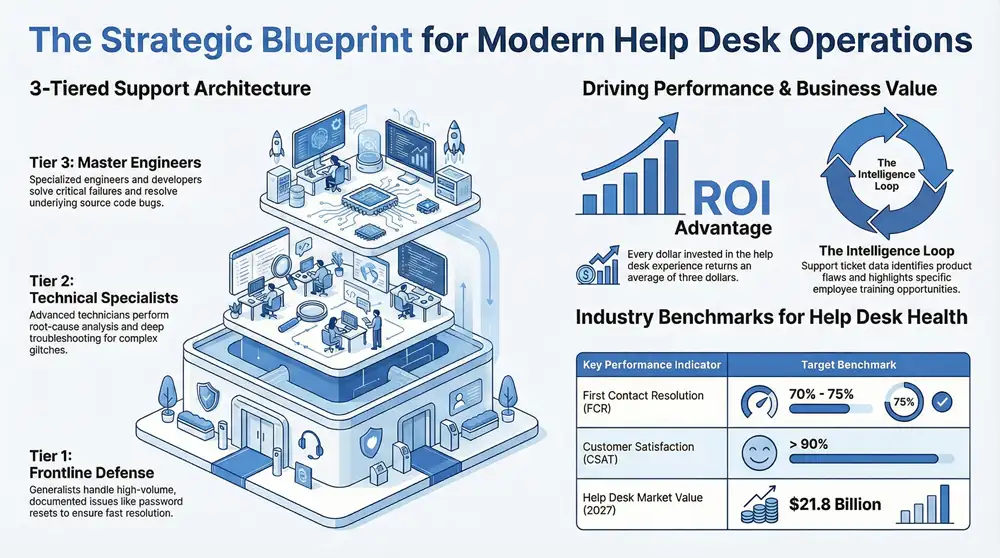
At its core, help desk support is the central point of contact for anyone—be it an employee or a customer—who runs into a technology problem. Think of it as the go-to resource for troubleshooting and information, making sure everyone can use their tech tools without a hitch.
Understanding the Core Mission of a Help Desk

Picture a help desk as the mission control for your company’s technical side. Its main job is simple but critical: get users back to normal operations as fast as possible. This minimizes the business disruptions that IT issues can cause.
This team is your frontline defense for everything from a forgotten password and software glitches to a malfunctioning printer or a spotty network connection. By funneling all these requests into one place, a help desk brings a sense of order to the chaos of daily tech troubles.
Instead of employees or customers getting stuck and frustrated, they have a single, reliable number to call or email for expert help. This structured approach doesn’t just fix the problem at hand; it also tracks recurring issues, gathering valuable data that can help shape a smarter, more resilient IT strategy down the road.
The Dual Role of Help Desk Support
A truly effective help desk actually serves two very different, but equally important, groups: your internal team and your external customers. The support for each is tailored to their unique needs, but both ultimately contribute to the overall health and success of the business.
- Internal Support (Employee-Facing): This is all about keeping your workforce productive. When an employee’s laptop dies or they can’t log into a critical app, work grinds to a halt. The internal help desk jumps in to solve these issues quickly, ensuring your team has the tools they need to do their jobs.
- External Support (Customer-Facing): This side focuses on ensuring a positive customer experience with your products or services. If a customer hits a bug in your software or can’t figure out your online portal, a quick and helpful response can turn a moment of frustration into a chance to build real loyalty.
A help desk isn’t just a reactive “fix-it” team; it’s a proactive engine for operational stability and customer satisfaction. Its core mission is to empower users, solve problems efficiently, and gather insights that drive continuous improvement.
This dual focus is what makes help desk support so essential. It ensures the technology that powers your business works for both the people building it and the people buying from it.
Help Desk Fundamentals at a Glance
To really get a handle on what help desk support is, it’s useful to see its core components laid out. The table below breaks down the essential functions and goals that define a modern, effective help desk.
| Aspect | Description |
|---|---|
| Primary Goal | To provide a single point of contact for resolving user incidents and service requests efficiently. |
| Key Function | Incident management, which involves logging, tracking, diagnosing, and resolving technical issues. |
| Target Users | Both internal employees needing IT assistance and external customers seeking product or service support. |
| Core Value | Minimizing downtime, improving user productivity, and enhancing overall satisfaction. |
Ultimately, the help desk acts as the face of your IT department. Its performance directly shapes how users feel about the technology within the company and the quality of care your business provides to its customers.
How Tiered Support Structures Improve Efficiency
To handle the constant flow of user requests, most businesses rely on a tiered support system. This isn’t just about drawing an org chart; it’s a strategic way to route problems to the right person, right away. This approach stops simple, everyday issues from bogging down your senior technicians and guarantees the truly complex problems get the expert attention they need.
Think of it like a hospital emergency room. When you walk in, a triage nurse assesses your situation. A minor cut is treated differently than a major injury, making sure the most critical cases get immediate attention from specialists. A tiered help desk works on the exact same principle, sorting and escalating issues for a fast, effective response.
The system usually has three levels, or tiers, with each one tackling progressively tougher problems. By filtering requests this way, businesses can solve a huge number of issues at the very first point of contact, which saves time, cuts costs, and keeps everyone happy and productive. Let’s break down how each of these tiers works.
Tier 1: The First Line of Defense
Tier 1 is the frontline of what is help desk support is all about. These technicians handle the vast majority of incoming requests, focusing on common, well-documented problems. Their main goal is to resolve as many issues as possible on that first call or email, a key metric known as First Contact Resolution (FCR).
You can think of Tier 1 specialists as the generalists of the IT world. They’re armed with scripts, checklists, and a solid knowledge base to knock out predictable issues with speed and efficiency.
Common Tier 1 tasks include:
- Password Resets: The classic “I’m locked out!” call that every user makes at some point.
- Basic Software Guidance: Walking users through common functions in an application they use every day.
- Printer Troubleshooting: Fixing those simple but frustrating connectivity or driver issues.
- Initial Triage: Gathering the essential details about a problem before passing it up the chain to a higher tier.
By taking care of these frequent and straightforward requests, Tier 1 support frees up the more specialized techs to concentrate on the bigger fish.
Tier 2: Deeper Technical Expertise
When a problem is too tricky for Tier 1, it gets escalated to Tier 2. The technicians at this level have more in-depth technical knowledge and hands-on experience. They’re the ones who handle issues that require advanced troubleshooting, software analysis, or a real understanding of the backend systems.
These are the specialists who dig in to figure out why a problem is happening, not just how to apply a quick patch. They might use remote access tools to look directly at a user’s system or pore over server logs to find the root cause of an outage.
Tier 2 acts as the crucial middle ground, bridging the gap between general support and high-level engineering. They solve the tricky problems that require more than a standard script.
For instance, if a bunch of users report that a specific software feature keeps crashing, a Tier 2 technician would jump in to investigate, try to replicate the error, and figure out if it’s a localized glitch or a widespread bug that needs a bigger fix.
Tier 3: The Ultimate Problem Solvers
Tier 3 represents the highest level of technical support you can get. This team is usually made up of specialized engineers, software developers, or even the third-party vendors who built the hardware or software in the first place. They get the call for the most critical and complex issues that Tier 1 and Tier 2 couldn’t crack.
These are the experts who fix bugs in the source code, tackle major server failures, or engineer new solutions for problems that have never been seen before. Their work often involves serious research, development, and testing. Once they find a solution, they document it and share that knowledge back down with Tier 1 and Tier 2, empowering them to resolve similar issues faster in the future.
This structured approach is a cornerstone of many successful IT strategies. You can see how it fits into the bigger picture by exploring different IT service management frameworks. The reliance on organized systems like this is only growing. Help desk software usage among customer service teams recently shot up to 53%, an 11% jump since 2020. This trend underscores the push for more efficient problem-solving, with the global help desk software market expected to hit $21.8 billion by 2027. Discover more insights about help desk statistics on Desku.io.
The Essential Tools and Processes That Power a Help Desk

A great help desk isn’t just a group of smart technicians answering phones; it’s a well-oiled machine running on structured processes and the right software. This combination is what turns a user’s problem into a solved ticket, quickly and efficiently.
To really get what’s happening behind the scenes, it helps to follow the journey of a single support request, often called the ticket lifecycle. This journey kicks off the moment a user reports an issue—whether it’s through an email, a call, or a web portal. That problem is logged, given a unique ticket number, and becomes the single source of truth for everything that happens next.
The Lifecycle of a Support Ticket
The first step is always ticket creation and categorization. An agent—or sometimes an automated system—assigns the ticket a priority level. Is it a “server is down” emergency (high priority) or a minor “how do I do this?” question (low priority)? At the same time, it’s categorized by the type of issue, like “hardware failure,” “software bug,” or “access request.” This initial sorting is crucial for getting the ticket to the right person.
Next up is assignment and tracking. The ticket lands in a Tier 1 agent’s queue, and they start investigating. Every single action, from their first diagnostic check to follow-up emails with the user, gets logged in the system. This creates a transparent audit trail, ensuring no request ever falls through the cracks or gets forgotten.
If the Tier 1 agent hits a wall, the ticket gets escalated. This is where the tiered support model really shines, making sure complex problems get expert eyes on them without wasting time.
As you can see, issues move up the ladder from general support to highly specialized technicians. It’s an efficient system that makes the best use of everyone’s time. Once a fix is found, the ticket is marked as resolved, the user gets the good news, and the ticket is closed. But that ticket’s data lives on, becoming a valuable piece of knowledge for solving similar problems in the future.
Core Technologies in the Help Desk Toolkit
This whole lifecycle is powered by a handful of indispensable software tools that create a seamless support system. Honestly, trying to manage hundreds of daily requests without them would be pure chaos.
- Ticketing Systems: This is the heart of the help desk. Platforms like Zendesk or Jira are built to log, track, and manage every incoming support request. They give agents a central dashboard to see open tickets, prioritize what’s most important, and work together on tricky issues.
- Knowledge Bases: A well-stocked knowledge base is an absolute game-changer. It’s a digital library of how-to guides, troubleshooting articles, and FAQs that empowers users to solve simple problems themselves. This self-service option cuts down on incoming tickets and also gives Tier 1 agents a reliable playbook to work from.
- Remote Desktop Software: Sometimes, you just need to see what the user is seeing. Remote desktop tools let technicians securely access and control a user’s computer to diagnose and fix problems without having to be physically there. Effective help desks rely on robust remote support solutions.
By integrating these tools, a help desk transforms from a reactive problem-solving team into a proactive and data-driven operation. The right technology stack not only boosts agent productivity but also dramatically improves the user experience.
These systems provide the structure needed for consistent, high-quality service. For those looking to build out more advanced support frameworks, our guide on IT service desk solutions offers a deeper dive into crafting a comprehensive strategy. At the end of the day, it’s the combination of clear processes and the right tools that allows a help desk to scale effectively and maintain high standards as a business grows.
Measuring Success with Key Help Desk Metrics
How do you know if your help desk is actually working? Gut feelings won’t cut it. The real answer is hiding in plain sight—in the data. Tracking the right key performance indicators (KPIs) is the only way to get an honest look at performance, find the weak spots, and make smart decisions to improve your support game.
Think of metrics as the vital signs for your support team’s health. They tell a story about efficiency, user satisfaction, and the real impact on your business. Flying blind without them means you can’t prove your team’s value or make a solid case when you need more resources.
This isn’t about collecting numbers for a fancy dashboard. It’s about turning vague goals like “better support” into concrete, measurable targets. When you focus on the right metrics, you can spot problems before they blow up, celebrate team wins, and constantly sharpen your approach to delivering fantastic service.
First Contact Resolution (FCR)
Of all the numbers you can track, one of the most powerful is First Contact Resolution (FCR). This simply measures the percentage of support tickets that are completely solved during the very first interaction. No follow-up calls, no extra emails—just one and done.
A high FCR rate is a huge signal that you have an efficient, knowledgeable team. It means your people have the right training, the right tools, and the right information to fix things on the spot. Even more importantly, it has a direct line to user happiness. Customers and employees love getting their issues fixed fast without being bounced around.
A strong FCR rate shows your processes are humming along nicely. On the flip side, a low or dipping FCR often points to gaps in your knowledge base, a need for better agent training, or escalation paths that are just too complicated.
Keeping an eye on this KPI helps you find the friction in your support process and smooth it out.
Average Resolution Time and Ticket Volume
Next up, Average Resolution Time tracks the total time it takes for a ticket to go from open to officially closed. While faster is generally better, this number doesn’t tell the whole story on its own. You need to look at it alongside Ticket Volume—the total number of new tickets coming in over a set period.
Here’s an example: a sudden jump in resolution time might not mean your team is slacking. If it happened at the same time as a huge spike in ticket volume because of a new software launch, it just means they’re handling a much heavier load. Tracking these two metrics together is how you understand your team’s real capacity and know when they’re getting swamped.
Looking at these patterns over time reveals trends that are gold for strategic planning. If you see ticket volume for a specific issue creeping up every month, it could be a sign of a nagging product bug that your development team needs to squash for good.
Customer Satisfaction (CSAT)
Finally, we have Customer Satisfaction (CSAT), which measures exactly what it sounds like: how happy people are with the support they received. This is usually captured with a quick, one-question survey sent after a ticket is closed, asking users to rate their experience.
While technical stats like FCR are crucial, CSAT gives you direct, unfiltered feedback on how your service is perceived. A high CSAT score, where the goal is often 90% or higher, shows your team isn’t just closing tickets—they’re solving problems with a helpful, positive attitude. A sudden drop in CSAT is a major red flag, pointing to potential issues with an agent’s performance, communication skills, or the quality of the solution that need immediate attention.
Essential Help Desk KPIs and What They Mean
Tracking metrics isn’t about micromanagement; it’s about empowerment. The right data gives your team the insights they need to improve, shows management the value of your support operations, and ultimately leads to happier, more productive users.
Here’s a quick breakdown of the essential KPIs and what they really tell you about your help desk’s performance.
| KPI | What It Measures | Why It’s Important |
|---|---|---|
| First Contact Resolution (FCR) | Percentage of tickets solved in the first interaction. | Indicates agent efficiency and user satisfaction. Industry benchmark: 70-75%. |
| Average Resolution Time | Average time from ticket creation to closure. | Measures overall team speed and process effectiveness. |
| Ticket Volume | Total number of tickets created in a period. | Helps with resource planning and identifying widespread issues. |
| Customer Satisfaction (CSAT) | User happiness with a specific support interaction. | Provides direct feedback on service quality. Industry benchmark: >90%. |
By consistently monitoring these four pillars of help desk performance, you move from guesswork to a data-driven strategy. You’ll know exactly where you’re winning and where you need to focus your efforts to build a truly exceptional support experience.
The Real Business Impact of High-Quality Support

A great help desk does far more than just fix broken printers or reset forgotten passwords. When it’s done right, it delivers real, measurable value that hits the bottom line, turning what many see as a necessary expense into a strategic business asset.
When your support team is responsive, knowledgeable, and genuinely helpful, it becomes a powerful engine for efficiency and growth. It’s not just about resolving technical glitches; it’s about protecting productivity, strengthening customer relationships, and gathering critical business intelligence.
Every closed ticket represents a real contribution to your organization’s health. This is what separates an average support team from an exceptional one—they focus on outcomes, not just ticket counts, and in doing so, they help drive revenue and protect the company’s reputation.
From Cost Center to Revenue Driver
One of the biggest impacts of quality support is its direct effect on customer loyalty and retention. When customers get fast, effective help, they feel valued and are far more likely to stick around. This transforms a potentially negative experience into a positive one, turning frustrated users into brand advocates who drive repeat business and referrals.
The financial consequences are huge. In the U.S. alone, poor customer service costs companies over $62 billion a year. On the flip side, smart investments in support pay off. For every dollar invested in the customer experience through a help desk, businesses can see an average return of $3. Companies that prioritize a superior customer experience consistently deliver returns three times higher than their competitors. Learn more about these help desk statistics on FinancesOnline.com.
Protecting Productivity and Minimizing Downtime
Internally, the impact is just as profound. Every minute an employee spends wrestling with a tech issue is a minute they aren’t doing their actual job. An efficient internal help desk acts as a productivity shield, minimizing downtime and getting your staff back on track quickly.
A help desk’s true value isn’t measured by how many problems it fixes, but by how many problems it prevents from disrupting the business. It’s an investment in operational continuity.
Think about the ripple effect of a single system outage. Without a responsive support team, operations can grind to a halt, deadlines get missed, and employee morale plummets. A high-quality help desk mitigates these risks, ensuring the technology that powers your business remains a tool for success, not a source of frustration.
Uncovering Invaluable Business Intelligence
Beyond the day-to-day fixes, a strategic help desk is a goldmine of business intelligence. Every support ticket is a piece of data that tells a story about your products, services, and how people are using them. By analyzing ticket trends, a business can uncover some incredibly valuable insights.
- Product Flaw Detection: Is there a sudden spike in tickets related to a specific software feature? That’s an early warning sign for developers that a critical bug might be lurking.
- User Experience Gaps: Are users constantly asking how to perform a certain task? That’s a clear signal that the interface is confusing or the documentation isn’t doing its job.
- Training Opportunities: If recurring issues are coming from one department, it highlights a need for targeted employee training, which can boost skills and cut down on future tickets.
This feedback loop turns the help desk from a reactive team into a proactive partner in business improvement. It provides the raw data needed to make smarter decisions, refine products, and create a better overall experience for everyone.
Choosing Between an In-House and Outsourced Help Desk
Sooner or later, every growing business hits a crossroads with its IT support. Do you build your own help desk from the ground up, or do you partner with a team of outside experts? This is one of the biggest decisions you’ll make, and there’s no single right answer. It really boils down to your company’s specific needs, budget, and where you see yourself in the next few years.
An in-house team is completely immersed in your world. They live and breathe your company culture, which can lead to a really personal and consistent experience for your employees. On the flip side, outsourcing opens the door to a massive pool of talent, better technology, and efficiencies that are just plain tough to build on your own.
Evaluating the In-House Model
When you build an in-house help desk, you’re in the driver’s seat. You have complete, direct control over everything. You get to handpick every person on the team, train them to your exact standards, and weave them into the fabric of your company culture. This closeness creates a deep understanding of your products and a powerful sense of ownership over user happiness.
But that level of control doesn’t come free. Building an internal team is a major investment in several key areas:
- Recruitment and Hiring: Finding, interviewing, and onboarding qualified IT pros is both time-consuming and expensive.
- Ongoing Training: Technology never stands still. You have to constantly invest in training just to keep your team’s skills from getting stale.
- Salaries and Benefits: These are significant fixed costs that can put a real strain on the budgets of small to mid-sized businesses.
- Infrastructure: You’re on the hook for buying and maintaining all the necessary software, hardware, and even the office space.
This model is often the best fit for companies with highly specialized, complex products or a unique culture that would be difficult for an outside partner to truly understand and replicate.
Understanding the Outsourced Advantage
Outsourcing means partnering with a managed service provider (MSP) that lives and breathes help desk support. Right off the bat, you get access to a team of trained experts and a whole suite of professional support tools without that massive upfront cost. For many businesses, the ability to offer 24/7 coverage is the real game-changer—something that’s often financially impossible for an in-house team to provide.
The move toward outsourcing is only getting bigger. The global IT help desk outsourcing market is expected to jump from nearly $10 billion to $18.3 billion by 2033. Right now, about 50% of companies around the world already outsource at least some of their help desk functions. On average, businesses that do outsource hand off about 55% of their help desk and desktop support tasks.
The real beauty of outsourcing is that it turns a huge, fixed capital expense into a predictable, scalable operating expense. You simply pay for the support you need, when you need it.
For businesses trying to get a handle on costs, improve service quality, and let their teams focus on what they do best, bringing in an expert provider for remote help desk support is often the smartest move. If you’re exploring your options, checking out the top outsourced help desk services is a great place to start. This approach gives you the agility to scale your support up or down as your business changes, ensuring you’re never caught off guard.
Frequently Asked Questions About Help Desk Support
To wrap things up, let’s tackle some of the most common questions we hear from clients. These are the details that often get overlooked but make a huge difference in understanding what a help desk really does and how to get one working for you.
Help Desk vs. Service Desk: What Is the Difference?
While people often use these terms interchangeably, there’s a key distinction. Think of a help desk as the emergency room for your IT. It’s primarily reactive, focused on fixing immediate, break-fix issues like a broken laptop, a software glitch, or a forgotten password. The goal is simple: get users back to work as quickly as possible.
A service desk, on the other hand, is more like your primary care physician—it’s strategic and looks at the bigger picture of your company's IT health. It handles everything a help desk does, but also manages service requests (like setting up a new employee with a computer), oversees change management, and aligns with broader IT service management (ITSM) goals. In short, the help desk is a crucial component within the larger service desk framework.
What Skills Are Essential for Help Desk Staff?
A great help desk professional is a unique blend of tech wizard and people person. Having one without the other just doesn't work. The right combination ensures they can not only solve the problem but also leave the user feeling heard, understood, and supported.
Here are the non-negotiables:
Technical Proficiency: A solid foundation in troubleshooting common hardware, software, and network issues is the price of entry.
Problem-Solving: This isn't just about following a script. It’s the ability to think critically, diagnose the root cause of an issue, and find the right fix.
Communication Skills: Explaining complex technical concepts to non-technical users without a mountain of jargon is a true talent.
Patience and Empathy: Dealing with frustrated users requires a calm and understanding demeanor to de-escalate stress and build trust.
The best help desk agents are not just tech experts; they are excellent communicators and problem-solvers who can manage both technology and human emotion with equal skill.
How Do You Set Up a New Help Desk?
Getting a new help desk off the ground involves a few foundational steps. First, you have to define your goals. Are you supporting your internal staff, external customers, or both? The answer changes everything. Next, you’ll need to pick the right ticketing software to log, track, and manage all incoming requests so nothing falls through the cracks.
From there, it’s all about people and process. You'll need to assemble your team, making sure they have that critical mix of technical and soft skills. Finally, create a knowledge base with answers to common questions. This gives users a self-service option and provides your team with a consistent playbook, setting the stage for an effective support system from day one.
Ready to stop worrying about IT and start focusing on your business? The expert team at Kraft Business Systems provides reliable, 24/7 managed help desk support designed to keep your Michigan organization productive and secure. Learn how our tailored IT solutions can help you achieve your goals by visiting us at https://kraftbusiness.com.