


Before you even think about picking up the phone to call a Managed Service Provider (MSP), the most important work has already begun. Right inside your own office.
Jumping into conversations with potential IT partners without a crystal-clear picture of what you actually need is like going to a car dealership without knowing if you need a sedan or a moving truck. You’ll end up with a great sales pitch, but probably not the right solution.
The absolute most critical phase of choosing an MSP happens before you ever see a proposal. It’s all about introspection—taking a hard, honest look at your current technology, the daily headaches it causes, and where you want your organization to be in the next three to five years.
When you document this first, you create a blueprint. This blueprint becomes your filter, helping you instantly weed out providers who aren’t a good fit and focus only on the ones who can genuinely solve your problems.
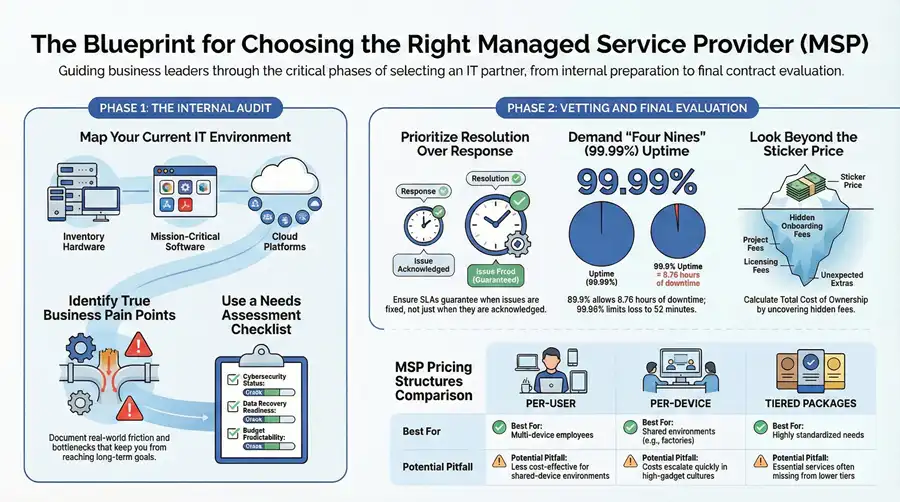
Map Your Current IT Environment

First things first: you need to know what you have. You don’t need to be an IT wizard for this, but you do need to create a basic inventory of your technology. This audit gives potential MSPs a clear baseline of what they’ll be asked to manage, support, or replace.
Your inventory should cover the basics:
- Hardware: Jot down a rough count of your servers, workstations, laptops, printers, and any networking gear like switches or firewalls.
- Software and Applications: List the mission-critical software that runs your business. This could be anything from accounting software and CRMs to specialized applications for manufacturing or healthcare.
- Cloud Services: Make a note of any cloud platforms you’re already using, like Microsoft 365 or Google Workspace, and what you use them for.
This simple self-assessment is the starting point for understanding the true scope of work. It also helps you see if you need help with broader IT Asset Management best practices to get a better handle on costs and compliance.
Identify Your True Pain Points
Once you know what you have, it’s time to figure out what’s broken. Move beyond the list of tech and focus on the real-world business problems. Where is technology causing friction for your team? What keeps you up at night? These pain points are the real reason you’re looking for an MSP in the first place.
This process—assessing what you have, identifying the problems, and documenting what you need—is the key to a focused and effective search.
This structured approach ensures you’re not just buying services, but solving problems.
To help you get started, we’ve put together a simple checklist. Use this to take stock of your current situation and document what a future-state solution should look like.
Initial MSP Needs Assessment Checklist
| Assessment Area | Key Questions to Answer | Your Organization’s Status (Red/Yellow/Green) |
|---|---|---|
| Current IT Support | How do we handle IT issues now (in-house, break-fix)? What’s the average response time? Are we satisfied? | |
| Cybersecurity | What security measures do we have (firewall, antivirus)? Have we had any security incidents? Do we need to meet compliance standards (e.g., HIPAA)? | |
| Data Backup & Recovery | How is our data backed up? How often? Have we ever tested a full restore? How long can we afford to be down? | |
| Employee Productivity | Are slow computers or network issues common complaints? Do our remote workers have secure and reliable access to systems? | |
| Business Goals | Are we planning to expand to new locations? Are we adopting new software or cloud services in the next 1-2 years? | |
| IT Budget | What is our current IT spending? Is it predictable or does it fluctuate wildly with unexpected repairs? |
Once you’ve run through this checklist, you’ll have a much clearer picture of your needs, which is the most powerful tool you can bring to the negotiation table. It shifts the conversation from a generic sales pitch to a focused discussion about solving your specific business challenges.
The market for managed services is exploding, projected to grow from USD 297.20 billion to a staggering USD 878.71 billion by 2032. But within that massive market, only a small fraction of providers—perhaps 5,000 to 10,000—are mature enough to handle the complex needs of a growing Michigan business.
Knowing exactly what you need ensures you partner with one of the best. If you’re new to this world, taking a moment to understand what managed IT services are can also provide a solid foundation for this entire process.
Vetting an MSP’s Technical and Security Capabilities

Once you have a solid handle on your own needs, the real work begins. It’s time to look past the slick brochures and dig into a provider’s actual technical and security chops. This stage is less about what an MSP says they can do and all about how they actually do it. This is where you uncover their true ability to protect and support your Michigan-based organization.
This means you’ve got to ask specific, tough questions that demand detailed answers. If you hear vague promises about “robust security,” that’s a major red flag. Your mission is to understand their processes, the real-world knowledge of their team, and how much they’re investing in modern, effective technology.
Probing Their Cybersecurity Defenses
Cybersecurity isn’t just another line item on a proposal; it’s the absolute foundation of a modern IT partnership. A provider’s approach to security tells you everything you need to know about their competence and commitment to protecting your business. Don’t be afraid to get into the weeds here.
Start by asking them to walk you through their standard security stack. What specific tools are they using for endpoint detection and response (EDR), firewalls, and email filtering? A big red flag is an over-reliance on a single third-party tool without the in-house expertise to actively manage it. You’re looking for a partner who integrates these tools into a cohesive defense strategy, not just a reseller.
Key Takeaway: A top-tier MSP should be able to describe their incident response process step-by-step without a single hesitation. Ask them point-blank: “If we suspect a data breach at 2 AM on a Saturday, what happens next?” The answer should be a clear, documented procedure, not a fuzzy promise to “look into it.”
The security expertise of an MSP is everything. With the market projected to soar past $300 billion by 2025, a sharp focus on cybersecurity is driving 66% of IT outsourcing adoption. This is especially true as remote work continues to open up new vulnerabilities. While thousands of providers exist, it’s estimated that only 5,000-10,000 MSPs truly meet enterprise-grade standards, creating a huge gap between what businesses need and who can actually deliver.
Evaluating Technical Expertise and Infrastructure Management
Beyond just security, you need to be confident they can manage the core technologies your business runs on. This covers everything from your network infrastructure and cloud services all the way to your plans for business continuity.
Questions to Uncover True Technical Skill:
- Cloud Management: How do you manage and secure cloud environments like Microsoft Azure or AWS? Can you show us examples of cloud migration projects you’ve handled for businesses like ours?
- Network Oversight: What’s your process for network monitoring and management? How do you ensure our offices and remote staff have optimal performance and uptime?
- Disaster Recovery: Can we review your disaster recovery and business continuity plan? How often is it tested, and what were the results of the last test?
These questions help you figure out if they’re proactive strategists or just a reactive “break-fix” shop. A real partner will be talking about proactive maintenance, patching schedules, and long-term technology roadmaps. For a deeper look, check out our guide on the role of MSPs in IT security to see how these technical skills directly build a stronger defense.
Verifying Certifications and Compliance Knowledge
Certifications aren’t just logos to pretty up a website; they are third-party proof of an MSP’s processes and security posture. But not all certifications are created equal.
You want to focus on the ones that demand rigorous, independent audits. Here are two of the most important ones to look for:
- SOC 2 Type II: This report validates that a provider has strict internal security controls in place and, crucially, that those controls have been tested for operational effectiveness over a period of time (usually 6-12 months). It’s a powerful sign of a mature and secure operation.
- ISO 27001: This is an international standard for information security management. Earning this certification shows a systematic, ongoing approach to managing and protecting both company and customer data.
For Michigan organizations in regulated industries like healthcare (HIPAA), manufacturing, or government, this kind of verification isn’t just nice to have—it’s non-negotiable. Ask potential MSPs how they ensure data sovereignty and help their clients meet specific compliance rules. Their ability to speak fluently about your industry’s requirements is one of the clearest signs you’ve found the right long-term partner.
Decoding Service Level Agreements and Support Models
Once you’ve confirmed a potential MSP has the technical chops, it’s time to dig into the single most important document in your future partnership: the Service Level Agreement (SLA). Don’t just skim this. The SLA isn’t just a bunch of legal jargon; it’s the rulebook that defines how your MSP will perform, what happens when they don’t, and what you can expect day-to-day. A weak SLA is a recipe for downtime and frustration, while a strong one is your best guarantee for business continuity.
The trouble is, many SLAs are written to be intentionally dense. Your job is to cut through that noise and find the metrics that actually matter to your business. Getting this right is how you separate the truly accountable partners from the rest of the pack.
Differentiating Response Time from Resolution Time
I’ve seen countless businesses get burned by this one. They sign an agreement thinking they’re covered, only to realize they’ve confused two very different metrics: response time and resolution time. The difference between them can mean hours—or even days—of crippling downtime.
A response time guarantee only promises how quickly the MSP will acknowledge your support ticket. A 15-minute response sounds fantastic on paper, but it just means someone will reply to your frantic email or log your call within 15 minutes. It says absolutely nothing about when they’ll actually fix the problem.
On the other hand, a resolution time guarantee commits the provider to solving the issue within a specific timeframe. This is the number that directly impacts your bottom line. A well-crafted SLA will have different resolution times based on the severity of the problem, ensuring a critical server outage gets treated with far more urgency than a printer jam.
Key Takeaway: Don’t ever sign an SLA that only promises fast response times. Look for clearly defined resolution guarantees tiered by priority. A “P1” critical issue should have a much faster resolution promise than a “P4” minor request.
Understanding Uptime Guarantees in the Real World
Providers love to toss around impressive-sounding numbers like “99.9% uptime,” but those little decimal points make a world of difference. It’s easy to see “99.something” and assume you’re covered, but let’s do the math on what that means for potential downtime over a year.
- 99.5% Uptime: This sounds good, but it allows for up to 43.8 hours of downtime annually. That’s more than a full work week your systems could be offline.
- 99.9% Uptime: This is a common offering, but it still translates to 8.76 hours of downtime per year—an entire business day lost.
- 99.99% Uptime: Now we’re talking. This allows for just 52.6 minutes of potential downtime annually. For most critical systems, this should be your minimum standard.
When you’re reviewing an SLA, pull out your calculator. Figure out what each percentage means in actual hours and minutes. For a Michigan manufacturing plant, an hour of downtime can halt a production line and cost thousands. For a healthcare provider, it can impact patient care. A 99.99% guarantee isn’t a luxury; for many, it’s a necessity.
Choosing the Right IT Support Model
Not every business needs the same kind of IT support. A great MSP won’t try to shoehorn you into a one-size-fits-all plan. They’ll have different models designed to fit your internal team’s capabilities and your business’s operational rhythm.
Here are the most common structures you’ll see:
- Fully Outsourced Helpdesk: The MSP becomes your IT department, handling every single request from your employees. This is a perfect fit for businesses with no dedicated in-house IT staff.
- Co-Managed IT: This is an increasingly popular model where the MSP partners with your existing IT person or team. The MSP usually handles the heavy lifting—like 24/7 monitoring, complex infrastructure, and advanced security—which frees up your internal staff to focus on strategic projects and hands-on user support.
- Tiered Support: The provider offers different packages (e.g., Gold, Silver, Bronze) with varying service levels. This can seem cost-effective, but you have to read the fine print. Be sure you know what’s included versus what counts as an extra charge, like on-site visits or after-hours support.
Non-Negotiable SLA Components
Finally, a solid SLA must have teeth. If a provider fails to meet their uptime or resolution guarantees, there have to be consequences. This is where accountability is written into the contract.
Before you sign, make sure your agreement clearly outlines:
- Penalties for Non-Compliance: This is usually handled through service credits. If the MSP misses its targets, you should get a credit on your next monthly bill.
- A Clear Escalation Path: When a critical issue isn’t getting solved fast enough, who do you call? The SLA needs to define the chain of command, from the frontline helpdesk all the way up to senior management.
- Exclusions and Scope: The document must be explicit about what is and is not covered. This prevents you from getting hit with surprise charges for work you assumed was included in your flat monthly fee.
Think of the SLA as your ultimate insurance policy. By taking the time to scrutinize these details, you’re making sure you’re signing a genuine commitment to performance, not just a document full of empty promises.
Analyzing Pricing Models and Total Cost of Ownership
Trying to compare pricing proposals from different Managed Service Providers can feel like they want you to be confused. One quote is priced per user, another per device, and a third throws a bunch of gold, silver, and bronze packages at you, making a true apples-to-apples comparison almost impossible.
To really get to the bottom of what you’ll be paying, you have to look way past the monthly fee and calculate the Total Cost of Ownership (TCO).
That initial price tag is just the tip of the iceberg. I’ve seen it happen time and again: a provider looks cheaper on paper but ends up costing a fortune in the long run. This death-by-a-thousand-cuts happens through slow support that kills productivity, frequent downtime that grinds operations to a halt, or a never-ending stream of extra fees for anything they decide is “out of scope.”
Unpacking Common MSP Pricing Models
Most MSPs build their pricing around one of a few common models. Getting a handle on the pros and cons of each is your first step to decoding their proposals and finding a model that actually fits how your organization works. Each has its place, but the wrong one can lead to some nasty budget surprises.
- Per-User Pricing: You pay a flat monthly fee for each employee. This is beautifully simple and predictable, making it easy to budget for as your team grows or shrinks. It’s a great fit for organizations where people use multiple devices, like a laptop, desktop, and phone.
- Per-Device Pricing: Here, the fee is based on the number of devices being managed—servers, workstations, firewalls, you name it. This can be a smart move for businesses with shared workstations, like in a manufacturing plant, but it gets expensive fast if every employee has a pile of gadgets.
- Tiered Packages (Gold, Silver, Bronze): Providers bundle services into different levels. This looks simple on the surface, but you have to read the fine print. More often than not, the cheaper tiers are missing critical services like on-site support or advanced security tools, essentially forcing you into a more expensive package than you first thought.
A clear, straightforward pricing structure is usually the mark of a mature, confident provider. It’s no secret that cost efficiency is a huge driver for outsourcing. In fact, 61% of new MSP contracts signed by mid-sized US firms are specifically to get a better handle on IT spending. A good partnership can genuinely reduce IT costs by 30-50%, but that only happens when the pricing is transparent and predictable from the start. For a closer look at these market dynamics, you can discover more insights about MSP market growth reports on marketgrowthreports.com.
It’s helpful to see these models side-by-side to understand where the value and potential risks lie.
MSP Pricing Model Comparison
| Pricing Model | How It Works | Best For | Potential Pitfalls |
|---|---|---|---|
| Per-User | A flat monthly fee for each employee, regardless of device count. | Businesses where employees use multiple devices (laptop, phone, tablet). | Can be less cost-effective if many users share a few devices. |
| Per-Device | A monthly fee for each managed device (server, workstation, printer, etc.). | Environments with shared devices, like manufacturing floors or call centers. | Costs can escalate quickly in a “one employee, many devices” culture. |
| Tiered Packages | Services are bundled into different levels (e.g., Bronze, Silver, Gold). | Businesses with very basic or highly standardized needs that fit neatly into a tier. | The “essentials” are often missing from lower tiers, forcing an upsell. |
Ultimately, the best model is the one that aligns with your business operations and provides the most predictable monthly cost.
Looking Beyond the Monthly Fee to Find Hidden Costs
The real secret to an accurate comparison is hunting down the hidden costs that aren’t printed in bold on page one of the proposal. These are the little expenses that can quickly chew through any savings you thought you were getting with a low-cost provider.
Pro Tip: Don’t just read the quotes—interrogate them. Create a simple spreadsheet to compare providers side-by-side. Put the monthly fee in one column, then add more columns for every potential extra charge you can dig out of the contract’s fine print. This is the only way to calculate the real TCO.
When you’re reviewing proposals, be on the lookout for these classic hidden costs:
- Onboarding and Setup Fees: Is the initial setup and migration work included, or is that a separate, one-time bill waiting to hit your desk?
- After-Hours and On-Site Support: What happens when something breaks at 7 PM on a Friday? What are the rates? Is there a surcharge for a technician to actually come to your office?
- Project Work: You need to get a crystal-clear definition of “project work.” Things like office moves, major software migrations, or new server installations are almost always billed separately at a hefty hourly rate.
- Hardware and Software Licensing: Does that monthly fee include licensing for antivirus, Microsoft 365, and other critical tools, or will you be getting a separate invoice for all of that?
Getting answers to these questions is non-negotiable. For a comprehensive breakdown of what to expect, you can learn more about managed IT services costs in our detailed guide. This approach forces you to shift your focus from the sticker price to the long-term value, making sure you end up with a partner who delivers predictable results, not a constant stream of surprise invoices.
You’ve sifted through proposals, translated the fine print in the Service Level Agreements, and done the math on the true Total Cost of Ownership. Now you’re at the finish line, staring at your final one or two contenders. This is where you move past the sales pitches and into the real world.
These last few steps are non-negotiable. They are your best, and final, chance to confirm that a provider’s on-the-ground performance actually lives up to what they promised in the conference room. Get this part right, and you’ll sign that multi-year contract with complete confidence.
Conducting Reference Checks That Actually Tell You Something
Every MSP is going to hand you a list of their happiest clients. Your job is to dig past the generic, “Yeah, they’re great” comments. You need to ask pointed, specific questions that uncover how they really act when the pressure is on.
Forget questions that can be answered with a simple “yes” or “no.” You’re hunting for stories.
Critical Questions to Ask an MSP’s References
- On Problem Resolution: “Walk me through a time this MSP handled a critical IT emergency for you. What was the issue, how did they communicate with you during the crisis, and what was the final outcome?”
- On Proactive Strategy: “How often do they bring new ideas to the table? Can you give me a specific example of a strategic recommendation they made that genuinely improved your business operations or security?”
- On Daily Support: “What’s the day-to-day experience like for my employees when they need help? Are the technicians they talk to knowledgeable and easy to work with?”
- On Regrets and Improvements: “If there’s one thing you wish this MSP did differently or better, what would it be?”
The answers you get here are pure gold. A glowing reference who can’t recall a single strategic recommendation probably has a reactive, break-fix provider on their hands. But a reference who enthusiastically details how the MSP smoothly handled an after-hours server crash tells you everything you need to know about their competence and commitment.
Evaluating the Onboarding Process
How an MSP plans to bring you into their fold is a massive tell. It reveals their attention to detail, their processes, and how organized they really are. A smooth, well-documented onboarding is the foundation of a great partnership. A vague, chaotic, or disorganized plan is one of the biggest red flags you can find.
A serious provider should hand you a detailed onboarding project plan. This isn’t a one-page checklist; it’s a comprehensive document that maps out every single step of the transition.
Pro Tip: Ask to see a redacted sample of an onboarding plan they used for another client. This is the ultimate “show, don’t tell” moment. A confident MSP won’t hesitate, because it showcases their methodical approach.
This onboarding plan should clearly spell out:
- Discovery and Assessment: How they’ll conduct a deep dive into your current network, hardware, and software to make sure nothing gets missed.
- Data Migration: A clear schedule for moving data to new systems or the cloud, with a specific strategy to keep downtime to an absolute minimum.
- Agent Deployment: The timeline for rolling out their management and security software to all your computers and servers.
- Team Introduction and Training: The plan for introducing their key people to your team and showing your staff exactly how to get help when they need it.
If a provider gets hazy on these details, be very wary. A messy start almost always leads to a messy partnership.
Scrutinizing the Final Contract
The contract is the last piece of the puzzle. At this point, you’re not just scanning for gotchas; you’re confirming that the legal document perfectly mirrors all the verbal promises and expectations set during the sales process. Don’t hesitate to get your lawyer involved for a final review.
Pay laser-sharp attention to these clauses. They will dictate the terms of your relationship for years.
- Termination Clause: How do you get out if they consistently fail to deliver? Look for a “for cause” termination clause that protects you from poor performance. You also need to understand the notice period required to leave the contract without cause at the end of the term.
- Liability Limits: Every contract will have a clause limiting the provider’s financial liability if something goes horribly wrong. Make sure this number is reasonable and actually aligns with the potential business impact of a major IT failure on their part.
- Data Ownership and Return: The contract must state, in no uncertain terms, that you own your data. It should also clearly detail the process and format for getting all your data back if you terminate the agreement. The last thing you want is to be held hostage by a provider who makes it difficult to retrieve your most valuable asset.
Taking the time to nail these final checks is the single most important investment you can make in your new IT partnership. It ensures you’re not just hiring a vendor, but truly partnering with a team that’s ready to support your organization’s future.
Common Questions About Choosing an MSP
When we walk Michigan businesses through the process of finding the right technology partner, the same handful of questions always come up. Getting straight answers to these is the key to making a confident decision instead of a risky guess. Let’s tackle the most common ones head-on.
What Is the Biggest Mistake Businesses Make?
Without a doubt, the single most common—and costly—mistake is getting fixated on the monthly price tag. While everyone has a budget, choosing an MSP just because they’re the cheapest bidder is almost always a recipe for long-term pain.
Low-cost providers have to cut corners somewhere. That usually means they’re using outdated tech, have painfully slow response times when you’re in a crisis, or just don’t have the deep security expertise needed to protect a modern business from threats. Any initial savings get wiped out fast by expensive downtime, frustrated employees, or a single devastating security breach.
Key Insight: Look at a potential MSP based on the total value they bring to the table. This is about their ability to meet your specific technical, security, and compliance needs. The right partner isn’t just an IT expense; they’re an investment in your business’s resilience.
Should I Choose a Local or National Provider?
Both have their pros and cons, and the right answer really hinges on how your business operates. A local Michigan-based MSP offers a more personal relationship and genuinely understands the regional business climate. Plus, their proximity means they can get on-site fast when a remote fix just won’t cut it—a massive advantage for many organizations.
On the other hand, a big national provider might have a wider range of highly specialized services and more resources to throw at a problem. But for most small and mid-sized businesses, a reputable local or regional MSP often hits that sweet spot. They deliver serious capabilities while still providing the kind of personalized, responsive service that feels like a true partnership.
How Long Should an MSP Contract Be?
You’ll typically see contracts ranging from one to three years. When you’re just starting with a new partner, a one-year term is usually the smartest move. It gives you an entire business cycle to really evaluate their performance and see if they’re a good cultural fit, all without locking you into a long-term commitment if things don’t pan out.
Longer three-year contracts might come with a tempting discount, but you’re trading that for a major loss of flexibility. No matter the term, make sure the contract has a crystal-clear termination clause. It needs to detail a reasonable notice period and spell out the entire offboarding process, including how your data will be transitioned. This ensures a clean break if you ever decide to switch providers.
What Is Co-Managed IT and Is It Right for Me?
Co-managed IT is a collaborative model where an MSP works with your existing in-house IT staff instead of completely replacing them. Think of it as adding a powerhouse of specialists to your team. The MSP typically handles the more time-consuming or complex tasks that can easily overwhelm a small internal team.
Here’s what an MSP often takes on in a co-managed setup:
- 24/7 network monitoring and security alerts to catch threats at all hours.
- Advanced cybersecurity defense, like managing firewalls and endpoint protection.
- Strategic projects, such as cloud migrations or major infrastructure upgrades.
- Data backup and disaster recovery management to keep your business running no matter what.
This frees up your internal people to focus on day-to-day user support, business-specific applications, and the hands-on tasks that require their unique knowledge of your company. Co-managed IT is a perfect fit for organizations that have a great IT person or team but need to boost their capabilities, fill in specific skill gaps, or add strategic depth without the high cost of hiring more full-time staff. You get the best of both worlds: your trusted internal knowledge backed by external expertise and resources.
Choosing the right technology partner is one of the most important decisions your Michigan business will make. Kraft Business Systems delivers secure, end-to-end solutions that align with your specific goals, ensuring your organization is productive, resilient, and ready for what’s next. To learn how we can simplify your IT and protect your operations, visit us at Kraft Business Systems.

