
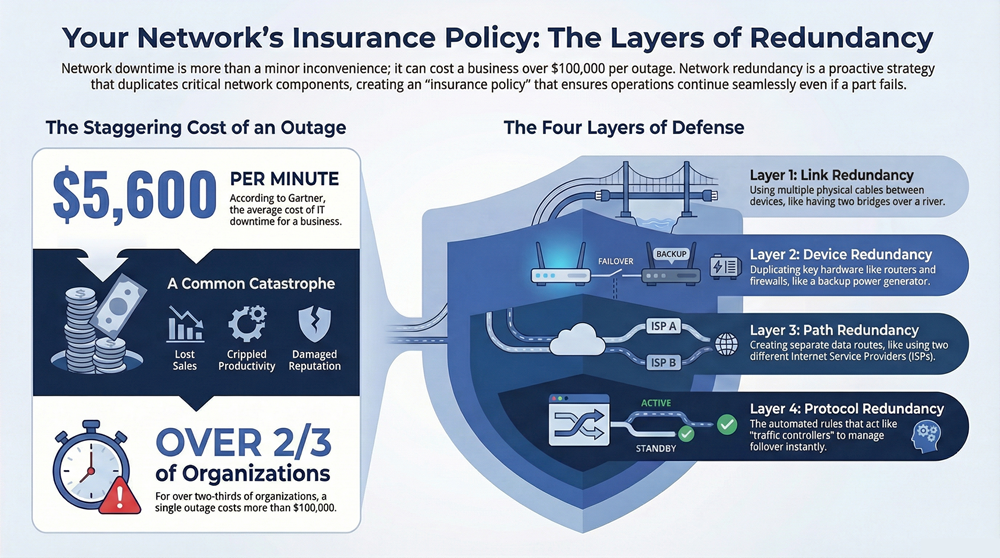
When you hear the term network redundancy, think of it as a smart insurance policy for your company’s connectivity. It’s the practice of building in duplicates of your most critical network components—routers, switches, internet connections—so that if one part fails, another is ready to take over instantly.
This isn’t just a “nice-to-have.” It’s a proactive strategy that prevents a single point of failure from grinding your entire operation to a halt.
Why Network Redundancy Is Your Best Insurance Policy
Ever driven a long distance without a spare tire? You might make it just fine, but one stray nail could leave you stranded for hours. Running a business network without redundancy is the exact same gamble. Everything works perfectly… until it doesn’t.
At its core, network redundancy creates backup systems and alternate routes for your data. If your primary internet connection goes down or a key switch fails, a secondary component seamlessly picks up the slack. This failover process is usually so fast that your team won’t even notice a blip.
Before we dive deeper, let’s get a quick handle on the key concepts that make up a resilient network.
Key Redundancy Concepts at a Glance
This table breaks down the big ideas into simple terms, giving you a quick reference as we go.
| Concept | Primary Goal | Common Example |
|---|---|---|
| High Availability | Minimize downtime by ensuring services are always accessible. | An e-commerce site that stays online during a server failure. |
| Fault Tolerance | Continue operating without interruption even if a component fails. | A RAID 10 server that keeps running after a hard drive dies. |
| Failover | Automatically switch to a backup system when a primary fails. | A secondary internet connection kicking in when the main one drops. |
| Single Point of Failure (SPOF) | A component whose failure will take down the entire system. | Having only one firewall protecting the entire network. |
Understanding these terms is the first step toward building a network that can withstand the unexpected.
The True Cost of an Outage
A network outage is way more than a minor headache. For any business that depends on being online, downtime means lost sales, crippled productivity, and a damaged reputation.
It’s not a small problem. Industry reports show that for over two-thirds of organizations, a single IT outage costs more than $100,000. Suddenly, the investment in a redundant system looks like a pretty smart financial decision.
A redundant network isn’t just a tech upgrade; it’s a fundamental part of a solid business continuity plan. By planning for failure, you turn your network from a potential liability into a resilient asset that keeps your business running, no matter what.
Building a Foundation of Reliability
This idea of operational resilience is what it’s all about. A well-designed redundant network makes sure your critical applications, from your customer database to your communication tools, are always available. It’s the bedrock that supports everything else. For a deeper look at the core ideas that make a network tough and fault-tolerant, you can explore these network resiliency and high availability principles.
Ultimately, investing in redundancy is a strategic move that aligns your technology with your business goals. It’s a critical piece of any effective strategy for business continuity and disaster recovery, protecting your organization from the unpredictable world of hardware failures and service interruptions.
Breaking Down the Four Layers of Network Redundancy
Thinking about network redundancy isn’t about buying a single backup box; it’s a layered strategy, kind of like how you’d fortify a castle. A strong castle doesn’t just rely on a big wall. It has multiple walls, backup gates, different escape tunnels, and guards to manage everything. A truly resilient network is built the same way, with several layers of protection working together.
To really grasp what redundancy in networking is, you have to look beyond a single solution. It’s about stacking defenses at different levels to make sure there’s no single point of failure that can take your entire operation offline. This multi-layered approach creates a robust system where one failure is just a minor hiccup, not a catastrophe.

Layer 1: Link Redundancy
The most fundamental layer is link redundancy. This is as simple as it sounds: having more than one physical connection between your critical network devices. Think of it like having two separate bridges crossing a river between two towns. If one bridge closes for repairs or collapses, traffic can immediately be diverted to the second one.
In your network, this usually means running two Ethernet cables between two important switches. If one cable gets accidentally cut, unplugged, or the port it’s plugged into dies, data automatically starts flowing over the backup link. This simple step prevents a surprisingly common point of failure.
Layer 2: Device Redundancy
Moving up a level, we have device redundancy, which is all about duplicating the actual hardware. Having multiple links is great, but it won’t help you if the device at one end of those links fails completely. This layer is like having a backup power generator for your office; if the main power grid goes down, the generator kicks in.
Common examples include:
- Standby Routers: A secondary router sits idle, fully configured and ready to take over the instant the primary one fails.
- Clustered Firewalls: Two or more firewalls work in tandem. If one goes offline, the other immediately assumes the full workload of inspecting and filtering traffic.
- Stacked Switches: Multiple switches can be physically connected and configured to act as a single, logical unit, giving you both better performance and redundancy.
Device redundancy tackles the hard reality that hardware doesn’t last forever. By having a “hot spare” ready to go, you can survive a complete device failure with minimal to zero interruption for your users.
Layer 3: Path Redundancy
Path redundancy takes the concept bigger, creating entirely separate routes for data to travel across the network. It’s like planning a road trip with multiple routes on your map. If a major highway is blocked by an accident, you can take a series of back roads to get where you’re going.
This layer is crucial for protecting against larger disruptions. For example, you might have two separate internet connections from two different Internet Service Providers (ISPs). If one ISP has a major regional outage, your network traffic can automatically fail over to the connection from the second provider. This is a game-changer for business continuity.
Layer 4: Protocol Redundancy
Finally, protocol redundancy is the intelligence that makes all the other layers work together seamlessly. These are the software-based rules and protocols that monitor the health of your network and automatically manage the failover process when something breaks. Think of these protocols as the traffic controllers who actively watch all the bridges and highways, redirecting cars the moment they spot an issue.
Without these protocols, your backup links and devices would just sit there, unused. It would take a network administrator manually intervening to switch everything over, causing significant downtime. These automated systems are what make modern redundant networks so effective—they can switch to a backup in milliseconds, long before any human could even identify the problem.
Understanding the Technologies That Power Redundancy
Having extra hardware is only half the battle. Those different layers of redundancy don’t just work on their own; they need a set of smart protocols and technologies to act as the network’s brain. Think of these as the behind-the-scenes heroes that make automatic failover a reality.
Without them, your spare links and devices would just sit there, useless, until an admin frantically steps in to manually fix things. These technologies are what provide the rules and communication needed to spot a failure and switch to a backup path in the blink of an eye. Let’s pull back the curtain on the most important ones.
Ensuring a Reliable Gateway with FHRPs
Imagine your office has two doors, but everyone is told to only use the main one. If that door gets stuck, work grinds to a halt until someone shouts, “Hey, use the side door!” This is exactly what happens on a network without a First Hop Redundancy Protocol (FHRP). Your computers and servers need a default gateway—a single router IP address—to send traffic outside the local network.
FHRPs solve this by creating a virtual gateway. Several physical routers team up, but they present a single, shared IP address to everyone on the network. If the main router goes down, a backup router instantly takes over that virtual address, and no one even notices.
Here are the key players:
- Hot Standby Router Protocol (HSRP): A Cisco-proprietary protocol where one router is “active” and handles all traffic. Another sits in “standby” mode, ready to take over the instant the active one fails.
- Virtual Router Redundancy Protocol (VRRP): This is the open-standard version that works like HSRP, allowing routers from different vendors to play nicely together to provide a redundant gateway.
- Gateway Load Balancing Protocol (GLBP): Another Cisco invention that goes a step further. It allows multiple routers to be active at the same time, sharing the traffic load for better efficiency.
Preventing Disastrous Loops with STP
When you add redundant links between your switches to prevent a single cable failure from taking you down, you accidentally create a new problem: a broadcast storm. A single broadcast message can get caught in a loop, endlessly circling between switches, eating up all your bandwidth and crashing the network. It’s a surprisingly common and catastrophic issue.
This is where the Spanning Tree Protocol (STP) saves the day. Think of STP as a smart traffic cop. It maps out all the physical paths in the network and strategically blocks redundant links to create a single, clean, loop-free path for data to travel.
If the primary path ever fails, STP immediately unblocks one of the standby links, restoring connectivity in seconds. This lets you have all the benefits of physical link redundancy without the risk of creating a network meltdown.
Bundling Links for Speed and Resilience with LACP
What if you could combine multiple physical network cables into one single, super-fast virtual link? That’s precisely what the Link Aggregation Control Protocol (LACP) does. It lets you bundle several Ethernet cables between two devices (like a server and a switch) and trick them into thinking it’s just one massive connection.
This technique, often called “port-channeling” or “teaming,” delivers two huge benefits:
- Increased Bandwidth: If you bundle four 1Gbps links, you get a single logical link with 4Gbps of total throughput.
- Enhanced Redundancy: If one of the physical cables in the bundle fails or gets unplugged, traffic is automatically and seamlessly redistributed across the remaining active links.
LACP is a powerful and cost-effective way to get both link redundancy and a major performance boost. It’s like turning several small country roads into a multi-lane superhighway that can handle more traffic and stay open even if one lane is closed for repairs.
This idea of pooling resources is a cornerstone of modern IT. In a similar way, you can unlock business efficiencies with virtualization technology, which applies the same principle of combining hardware to create more flexible and resilient systems.
Intelligent Pathfinding with Dynamic Routing
In larger networks, data might have dozens of possible ways to get from point A to point B. Manually configuring all those routes would be a nightmare. This is where dynamic routing protocols come in, acting like a GPS for your data packets.
These protocols let routers talk to each other, sharing real-time information about the network’s health. They automatically learn about all the available paths, measure their quality, and pick the best one to send traffic. If a path suddenly goes down, the routers immediately calculate a new best route without missing a beat.
Let’s take a quick look at the protocols that make this happen.
| Protocol | Primary Function | Typical Use Case |
|---|---|---|
| HSRP/VRRP | Provides a redundant default gateway for devices on a local network. | Ensuring PCs and servers can always reach the internet, even if a router fails. |
| STP | Prevents network loops in a switched environment with redundant links. | Connecting switches with multiple cables for resilience without causing broadcast storms. |
| LACP | Bundles multiple physical links into a single, high-bandwidth logical link. | Increasing server-to-switch bandwidth and providing link-level failover. |
| OSPF/BGP | Dynamically finds the best path for data across complex networks. | Routing traffic within a large company (OSPF) or across the global internet (BGP). |
This table shows how each technology plays a unique role, from local network reliability (HSRP/STP) to large-scale pathfinding (OSPF/BGP).
Two of the most common dynamic routing protocols you’ll encounter are:
- Open Shortest Path First (OSPF): Used inside a single organization’s network (an autonomous system). OSPF routers build a complete map of the internal network to make incredibly fast and smart routing decisions.
- Border Gateway Protocol (BGP): This is the powerhouse protocol that runs the global internet. BGP is used to exchange routing information between different service providers and massive organizations, ensuring your data can find its way across the world.
Together, these technologies form the operational backbone of any truly redundant network, working in concert to automate failure detection and rerouting so your business stays online.
Let’s be honest, building a redundant network isn’t like flipping a switch. It’s a serious strategic decision that forces you to weigh the real-world costs against the potential benefits. While the dream of 100% uptime is what everyone wants, getting there requires a significant investment in both hardware and human expertise. Every business has to find its own sweet spot between total resilience and practical reality.
The single most powerful reason to go down this road is achieving high availability. It’s non-negotiable for businesses that never sleep, like e-commerce stores or financial services. For them, every second of downtime isn’t just an inconvenience—it’s lost revenue, angry customers, and a damaged reputation. A well-designed redundant system is what keeps the lights on, even when individual pieces of gear decide to fail.
The Undeniable Benefit: High Availability
At its core, network redundancy is about minimizing disruptions. Period. By creating backup paths and having spare hardware warmed up and ready to go, you’re basically buying an insurance policy against unexpected failures. This isn’t a reactive fix; it’s a proactive strategy to keep your critical services online, your employees working, and your customers happy.
Think about the catastrophic financial hit an outage can cause. For large companies, a system-wide failure can cost upwards of $1-5 million per hour. And that number doesn’t even touch the potential regulatory fines or legal headaches that can follow. If you want to dive deeper into the engineering principles that prevent these disasters, the Wikipedia page on redundancy in engineering) is a great resource.
When you look at it through that lens, the cost of a few extra routers and switches starts to feel a lot more palatable. A redundant network isn’t just a tech feature; it’s a fundamental part of a sound risk management strategy that directly protects your bottom line.
The Inherent Costs and Complexity
Of course, these benefits don’t come for free. The most obvious downside is the sticker shock. Building in redundancy means buying duplicates of everything: routers, switches, firewalls, and maybe even a second internet connection from a different provider. That initial cash outlay can be a tough pill to swallow, especially for small and mid-sized businesses.
And the spending doesn’t stop after the initial purchase. More gear means higher electricity bills and a bigger footprint in your server room. It’s a real, ongoing operational cost you have to factor into the budget.
Redundancy is supposed to eliminate single points of failure. But if you’re not careful, a poorly managed redundant network can accidentally create new ones. The added complexity is a huge challenge that requires skilled oversight.
Let’s face it, a more complex network is just harder to manage. With more devices, more cables, and more protocols in the mix, the configuration gets complicated fast. One wrong move during setup can lead to nasty problems like routing loops or, even worse, a failover system that doesn’t actually fail over when you need it to.
This extra complexity demands a higher level of expertise from your IT team. Your staff needs to be properly trained on the specific protocols you’re using, and they have to know how to test the failover mechanisms regularly. Without that diligent management and routine testing, your big investment in redundancy might just be giving you a false sense of security, ready to let you down when it matters most.
Designing a Truly Resilient Redundant Network

Theory is one thing; building a network that can actually shrug off a real-world failure is something else entirely. Crafting a genuinely resilient system goes way beyond just plugging in extra hardware. It demands a thoughtful strategy, meticulous planning, and a commitment to actually testing your assumptions.
This is where the principles of network redundancy move from a blueprint to a functional reality. A successful design doesn’t just hope for the best—it anticipates failures and ensures every backup component performs exactly as intended when the time comes. Without that practical, hands-on approach, your investment might only provide a false sense of security.
Uncover Weaknesses with SPOF Analysis
The very first step is to hunt down every last single point of failure (SPOF). A SPOF is any individual component—a router, a switch, a power supply, or even a single internet connection—whose failure would take down a significant part of your operations.
Think of it like being a detective for your network. You have to trace every critical data path from end to end, asking a crucial question at every single step: “What happens if this one piece breaks?” This analysis often reveals surprising vulnerabilities that were hiding in plain sight.
Diversify Your Hardware and Connections
Relying on a single hardware vendor can be a hidden risk. If that manufacturer discovers a major security flaw or a bug in their software, every identical device in your network could become vulnerable at the exact same time. Suddenly, you have a widespread, systemic point of failure.
To counter this, consider vendor diversification. Using routers from one company and switches from another dramatically reduces the impact of a single vendor’s issue. This same logic applies to your internet connections. Sourcing your primary and backup internet from two different providers ensures that a regional outage affecting one carrier won’t leave you completely offline.
This strategy includes:
- Hardware Diversity: Mix and match equipment from different manufacturers for core functions.
- Carrier Diversity: Use separate ISPs for your primary and backup internet connections.
- Path Diversity: Ensure the physical fiber paths for your connections enter your building from different locations. This protects against physical damage, like a construction crew accidentally digging in the wrong spot.
A truly resilient network avoids putting all its eggs in one basket. By diversifying vendors and physical paths, you build a system that is strong against both technical glitches and real-world accidents.
Protect Against Disaster with Geographic Redundancy
Hardware failures are common, but what about a localized disaster like a fire, flood, or an extended power outage? If all your redundant equipment is sitting in the same building, it’s all equally vulnerable. This is where geographic redundancy becomes absolutely essential for true business continuity.
For critical operations, this means having a secondary data center or cloud presence in a completely different location. Data is replicated between the sites, and if your primary location goes offline, you can fail over all operations to the backup site. This ensures your business can continue running even in the face of a regional catastrophe, maintaining access to vital data and applications.
Test Everything, Because Untested Backups Fail
Here is the single most critical rule of redundancy: a backup you haven’t tested is not a backup at all. It’s just a hope. You absolutely must conduct regular, scheduled failover testing to prove that your redundant systems actually work as expected.
These tests simulate a real outage, forcing your network to switch over to its backup components. This process validates your configurations, confirms that automated systems trigger correctly, and helps your IT team practice their response in a controlled environment. Without these drills, you won’t find the hidden configuration errors or protocol mismatches until a real crisis hits—which is the worst possible time to discover a problem.
Seeing Redundancy in the Real World
It’s one thing to talk about protocols and redundant links, but it’s another thing to see what happens when that safety net isn’t there. For a lot of industries, network redundancy isn’t just a nice-to-have technical feature; it’s a core requirement for keeping people safe, staying compliant, and turning a profit.
These real-world examples show how a well-designed, resilient network is the invisible backbone preventing a small technical glitch from spiraling into a full-blown disaster.
Healthcare Operations
In a hospital, network downtime isn’t an inconvenience—it’s a critical safety risk. Modern medicine runs on data. Think about electronic health records (EHRs), MRI and CT scanners sending huge image files, and even life-support systems that constantly transmit patient data.
If the network blinks, a doctor might not be able to see a patient’s critical allergy information before prescribing medication. A crucial test result could be delayed. Redundancy makes sure that doesn’t happen.
- Device Redundancy: Backup routers and switches in the hospital’s data center ensure EHR systems are always online, even if a primary piece of hardware gives out.
- Path Redundancy: Using multiple internet service providers means cloud-based medical apps and telehealth appointments keep working, even if one ISP has an outage.
Financial Services
The financial world moves at the speed of data. For stock trading platforms, credit card processors, and online banking apps, even a few seconds of downtime can translate into millions of dollars in lost transactions and a massive blow to customer trust.
A major outage can disrupt markets and send customers scrambling. We saw this on a huge scale with the Google Cloud outage and its disruption, which took down countless online services that people rely on every day.
In finance, redundancy is non-negotiable. The industry standard is 99.999% uptime, often called “five nines.” That works out to less than six minutes of unplanned downtime for the entire year. You simply can’t achieve that without a deeply layered redundancy strategy.
This often includes geographically separate data centers, allowing an entire operation to “failover” to a secondary site hundreds of miles away if a regional disaster strikes. To get a sense of how critical this is at scale, it’s worth reading up on the rise of data center infrastructure, where this kind of planning is the absolute foundation.
Manufacturing and Production
On a modern factory floor, a network outage can bring a multi-million-dollar production line to a dead stop. Assembly lines are no longer just mechanical; they’re driven by interconnected sensors, robotic arms, and control systems all talking to each other over the network. If that conversation stops, so does everything else.
A redundant network design prevents these incredibly expensive interruptions. By having redundant links to critical machinery and backup core switches, the commands that control the assembly line never get dropped. Production keeps moving, waste is minimized, and the company avoids the staggering costs of idle equipment and a workforce with nothing to do.
Frequently Asked Questions About Network Redundancy
We’ve covered a lot of ground on what network redundancy is and how it works. To tie it all together, let’s tackle some of the most common questions that pop up when businesses start looking into this. These quick answers should help clear up any lingering confusion.
What Is the Difference Between Redundancy and High Availability?
It's a classic mix-up, but the distinction is pretty simple. Redundancy is the method—having backup hardware and connections. High Availability (HA) is the goal—making sure your services stay online and accessible with as close to zero downtime as possible.
Think of it like this: you install redundant routers (the method) to achieve high availability for your internet connection (the goal). You really can't have true HA without some form of redundancy backing it up.
How Much Redundancy Do I Actually Need?
This is the big question, and the answer is always: it depends on your business's tolerance for downtime. A small retail shop might just need a backup 4G internet connection, while an e-commerce giant needs fully mirrored, geographically separate data centers to process orders 24/7.
The key is to run a business impact analysis. Just ask yourself one question: "How much money do we lose for every hour the network is down?" That number will tell you exactly how much you can and should invest in a redundant setup.
Is Network Redundancy Expensive to Implement?
It certainly can be, but it doesn't have to be. The cost scales directly with the level of protection you're aiming for. A basic N+1 strategy with a single backup router is far more affordable than a full 2N design where you have two of everything.
But the better question is this: is redundancy more expensive than an outage? According to Gartner, the average cost of IT downtime is a staggering $5,600 per minute. A number like that can make the cost of backup equipment look like a bargain.
Can Redundancy Make My Network More Complicated?
Yes, and this is one of the main trade-offs you have to accept. Adding more components, paths, and protocols absolutely increases the complexity of your network. A more complex system needs more skilled management and, critically, regular testing to make sure the failover actually works when you need it.
If it's not configured and maintained properly, a redundant setup can sometimes introduce new, completely unexpected points of failure. This is exactly why partnering with experienced network professionals is so important for getting it right.
A resilient network isn’t a luxury; it’s the foundation of modern business. At Kraft Business Systems, our experts design, implement, and manage redundant network solutions that shield your organization from the high cost of downtime. We make sure the technology aligns with your specific goals, keeping your Michigan business secure, productive, and ready for whatever comes next. Learn more about our managed IT services.